Free • No signup Apply Disposable camera filter · Free

AI Disposable Camera Filter

Recreate authentic disposable camera flash photography from the 2000s
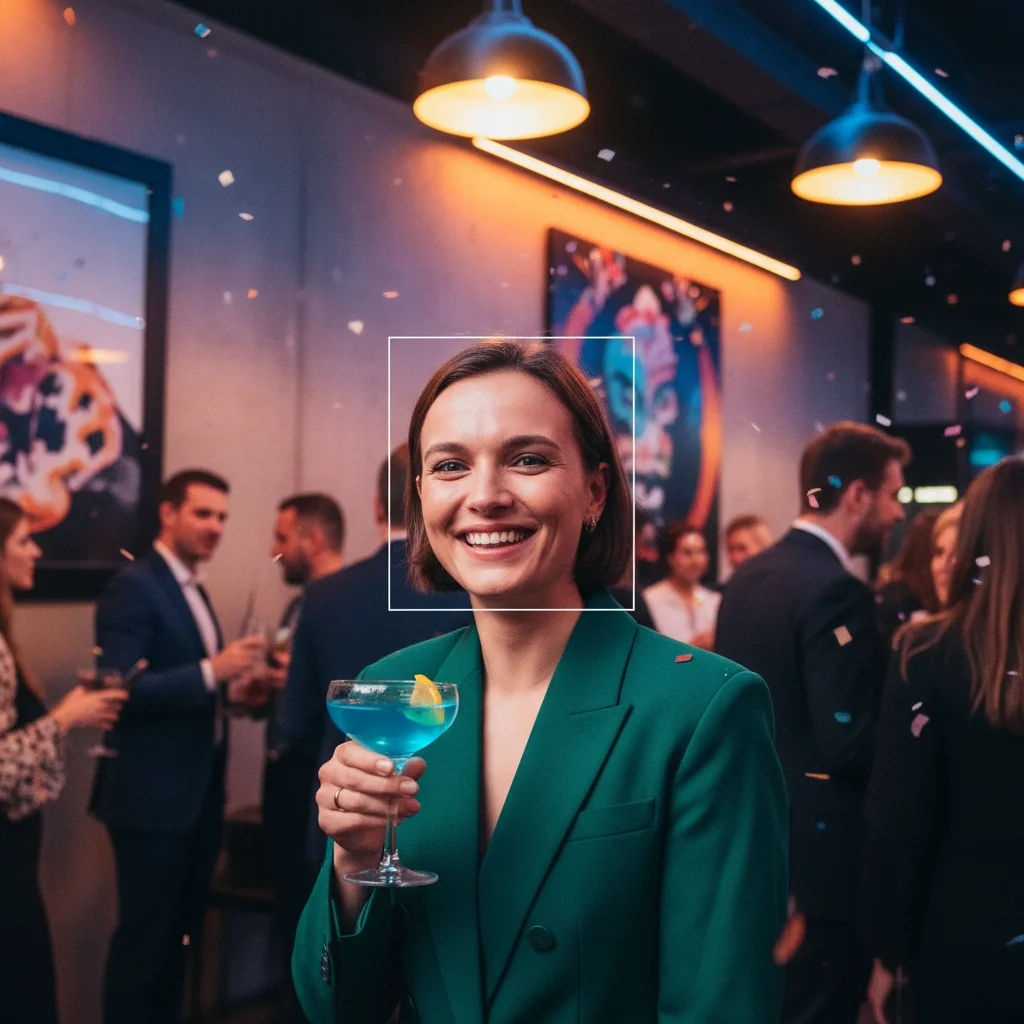
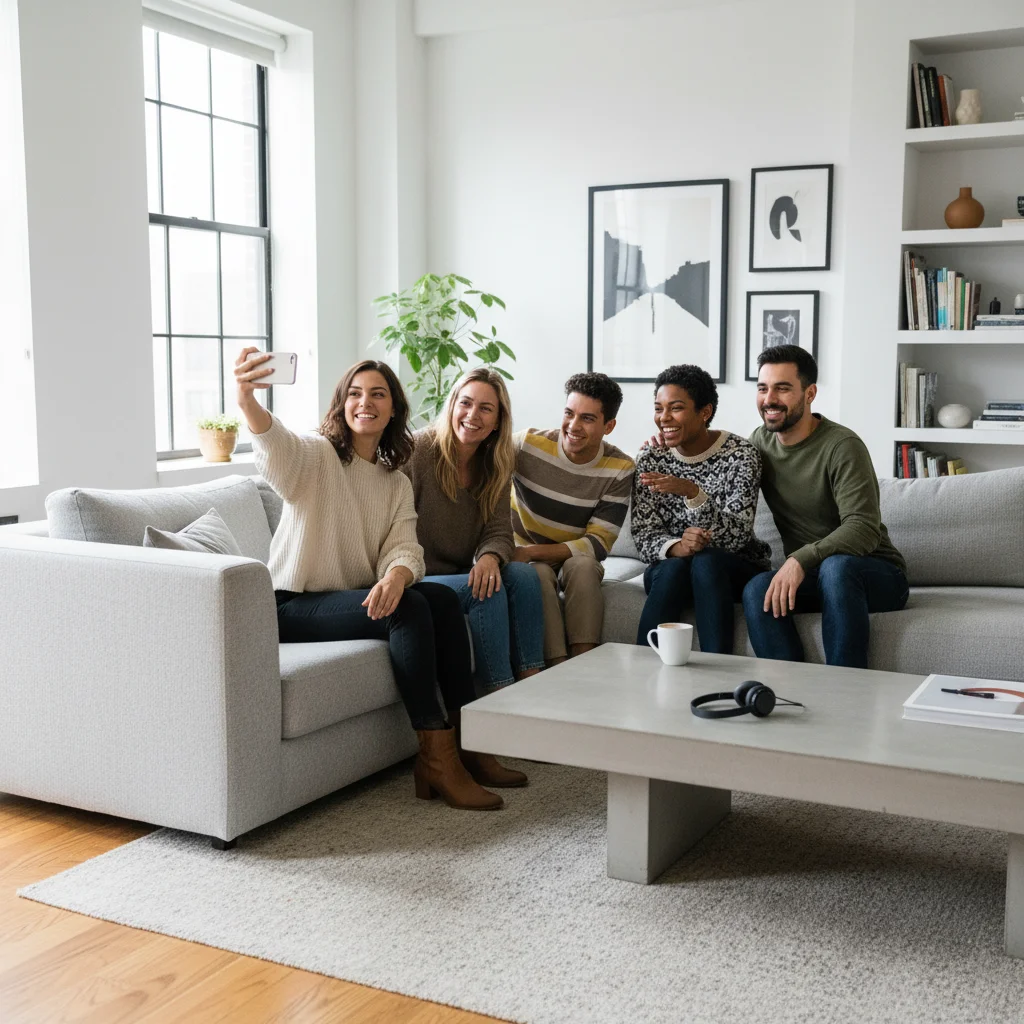
Modern clean indoor portrait
Before
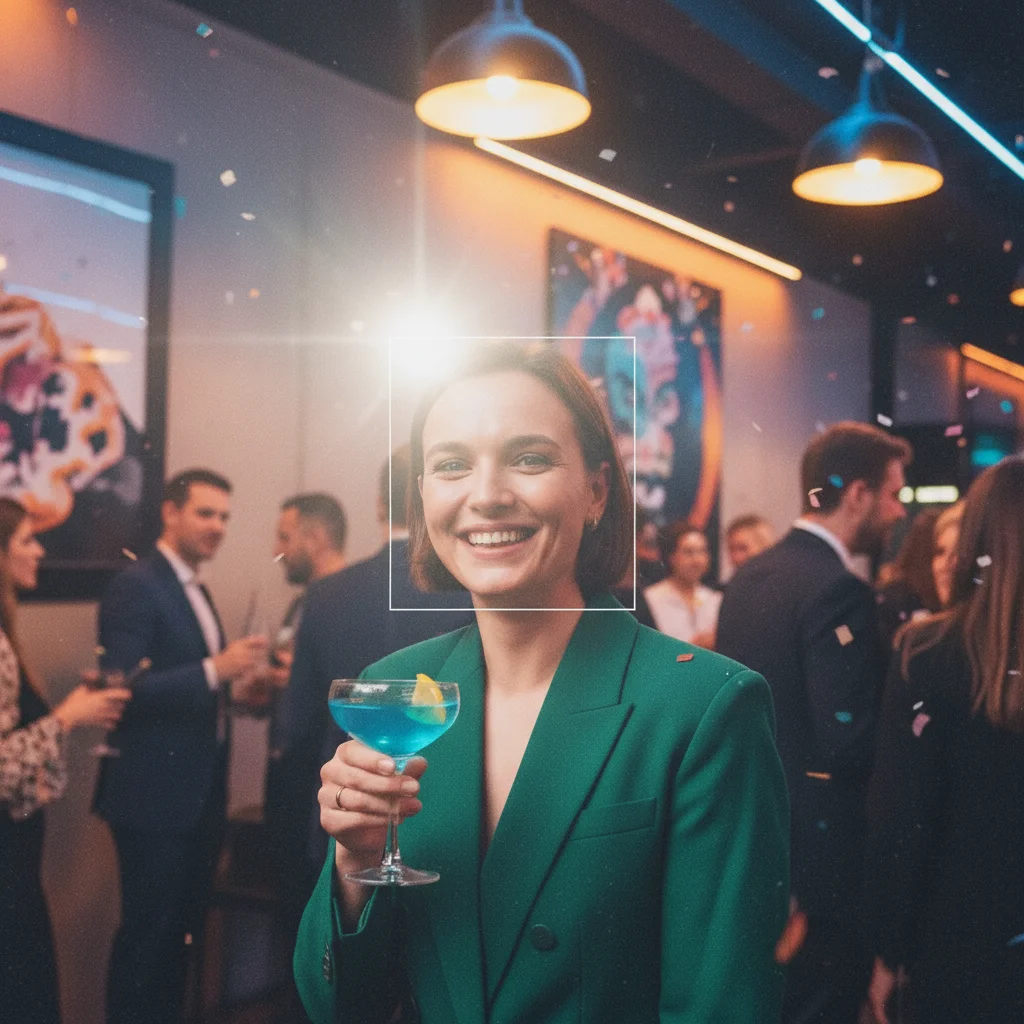
Portrait with authentic disposable camera flash and grain aesthetic
After

Apply Disposable Camera Filter to Photo

Drop your photo here

or click to browse

Release to upload

Free • No signup

Advertisement
Popular use cases:
  • Y2K aesthetic photos
  • nostalgic party photos
  • retro social media content
  • 2000s throwback posts
  • indie film photography
  • vintage birthday photos

Cost
Free No signup required
Time
Instant results in 15-30 seconds
Works on
Any device - browser, phone, tablet, desktop
Powered by
AI-powered photo editing
Scenario Prompt Time
Classic Y2K flash photo apply disposable camera filter with flash glare, film grain, and warm yellow tint like early 2000s party photos 20s
Kodak FunSaver aesthetic apply Kodak FunSaver disposable camera filter with overexposed flash bloom, grain, and soft focus 20s
Fujifilm QuickSnap look apply Fujifilm QuickSnap filter with cooler color tone, light leaks at corners, and moderate flash 20s
Heavy grain party photo apply disposable camera filter with heavy film grain, strong flash bloom, and slight motion blur 25s

How it works

  1. Upload your photo

    Drop your image into EditThisPic. JPG, PNG, WebP up to 7MB. Works especially well with indoor shots, party photos, and portraits—classic disposable camera subjects that show off the flash glare and grain.

    Expect: Simple edits: 15-30 seconds. Complex lighting: may need one refinement to balance flash intensity and grain.
  2. Describe the disposable camera look you want

    Type your instruction: 'apply disposable camera filter with flash glare and grain' or 'make it look like Kodak FunSaver photo with light leaks.' Be specific about flash intensity, grain level, color warmth, and whether you want light leaks or date stamps. No marking needed—the AI applies the effect to your entire image.

    Tip: Mention specific disposable camera brands ('Kodak FunSaver', 'Fujifilm QuickSnap') or characteristics ('overexposed flash', 'yellow tint', 'corner vignette') for more authentic results.

    Copy one of these to get started:

    Classic Y2K flash photography apply disposable camera filter with flash glare, film grain, and warm yellow tint like early 2000s party photos
    Kodak FunSaver aesthetic apply Kodak FunSaver disposable camera filter with overexposed flash bloom, grain, and soft focus
    Fujifilm QuickSnap look apply Fujifilm QuickSnap filter with cooler color tone, light leaks at corners, and moderate flash
    Heavy grain party photo apply disposable camera filter with heavy film grain, strong flash bloom, and slight motion blur for party aesthetic
    2 more prompts
    Outdoor disposable camera apply disposable camera filter with minimal flash, natural grain, light leaks, and sun-faded colors for outdoor shot
    Waterproof disposable camera apply waterproof disposable camera filter with blue-green color cast, heavy grain, and soft underwater-like haze
  3. Generate and review

    Click Generate and watch as AI applies authentic disposable camera characteristics: flash bloom, film grain, color shift, soft focus, and light leaks. Check the result for the right balance—too subtle looks digital, too heavy can obscure details.

  4. Refine if needed

    If flash is too subtle, regenerate with 'stronger flash bloom and overexposure.' If too blown out, try 'subtle disposable camera filter with light grain.' You can adjust intensity, grain, and color warmth without starting over.

    Tip: Combine elements for unique looks: 'Fujifilm QuickSnap with light leaks and date stamp' or 'heavy grain with minimal flash for indoor party aesthetic.'
Try it free

Apply Disposable Camera Filter to Photo

Drop your photo here

or click to browse

Release to upload

Free • No signup

"The disposable camera filter nailed the Y2K aesthetic I was going for. Looks exactly like my old Kodak FunSaver photos from 2003." @y2k_nostalgic

See it in action

Modern clean indoor portrait
Before
->
Portrait with authentic disposable camera flash and grain aesthetic
After

Portrait to Y2K Flash Photo

Transformed modern portrait into authentic early 2000s disposable camera party shot with flash bloom and grain.

Prompt: apply disposable camera filter with flash glare, film grain, and warm yellow tint like early 2000s party photos
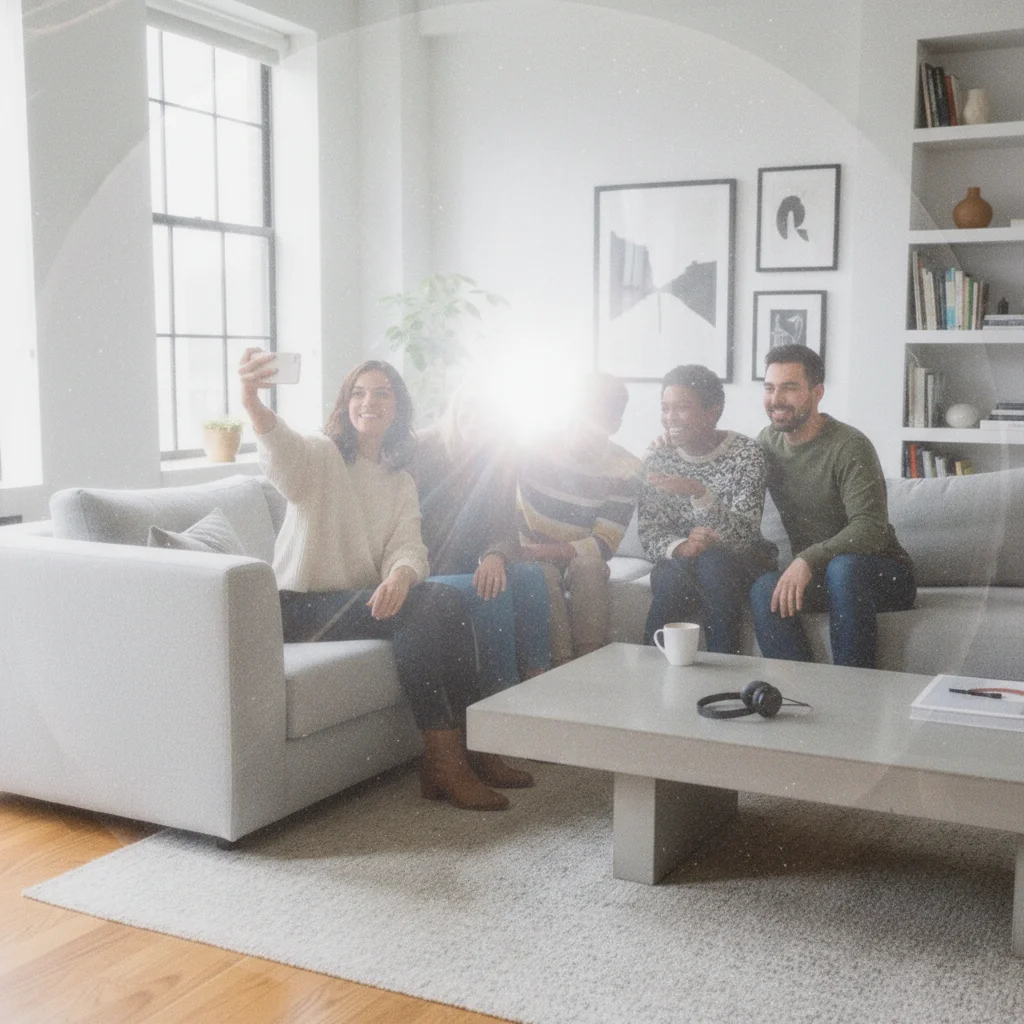
Modern sharp group photo
Before
->
Group photo with Kodak FunSaver flash bloom and warmth
After

Group Photo to Kodak FunSaver

Converted digital group shot into nostalgic Kodak FunSaver aesthetic with overexposed flash and warm tones.

Prompt: apply Kodak FunSaver disposable camera filter with overexposed flash bloom, grain, and soft focus
Advertisement

If something looks off

Flash effect is too subtle or missing

Why: Disposable camera flash is a key characteristic, but 'disposable camera filter' alone doesn't tell the AI how strong the flash should be.

Try: Regenerate with 'apply disposable camera filter with strong overexposed flash bloom and bright center' or 'heavy flash glare like direct flash photography'

Tip: Use terms like 'overexposed flash', 'flash bloom', or 'blown-out center' to emphasize that characteristic disposable camera flash look.

Colors look too cool or blue instead of warm yellow

Why: Different disposable cameras had different color casts—Kodak was warmer, Fujifilm cooler. Without specifying, the AI may choose either direction.

Try: Try 'apply disposable camera filter with warm yellow tint' for Kodak-style or 'cooler blue-green tones' for Fujifilm-style

Tip: Kodak cameras created warm, yellowish tones. Fujifilm had cooler, slightly greenish tones. Specify the brand if you want a specific color palette.

Grain is too heavy and image looks muddy

Why: Disposable camera grain varied by lighting—outdoor shots were cleaner, indoor shots were grainier due to low light and flash. Too much grain can overwhelm the image.

Try: Regenerate with 'apply disposable camera filter with moderate grain' or 'light film grain with flash bloom'

Tip: Match grain to your scenario—outdoor shots should have 'light grain', indoor/party shots can handle 'heavy grain'.

Image is too soft or blurry

Why: Disposable cameras had cheap plastic lenses that created soft focus, but too much blur loses important details like faces.

Try: Try 'apply disposable camera filter with slight soft focus while preserving main subject details' or 'minimal blur with flash and grain'

Tip: Disposable camera softness should be subtle—you want that characteristic haze without making faces unrecognizable.

Quick answers

Do I need to mark anything before applying the disposable camera filter?

No! Just describe the disposable camera aesthetic you want: 'apply disposable camera filter with flash glare and grain' or 'make it look like Kodak FunSaver photo.' The AI applies the effect to your entire image. Markers aren't needed for full-image filters like disposable camera effects.

How do I recreate the authentic Y2K photography look?

Focus on three elements: overexposed flash (blown-out center), warm yellow color cast (especially for Kodak), and visible film grain. Try: 'apply disposable camera filter with flash glare, film grain, and warm yellow tint like early 2000s party photos.' This captures that iconic Y2K party aesthetic.

What's the difference between disposable camera filter and VHS filter?

Disposable camera filters recreate still photography from cheap film cameras (2000s)—flash bloom, grain, light leaks. VHS filters recreate video tape aesthetics (1980s-90s)—scan lines, tracking errors, color bleeding. They're both retro but from different eras and media types.

Can I add a date stamp like real disposable cameras had?

Yes! Include 'with date stamp' in your prompt: 'apply disposable camera filter with flash, grain, and orange date stamp in corner.' The AI will add that characteristic date/time overlay that appeared on some disposable camera models.

Is there a free disposable camera filter without creating an account?

Yes! EditThisPic's AI disposable camera filter is completely free to try with no signup required. Just upload your photo, describe the Y2K flash photography aesthetic you want, and download your filtered image with no watermark.

Ready to apply disposable camera filter to your photos?

Free to try. No signup required.

Try it free