Free β€’ No signup Transform Pet into hilariously overweight version Β· Free

AI Fat Pet Prank

Upload your pet's photo, AI makes them look absurdly overweight. Perfect for pranking your friends.

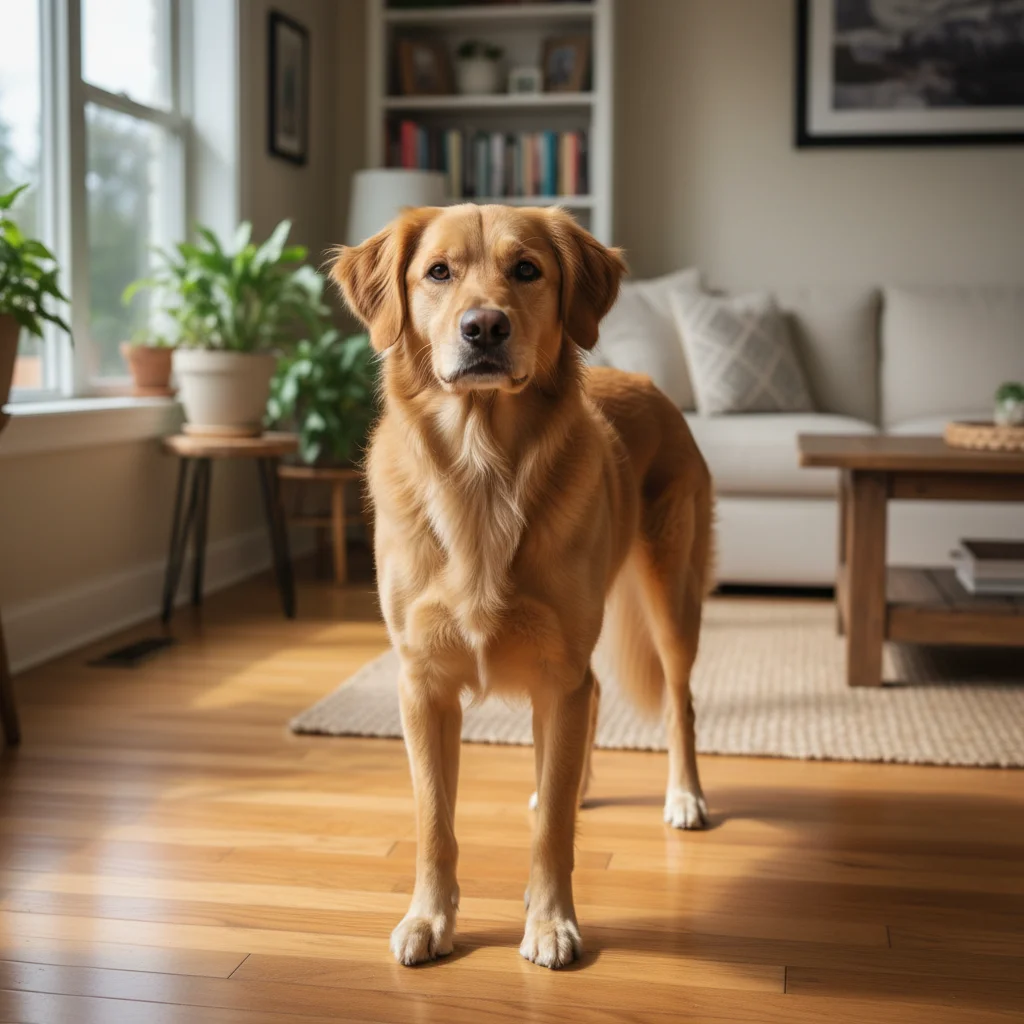
Normal weight pet before AI fat prank edit
Before
β†’
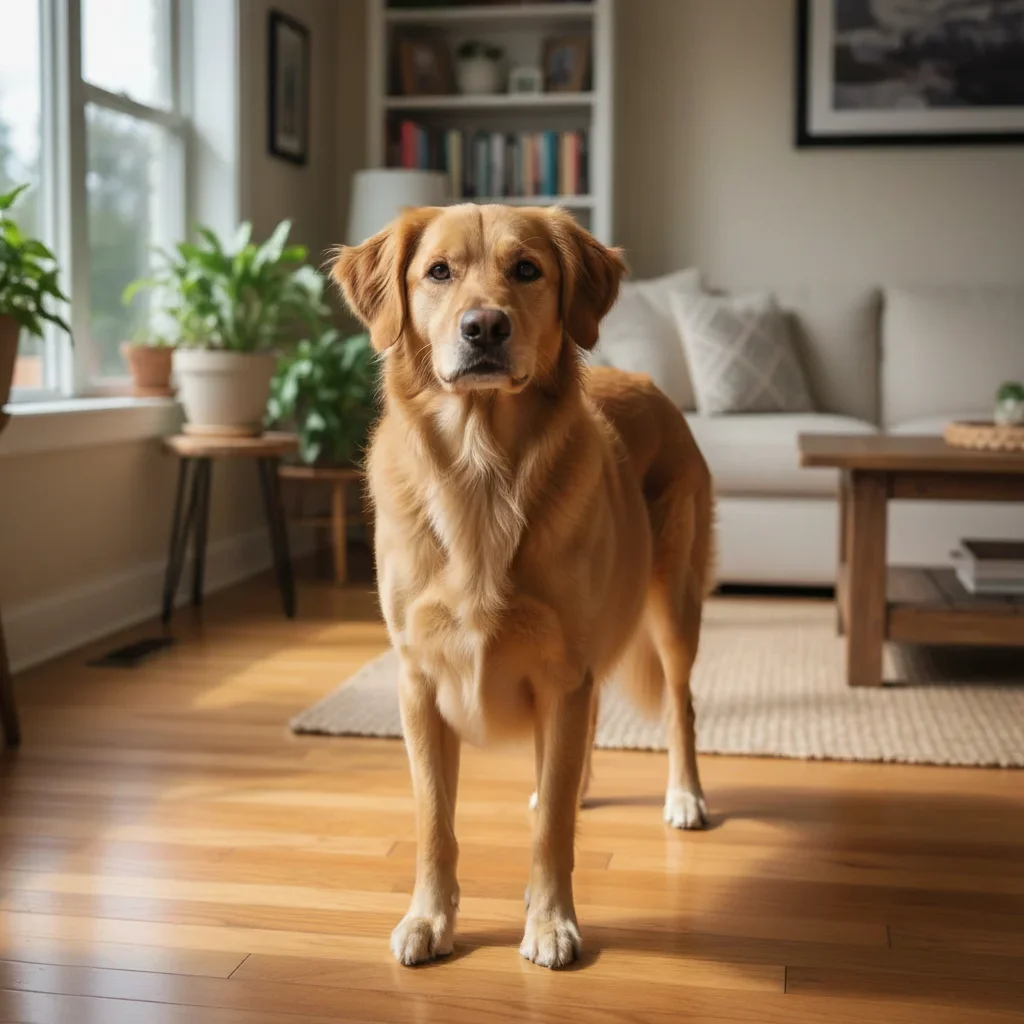
Same pet made to look hilariously overweight with AI
After

AI Fat Pet Prank Photo Maker

Upload photo to transform pet into hilariously overweight version

Free β€’ Results in 30 seconds β€’ No signup

Release to upload

FreeNo signupNo watermark

1 free edit·then from $1.99

Popular use cases:
  • fat pet prank
  • make pet look fat AI
  • chonky pet photo editor
  • overweight pet prank
  • fat pet meme maker
  • pet sitting prank photo

Cost
Free No signup required
Time
Instant results in 15-30 seconds
Works on
Any device - browser, phone, tablet, desktop
Powered by
AI-powered photo editing

How it works

  1. Upload your pet's photo

    Drop any photo of a dog, cat, or other pet into EditThisPic. Clear, well-lit photos where the pet's full body is visible work best. JPG, PNG, or WebP up to 7MB.

    Expect: Most edits complete in 20-45 seconds. The AI works with any pet breed or size.
  2. Describe how fat you want them

    Type something like 'Make this pet look extremely fat and round, like they ate an entire thanksgiving dinner.' The more specific and funny your prompt, the better the result.

    Tip: Be specific about the level of chonk β€” 'slightly pudgy' gives a different result than 'so round they can barely walk.' Mention specific body parts like 'enormous belly dragging on the ground' for maximum comedy.

    Copy one of these to get started:

    Classic pet-sitting prank Make this pet look extremely fat and round, like they've gained 50 pounds. Their belly should be huge and almost touching the ground. Keep the face recognizable.
    Maximum chonk mode Make this pet look so enormously overweight they're basically a perfect sphere with legs. Comically round body, tiny legs sticking out, fat rolls everywhere.
    Subtle and believable Make this pet look noticeably overweight but still realistic β€” like they've been getting too many treats. Add a rounder belly and thicker body while keeping everything else natural.
    Stuck in something Make this pet look so fat they're stuck in their bed and can barely fit. Their body should be spilling over the edges of whatever they're sitting on.
    4 more prompts
    Food coma aftermath Make this pet look like they just ate an entire buffet β€” enormously bloated belly, food-drunk expression, lying on their back with legs splayed out.
    Double chin special Make this pet look fat with a massive double chin, puffy cheeks, and a thick chunky body. Like the world's most overfed pet.
    Sausage body Make this pet's body look like a stuffed sausage β€” long, round, and bulging. Legs should look tiny compared to the massive body. Keep the head normal size for contrast.
    TikTok viral style Make this pet look absurdly overweight like the viral fat pet trend β€” triple their body width, add a huge round belly, make them look like they've never missed a meal in their life.
  3. Send it to the pet owner

    Download your masterpiece and send it to whoever left their pet with you. Caption it 'Sorry, I think I overfed them a little...' and wait for the panicked response.

Try it free ↓

AI Fat Pet Prank Photo Maker

Upload photo to transform pet into hilariously overweight version

Free β€’ Results in 30 seconds β€’ No signup

Release to upload

Free β€’ No signup

See it in action

Normal weight pet before AI fat prank edit
Before
->
Same pet made to look hilariously overweight with AI
After

Pet-sitting prank β€” before and after

A normal-sized pet transformed into an enormously overweight version for the classic pet-sitting prank.

Prompt: Make this pet look extremely fat and round, like they've gained 50 pounds. Their belly should be huge and almost touching the ground.
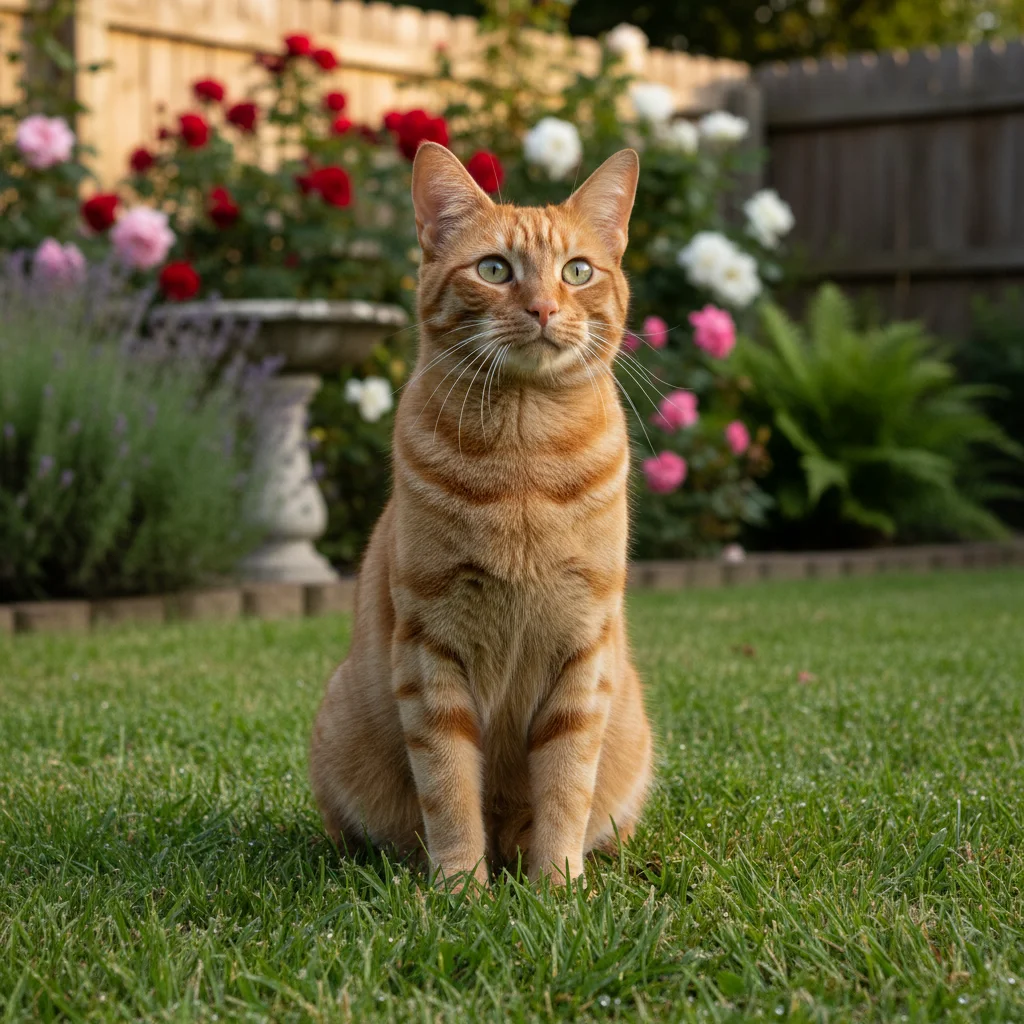
Slim cat before AI fat pet transformation
Before
->
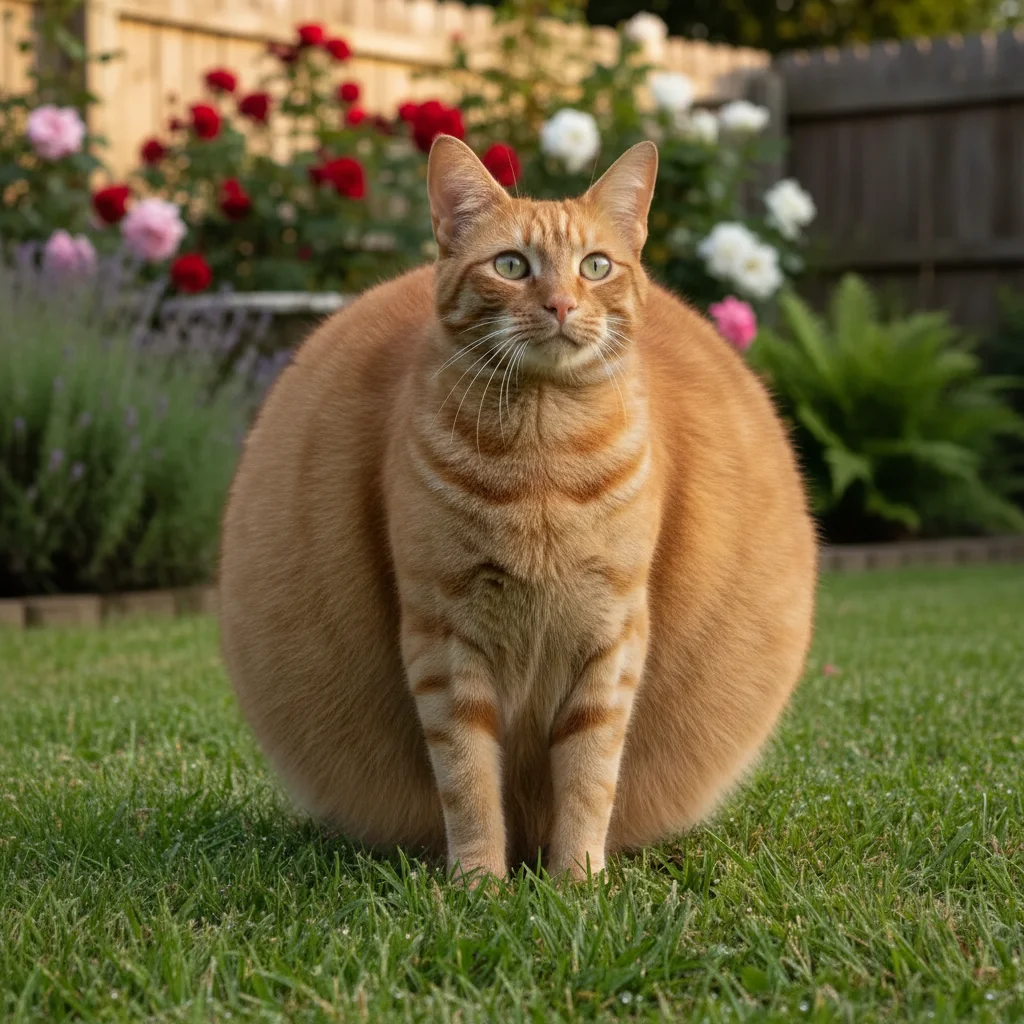
Same cat made to look comically round and overweight
After

Maximum chonk transformation

Taking a slim pet and turning them into an absurdly round chonker for social media laughs.

Prompt: Make this pet look so enormously overweight they're basically a perfect sphere with legs.

If something looks off

The pet's face changed and the owner won't recognize them

Why: The AI modified the whole image instead of focusing on body proportions.

Try: Make only the body look fat and overweight β€” keep the face, head, and markings exactly the same

Tip: Add 'keep the face unchanged' to any fat pet prompt to preserve the recognizable features.

The result looks unrealistic or distorted

Why: The AI stretched the image rather than adding natural-looking fat.

Try: Add realistic fat and weight to this pet β€” round belly, thicker legs, fat rolls β€” without stretching or distorting the image

Tip: The word 'realistic' helps the AI add volumetric fat instead of just stretching pixels.

Pet doesn't look fat enough

Why: The prompt was too subtle for the AI to make a dramatic change.

Try: Make this pet look EXTREMELY obese β€” at least triple the body width, enormous belly, barely able to see their legs under the fat

Tip: Use words like 'enormously,' 'extremely,' and 'triple' to push the AI toward bigger transformations.

Background or furniture got distorted

Why: The AI expanded the pet but warped surrounding objects too.

Try: Make only the pet look fat. Keep the background, floor, and all surrounding objects completely unchanged.

Tip: Tap a marker on the pet specifically so the AI knows to only modify that area.

Looks more like a different animal than a fat version

Why: The AI changed too many features at once.

Try: Keep this pet's exact breed, coloring, and face but make their body look extremely overweight and round

Tip: Mentioning the breed specifically ('fat golden retriever') helps the AI maintain the right proportions.

Quick answers

Do I need to mark the pet in the photo?

No! Just upload the photo and describe how fat you want them to look. The AI automatically detects the pet and adds weight. Markers only help if there are multiple pets or the AI changes the wrong area.

Is this free?

Yes β€” you get 1 free edit per week, no account needed. For unlimited fat pet pranks, plans start at $1.99.

Does it work with any pet breed?

Yes β€” dogs, cats, hamsters, rabbits, birds, you name it. The AI works with any animal. Different breeds give different hilarious results β€” a chonky chihuahua hits different than a fat great dane.

What's the pet-sitting prank everyone's doing?

You take a photo of someone's pet while pet-sitting, use AI to make them look enormously overweight, then text it to the owner with something like 'I think I've been feeding them too much.' The owner panics, you laugh, then reveal it's AI. It went viral with 2.7 million likes.

Will the pet still look like themselves?

Yes β€” the AI keeps the face, markings, and coloring the same while making the body look fat. This is what makes the prank work: the owner recognizes their pet but can't believe how chunky they look.

Can I make the fat level subtle or extreme?

Absolutely. Ask for 'slightly pudgy' for a realistic look that genuinely worries the owner, or go full 'bowling ball with legs' for obvious comedy. Both approaches work great.

Can I use this on my phone?

Yes. EditThisPic works in any mobile browser β€” iPhone, Android, tablet. No app download needed. Perfect for doing it right from the couch while the pet is napping next to you.

Is there a watermark on the result?

No watermark, ever. The downloaded image is clean and ready to send. Nothing gives away that it's AI-edited β€” which is exactly what makes the prank work.

How much does EditThisPic cost?

You get 1 free edit per week β€” no account needed. After that, credit packs start at $1.99 for 3 edits. Monthly plans start at $4.99/mo for 15 edits with unused credits rolling over. All edits are full resolution with no watermark.

Ready to chonkify your pet?

Free to try. No signup required.

1 free edit included·Credit packs from $1.99