Free • No signup Style Food photos · Free

AI Food Photo Styler

Describe your ideal styling and AI enhances food photos instantly. No selection needed.

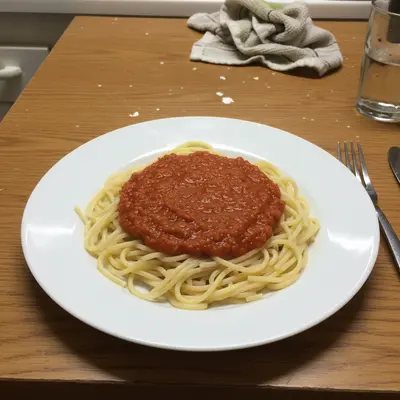
Plain pasta dish with flat lighting and dull colors
Before
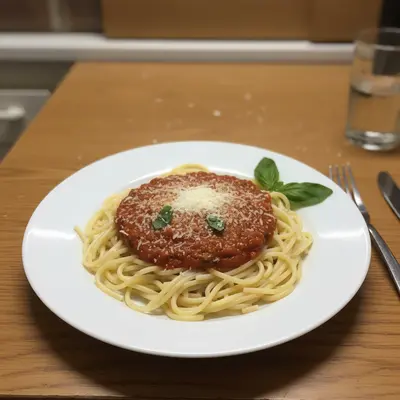
Same pasta dish with enhanced colors, better lighting, and appetizing presentation
After

AI Food Photo Styler

Drop your photo here

or click to browse

Release to upload

Free • No signup

Popular use cases:
  • restaurant menu photography
  • social media food content
  • food blog photography
  • menu design
  • food delivery apps
  • instagram food posts
  • food marketing
  • culinary presentation

Cost
Free No signup required
Time
Instant results in 15-30 seconds
Works on
Any device - browser, phone, tablet, desktop
Powered by
AI-powered photo editing
Scenario Prompt Time
Basic enhancement make this food photo look more appetizing and professional 20s
Social media styling style this food photo for social media with vibrant colors 25s
Restaurant menu quality enhance this dish to look like a professional menu photo 30s

How it works

  1. Upload your food photo

    Upload a photo of any dish, meal, or beverage. Works with restaurant dishes, home cooking, desserts, and drinks. JPG, PNG, WebP up to 7MB.

    Expect: Simple enhancement: 15-20 seconds. Complex styling with multiple elements: 30-40 seconds and may need refinements.
  2. Describe the styling you want

    Type your enhancement: 'make this food photo look more appetizing and professional' or 'style this like a restaurant dish with better colors and lighting.' Be specific about colors, presentation, or mood. No marking needed—the AI understands food styling concepts.

    Tip: Include lighting direction like 'warm golden lighting from above' or mood like 'fresh and vibrant' for more targeted results.

    Copy one of these to get started:

    Restaurant-quality enhancement make this food photo look more appetizing and professional with restaurant-quality lighting and colors
    Social media ready styling style this food photo for social media - vibrant colors, appealing lighting, make it look delicious
    Menu photo enhancement enhance this dish to look like a professional menu photo with perfect lighting and presentation
    Home cooking upgrade make this home-cooked meal look more appetizing and photo-ready with better colors and lighting
    6 more prompts
    Dessert presentation styling style this dessert photo to look irresistible with enhanced colors, textures, and appealing presentation
    Fresh and healthy styling make this food photo look fresh, healthy, and appetizing with natural lighting and vibrant colors
    Warm comfort food styling style this comfort food to look cozy and appetizing with warm lighting and rich colors
    Gourmet fine dining styling enhance this dish to look like fine dining with elegant plating, perfect lighting, and sophisticated presentation
    Beverage styling enhancement make this drink photo look more appealing with enhanced colors, condensation, and professional lighting
    Food blog photo styling style this food photo for a blog - natural, appetizing, with good lighting and authentic presentation
  3. Review the enhancement

    Check that colors look natural and appetizing. Look for realistic lighting, enhanced texture details, and improved presentation. Make sure the food still looks authentic and edible.

  4. Fine-tune with markers if needed

    If specific areas like sauce, garnishes, or lighting need adjustment, tap markers on those spots and regenerate. Most food styling works perfectly on the first try.

    Tip: Markers are for precision tweaks only. Try without them first—the AI handles most food styling automatically.
Try it free

AI Food Photo Styler

Drop your photo here

or click to browse

Release to upload

Free • No signup

"Our restaurant's online orders went up 30% after using this to style our menu photos. The dishes look exactly like what customers expect when they arrive - but way more appetizing in the photos." @ChefMarcos_NYC

See it in action

Plain pasta dish with flat lighting and dull colors
Before
->
Same pasta dish with enhanced colors, better lighting, and appetizing presentation
After

Home-cooked pasta styled for sharing

A simple pasta dish transformed into an appetizing, restaurant-quality photo perfect for social media.

Prompt: make this food photo look more appetizing and professional with restaurant-quality lighting and colors
Basic hamburger with plain presentation
Before
->
Same burger with professional menu-quality lighting and enhanced colors
After

Burger enhanced for menu photography

A basic burger photo elevated to professional menu quality with enhanced colors and presentation.

Prompt: enhance this dish to look like a professional menu photo with perfect lighting and presentation
Plain chocolate cake slice with basic presentation
Before
->
Same cake slice with enhanced textures, rich colors, and appealing dessert styling
After

Dessert styled for social media

A homemade cake slice transformed into an irresistible social media-worthy dessert photo.

Prompt: style this dessert photo to look irresistible with enhanced colors, textures, and appealing presentation

Detailed Guides by Scenario

📷

Restaurant & Menu Photography

Style food photos for professional restaurant menus, delivery apps, and commercial food marketing with appetizing, commercial-quality results.

Common Scenarios

  • Enhancing dishes for restaurant menu photography and print materials
  • Styling food photos for delivery app listings to increase orders
  • Creating appetizing food imagery for restaurant social media and advertising

Best Practices

  • Use 'professional menu photo' in prompts for clean, commercial styling
  • Specify 'restaurant-quality lighting' for consistent professional presentation
  • Keep styling natural and authentic—customers expect food to look like the photo
📷

Social Media & Food Blogging

Create eye-catching, share-worthy food photos for Instagram, food blogs, and personal social media with enhanced colors and appealing presentation.

Common Scenarios

  • Styling food photos for Instagram posts and food blogging content
  • Enhancing home cooking photos to look more appetizing for sharing
  • Creating appealing food content for personal or business social media

Best Practices

  • Use 'vibrant colors' and 'social media ready' for platform-optimized styling
  • Balance enhancement with authenticity—followers appreciate realistic food
  • Consider your personal brand style when describing the desired look
📷

Home Cooking & Personal Use

Transform everyday home cooking photos into appetizing images perfect for sharing with family, documenting recipes, or creating personal food memories.

Common Scenarios

  • Enhancing family meal photos and home cooking for personal documentation
  • Styling homemade dishes before sharing with friends and family
  • Creating appetizing photos of recipe experiments and cooking successes

Best Practices

  • Keep styling natural with phrases like 'realistic and appetizing'
  • Focus on making food look delicious while preserving the home-cooked character
  • Use simple enhancements rather than dramatic restaurant-style changes

If something looks off

AI changed the wrong area or something I didn't want changed

Why: The AI couldn't determine exactly which part of the food you wanted enhanced from description alone. This happens with complex dishes that have multiple components.

Try: Tap a marker on the specific food element you want to style, then regenerate with the same prompt

Tip: Markers tell the AI 'I mean THIS ingredient specifically.' Use them when description alone is ambiguous.

Food looks over-processed or artificial

Why: The enhancement was too aggressive, making the food look fake or heavily filtered instead of naturally appetizing.

Try: make this food photo look more appetizing but keep it natural and realistic

Tip: Adding 'natural' or 'realistic' prevents over-enhancement while still improving appeal.

Colors look unnatural or too saturated

Why: The AI boosted colors beyond what looks edible, making the food appear artificial or unappetizing.

Try: enhance this food photo with natural, appetizing colors that look realistic and edible

Tip: Specify 'edible' and 'realistic' to keep colors within natural food ranges.

Lighting doesn't match the original scene

Why: The AI added lighting effects that don't fit the original photo's environment or mood.

Try: style this food photo with lighting that matches the original scene but makes it more appetizing

Tip: Mentioning 'matches the original scene' preserves authenticity while improving appeal.

Enhancement made the food look less appetizing

Why: Sometimes the AI interpretation doesn't align with what makes food look delicious to human eyes.

Try: make this food look delicious and mouth-watering with warm, inviting colors and perfect lighting

Tip: 'Mouth-watering' and 'inviting' guide the AI toward universally appetizing enhancements.

Quick answers

Do I need to mark the food before describing how I want it styled?

No! Just describe the enhancement you want: 'make this food photo look more appetizing' or 'style this like a restaurant dish.' The AI understands food styling concepts. Only use markers when you have a complex dish and want to enhance just one specific element—like making only the sauce look glossier while leaving the rest unchanged.

How do I make my food photos look like restaurant quality?

Use prompts like 'make this food photo look more appetizing and professional with restaurant-quality lighting and colors' or 'style this like a professional menu photo.' The AI will enhance lighting, boost natural colors, and improve presentation while keeping the food looking authentic and edible.

Is there a free AI tool to enhance food photography without login?

Yes, EditThisPic offers free food photo styling with no account needed. Upload your food photo, describe how you want it enhanced, and download the styled result. No watermarks on outputs. Perfect for social media posts, menu photos, and food blog content.

Can AI food styling work on any type of food?

Yes! The AI works on all food types—main dishes, desserts, beverages, snacks, home cooking, and restaurant plates. It adapts the styling approach based on the food type: making desserts look sweeter, beverages more refreshing, and savory dishes more appetizing.

What makes food photography look more appetizing?

Better lighting, enhanced natural colors, improved contrast, and realistic texture details. EditThisPic's AI understands these principles and applies them automatically when you describe wanting 'appetizing' or 'delicious-looking' results. It enhances without making food look artificial.

How do I style food photos for social media?

Use prompts like 'style this food photo for social media - vibrant colors, appealing lighting, make it look delicious.' The AI will enhance colors and lighting to make photos pop on Instagram and other platforms while keeping the food looking authentic and appetizing.

Can I enhance food photos taken with my phone camera?

Absolutely! EditThisPic works great with phone photos. Upload your mobile food photo and describe the enhancement you want. The AI can transform basic phone photos into professional-looking food imagery perfect for sharing or business use.

What's the best free tool for food photography enhancement?

EditThisPic is one of the best free AI food photo stylers available. Unlike apps that require complex editing, just describe what you want: 'make this look more appetizing.' The AI handles lighting, colors, and presentation automatically. No signup required, no watermarks.

How do I make home cooking look professional in photos?

Use prompts like 'make this home-cooked meal look more appetizing and photo-ready with better colors and lighting.' The AI enhances presentation while preserving the authentic home-cooked character. Perfect for food blogs, social sharing, and family recipe documentation.

Does food photo styling work for menu photography?

Yes! Use prompts like 'enhance this dish to look like a professional menu photo with perfect lighting and presentation.' The AI creates clean, appetizing commercial food styling perfect for restaurant menus, delivery apps, and food service marketing.

Can I style beverage photos to look more refreshing?

Absolutely! For drinks, try 'make this drink photo look more appealing with enhanced colors, condensation, and professional lighting.' The AI adds realistic details like condensation and enhances colors to make beverages look fresh and refreshing.

Ready to style your food photos?

Free to try. No signup required.

Try it free