Free β€’ No signup Create April Fools prank photo Β· Free

April Fools Prank Photo Editor

Upload any photo, describe the prank, and the AI makes it look real. Fake car damage, mystery strangers, ridiculous scenarios β€” all ready to send in seconds.

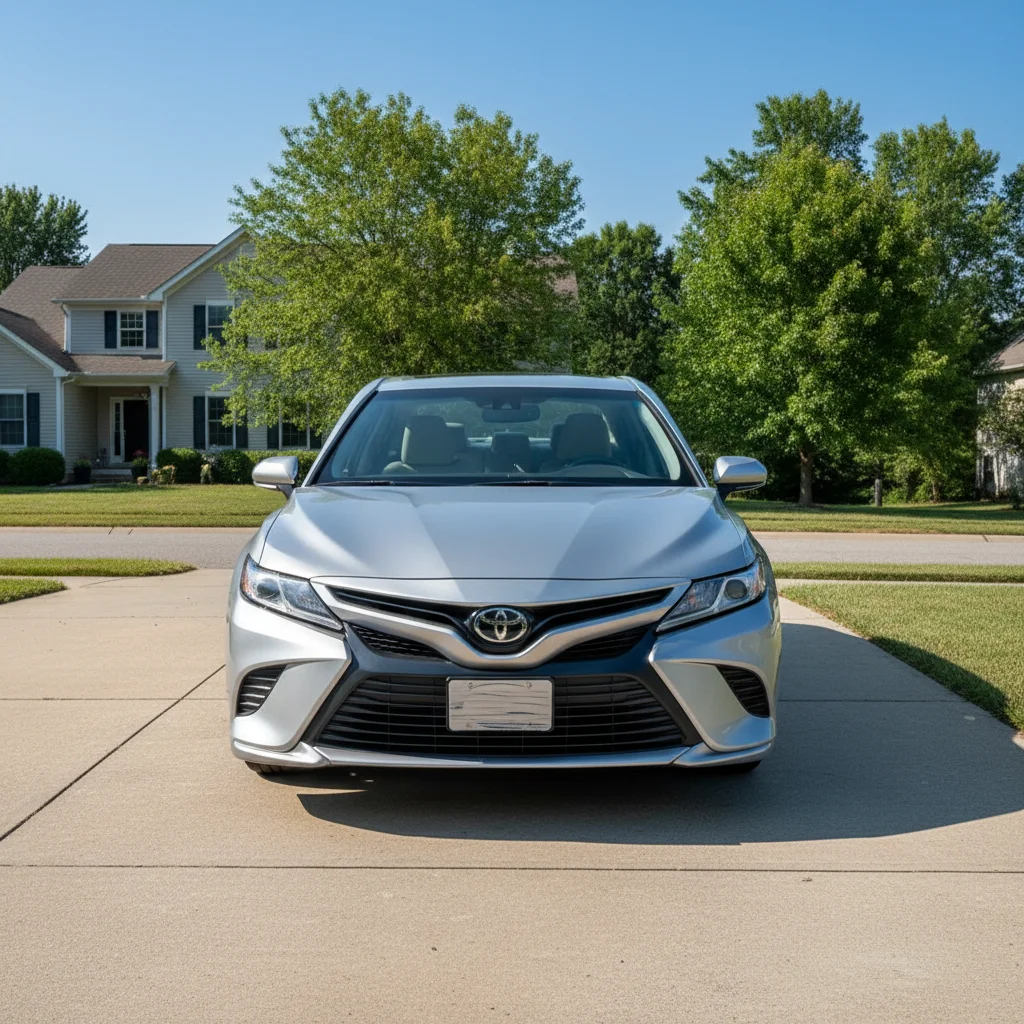
Clean silver car parked in driveway before April Fools edit
Before
β†’
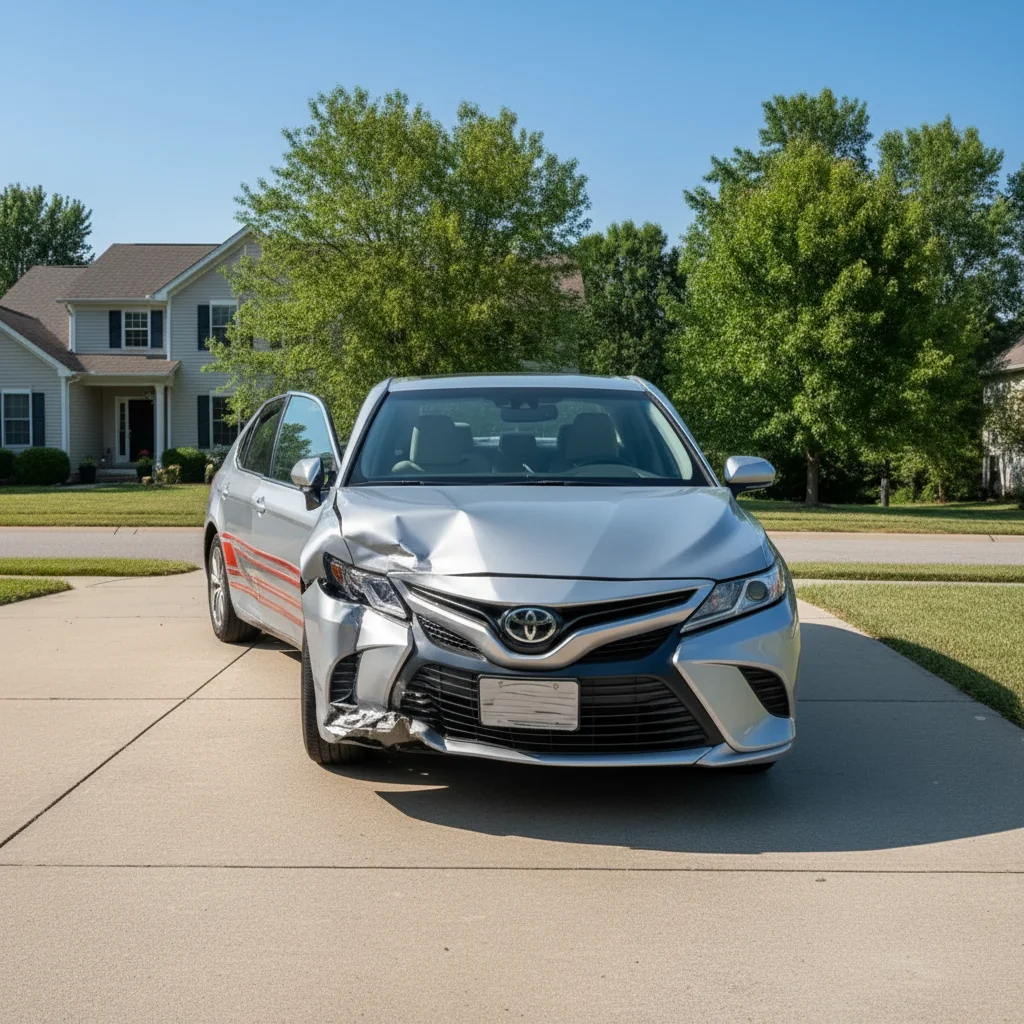
Same car with AI-added dent and scrape for April Fools prank
After

April Fools Prank Photo Editor

Upload photo to create April Fools prank photo

Free β€’ Results in 30 seconds β€’ No signup

Release to upload

FreeNo signupNo watermark

1 free edit·then from $1.99

Popular use cases:
  • april fools photo prank
  • april fools prank photo editor
  • AI april fools photo maker
  • fake photo for april fools
  • april 1st prank photo ideas
  • realistic april fools photo prank
  • april fools prank to send friends

Cost
Free No signup required
Time
Instant results in 15-30 seconds
Works on
Any device - browser, phone, tablet, desktop
Powered by
AI-powered photo editing
Scenario Prompt Time
Car damage prank Add a large dent and scrape on the driver's door 30s
Stranger in house Add a man eating cereal at my kitchen table 30s
Fake engagement ring Add a large diamond ring on my left ring finger 15s
Flooded room Add 4 inches of water flooding the entire floor 30s

How it works

  1. Upload your photo

    Drop any photo into EditThisPic β€” a picture of your car, house, kitchen, or yourself. JPG, PNG, and WebP all work up to 7MB. The more ordinary the starting photo, the more convincing the prank.

    Expect: Upload takes a few seconds. Most April Fools edits complete in 20-40 seconds.
  2. Describe the prank

    Type exactly what you want to fake. 'Add a large dent and scrape on the driver's door' or 'Put a stranger eating cereal at my kitchen table.' The more specific you are, the more realistic the result.

    Tip: Include details about the setting β€” lighting, surfaces, and scale. 'A deep scratch running from the headlight to the wheel arch on the passenger side' beats 'scratch the car.'

    Copy one of these to get started:

    Crashed car prank Add a large crumpled dent on the driver's door and a long deep scrape running from the front wheel arch to the rear bumper β€” make it look like a real parking lot collision
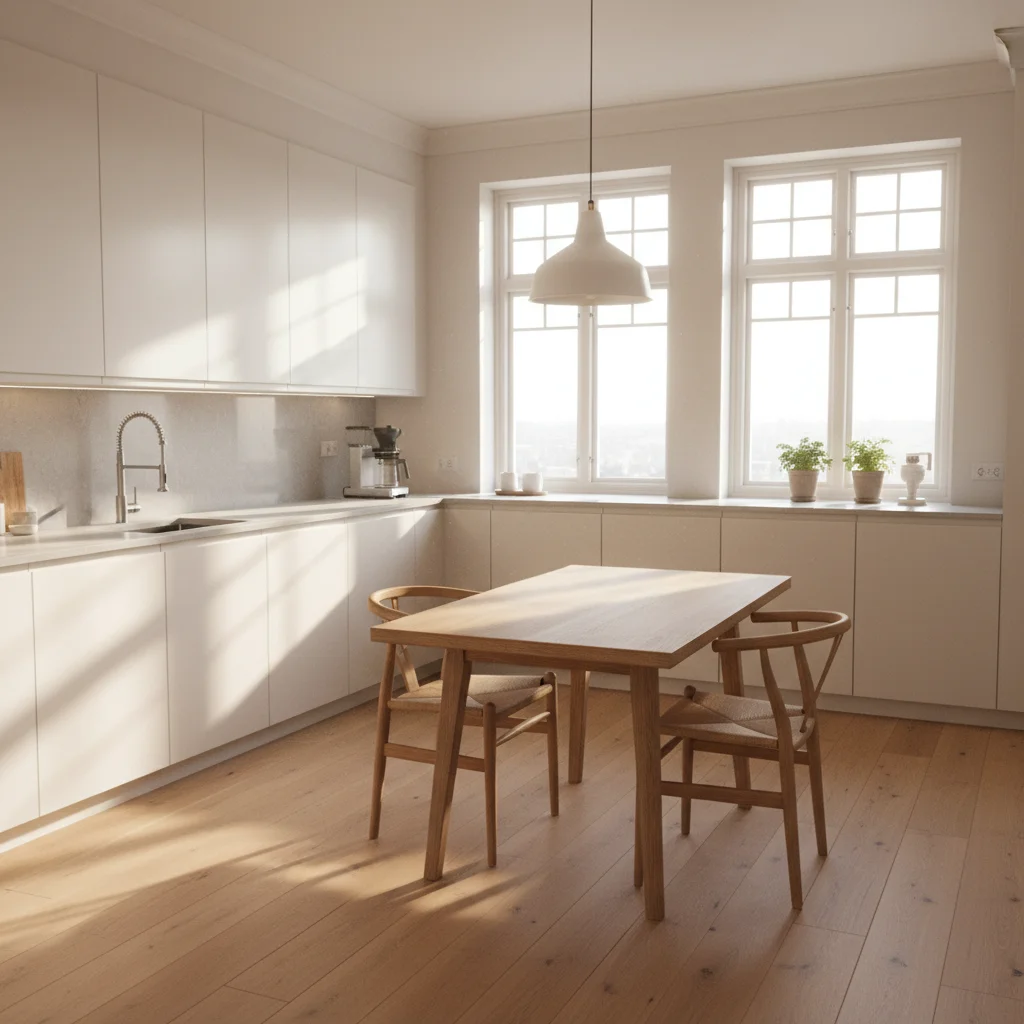
    Stranger in the kitchen prank Add a scruffy man in a bathrobe sitting at the kitchen table eating cereal and reading a newspaper, completely relaxed like he lives here
    Fake engagement ring prank Add a large, flashy engagement ring on my left hand ring finger β€” make the stone look expensive and the ring clearly visible
    Flooded room prank Add 4 inches of murky water flooding the entire living room floor, with furniture legs submerged and small items floating β€” make it look like a burst pipe
    4 more prompts
    Wanted poster prank Make this look like an official police wanted poster with 'WANTED' text across the top, a reward amount, and a list of fake crimes β€” keep the face clearly visible
    New tattoo prank Add a large, intricate sleeve tattoo covering the entire arm from shoulder to wrist β€” dark ink, detailed design, realistic skin texture
    Breaking news prank Put this person's face on a breaking news chyron graphic with their name on screen and a ridiculous fake headline underneath
    Fake new car prank Replace this car with a bright neon yellow Lamborghini parked in the same driveway, same angle and lighting β€” make it look like I actually bought it
  3. Send it

    Review the result β€” check that lighting and shadows match the original. Download the clean, watermark-free image and send it to your target. April 1st is one day a year; make it count.

Try it free ↓

April Fools Prank Photo Editor

Upload photo to create April Fools prank photo

Free β€’ Results in 30 seconds β€’ No signup

Release to upload

Free β€’ No signup

See it in action

Clean silver car parked in driveway before April Fools edit
Before
->
Same car with AI-added dent and scrape for April Fools prank
After

Parking lot damage prank

A photo of a normal family car in a driveway, edited to show a large dent and scrape β€” convincing enough to trigger an immediate panic text.

Prompt: Add a large crumpled dent on the driver's door and a long deep scrape running from the front wheel arch to the rear bumper β€” make it look like a real parking lot collision
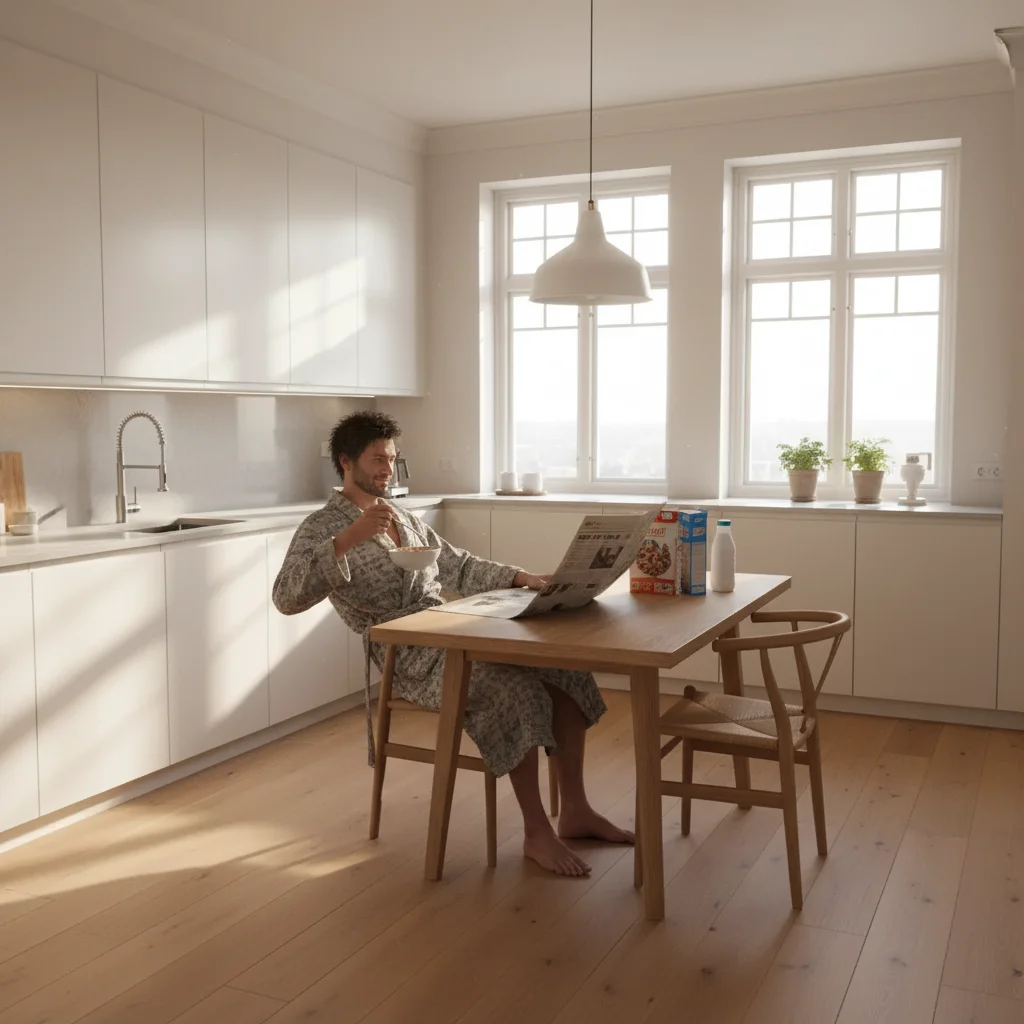
Empty kitchen before April Fools prank edit
Before
->
Kitchen with AI-added stranger eating cereal at the table
After

Stranger in the kitchen prank

An ordinary kitchen photo turned into an April Fools classic β€” a completely unknown man eating breakfast at the table like he belongs there.

Prompt: Add a scruffy man in a bathrobe sitting at the kitchen table eating cereal and reading a newspaper, completely relaxed like he lives here
Hand with no rings before April Fools prank edit
Before
->
Hand with AI-added engagement ring for April Fools prank
After

Fake engagement ring prank

A hand selfie with an AI-added oversized engagement ring β€” perfect for dropping on social media on April 1st.

Prompt: Add a large, flashy engagement ring on my left hand ring finger β€” make the stone look expensive and the ring clearly visible

If something looks off

Damage or added element looks obviously fake

Why: The AI matched the right object but the lighting or shadows don't fit the original photo.

Try: Add 'matching the ambient lighting and casting a realistic shadow on the surface' to your prompt

Tip: Photos taken in flat, even lighting (overcast day, indoor fluorescent) produce the most convincing fake damage.

Added person looks stiff or out of place

Why: The pose or clothing description wasn't specific enough for the AI to blend them naturally.

Try: Describe what the person is wearing, their exact posture, and what they're doing with their hands β€” the more specific, the more natural the result

Tip: People mid-action (eating, reading, looking at their phone) look more believable than people just standing there.

Car damage looks too clean or cartoon-like

Why: Damage prompts without material texture cues produce stylized results.

Try: Add 'with exposed metal, paint flaking at the edges, and slight rust beginning to show β€” make it look like it happened a few days ago'

Tip: Aged damage looks more believable than fresh damage on most cars.

The AI edited the wrong part of the photo

Why: The prompt didn't have enough location information for the AI to target the right area.

Try: Tap a marker on the exact area you want edited, then re-run your prompt

Tip: Markers help most on complex photos with lots of elements β€” they give the AI a precise target.

The prank isn't convincing enough to fool anyone

Why: The edit looks real but the scenario is too extreme to be believable.

Try: Scale back the damage β€” a single deep scratch is more believable than a totaled car. Try 'a dent the size of a fist' instead of 'completely crushed hood'

Tip: The best April Fools pranks live in the 'plausible but alarming' zone β€” just believable enough to create a moment of panic.

Quick answers

Do I need to mark areas in the photo before describing what I want?

No β€” just describe what you want and where it should go ('add a dent on the driver's door,' 'put a stranger at the kitchen table') and the AI figures out placement. For extra precision on complex photos, you can tap to place a marker and then run your prompt.

Is this free?

Yes. EditThisPic gives you 1 free edit per week with no account needed. If you want to run multiple prank edits before April 1st, credit packs start at $1.99.

Will the prank photo look realistic enough to fool someone?

For most prank scenarios β€” car damage, strangers in a room, fake rings β€” yes. The AI matches lighting, shadows, and perspective to the original photo. The most convincing results come from well-lit photos and specific prompts. On a phone screen, the difference is nearly impossible to spot at first glance.

What kinds of April Fools photo pranks can I make?

Anything you can describe: fake car damage, strangers in your kitchen, flooded rooms, fake engagement rings, new tattoos, wanted posters with a friend's face, cars that have been replaced with sports cars, wedding photos with uninvited guests. If you can describe it, the AI can make it.

Will there be a watermark on the photo?

No. EditThisPic never adds a watermark to your edited photos. The image you download is clean and ready to send β€” no badge, no logo, nothing that gives away the tool.

How is this different from a meme generator or filter app?

Filter apps give you preset effects. EditThisPic lets you describe any custom scenario in plain English and the AI generates a realistic result from scratch. There are no templates β€” you can create something your target has never seen before, which is exactly what makes a great prank.

Is it safe to use? Does it store my photos?

Your uploaded photo is processed to generate the edit and is not stored long-term. No account is needed, so there's no profile or history tied to your photos. See the EditThisPic privacy policy for full details.

Can I do multiple prank edits on the same photo?

Yes. Each edit builds on the previous one, so you can add a stranger, then add a mess, then add a flooded floor β€” all in separate steps. You can also undo and try a different direction if the first attempt isn't convincing enough.

How much does EditThisPic cost?

You get 1 free edit per week β€” no account needed. After that, credit packs start at $1.99 for 3 edits. Monthly plans start at $4.99/mo for 15 edits with unused credits rolling over. All edits are full resolution with no watermark.

Ready to pull off the prank?

Free to try. No signup required.

1 free edit included·Credit packs from $1.99