Free • No signup Change Shoe color · Free

Change Shoe Color in Photo

← Browse all change & replace tools

Last updated

Recolor any shoe in a photo by typing the new color — no selection tools, no masking needed. Useful for checking whether a shoe color coordinates with an outfit before buying, updating resale listing photos, and previewing limited-edition colorways on existing silhouettes. Keeps the shoe style, sole detail, and texture intact. Free, no account needed.


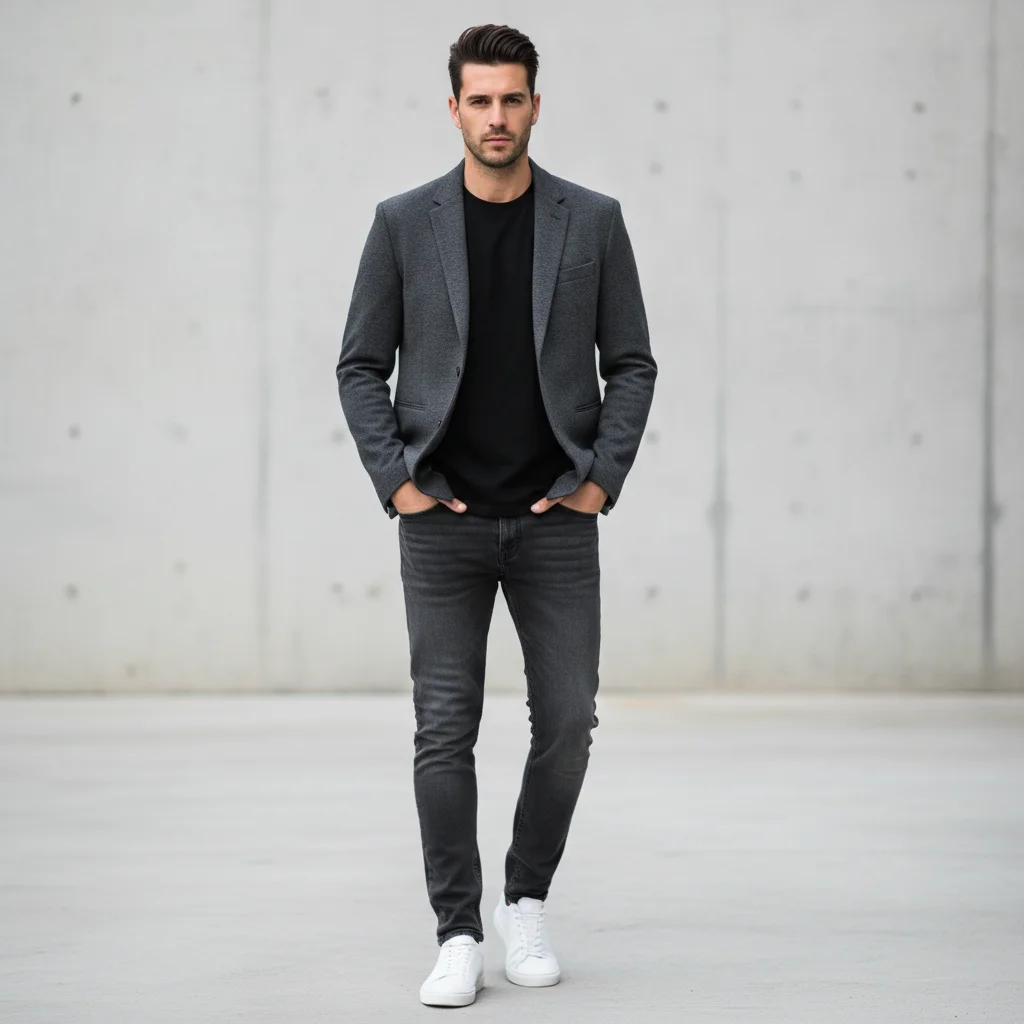
Man in dark grey jeans and dark jacket wearing bright white sneakers Same man with sneakers recolored to all-black

Upload photo to change shoe color

"Change the shoe color to olive green, keep the white sole and the cream laces unchanged"

Release to upload

50,000+photos edited
<30stypical edit
1 freeedit weekly

1 free edit·then from $4.99

How it works

  1. Upload a photo where the shoes are visible

    A full-body or lower-body shot with clearly visible footwear works best. Product photos and flat-lay shots also work. The shoes should be in reasonable focus. JPG, PNG, WebP up to 7MB.

    Expect: Solid color shoes: 25-35 seconds. Multi-color or patterned shoes: 40-50 seconds.
  2. Describe the new color

    Type: 'change the shoe color to olive green, keep the sole white and the lace eyelets unchanged.' You don't need to mark the shoes. Specific color names with material context get the most accurate results — 'white leather' instead of just 'white.'

    Tip: If you only want the upper recolored but not the sole, say 'change the shoe upper to [color], keep the sole its original color.'

    Copy one of these to get started:

    White sneakers to all-black for dark outfit Change the white sneakers to all-black including the sole, keep the shoe silhouette and lace style unchanged

    Preview shoe color variant for outfit matching Change the shoe color to olive green, keep the white sole and the cream laces unchanged
    Red shoes to a neutral for versatility Recolor the red shoes to a classic camel tan, preserve the leather texture and the contrast sole stitching
    Resale listing — add color option photos Change the shoe color to midnight navy blue, same material and texture, keep all sole details unchanged
    2 more prompts
    Match shoes to a specific outfit color Change the shoe color to match the color of the trousers in the photo — a medium charcoal grey, keep the sole black
    Colorful sneakers to a tonal option Change the multi-color patterned sneakers to a tonal all-white, keep the silhouette and sole profile
  3. Check color coverage and edges

    Verify the shoe color is uniform across the toe, sides, heel, and tongue. Check that the sole, laces, and eyelets are still their intended colors. Zoom in on where the shoe meets the floor to check edge quality.

See it in action

Man in dark grey jeans and dark jacket wearing bright white sneakers
Before
->
Same man with sneakers recolored to all-black
After

White sneakers to all-black

A full-body outfit photo updated to preview the same sneaker silhouette in all-black for a darker outfit.

Prompt: Change the white sneakers to all-black including the sole, keep the shoe silhouette and lace style unchanged

Woman in cream trousers and beige blouse wearing bright red leather loafers
Before
->
Same woman with loafers recolored to camel tan
After

Red shoes to camel tan for outfit versatility

A portrait photo with bright red shoes recolored to camel tan to preview a more versatile neutral colorway.

Prompt: Recolor the red shoes to a classic camel tan, preserve the leather texture and the contrast sole stitching

Quick answers

Do I need to mark the shoes before changing their color?

No. Type 'change the shoe color to navy blue' and EditThisPic identifies and recolors the shoes automatically. No selection tools or masking needed. If the shoes are very close in color to the floor or trousers, optionally add a marker to help the AI isolate them precisely.

How do I change shoe color in a photo for free with no login?

Upload your photo to EditThisPic and type: 'change the shoe color to [color], keep the sole and laces unchanged.' The AI recolors in about 30 seconds. No account, no login, no watermark on the result. Works in any browser on desktop or mobile.

What is the difference between changing shoe color and changing shoes entirely?

Changing shoe color recolors the existing shoe — same silhouette, same shape, same sole profile — just a different hue. Changing shoes entirely replaces the whole shoe with a different style, shape, or type. Use 'change shoe color' when you want the same shoe in a different color; use 'change shoes in photo' when you want a completely different style of footwear.

Can I recolor just the upper without changing the sole color?

Yes. Say 'change the shoe upper to [color], keep the sole [original color] unchanged.' The AI can recolor individual parts of the shoe independently. You can also say 'change the sole to white, keep the upper color unchanged' to flip it the other way.

How much does EditThisPic cost?

You get 1 free edit per week — no account needed. After that, credit packs start at $1.99 for 3 edits. Monthly plans start at $4.99/mo for 20 edits with unused credits rolling over. All edits are full resolution with no watermark.

Ready to preview that shoe color?

Free to try. No signup required.

1 free edit included·Credit packs from $4.99