AI Photo Editor for Facebook Marketplace
Last updated
Turn cluttered home photos into trustworthy Facebook Marketplace listings in seconds. No Photoshop needed.
Drop your photo here
"clean up the messy background, remove visible household clutter and distractions around the item"
Release to upload


Built for Facebook Marketplace Sellers
Facebook Marketplace is about local, trustworthy sales. Buyers want to see the actual item you're selling, but messy backgrounds make them scroll past. EditThisPic lets you clean up home photos while keeping them natural - blur backgrounds, remove clutter, enhance lighting. No studio setup needed.
Tools Facebook Marketplace Sellers Use Most
Remove Clutter
Clean up messy home backgrounds without making photo look staged
Blur Background
Focus attention on item while keeping natural home setting feel
Enhance Lighting
Brighten items photographed indoors or in poor lighting
Remove Background
Replace extremely messy backgrounds for cleaner presentation
Create Trustworthy Facebook Marketplace Photos
-
Upload your item photo
Drop your item image into EditThisPic. JPG, PNG, and WebP up to 7MB. Phone camera photos work great. Facebook Marketplace doesn't require high resolution, but clear photos get more messages.
Simple cleanup (blur background, basic lighting): 15-20 seconds. Heavy clutter removal or complex edits: may need 2-3 refinements. -
Describe what you want to clean up
Type 'clean up the messy background' or 'blur background to focus on the item' or 'enhance lighting to show product clearly.' The AI understands these instructions without you marking anything. Be specific if you want certain things removed: 'remove the laundry basket and wires visible behind the chair.'
For Marketplace, natural-looking edits work best. Try 'blur background' instead of complete removal to keep that peer-to-peer feel. -
Review and download
Check that the item looks clear, colors are accurate, and distractions are gone. Zoom in to verify item details are preserved and the edit looks natural. Download your cleaned-up listing photo.
Compare before and after to make sure the item itself wasn't changed - only the background should be cleaner.
Facebook Marketplace Photo Prompts
clean up the messy background, remove visible household clutter and distractions around the item
This is the go-to prompt for most Marketplace photos. Works great for furniture, appliances, and larger items.
blur the background to focus attention on the item, keep it looking natural and not staged
Perfect middle ground - hides mess without making photo look too professional or fake.
enhance lighting to show the item clearly, make colors accurate and bring out details
For items photographed indoors or in dim lighting. Makes items look more appealing without changing them.
remove the visible laundry basket, wires, and clutter on the left side, keep the item clear
Being specific about what to remove helps the AI target exact distractions.
Show 3 more prompts
remove the clutter and items scattered on the floor around the furniture, clean up the space
Common issue when selling furniture from your actual home. Focuses attention on what you're selling.
blur the messy bedroom background, focus on the clothing item, natural lighting
Blur is better than complete removal for clothing - keeps the lifestyle context.
replace background with clean neutral backdrop, not pure white, keep natural look for local sale
For when clutter is overwhelming. Light gray or beige works better than stark white for Marketplace.
| Edit Type | Prompt | Time | |
|---|---|---|---|
| Clean messy background | clean up the messy background, remove household clutter |
15s | Try This → |
| Blur background | blur background to focus on item, natural look |
15s | Try This → |
| Enhance lighting | enhance lighting to show item clearly, accurate colors |
15s | Try This → |
| Remove floor clutter | remove items scattered on floor around furniture |
20s | Try This → |
Facebook Marketplace Photo Examples
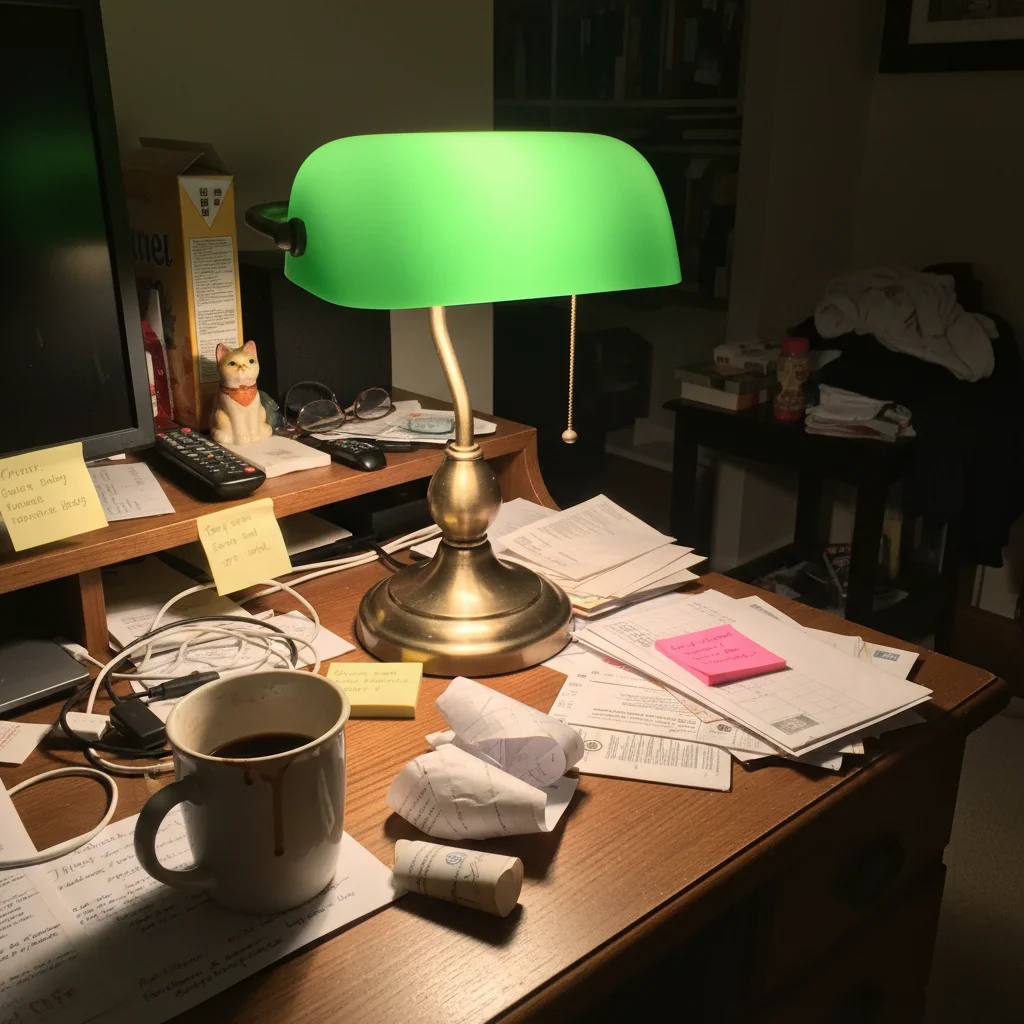
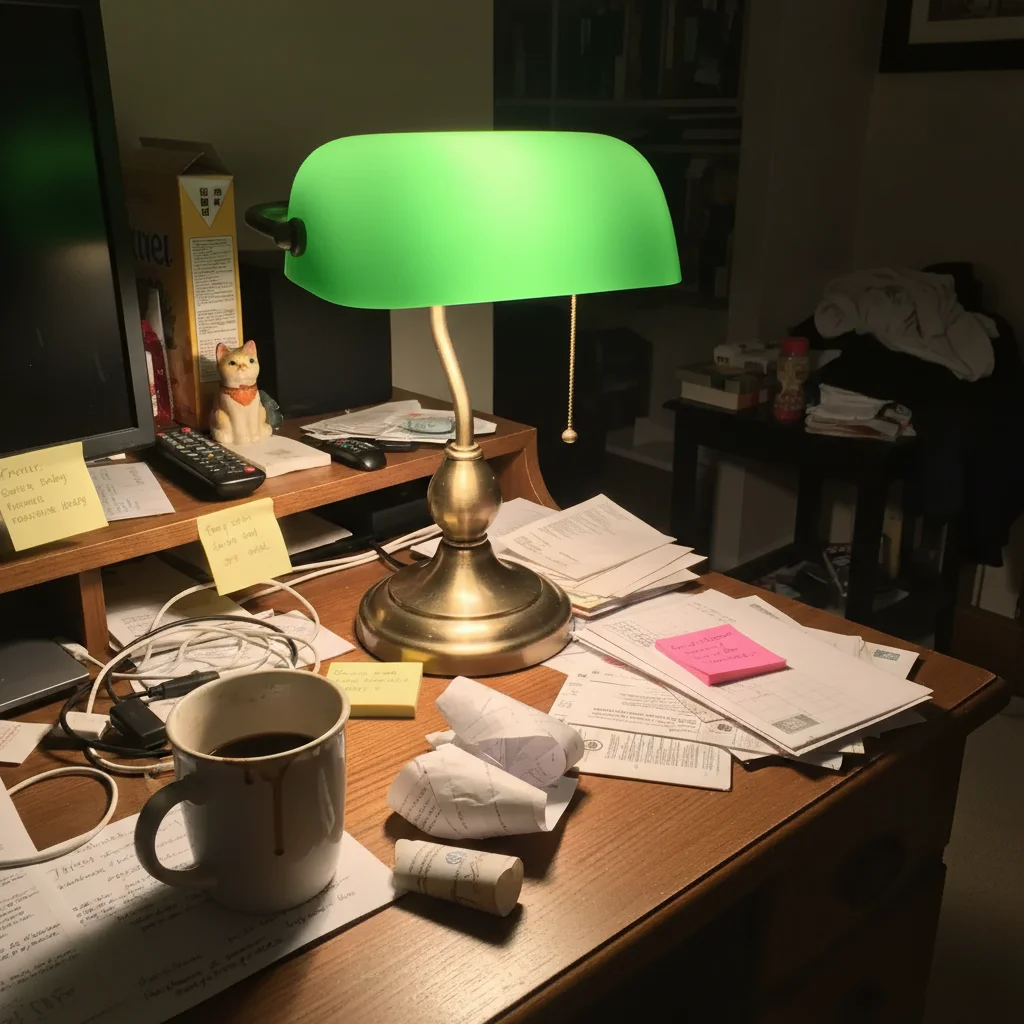
Vintage lamp from cluttered table
Mid-century modern lamp photographed on home office desk with visible clutter. One prompt created a clean, trustworthy listing photo.
clean up the messy background and clutter around the lamp, focus attention on the item
Furniture with messy floor cleaned up
Armchair being sold from living room with toys and clutter on floor. Transformed to presentable listing.
remove the toys, boxes, and clutter scattered on the floor around the chair, clean presentation
Common Facebook Marketplace Photo Issues
Photo looks too professional or fake for Marketplace
Why: Complete background removal can make local sale items look like stock photos, reducing trust.
blur the background naturally instead of removing it completely, keep authentic local sale feel
For Marketplace, slightly blurred real backgrounds often work better than perfect white backgrounds.
Lighting enhancement changed item colors
Why: Heavy lighting adjustments can shift colors, especially in poor original lighting conditions.
Adding 'preserve accurate colors' helps maintain true product appearance. Buyers want to see what they're getting.
Some clutter was removed but not everything
Why: The AI prioritized obvious foreground clutter but may have preserved background elements that looked intentional.
remove ALL visible clutter including items in the background, completely clean space
Being specific helps: 'remove the laundry basket on the right and cables on the left.'
Blur effect looks artificial or too strong
Why: Default blur may be too pronounced, creating an unnatural portrait-mode effect.
Adding 'subtly' or 'gently' creates softer, more natural-looking background blur.
Floor or surface was changed when I only wanted background cleaned
Why: The AI interpreted 'background' broadly and included the floor or table surface.
Specify what to preserve: 'keep the hardwood floor, only clean the wall behind it.'
Facebook Marketplace Seller Questions
Do I need to mark areas before cleaning up my Marketplace photos?
No! Just describe what you want: 'clean up the messy background' or 'blur background to focus on item.' The AI understands these instructions without marking.
Should I use white backgrounds for Facebook Marketplace like eBay?
No. White backgrounds work for eBay and Amazon, but Facebook Marketplace is local peer-to-peer selling. Buyers want to see authentic photos that show you actually own the item. Try blurring the background or cleaning up clutter instead of complete removal - keeps the trustworthy local sale feel.
Will cleaning up my photos make items sell faster on Marketplace?
Yes. Clean photos get significantly more messages and views. Buyers scroll fast through Marketplace - messy backgrounds make them assume the item is low quality or the seller is unreliable. A clean photo signals you care about the sale and the item is worth their time.
Can I use phone photos or do I need a real camera?
Phone photos work perfectly. Most Facebook Marketplace sellers use phones. The key is decent lighting - natural light near a window is ideal. EditThisPic can enhance lighting and clean up backgrounds, but extremely dark or blurry originals may not improve much.
How do I make Marketplace photos look trustworthy without looking fake?
Use subtle edits. Blur backgrounds instead of replacing them completely. Clean up obvious clutter but keep the natural setting. Enhance lighting without oversaturating colors. The goal is 'cleaned up' not 'professional studio shot' - buyers want to know you're a real person selling a real item.
Is EditThisPic's AI photo editor for facebook marketplace really free?
Yes — you get 1 free edit per week, no account needed. Plans start at $4.99/month for 15 edits.
Can I facebook marketplace on my phone?
Yes. EditThisPic works in any mobile browser — iPhone, Android, tablet. No app download needed.
What photo formats does the AI photo editor for facebook marketplace support?
JPG, PNG, WebP, and HEIC. Upload any common photo format and EditThisPic handles the rest.
Popular use cases
Ready to make your Marketplace listings stand out?
Free to try. No signup required. Start selling faster.
Start EditingTrusted by 15,000+ users