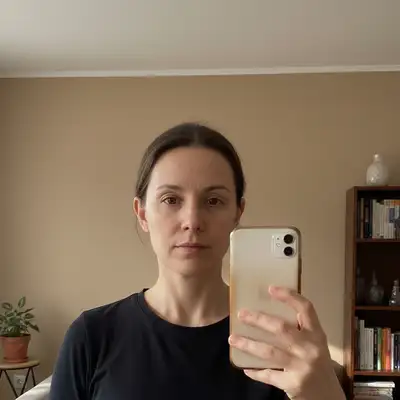
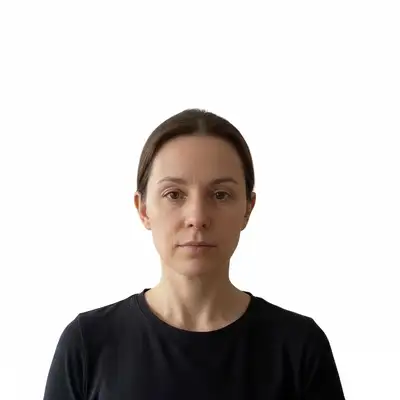
Resize photos to exact dimensions for Instagram, passport applications, wallet prints, Twitter headers, Pinterest pins, LinkedIn banners, and standard print sizes. Describe the target size and the AI crops, scales, and enhances to match — free preview, no signup, clean paid downloads.
FreeNo signupClean paid downloads
Drop your photo here
"crop this photo to US passport size — 2x2 inches, white background, face centered and taking up about 70% of the frame"
Drag & drop, or paste · JPG · PNG · WEBP
Free to try · no sign-up · photos are never shared
✦Free · No signup · Nothing to install
Release to upload
Free • No signup
Before→After
Quick Answer
EditThisPic resizes photos to any dimension using AI — Instagram squares, passport photos (2x2 inches / 35x45mm), wallet size (2.5x3.5 inches), print sizes, and social media presets. Upload your photo, describe the target size, and get a precisely cropped and enhanced result in under 60 seconds. Free, no signup required.
Unlike generic online resizers that simply stretch or squash pixels, EditThisPic uses AI to understand your intent — centering faces intelligently, generating content when aspect ratios don't match, and enhancing detail when upscaling. Describe what you need in plain English and get a result ready to upload or print.
Passport and government ID photos have strict size, background, and composition requirements that vary by country. AI resizing handles the exact crop, centers the face at the right position, and produces a white background — meeting requirements for US, UK, Schengen, Indian, and other national standards.
Common scenarios
Resizing a selfie or casual photo to 2x2 inches for a US passport application
Cropping a photo to 35x45mm with a white background for a UK or Schengen visa
Making an Indian passport photo (35x35mm) or a student ID photo from a smartphone photo
Best practices
Specify the exact country or size in your prompt: 'crop to US passport size 2x2 inches, white background, face centered' leaves no ambiguity
Use a photo with even, neutral lighting — passport offices reject photos with strong shadows across the face
State the background requirement explicitly: 'set the background to plain white' so the AI removes any cluttered background before cropping
Take the source photo straight-on with good lighting for the cleanest result — tilted or angled shots require more correction
Sample prompts
Crop this photo to US passport size — 2x2 inches, white background, face centered and occupying 70-80% of the frameResize to Indian passport photo size 35x35mm, white background, looking directly at the camera
📱
Social Media Resize Presets
Every social platform has its own ideal image dimensions. Uploading the wrong size means compressed, cropped, or blurry images. AI resizing handles the exact pixel dimensions for Instagram posts and Stories, LinkedIn banners, Twitter headers, Pinterest pins, and Facebook covers — with smart cropping that keeps subjects intact.
Common scenarios
Resizing a portrait photo to a 1:1 square for an Instagram feed post without losing the subject
Cropping a landscape photo to 1500x500 pixels for a Twitter or X header banner
Resizing a tall photo to 1000x1500 (2:3) for maximum Pinterest pin engagement
Best practices
Name the platform and the format: 'resize for Instagram post square 1080x1080, keep the subject centered' produces a tighter result than 'make it square'
For profile photos that need to appear as circles, leave extra margin: 'crop to square with breathing room around the subject so nothing is cut when displayed as circle'
LinkedIn banners display at 1584x396 — ask to 'use the center two-thirds of the image' to keep important content in the safe zone
For Pinterest, vertical (2:3) outperforms square — specify '1000x1500 vertical crop, subject in upper third'
Sample prompts
Resize this photo for an Instagram post — 1080x1080 square, center the subject and don't crop any facesCrop to Twitter header dimensions 1500x500 pixels, keep the person in the right third with space on the left for text
🖨️
Standard Printing Sizes
Getting print dimensions right before you order avoids cropped subjects, blurry enlargements, and wasted prints. AI resizing handles standard print sizes — 4x6, 5x7, 8x10, 11x14 — at 300 DPI for sharp output, with smart cropping to preserve composition.
Common scenarios
Resizing a smartphone photo to 8x10 inches at 300 DPI for a framed print order
Preparing a family photo for a 4x6 print without cutting off heads or feet at the edges
Upscaling a smaller image to reach the minimum resolution for an 11x14 large format print
Best practices
State both the print size and the resolution: 'resize for 8x10 inch print at 300 DPI' gives a specific target of 2400x3000 pixels
For large prints (11x14 and above), AI upscaling is often needed — start from the highest resolution original available
Specify how to handle the aspect ratio mismatch: 'crop to 4x6 and keep the faces in frame, do not stretch or distort'
For canvas or fine-art prints, add extra resolution: 'resize to 300 DPI for large format printing, sharpen details'
Sample prompts
Resize this photo for an 8x10 inch print at 300 DPI — crop to fit without distorting anyone's faceUpscale this image to 4x6 print size at 300 DPI, sharpen details and enhance quality for printing
🌐
Web Upload Limits and Compression
Many websites enforce file size or pixel dimension caps — government portals, job application forms, real estate sites, and e-commerce platforms all set maximum upload sizes. AI resizing reduces file size to meet limits while preserving as much quality as possible.
Common scenarios
Compressing a 12MP smartphone photo to meet a 2MB upload limit on a government visa portal
Resizing a product photo to Amazon's 2000x2000px minimum with no quality loss
Reducing an image to under 500KB for a job application form that rejects large files
Best practices
Specify the file size target if you know it: 'reduce to under 2MB, keep as much quality as possible'
E-commerce platforms often have both minimum and maximum pixel requirements — state both: 'resize to 2000x2000 pixels square for Amazon'
For web use, converting to JPEG at 80-85% quality or WebP offers the best size-to-quality tradeoff
For government portals with strict dimension requirements, specify both dimension and file size: 'resize to 600x600 pixels and under 500KB'
Sample prompts
Compress this photo to under 2MB while keeping the quality as high as possible for a web uploadResize to 2000x2000 square for Amazon product listing — white background, product centered
Example prompts to get started
crop this photo to US passport size — 2x2 inches, white background, face centered and taking up about 70% of the frame
US passport photos must be 2x2 inches (51x51mm) with the face centered, white background, and no glasses. UK passport photos are 35x45mm. Schengen/EU visas use 35x45mm. Indian passports use 35x35mm. Most countries require a plain white or off-white background with the face taking up 70-80% of the frame. Specify the country when prompting for best results.
What are wallet size photo dimensions?
Standard wallet size photos are 2.5x3.5 inches (64x89mm) at 300 DPI, which equals 750x1050 pixels. They are portrait orientation. Some wallets fit 2x3 inch photos (51x76mm). Specify which size you need: 'resize to wallet size 2.5x3.5 inches portrait' or 'wallet photo 2x3 inches.'
What image size does Instagram require?
Instagram feed posts: 1080x1080px (square 1:1), 1080x1350px (portrait 4:5), or 1080x566px (landscape 1.91:1). Instagram Stories and Reels: 1080x1920px (9:16 vertical). Profile photos: 320x320px (displayed as circle). Instagram compresses larger uploads — upload at the recommended dimensions for the best display quality.
Does resizing a photo reduce its quality?
Downscaling (making smaller) preserves quality well — you're reducing data, not inventing it. Upscaling (making larger) traditionally degrades quality, but AI upscaling predicts and generates detail to maintain sharpness. For best upscaling results, start from the highest-resolution original available. Beyond 2x upscaling, diminishing returns set in.
How do I resize a photo without cropping it?
If the aspect ratio doesn't match, you have two options: letterboxing (add neutral borders to reach the target ratio without cropping) or AI outpainting (generate content beyond the edges to fill the new dimensions). Prompt examples: 'add white borders to make this square without cropping' or 'extend the sides to make this a 16:9 landscape photo.'
What resolution do I need for printing?
300 DPI is the standard for sharp photo prints. At 300 DPI: 4x6 inches = 1200x1800px, 5x7 = 1500x2100px, 8x10 = 2400x3000px, 11x14 = 3300x4200px, 16x20 = 4800x6000px. Smartphone photos are typically 12MP (4032x3024px), sufficient for prints up to 13x9 inches at 300 DPI without upscaling.
What is the Twitter or X header image size?
Twitter/X profile header images display at 1500x500 pixels (3:1 aspect ratio). The center area is safest for key subjects, as mobile devices crop the edges. For best results, prompt: 'resize to Twitter header 1500x500 pixels, keep the main subject in the center third.'
What size are Pinterest pin images?
Pinterest recommends 1000x1500 pixels (2:3 vertical ratio) for standard pins. Square (1:1) and 9:16 vertical also work. Avoid horizontal images — they display small in the feed. Vertical pins with a 2:3 ratio consistently earn more engagement on Pinterest.
What is the LinkedIn banner size?
LinkedIn profile background banners display at 1584x396 pixels (4:1 aspect ratio). The profile photo overlaps the lower-left corner, so keep important content in the center or right half. LinkedIn company page covers are 1128x191 pixels. Prompt: 'resize to LinkedIn banner 1584x396, keep the subject in the center-right area.'
Can I resize a photo for a student ID?
Yes. Student ID photos typically follow the same format as passport photos: 2x2 inches or 35x45mm, white or light background, face centered and occupying 70-80% of the frame. Use the AI Student ID Photo Maker tool or prompt: 'crop to student ID size 2x2 inches, white background, face centered.'
Is there a free image resizer online with no watermark?
Yes. EditThisPic offers a free preview edit once per week with no signup required, and the purchased download is clean. Resize, crop, and upscale photos — the paid result is clean and ready to use. For more frequent resizing, credit packs start at $4.99 for 10 edits.
What is the difference between DPI and pixel dimensions?
Pixel dimensions are the total image data (e.g., 3000x2400 pixels). DPI (dots per inch) determines how large those pixels print. A 3000px-wide image at 300 DPI prints 10 inches wide and sharp. At 150 DPI, the same image prints 20 inches wide but softer. For digital/web use, only pixel dimensions matter — DPI has no effect on screen display.