Free • No signup Make Caricature · Free

AI Caricature Maker

Upload a photo and describe the exaggeration style. AI creates a fun caricature in seconds.

Man in dark blue suit with wide smile in professional headshot
Before
Same man as a humorous caricature with oversized head and exaggerated smile
After

AI Caricature Maker

Drop your photo here

or click to browse

Release to upload

Free • No signup

Advertisement
Popular use cases:
  • custom gifts
  • party entertainment
  • social media avatars
  • team building
  • birthday presents
  • wedding caricatures
  • corporate events
  • greeting cards

Cost
Free No signup required
Time
Instant results in 15-30 seconds
Works on
Any device - browser, phone, tablet, desktop
Powered by
AI-powered photo editing
Scenario Prompt Time
Classic fun caricature create a caricature with oversized head and exaggerated features 30s
Subtle editorial style create a subtle editorial-style caricature 35s
Extreme boardwalk style turn this into a boardwalk caricature with tiny body and huge head 40s

How it works

  1. Upload your photo

    Drop your image into EditThisPic. JPG, PNG, WebP up to 7MB. Clear face photos work best for caricatures. Front-facing portraits with visible facial features produce the funniest results.

    Expect: Simple caricature: 30-40 seconds. Detailed scene caricature: 45-60 seconds and may need exaggeration adjustments.
  2. Describe the caricature style

    Type your instruction: 'create a caricature with a big head, exaggerated nose, and humorous grin' or 'make a funny caricature emphasizing the eyes and smile.' Specify which features to exaggerate—nose, eyes, ears, chin. No marking needed—the AI finds the face automatically.

    Tip: Specify the level of exaggeration: 'slightly exaggerated' for subtle humor or 'wildly exaggerated' for maximum comedy.

    Copy one of these to get started:

    Classic fun caricature create a caricature from this photo with an oversized head, exaggerated facial features, and a humorous expression
    Boardwalk-style caricature turn this photo into a boardwalk caricature with a tiny body, huge head, and comically large eyes and grin
    Subtle editorial caricature create a subtle editorial-style caricature that slightly exaggerates the most distinctive facial features
    Bobblehead style turn this photo into a bobblehead-style caricature with a massive round head on a tiny body in a fun pose
    3 more prompts
    Celebrity roast style create a roast-style caricature that playfully exaggerates the most prominent features like nose, chin, and forehead
    Cute chibi caricature make a cute chibi-style caricature with an adorably oversized head, huge sparkly eyes, and a tiny body
    Couple caricature create a fun caricature of both people in this photo with matching exaggerated style and humorous expressions
  3. Review the caricature

    Check that the person is still recognizable despite the exaggeration. The best caricatures amplify distinctive features while keeping the likeness. Verify the humor hits the right tone—fun, not unflattering.

  4. Refine with markers if needed

    If certain features need more or less exaggeration, tap markers on those areas and regenerate with adjusted instructions. Want a bigger nose? Tap the nose and say 'exaggerate this feature more.'

    Tip: Markers are for precision refinement only. Try without them first—the AI usually nails the caricature in one go.
Try it free

AI Caricature Maker

Drop your photo here

or click to browse

Release to upload

Free • No signup

"Made caricatures of everyone at the office for our team Slack. People were laughing all day. Way cheaper than hiring a caricature artist at a party." @OfficeHumorDan

See it in action

Man in dark blue suit with wide smile in professional headshot
Before
->
Same man as a humorous caricature with oversized head and exaggerated smile
After

Headshot to classic caricature

A professional headshot transformed into a fun, exaggerated caricature with oversized head and big grin.

Prompt: create a caricature from this photo with an oversized head, exaggerated facial features, and a humorous expression
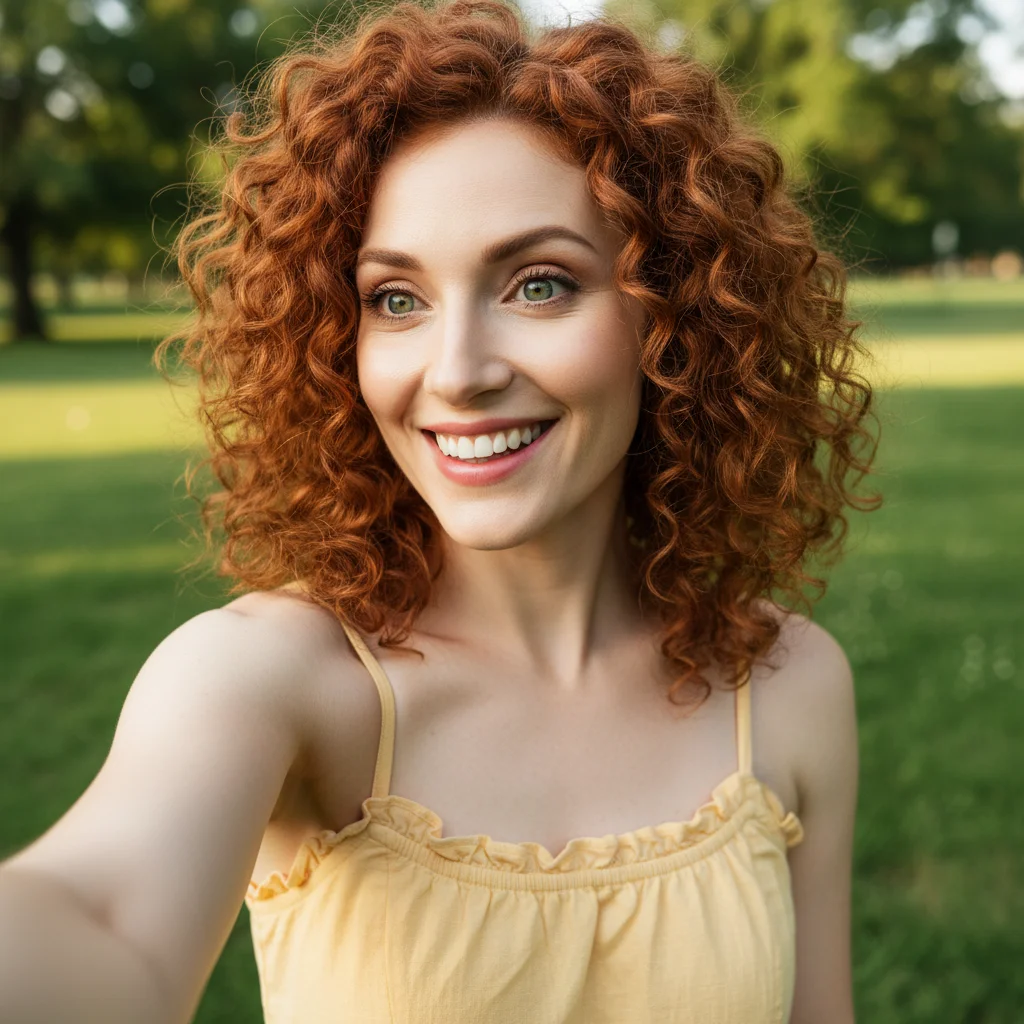
Woman with curly red hair smiling in outdoor selfie
Before
->
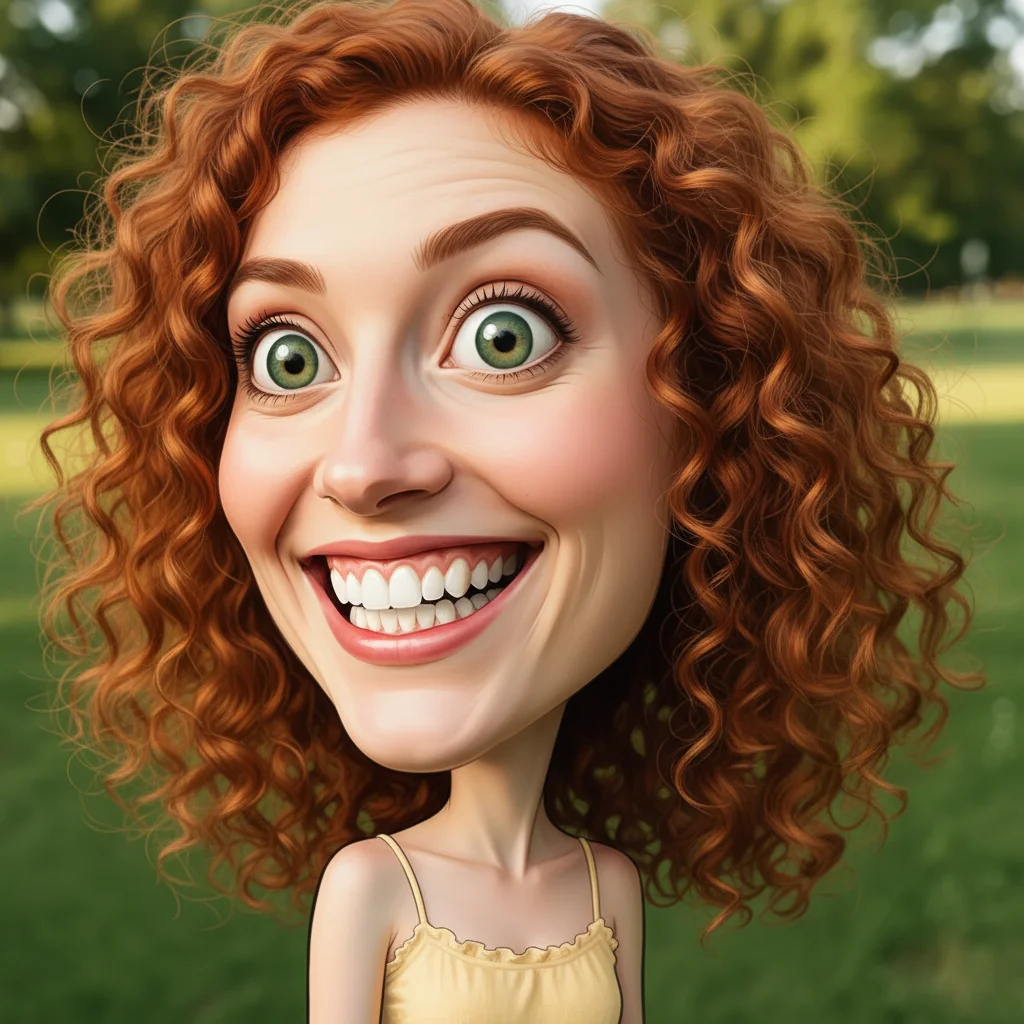
Same woman as a boardwalk caricature with huge head and tiny body
After

Selfie to boardwalk caricature

A casual selfie turned into a fun boardwalk-style caricature with extreme proportions and comedic style.

Prompt: turn this photo into a boardwalk caricature with a tiny body, huge head, and comically large eyes and grin
Advertisement

If something looks off

AI changed the wrong area or something I didn't want changed

Why: The AI couldn't determine exactly which features to exaggerate from description alone. This happens with vague instructions.

Try: Tap a marker on the specific feature you want exaggerated, then regenerate with the same prompt

Tip: Markers tell the AI 'I mean THIS feature specifically.' Use them when you want targeted exaggeration.

Caricature is too extreme and doesn't look like the person

Why: The AI applied maximum exaggeration, distorting the face beyond recognition.

Try: create a subtle caricature that slightly exaggerates features while keeping the person clearly recognizable

Tip: Use intensity words: 'slightly', 'moderately', or 'wildly' exaggerated to control the level.

Caricature isn't exaggerated enough—looks too realistic

Why: The AI was too conservative with the exaggeration, producing a result closer to a portrait than a caricature.

Try: create a wildly exaggerated caricature with a much bigger head, amplified nose and chin, and comedic proportions

Tip: Pile on the exaggeration words: 'wildly', 'comically', 'absurdly' push the AI toward bolder caricature.

Wrong features got exaggerated

Why: The AI chose to amplify features that weren't the most distinctive, making the caricature feel off.

Try: create a caricature focusing on exaggerating the [specific feature: eyes/nose/chin/forehead] while keeping other features normal

Tip: Name the exact features you want exaggerated. The AI exaggerates what you mention most prominently.

Result looks mean-spirited rather than fun

Why: Certain exaggeration choices can make a caricature feel unflattering instead of playful.

Try: create a lighthearted, friendly caricature with a warm smile and playful exaggeration that feels fun, not mocking

Tip: Words like 'lighthearted', 'friendly', and 'fun' steer the AI toward positive, affectionate caricature.

Quick answers

Do I need to mark my face before creating a caricature?

No! Just upload your photo and describe the caricature style: 'create a caricature with exaggerated features and a big head.' The AI detects faces automatically. Only use markers if you want to emphasize a specific feature—like tapping on the nose to make it extra exaggerated.

How do I make a caricature from a photo for free?

Upload your photo to EditThisPic and type 'create a caricature with an oversized head and exaggerated features.' The AI generates your caricature in about 30 seconds. Free to use, no account needed, and no watermark on the result.

Is there a free AI caricature maker that doesn't require login?

Yes. EditThisPic creates caricatures from photos with no signup required. Upload your image, describe the exaggeration style, and download. No watermarks, no account walls. Works on any face photo.

What's the best free tool for making caricatures from photos?

EditThisPic lets you control exactly how the caricature looks—which features to exaggerate, how extreme, what style. Unlike preset filters, you describe what you want. Free, no login, results in 30 seconds.

Ready to make a caricature from your photo?

Free to try. No signup required.

Try it free