Free • No signup Make Driver's license photo · Free

AI Driver's License Photo Maker

Turn any photo into a driver's license photo with proper background and framing. No marking needed.
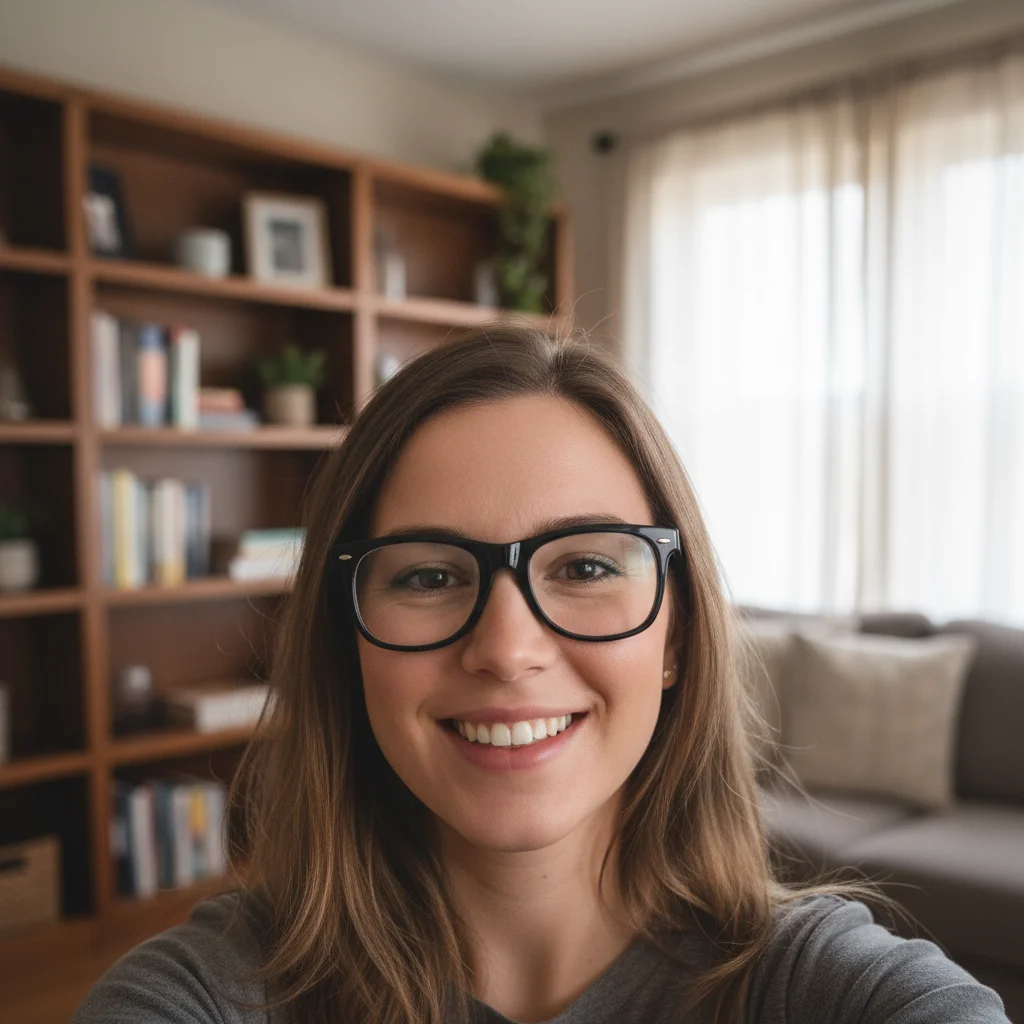
Man in grey polo photographed in living room
Before
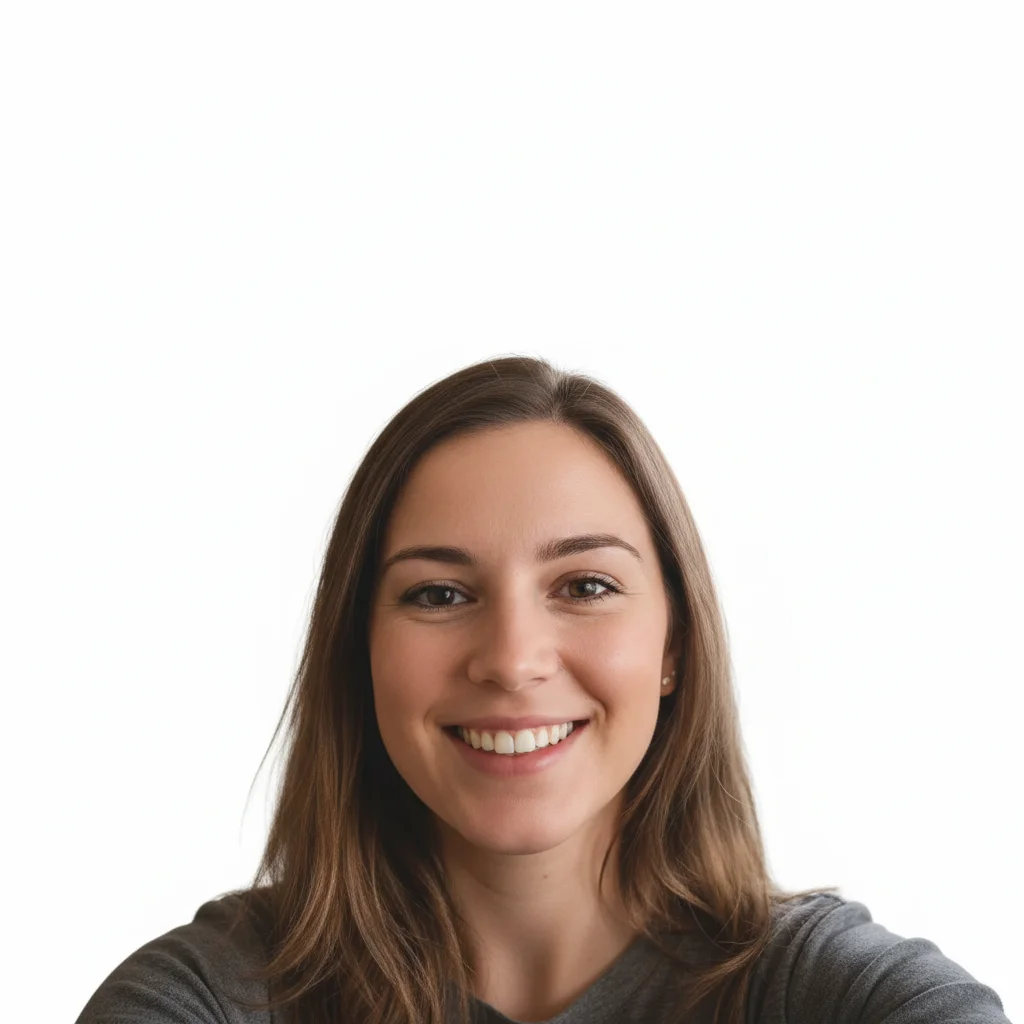
Same man with clean white background driver's license photo
After

AI Driver's License Photo Maker

Drop your photo here

or click to browse

Release to upload

Free • No signup

Advertisement
Popular use cases:
  • DMV photo submission
  • driver's license renewal
  • state ID photo
  • online license renewal
  • REAL ID photo
  • learner's permit photo
  • international driving permit
  • license photo at home

Cost
Free No signup required
Time
Instant results in 15-30 seconds
Works on
Any device - browser, phone, tablet, desktop
Powered by
AI-powered photo editing
Scenario Prompt Time
Standard white background driver's license photo with white background, head centered 30s
Blue background state format license photo with solid light blue background 30s
Fix lighting + background license photo, white background, even lighting, remove shadows 40s

How it works

  1. Upload your photo

    Drop your image into EditThisPic. JPG, PNG, WebP up to 7MB. Use a front-facing photo with your face clearly visible and eyes open. Avoid photos with sunglasses, hats, or heavy shadows on the face.

    Expect: Standard license photo conversion: 30-35 seconds. Photos with complex backgrounds or uneven lighting: 40-50 seconds.
  2. Describe the license photo format

    Type your instruction: 'make this a driver's license photo with plain white background, head centered, neutral expression' or 'convert to DMV photo format with light blue background, face filling center of frame.' Specify the background color required by your state. No marking needed—the AI understands license photo formatting.

    Tip: Most US states use light blue or white backgrounds. Check your state DMV website for the exact requirement.

    Copy one of these to get started:

    Standard DMV license photo make this a driver's license photo with plain white background, head centered, neutral expression, both eyes clearly visible
    Blue background state format convert this to a driver's license photo with solid light blue background, face centered, showing head and top of shoulders
    Selfie to license format convert this selfie into a driver's license photo with clean white background, straighten the face, center framing
    Fix harsh lighting make this a license photo with white background, remove harsh shadows from face, apply even and natural lighting
    3 more prompts
    Online renewal submission make this a DMV online renewal photo, plain white background, passport-style framing, 2x2 inches, neutral expression
    Remove glasses glare make this a driver's license photo with white background, remove the glare from glasses lenses, keep the glasses on
    International driver's license photo make this an international driving permit photo, white background, 35x45mm passport-style framing, neutral expression
  3. Check the formatting

    Verify the background is uniform with no shadows or color patches. Check that your face is centered, eyes are at the correct height, and the framing shows your head and the top of your shoulders. Ensure no accessories obscure your face.

  4. Refine with markers if needed

    If there are shadow remnants behind your head or the background color isn't perfectly uniform, tap markers on those spots and regenerate. Most license photos come out clean on the first attempt.

    Tip: Markers are for precision refinement only. Try without them first—you usually won't need them.
Try it free

AI Driver's License Photo Maker

Drop your photo here

or click to browse

Release to upload

Free • No signup

"Had to submit a photo online for my license renewal. Took a quick photo at home, used this to get the right background and framing. Approved first try—saved me a trip to the DMV." @DriverReady_Sam

See it in action

Man in grey polo photographed in living room
Before
->
Same man with clean white background driver's license photo
After

Living room photo to license format

A casual photo taken at home with furniture visible, converted to a proper driver's license photo.

Prompt: make this a driver's license photo with plain white background, head centered, neutral expression, both eyes clearly visible
Woman taking selfie inside car
Before
->
Same woman with white background driver's license photo formatting
After

Car selfie to license photo

A selfie taken inside a car transformed into a properly formatted license photo with uniform background.

Prompt: convert this selfie into a driver's license photo with clean white background, straighten the face, center framing
Advertisement

If something looks off

AI changed the wrong area or something I didn't want changed

Why: The AI couldn't determine exactly which area you meant from description alone. This happens when clothing color is close to the background color.

Try: Tap a marker on the specific area you want to change, then regenerate with the same prompt

Tip: Markers tell the AI 'I mean THIS area specifically.' Use them when description alone is ambiguous.

Background has uneven color or visible shadow patches

Why: The original photo had strong directional lighting that created shadows the AI didn't fully remove during background replacement.

Try: make this a license photo with PERFECTLY UNIFORM white background, zero shadows or grey areas anywhere behind the head

Tip: 'Perfectly uniform' and 'zero shadows' forces the AI to aggressively eliminate all background inconsistencies.

Face appears tilted or not looking straight ahead

Why: The original photo was taken at an angle or the camera was slightly tilted, and the AI preserved that tilt.

Try: make this a driver's license photo, straighten the head to face directly forward, level the eyes horizontally, white background

Tip: 'Straighten the head' and 'level the eyes' explicitly tell the AI to correct angular perspective from selfies.

Red-eye or glasses glare not removed

Why: Flash photography causes red-eye and glasses reflections that the AI treats as natural features unless told otherwise.

Try: make this a license photo with white background, remove the red-eye effect and any glare reflections from glasses

Tip: Be specific about what to remove: 'red-eye' and 'glare from glasses' are two separate corrections the AI handles well.

Photo looks over-processed or unnatural

Why: The AI applied too much enhancement when correcting lighting and background, making skin look artificial.

Try: convert to license photo with white background, keep natural skin texture and appearance, minimal enhancement only

Tip: 'Keep natural skin texture' prevents the AI from over-smoothing, which DMVs may reject as altered.

Quick answers

Do I need to mark the background before making a license photo?

No! Just type 'make this a driver's license photo with white background' and the AI handles background replacement, framing, and lighting automatically. Only use markers if you see shadow remnants or rough edges after the first result.

How do I make a driver's license photo at home for free?

Take a front-facing photo against any background, upload it to EditThisPic, and type 'convert to driver's license photo with white background, head centered.' The AI replaces the background and frames correctly. Free to try, no account needed.

Is there a free driver's license photo tool that doesn't require signup?

Yes, EditThisPic makes driver's license photos for free with no account needed. Upload any portrait or selfie, describe the format, and download the result. No watermarks. Works for US state DMV requirements and international driving permits.

What are the DMV photo requirements for a driver's license?

Requirements vary by state, but generally: plain white or light blue background, front-facing with both eyes visible, neutral expression, no sunglasses or hats, and taken within the last 6 months. Check your specific state DMV website for exact specifications.

Ready to make your driver's license photo?

Free to try. No signup required.

Try it free