Free โ€ข No signup Add Deceased loved one ยท Free

Add Deceased Loved One to Photo

Create a meaningful photo that includes someone who is no longer with us, honoring their memory in your family portraits.
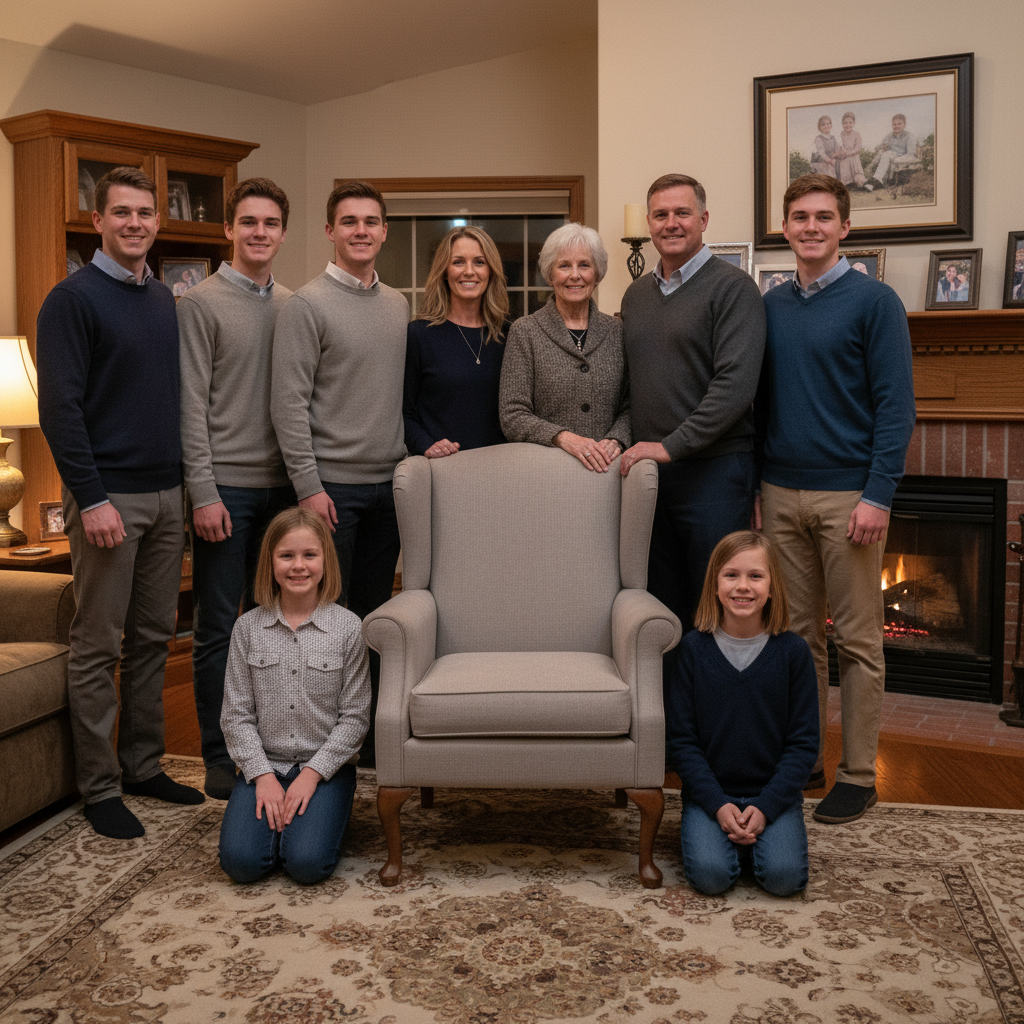
Family reunion photo with empty space in center
Before
โ†’
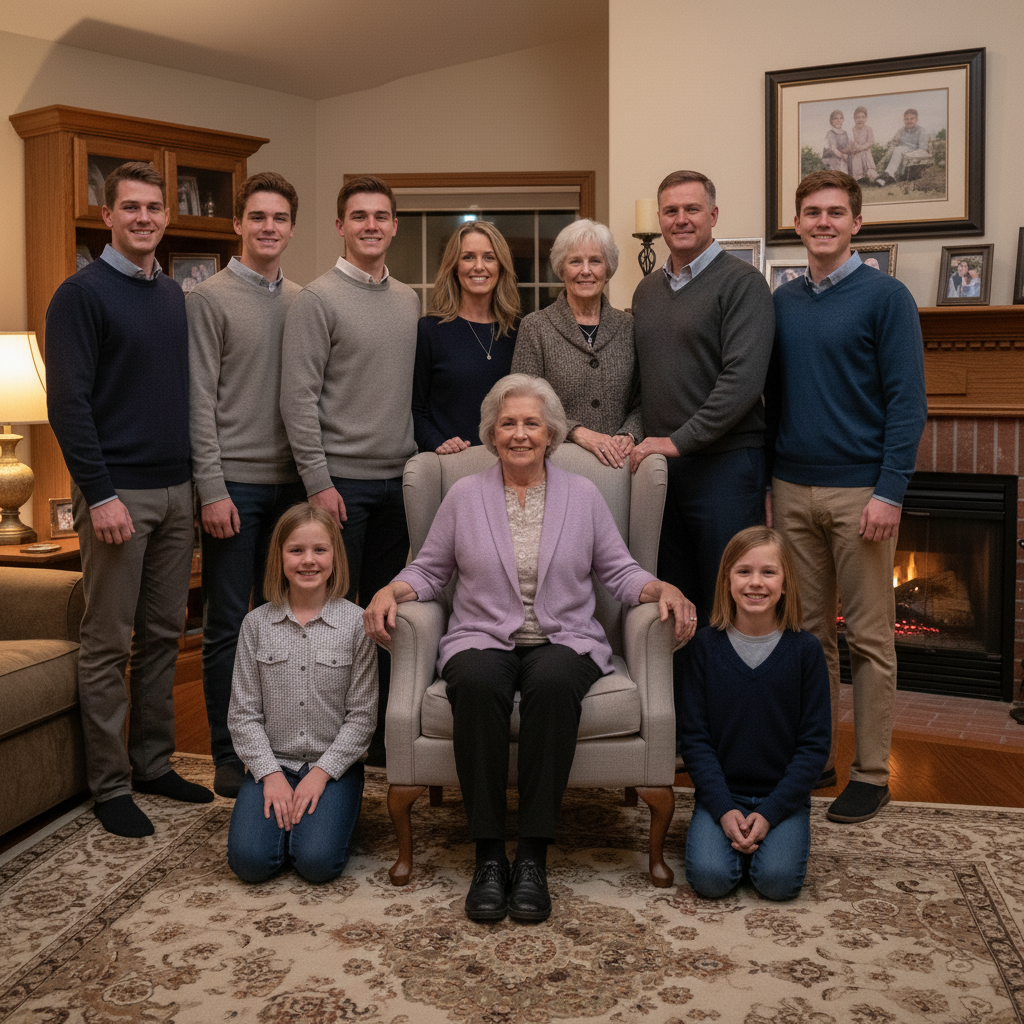
Complete family reunion with grandmother added in center
After

Add Deceased Loved One to Photo

Drop your photo here

or click to browse

Release to upload

Free โ€ข No signup

Advertisement
Popular use cases:
  • add deceased loved one to photo
  • add dead relative to photo
  • add grandparent who passed away
  • memorial photo creation
  • add someone who died to family photo
  • remembrance photo editing
  • deceased family member in photo
  • heaven photo with loved one

Cost
Free No signup required
Time
Instant results in 15-30 seconds
Works on
Any device - browser, phone, tablet, desktop
Powered by
AI-powered photo editing

How it works

  1. Choose your photos

    Select the family photo where you'd like to add your loved one. Photos with a natural space - an empty chair, a gap in a group, or room at the edge - work best. Then find a treasured photo of your loved one where they look happy and at peace.

    Expect: Most memorial photos take 30-60 seconds. You may want to try a few times to get the placement feeling just right - that's normal and okay.
  2. Upload the reference photo

    Click '+ Add reference image' below the prompt and upload the photo of your loved one. Choose an image where they look like themselves - their natural smile, a characteristic pose, the way you remember them. The AI will preserve their likeness while matching the scene.

    Tip: Photos with clear lighting and their face visible work best. It's okay if the lighting or setting is different from your main photo.

    Copy one of these to get started:

    Adding grandparent to family portrait add this person standing behind the seated family members on the right, with a gentle peaceful smile, matching the warm indoor lighting
    Seated position in group photo add this person seated in the empty chair on the left, wearing comfortable formal clothing, looking peacefully happy, with soft lighting matching the scene
    Gentle memorial presence add this person as a subtle, gentle presence in the upper corner, watching over the family with a warm smile, slightly soft-focused like a cherished memory
    Wedding photo with parent add this person standing beside the bride/groom, wearing formal attire appropriate for a wedding, with a proud loving expression, matching the ceremony lighting
    3 more prompts
    Holiday photo inclusion add this person sitting among the family group, wearing festive but comfortable clothing, with a natural happy expression, matching the warm holiday lighting
    Graduation celebration add this person standing proudly next to the graduate, arm around their shoulder, beaming with pride, matching the bright outdoor ceremony lighting
    Multiple generation portrait add this person in the back row with the other grandparents, wearing similar formal attire, with a content peaceful expression, matching the studio lighting
  3. Describe the placement with care

    Tell the AI where your loved one should appear: 'add this person seated in the empty chair on the left with a peaceful smile' or 'add this person standing behind the family, watching over us.' Include any clothing adjustments if needed.

    Tip: Many people find that placing their loved one slightly behind others, or in their 'usual spot,' feels most natural and comforting.

    Copy one of these to get started:

    Adding grandparent to family portrait add this person standing behind the seated family members on the right, with a gentle peaceful smile, matching the warm indoor lighting
    Seated position in group photo add this person seated in the empty chair on the left, wearing comfortable formal clothing, looking peacefully happy, with soft lighting matching the scene
    Gentle memorial presence add this person as a subtle, gentle presence in the upper corner, watching over the family with a warm smile, slightly soft-focused like a cherished memory
    Wedding photo with parent add this person standing beside the bride/groom, wearing formal attire appropriate for a wedding, with a proud loving expression, matching the ceremony lighting
    3 more prompts
    Holiday photo inclusion add this person sitting among the family group, wearing festive but comfortable clothing, with a natural happy expression, matching the warm holiday lighting
    Graduation celebration add this person standing proudly next to the graduate, arm around their shoulder, beaming with pride, matching the bright outdoor ceremony lighting
    Multiple generation portrait add this person in the back row with the other grandparents, wearing similar formal attire, with a content peaceful expression, matching the studio lighting
  4. Review and refine

    Take your time reviewing the result. It's okay if emotions come up. If something doesn't feel right - the expression, the placement, the size - you can adjust and try again. There's no rush.

    Tip: Save multiple versions if you want different options for different purposes (memorial service, home display, sharing with family).
Try it free โ†“

Add Deceased Loved One to Photo

Drop your photo here

or click to browse

Release to upload

Free โ€ข No signup

"I added my mom to our family Christmas photo. She passed last spring and we all wanted her there. Looking at it still makes me cry, but it's exactly what I needed." @RememberingMom_Sarah

See it in action

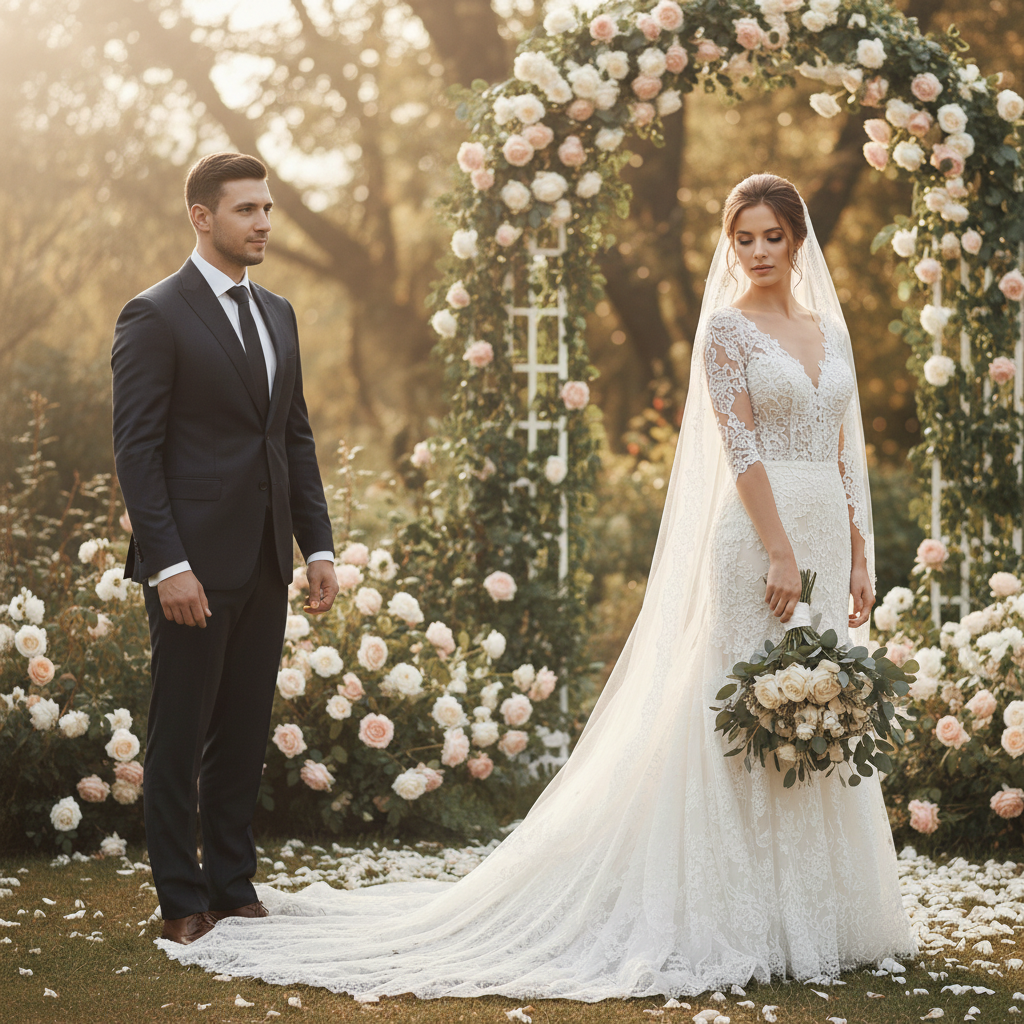
Family reunion photo with empty space in center
Main Photo
Reference
Reference
Complete family reunion with grandmother added in center
Result

Grandmother added to family reunion

A family reunion photo completed by adding grandmother who passed earlier that year, positioned in her usual spot at the center of the family.

Prompt: add this person seated in the center of the group, wearing a soft purple cardigan, with her characteristic warm smile, naturally blended into the indoor family setting
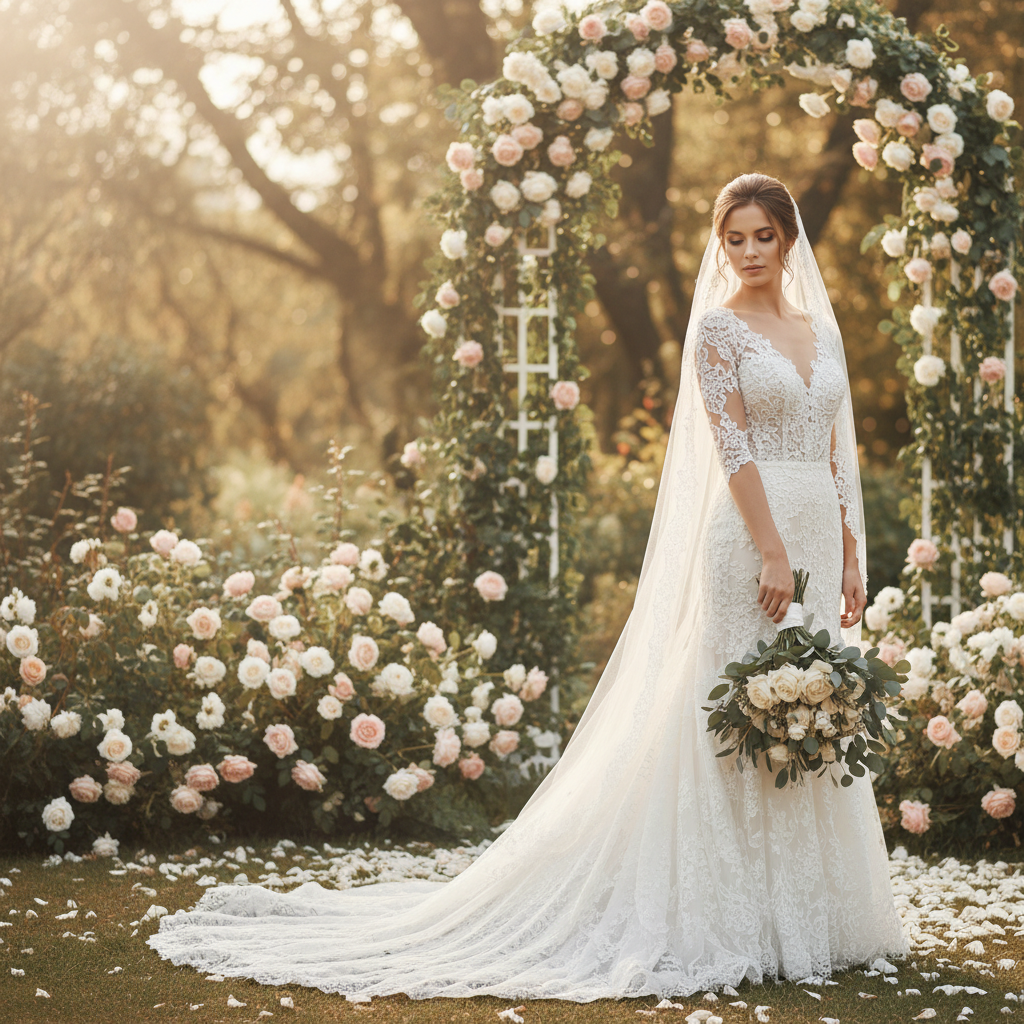
Bride standing alone where father would be
Main Photo
Reference
Reference
Bride with father added beside her
Result

Father added to daughter's wedding

A bride wanted her late father in her wedding portrait. He was added standing beside her in his characteristic proud pose.

Prompt: add this person standing to the left of the bride, wearing a dark formal suit, with a proud loving expression, arm gently at her side, matching the soft wedding photography lighting
Advertisement

If something looks off

The expression doesn't look like them

Why: The AI captured their features but not their characteristic expression that you remember.

Try: add this person with their natural [specific expression - warm smile, gentle eyes, characteristic grin]

Tip: Try a different reference photo where they have the expression you remember most fondly

The placement feels unnatural

Why: The position might not be where they would naturally be in family photos.

Try: add this person in their usual spot - [describe where they typically sat or stood in family photos]

Tip: Think about old family photos - where did they usually position themselves? That familiarity often feels most right.

It's too realistic and feels unsettling

Why: Sometimes a perfectly realistic integration doesn't feel emotionally right for memorial purposes.

Try: add this person with a gentle, peaceful presence, slightly soft lighting around them

Tip: For memorial displays, a subtle 'memory' quality - slightly softer focus or gentler lighting - can feel more appropriate than hyper-realism

The clothing doesn't match the occasion

Why: The reference photo's clothing doesn't fit the formality of the scene.

Try: add this person wearing [describe appropriate attire for the occasion] similar to others in the photo

Tip: Describe what they would have worn to that event - the AI can adjust clothing while keeping their face and likeness

They look the wrong age

Why: Your reference photo may be from a different time in their life than fits the scene.

Try: preserve their likeness and features while adjusting to appear [younger/older] to match the time period of this photo

Tip: If possible, find a reference photo from around the same era as your main photo

Quick answers

Is this respectful to do?

Many families find deep comfort in creating memorial photos. It allows them to have the family portrait they always wanted, or to include their loved one in photos from events they couldn't attend. What matters is your intention - if creating this photo brings you peace and honors their memory, it's a loving tribute. Some families frame these for memorial services, others keep them private. There's no wrong way to remember someone you love.

Will the photo look real or obviously edited?

The AI creates natural-looking results that match lighting, scale, and style. Most people can't tell the photo was edited. However, for memorial purposes, you can choose how realistic you want it - some families prefer a subtle 'memory' quality, while others want it to look like their loved one was really there. You have full control over the style.

Are my photos private?

Your photos are processed in real-time and not stored on our servers. We understand how personal and precious these images are. The editing happens securely, and your photos of your loved one remain completely private. We never use uploaded images for any other purpose.

What if I can't stop crying when I see the result?

That's completely normal and okay. Many people have strong emotional reactions when they see their loved one in a new photo. Take breaks if you need them. Save the image even if you're not ready to look at it again right away. Some families find it helps to do this process together, so they can support each other.

Can I print and frame this photo?

Yes, absolutely. The images download at full resolution with no watermark, suitable for printing and framing. Many families create these specifically for memorial displays, holiday mantels, or to give as gifts to other family members who would treasure having the photo.

What if I don't have a good photo of my loved one?

Even older or lower-quality photos can work. The AI needs to see their face clearly enough to capture their likeness. Phone photos, casual snapshots, even older printed photos that you've photographed work. If you only have blurry or damaged photos, you might try our photo restoration tool first to improve the reference image.

Can I add them to multiple photos?

Yes. Each edit is free once per week, or you can purchase credits for additional edits. Many families create several versions - one for the memorial service, one for home, different photos for different family members. You can also create variations with different expressions or positions.

Is this the same as AI that creates fake photos of people?

No. This tool composites a real person - your loved one - into an existing photo. It's not creating a fake person or putting them in situations that never happened. It's creating the photo you would have had if they could have been there. The intention is memorial and healing, not deception.

Create a photo that includes everyone you love

Honor their memory with a family portrait that feels complete.

Try it free โ†’