Free โ€ข No signup Perfect Wedding guest photos ยท Free

Wedding Guest Photo Editor

Fix flash, blur backgrounds, enhance your formal look - all with simple instructions

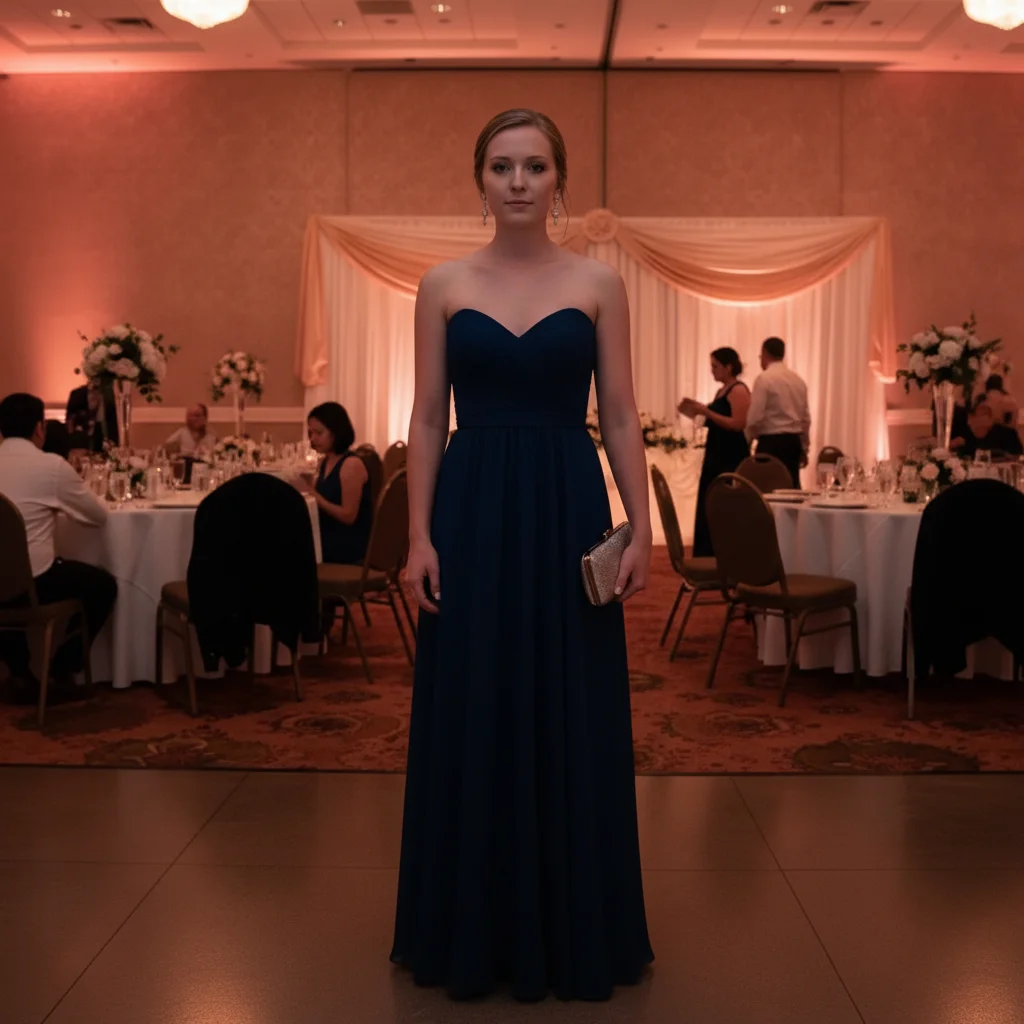
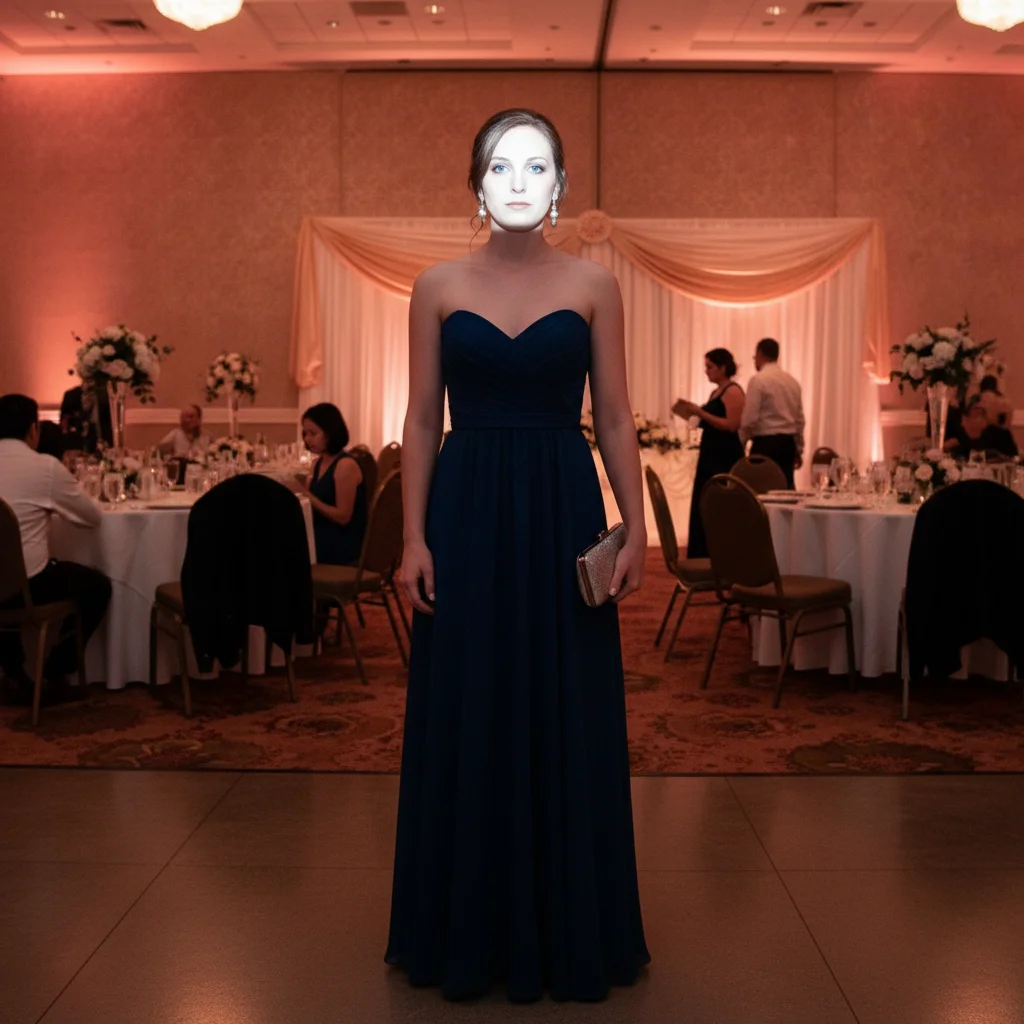
Guest in blue dress with harsh washed-out flash lighting
Before
โ†’
Same guest with balanced natural lighting and warm tones
After

Wedding Guest Photo Editor

Drop your photo here

or click to browse

Release to upload

Free โ€ข No signup

Advertisement
Popular use cases:
  • wedding guest photos
  • reception photos
  • formal attire photos
  • bridesmaid photos
  • groomsman photos
  • wedding ceremony photos
  • formal event photos
  • dress photos at weddings

Cost
Free No signup required
Time
Instant results in 15-30 seconds
Works on
Any device - browser, phone, tablet, desktop
Powered by
AI-powered photo editing
Scenario Prompt Time
Fix flash fix the harsh flash lighting from the venue 25s
Blur background blur the reception background with elegant bokeh 30s
Remove people remove the other guests in the background 35s
Enhance outfit enhance the color and details of my formal attire 25s

How it works

  1. Upload your wedding photo

    Drop your wedding guest photo into EditThisPic. Reception shots, ceremony photos, or outdoor wedding pics all work. JPG, PNG, WebP up to 7MB.

    Expect: Simple fixes like harsh flash: 25-30 seconds. Background blur or replacement: 30-40 seconds.
  2. Describe what needs fixing

    Type your fix: 'fix the harsh flash lighting from the venue' or 'blur the reception background with elegant bokeh.' Be specific about lighting issues, background problems, or enhancements you need. The AI understands wedding concepts like 'reception background,' 'venue flash,' and 'formal attire' without needing you to mark anything.

    Tip: For backgrounds, specify the effect: 'elegant bokeh blur' vs 'completely replace' creates different results

    Copy one of these to get started:

    Reception flash washed out your photo fix the harsh flash lighting from the venue
    Cluttered reception hall in background blur the reception background with elegant bokeh
    Strangers wandered into your shot remove the other guests in the background
    Want to showcase your formal outfit enhance the color and details of my formal attire
    3 more prompts
    Dim ceremony venue made photo dark brighten the photo while keeping warm ceremony lighting
    Messy venue background visible replace with elegant venue backdrop
    Group photo with uneven lighting balance the lighting so everyone is evenly lit
  3. Review your formal photo

    Check faces and outfit details at full zoom. Make sure the background enhancement looks natural. If something needs adjustment, describe the change in a follow-up prompt.

  4. Refine with markers if needed

    If the AI blurred your outfit too or changed the wrong area, tap markers on specific spots and regenerate. This is optional - most wedding photo fixes work perfectly without markers.

    Tip: Markers help when separating you from similar-colored backgrounds, or protecting specific outfit details
Advertisement
Try it free โ†“

Wedding Guest Photo Editor

Drop your photo here

or click to browse

Release to upload

Free โ€ข No signup

"I looked amazing but the venue flash was terrible. This fixed the lighting and blurred the busy reception hall perfectly!" @weddingguest_sarah

See it in action

Guest in blue dress with harsh washed-out flash lighting
Before
->
Same guest with balanced natural lighting and warm tones
After

Fixed Harsh Reception Flash

Venue flash created washed-out skin and harsh shadows. Balanced to natural elegant lighting.

Prompt: fix the harsh flash lighting from the venue
Guest in suit with cluttered reception hall and tables visible
Before
->
Same guest with elegantly blurred background, professional bokeh
After

Blurred Cluttered Reception Background

Busy reception hall distracted from formal outfit. Added elegant bokeh blur for professional portrait look.

Prompt: blur the reception background with elegant bokeh

Detailed Guides by Scenario

๐Ÿ“ท

Wedding Photo Enhancement

Make every wedding photo look its best โ€” fix lighting, remove distractions, and create frame-worthy memories from candid shots.

Common Scenarios

  • Enhancing professional photographer's shots that need minor wedding touch-ups
  • Fixing phone photos from guests that capture great moments but have poor quality
  • Cleaning up group wedding photos where someone blinked or wasn't looking at the camera

Best Practices

  • Start with the most important wedding moments โ€” those are the photos people will print and frame
  • Fix lighting issues first, then address any object removal or background cleanup
  • Keep edits natural โ€” wedding photos should look real, not overly filtered
๐Ÿ“ท

Printing & Keepsakes

Prepare wedding photos for prints, photo books, canvases, and other physical keepsakes that will last for years.

Common Scenarios

  • Selecting and enhancing the best wedding photos for a premium photo book
  • Preparing a wedding photo for a large canvas print or framed wall art
  • Creating a wedding montage or collage from multiple enhanced photos

Best Practices

  • For prints, use the highest resolution source image available โ€” enlarge and enhance with AI if needed
  • Color-correct all wedding photos to a consistent tone before printing a book or set
  • Check how the image looks cropped to common print sizes (5x7, 8x10, 16x20) before ordering
๐Ÿ“ท

Sharing & Social Media

Share wedding highlights on social media with polished photos that do the occasion justice.

Common Scenarios

  • Creating a curated set of wedding photos for an Instagram post or story series
  • Enhancing candid wedding moments that capture genuine emotion for social sharing
  • Preparing a highlight reel of the best wedding photos for friends and family

Best Practices

  • Pick 5-10 of the best wedding moments rather than posting everything โ€” quality over quantity
  • Edit all social media shares in the same style for a cohesive set
  • Tag the people and venue โ€” wedding content with tags gets significantly more engagement

If something looks off

AI blurred my outfit too when blurring background

Why: Outfit color or pattern was similar to background, making separation difficult

Try: Tap markers on your outfit edges, then use 'keep me and my outfit sharp, blur only background'

Tip: Markers protect your formal attire when outfit and background have similar colors

Fixed lighting but now colors look unnatural or too warm

Why: AI overcorrected the flash by adding too much warmth

Try: Use 'fix the harsh flash but keep natural color balance' or 'subtle flash correction'

Tip: Words like 'natural' and 'subtle' prevent overcorrection of lighting issues

Background blur made edges around hair look weird

Why: Complex hair or flowing dress details are hard for AI to separate from background

Try: Try 'refine the edges to look more natural' or tap markers along problem edges

Tip: Updo hairstyles and fitted outfits blur more cleanly than flowing hair or loose dresses

Removed people but left strange artifacts or patches

Why: People removal left behind shadows, reflections, or partial elements

Try: Follow up with 'clean up the remaining artifacts from the removal'

Tip: Person removal works best when they're at edges and against simple backgrounds

Enhanced formal attire but now it looks oversaturated

Why: The AI interpreted 'enhance' as maximum color boost

Try: Use 'subtly enhance my formal attire colors' or 'natural color improvement'

Tip: Specify 'natural' or 'subtle' to avoid cartoonish oversaturation

Background replacement doesn't match original lighting direction

Why: Original photo had light from different direction than generated background

Try: Add 'match the lighting direction to the subjects' in your prompt

Tip: Describe lighting: 'with soft light from upper left' helps AI match direction

Quick answers

Do I need to mark anything before fixing flash or blurring backgrounds?

No! Just describe what you want: 'fix the harsh flash' or 'blur the reception background.' The AI automatically detects you and your outfit and makes the fixes. Markers are only needed for precision refinements if edges aren't perfect or outfit colors blend with background.

Is there a free wedding photo editor that works without signing up?

Yes! EditThisPic is completely free to try with no account needed. You can fix harsh flash, blur backgrounds, remove photobombers, and enhance formal attire without signing up or entering payment information.

Can I fix multiple people in group wedding photos?

Absolutely. The AI detects all people and can fix lighting for everyone, blur backgrounds while keeping the group sharp, or balance uneven exposure. Try 'balance the lighting so everyone is evenly lit' for group shots.

How do I enhance my formal dress or suit details?

Use prompts like 'enhance the color and details of my formal attire' or 'make my dress look more vibrant.' This brings out fabric details, colors, and textures that harsh venue lighting washed out.

Will bokeh blur work if I'm close to the background?

Yes, but results depend on separation. The AI creates blur based on depth - the more distance between you and background, the more natural the blur. If you're very close to a wall, specify 'strong background blur' for more dramatic effect.

Can I remove folding chairs and reception tables from the background?

Yes! Use 'remove the folding chairs and reception tables from the background' or 'replace with elegant venue backdrop' for complete background replacement. Be specific about which items to remove.

Is EditThisPic's AI wedding guest photos perfecter really free?

Yes โ€” you get 1 free edit per week, no account needed. For unlimited edits, plans start at $3.99/month.

Can I perfect wedding guest photos on my phone?

Yes. EditThisPic works in any mobile browser โ€” iPhone, Android, tablet. No app download needed.
Ready to perfect your wedding guest photos?

Free to try. No signup required. Professional results in 25-35 seconds.

Try it free โ†’