Free β€’ No signup Add Bruise to photo Β· Free

AI Bruise Photo Editor

Upload any photo and the AI adds realistic bruises β€” face, arm, ribs, anywhere. Perfect for pranks, cosplay, Halloween costumes, and film projects.

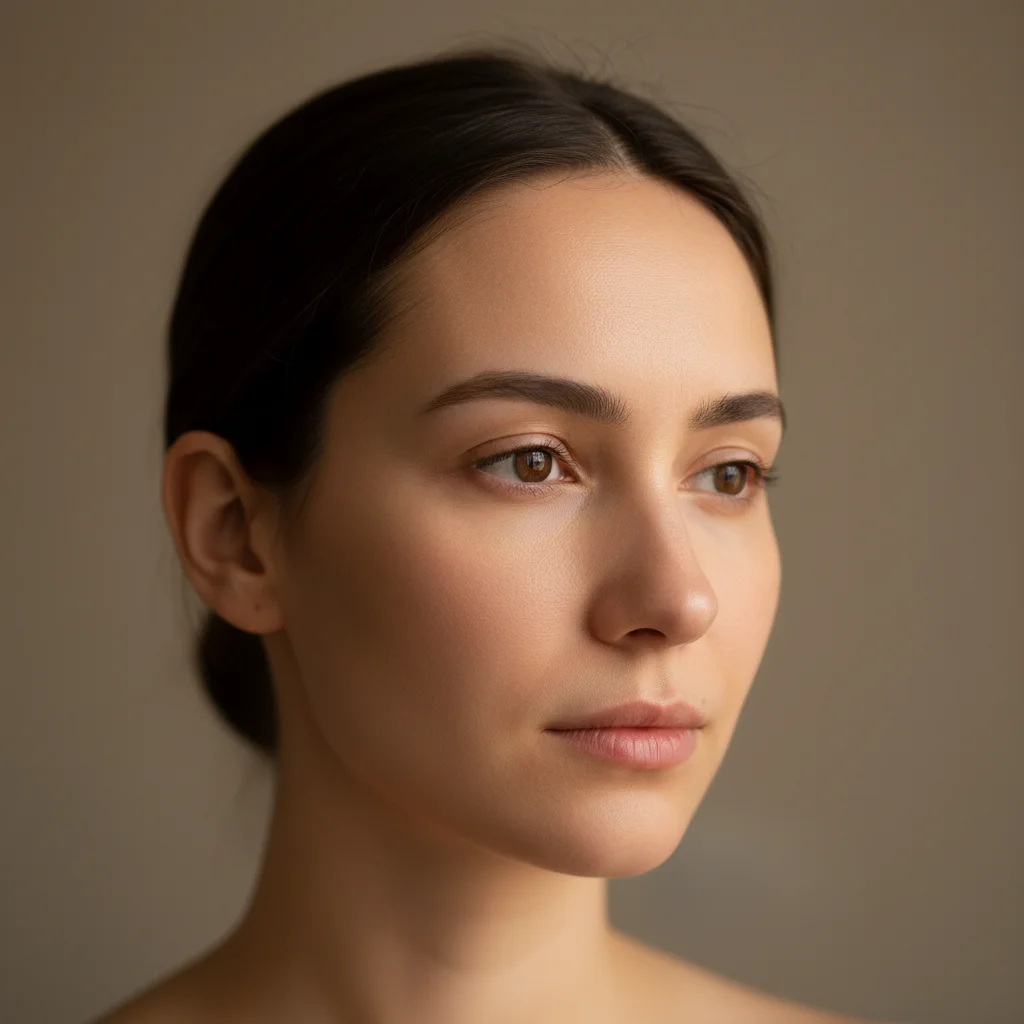
Clear portrait photo with no bruising
Before
β†’
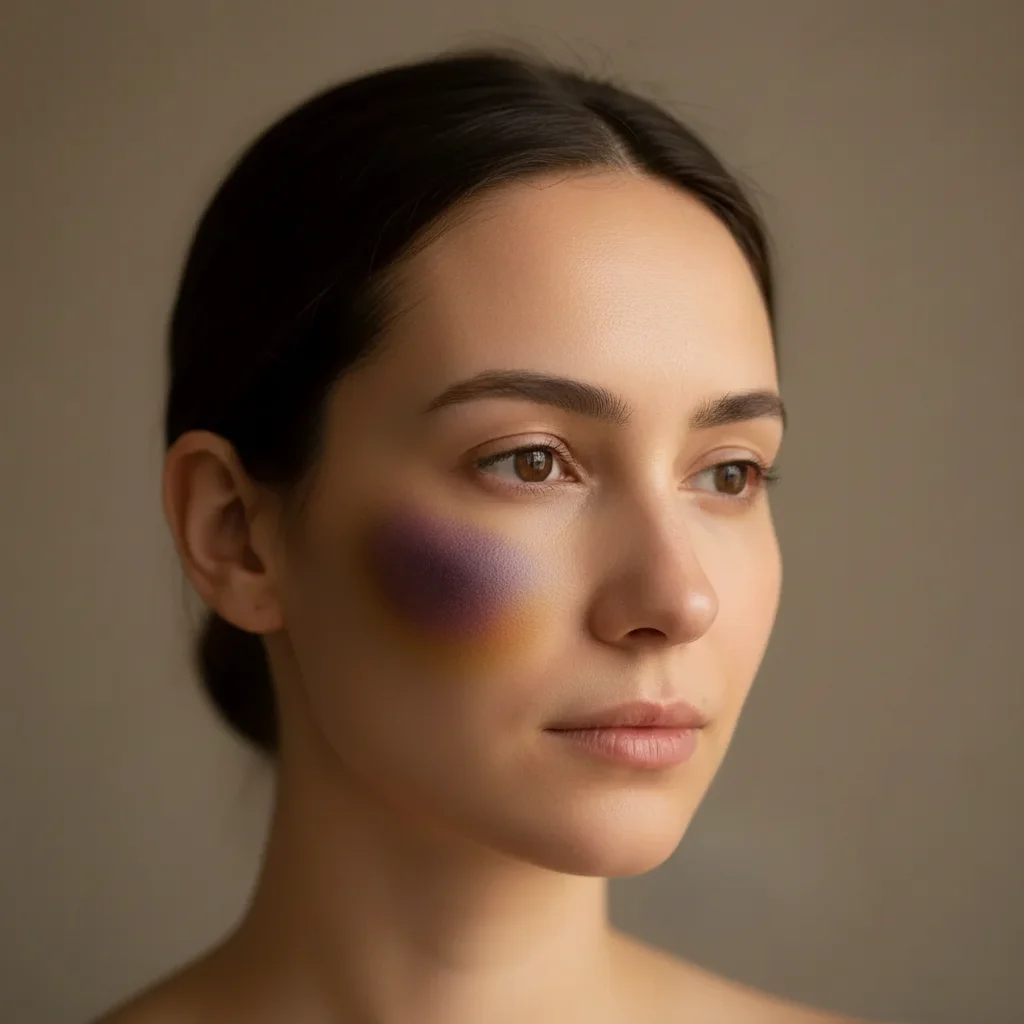
Same portrait with realistic AI-generated cheekbone bruise
After

Add Bruise to Photo

Upload photo to add bruise

Free β€’ Results in 30 seconds β€’ No signup

Release to upload

FreeNo signupNo watermark

1 free edit·then from $1.99

Popular use cases:
  • fake bruise photo
  • bruise prank photo
  • cosplay injury makeup reference
  • halloween bruise photo editor
  • film injury effect photo
  • realistic bruise generator
  • black and blue face photo
  • bruise photo for theatre

Cost
Free No signup required
Time
Instant results in 15-30 seconds
Works on
Any device - browser, phone, tablet, desktop
Powered by
AI-powered photo editing
Scenario Prompt Time
Face bruise (prank) Bruise on right cheekbone, dark purple with yellow-green edges, slightly swollen 15s
Black eye (severe) Severe black eye, deep purple-black, significant swelling under the eye 15s
Arm bruise (cosplay) Hand-shaped grip bruise on upper arm, dark purple fingerprint marks 30s
Multi-bruise (Halloween) Dramatic bruises on both cheeks and nose, exaggerated stage makeup style 30s

How it works

  1. Upload your photo

    Drop any photo into EditThisPic β€” a selfie, a portrait, a full-body shot. JPG, PNG, or WebP up to 7MB. Clear, well-lit photos of the face or body area you want bruised produce the most realistic results.

    Expect: Most bruise edits complete in 15-30 seconds.
  2. Describe the bruise you want

    Type what you want: 'Add a large purple and yellow bruise on the right cheekbone, slightly swollen' or 'Add a fresh bruise on the upper arm, dark purple.' Specify the location, size, and stage β€” fresh bruises are dark purple, older bruises turn yellow-green around the edges.

    Tip: Mention the bruise stage for realism: 'fresh' (dark purple, swollen), '2-3 days old' (deep purple), or 'healing' (yellow-green edges). The more detail, the more convincing.

    Copy one of these to get started:

    Classic face bruise prank Add a realistic bruise on the right cheekbone, dark purple in the center fading to yellow-green at the edges, slightly puffy and swollen like it happened yesterday
    Fresh black eye (harder hit) Add a severe fresh black eye covering the upper cheekbone and under-eye area, deep purple-black, significant swelling, looks like it happened a few hours ago
    Arm bruise for cosplay Add a large hand-shaped bruise on the upper arm, dark purple fingerprint marks visible, like someone grabbed the arm very hard β€” realistic trauma bruising
    Bar fight aftermath Add multiple bruises to the face: one on the jaw, a cut on the eyebrow, and a bruised nose bridge, all fresh and purple β€” looks like someone just lost a fight
    4 more prompts
    Halloween costume makeup reference Add stage-makeup style bruises across the face β€” zombie victim look, deep purple and green bruising on both cheeks and forehead, dramatic and exaggerated
    Healing bruise (older injury) Add a healing bruise on the cheek, mostly yellow and green with only a faint purple center, about a week old, barely noticeable but clearly there
    Ribs or torso bruise (film/theatre) Add a large impact bruise across the left ribcage area, dark purple center with reddish outer ring, looks like a blunt trauma injury from a film prop or fall
    Victim character for short film Add realistic bruising around the jawline and temple, dark purple with slight swelling, natural skin tone showing through, photorealistic injury makeup effect for a film character
  3. Send it

    Check the bruise looks convincing β€” natural coloring, correct skin tone integration, appropriate swelling. Then send the photo casually to whoever you're pranking. Works great on friends, siblings, and anyone who will absolutely panic.

Try it free ↓

Add Bruise to Photo

Upload photo to add bruise

Free β€’ Results in 30 seconds β€’ No signup

Release to upload

Free β€’ No signup

See it in action

Clear portrait photo with no bruising
Before
->
Same portrait with realistic AI-generated cheekbone bruise
After

Cheekbone bruise prank photo

A portrait photo with a convincing 2-day-old cheekbone bruise added. Friend texted back immediately asking if everything was okay.

Prompt: Add a realistic bruise on the right cheekbone, dark purple center fading to yellow-green edges, slightly swollen, looks 2-3 days old
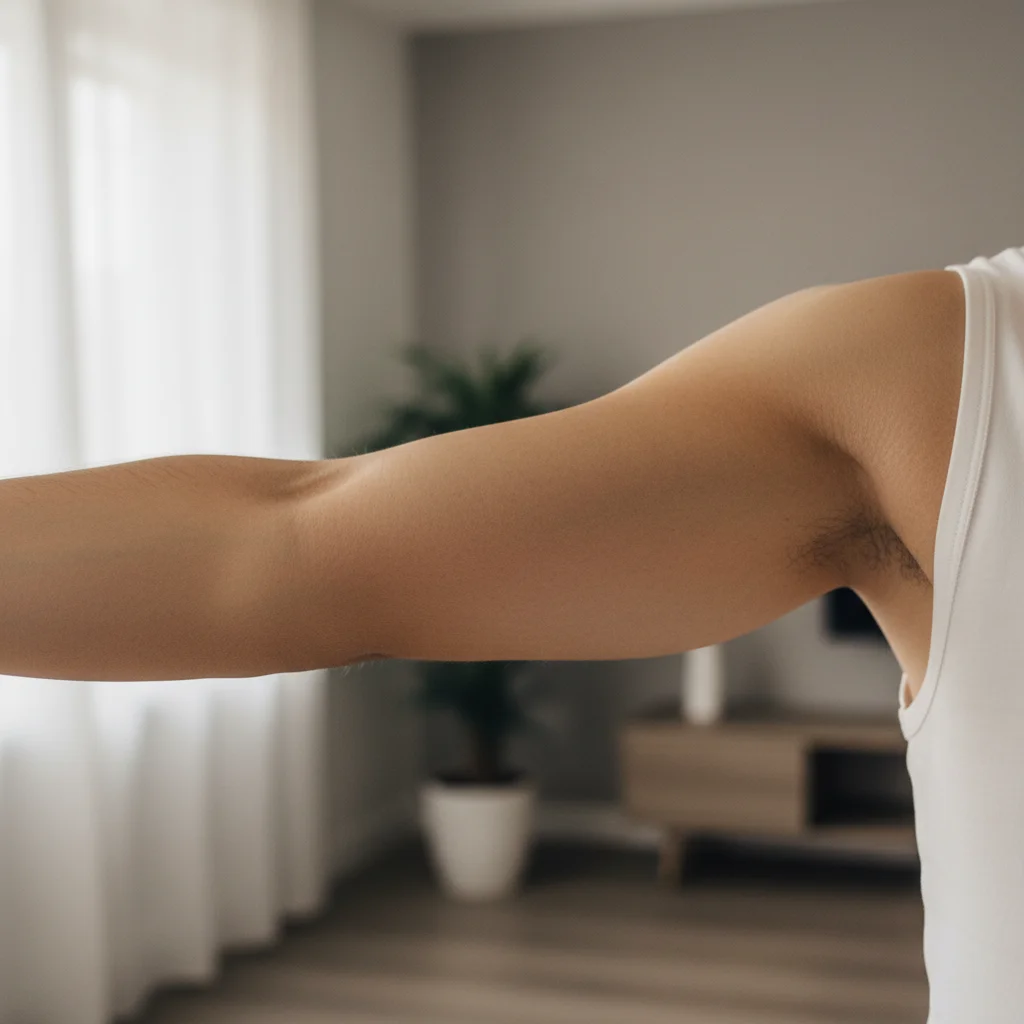
Clean arm photo with no marks
Before
->
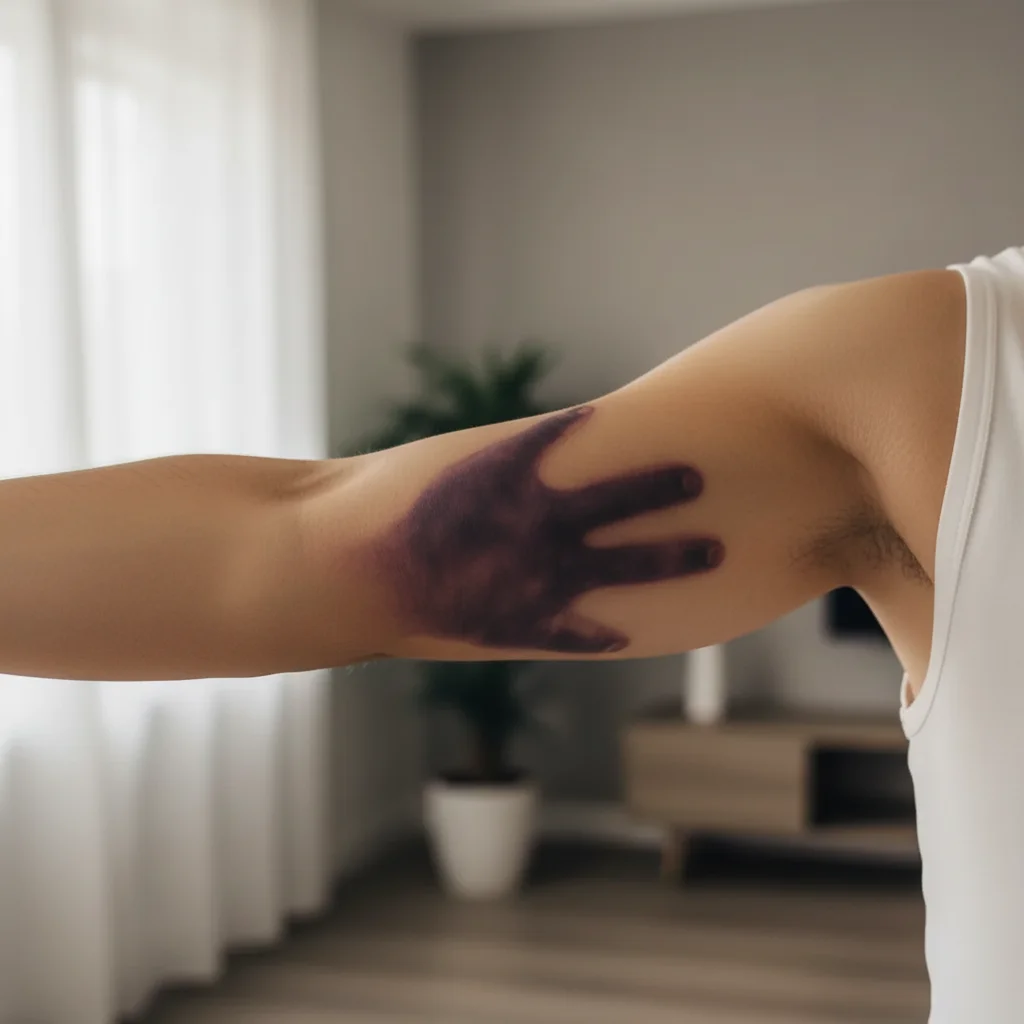
Arm with realistic grip-mark bruise pattern
After

Arm bruise for cosplay character

An arm photo with a dramatic grip-mark bruise added for a battered character costume at a convention.

Prompt: Add a large hand-shaped bruise on the upper arm, dark purple fingerprint impressions visible, like someone grabbed it very hard
Plain face portrait before Halloween bruise makeup
Before
->
Face portrait with dramatic multi-bruise Halloween effect
After

Multi-injury look for Halloween costume

A face photo transformed with multiple dramatic bruises for a zombie-victim Halloween costume reference photo.

Prompt: Add dramatic stage-makeup bruises across the face β€” deep purple and green on both cheeks, bruised nose bridge, exaggerated and vivid for a Halloween victim costume

If something looks off

Bruise looks too clean or fake

Why: The AI created a uniform color blob instead of a realistic multi-tone bruise.

Try: make the bruise more realistic with dark purple center, reddish inner ring, yellow-green fade at edges, and the natural skin tone visible through the bruise

Tip: Real bruises have layered colors β€” purple, red, and yellow at different distances from the impact point. Naming all three helps.

Bruise has no swelling or depth

Why: The AI applied color but didn't add the raised or swollen appearance of an injury.

Try: add slight swelling and puffiness to the bruised area, make it look raised and inflamed like a real impact injury

Tip: Use 'swollen,' 'puffy,' 'raised skin,' or 'inflamed' to get the 3D look that makes bruises convincing.

Bruise skin tone doesn't match the rest of the photo

Why: The AI used a generic bruise color that doesn't account for the person's skin tone.

Try: adjust the bruise to match the natural skin tone underneath β€” the bruise should look embedded in the skin, not painted on top

Tip: Try adding 'natural skin showing through the bruise' to get the translucent, under-skin look of a real bruise.

Bruise placed in the wrong location

Why: The AI interpreted the description differently, or the image has several possible areas.

Try: Tap a marker directly on the exact spot where you want the bruise, then regenerate with the same description

Tip: Markers are the fastest fix for placement β€” tap the exact cheek, arm section, or bone you want and regenerate.

Bruise looks cartoonish or illustrated

Why: The AI defaulted to a stylized look instead of photorealistic.

Try: make the bruise photorealistic, matching the lighting and skin grain of the original photo, not illustrated or cartoon-like

Tip: The word 'photorealistic' combined with 'matching the photograph's lighting' keeps the AI anchored to your photo's actual look.

Quick answers

Do I need to mark the area before describing where the bruise goes?

No. Just describe the location in words: 'add a bruise on the right cheekbone' or 'add a bruise on the upper left arm.' The AI understands body part names. Only use markers if the photo has multiple possible spots and you need to pinpoint an exact area.

Will the bruise look realistic enough to fool someone?

For most photos, yes β€” the AI creates multi-tone bruises with swelling that integrate with the photo's lighting and skin tone. Results are most convincing on clear, well-lit portraits. Add details like 'dark purple center fading to yellow-green' and 'slightly swollen' for the most realistic output.

Is this free?

Yes. EditThisPic gives you 1 free edit per week with no account needed. Credit packs start at $1.99 for more edits.

Can I add bruises to places other than the face?

Yes β€” any body area works. Arms, shoulders, ribs, legs, neck. Just describe the body part and the AI will place the bruise there. Upload a photo that shows the area clearly for best results.

Can I use this for cosplay or film projects?

Absolutely. Many users use EditThisPic to plan injury makeup for cosplay characters, short films, and theatrical productions. You can experiment with placement, severity, and bruise stage before applying real makeup β€” or use the photo directly as a digital asset.

What's the difference between a 'fresh' and 'healing' bruise prompt?

A fresh bruise (hours old) should be dark purple-black with swelling. A 2-3 day bruise is deep purple. A healing bruise (5-7 days) has yellow-green edges with faint purple remaining. Telling the AI the age of the bruise determines the color mix and whether swelling is present.

Will my photo be stored or shared?

No. Uploaded photos are used only to process your edit and are not stored or shared. You can edit photos of yourself or others without privacy concerns.

Does this work on mobile?

Yes β€” EditThisPic works in any mobile browser on iPhone, Android, or tablet. No app download needed.

How much does EditThisPic cost?

You get 1 free edit per week β€” no account needed. After that, credit packs start at $1.99 for 3 edits. Monthly plans start at $4.99/mo for 15 edits with unused credits rolling over. All edits are full resolution with no watermark.

Ready to add a bruise to your photo?

Free to try. No signup required.

1 free edit included·Credit packs from $1.99