Free β€’ No signup Add Black eye Β· Free

Add a Black Eye to a Photo

Upload a selfie or portrait and let the AI add a convincing black eye β€” swollen, bruised, and ready to send. Perfect for pranking someone who needs to explain themselves.

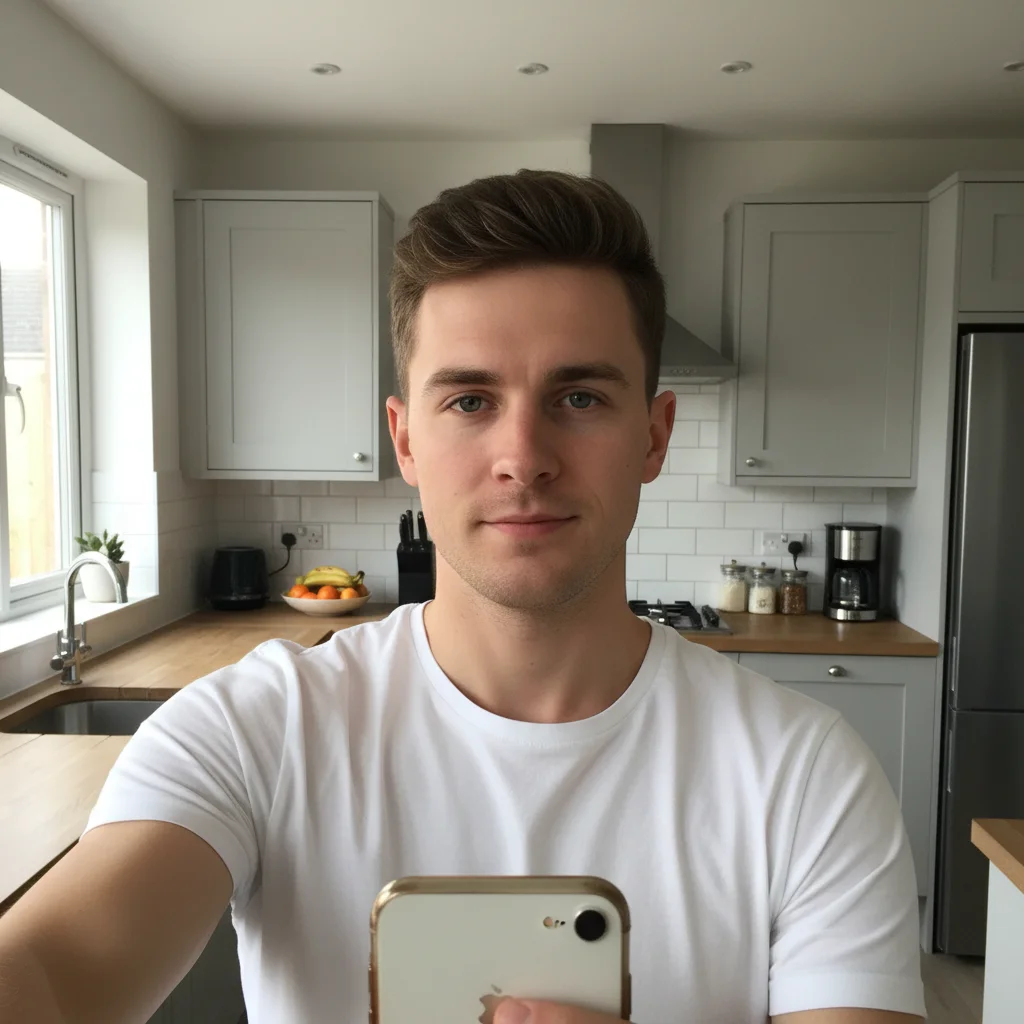
Normal selfie of a man with no injuries
Before
β†’
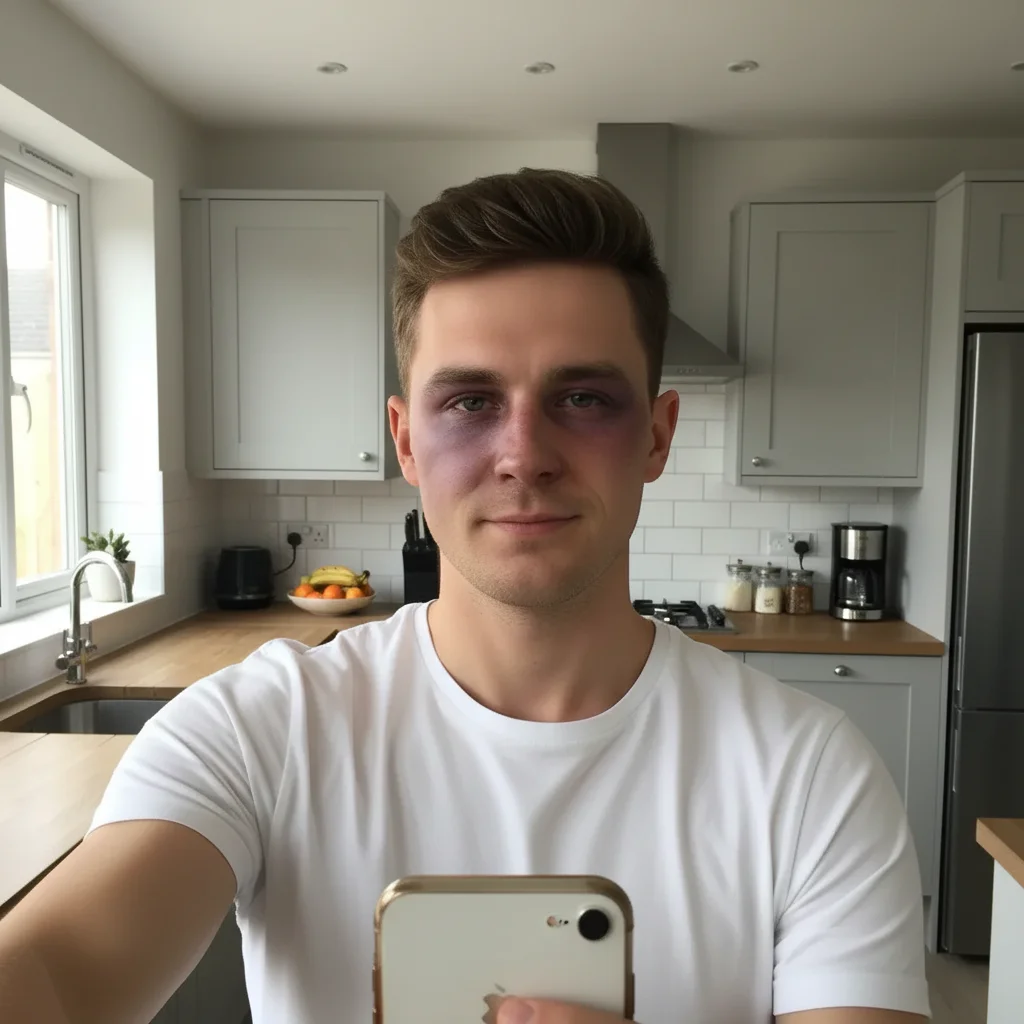
Same photo with a realistic black eye added β€” swollen and bruised left eye
After

Add a Black Eye to a Photo

Upload photo to add black eye

Free β€’ Results in 30 seconds β€’ No signup

Release to upload

FreeNo signupNo watermark

1 free edit·then from $1.99

Popular use cases:
  • black eye prank photo
  • fake injury photo
  • Halloween makeup photo editor
  • cosplay fight makeup reference
  • film makeup black eye
  • prank selfie editor
  • fake fight photo

Cost
Free No signup required
Time
Instant results in 15-30 seconds
Works on
Any device - browser, phone, tablet, desktop
Powered by
AI-powered photo editing
Scenario Prompt Time
Fresh punch Add a fresh black eye β€” swollen shut, dark red-purple bruising, angry and recent 15s
Aged bruise Add a 2-day-old black eye β€” purple fading to yellow-green at the edges, swelling reduced 15s
Subtle shiner Add a mild black eye β€” just slight discoloration and puffiness, early stage 15s
Full fighter Add two black eyes plus a cut brow, looks like a boxing match loss 30s

How it works

  1. Upload your photo

    Drop in any clear portrait or selfie where the face is visible and well-lit. Front-facing photos work best β€” the AI needs a clear view of the eye area to place the bruising naturally.

    Expect: Upload takes a couple of seconds. JPG, PNG, and WebP all work up to 7MB.
  2. Describe the injury

    Type what you want: 'Add a realistic black eye on the left side β€” bruised, swollen, with some purple and yellow discoloration' or 'Give them a bad shiner, looks like they lost a fight.' Be specific about which eye, severity, and coloring for the most convincing result.

    Tip: Specify the eye (left or right from the subject's perspective) and the stage of bruising. Fresh injuries are deep purple-red; older ones show yellow-green edges. Adding both makes it look more real.

    Copy one of these to get started:

    Classic prank shiner Add a realistic black eye on the left side β€” swollen eyelid, deep purple bruising around the socket, some redness at the inner corner, make it look like a solid punch landed
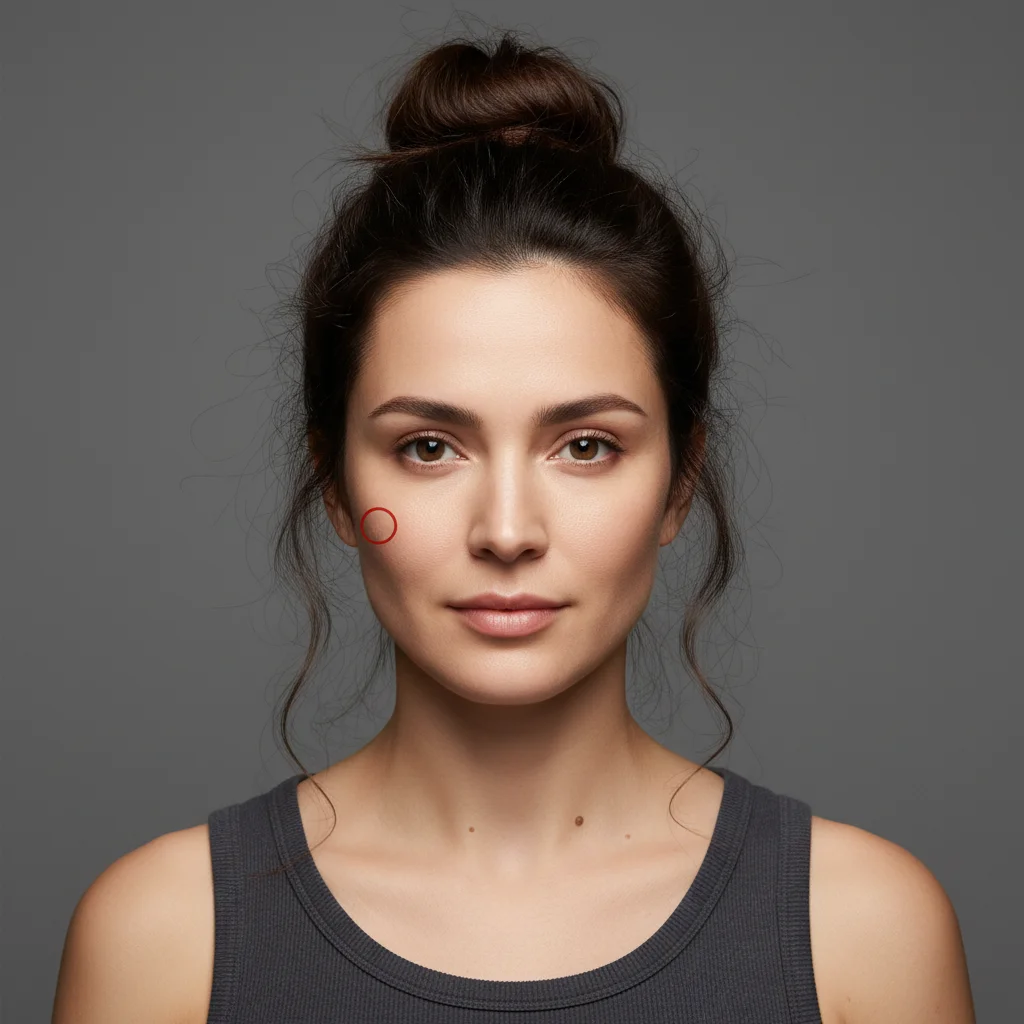
    Fresh fight injury Give them a fresh black eye on the right side β€” very swollen, angry red and deep purple, the eyelid is nearly shut, bruising spreading toward the cheekbone
    Two-day-old bruise Add a black eye that's a couple of days old β€” the swelling has gone down a bit, bruising is a mix of purple and greenish-yellow around the edges, under-eye area is dark
    Halloween zombie fighter Add two black eyes with heavy bruising β€” dark circles under both eyes, like a boxer or zombie, add some dried blood at the eyebrow and a cut on the cheekbone
    3 more prompts
    Film makeup reference Add a realistic stage makeup black eye β€” purple-blue bruising around the left socket with visible yellow undertones at the edges, subtle swelling, photorealistic not cartoonish
    Mild shiner (barely there) Add a subtle black eye β€” just slight purple discoloration and mild puffiness under the left eye, like the early stages of bruising after a minor hit
    Cosplay fighter Add a black eye plus a split lip to make them look like a street fighter or cosplay character β€” right eye bruised and swollen, lip slightly cut and swollen, overall beaten-up look
  3. Send it

    Download the edited photo and send it to your target β€” a worried parent, a curious coworker, or a group chat with no context. Works especially well paired with 'you should see the other guy.'

Try it free ↓

Add a Black Eye to a Photo

Upload photo to add black eye

Free β€’ Results in 30 seconds β€’ No signup

Release to upload

Free β€’ No signup

See it in action

Normal selfie of a man with no injuries
Before
->
Same photo with a realistic black eye added β€” swollen and bruised left eye
After

Classic prank β€” the shiner text

A clear selfie with a solid black eye added to the left side. Sent to a group chat with no context β€” maximum confusion achieved.

Prompt: Add a realistic black eye on the left side β€” swollen eyelid, deep purple bruising around the socket, some redness at the inner corner, make it look like a solid punch landed
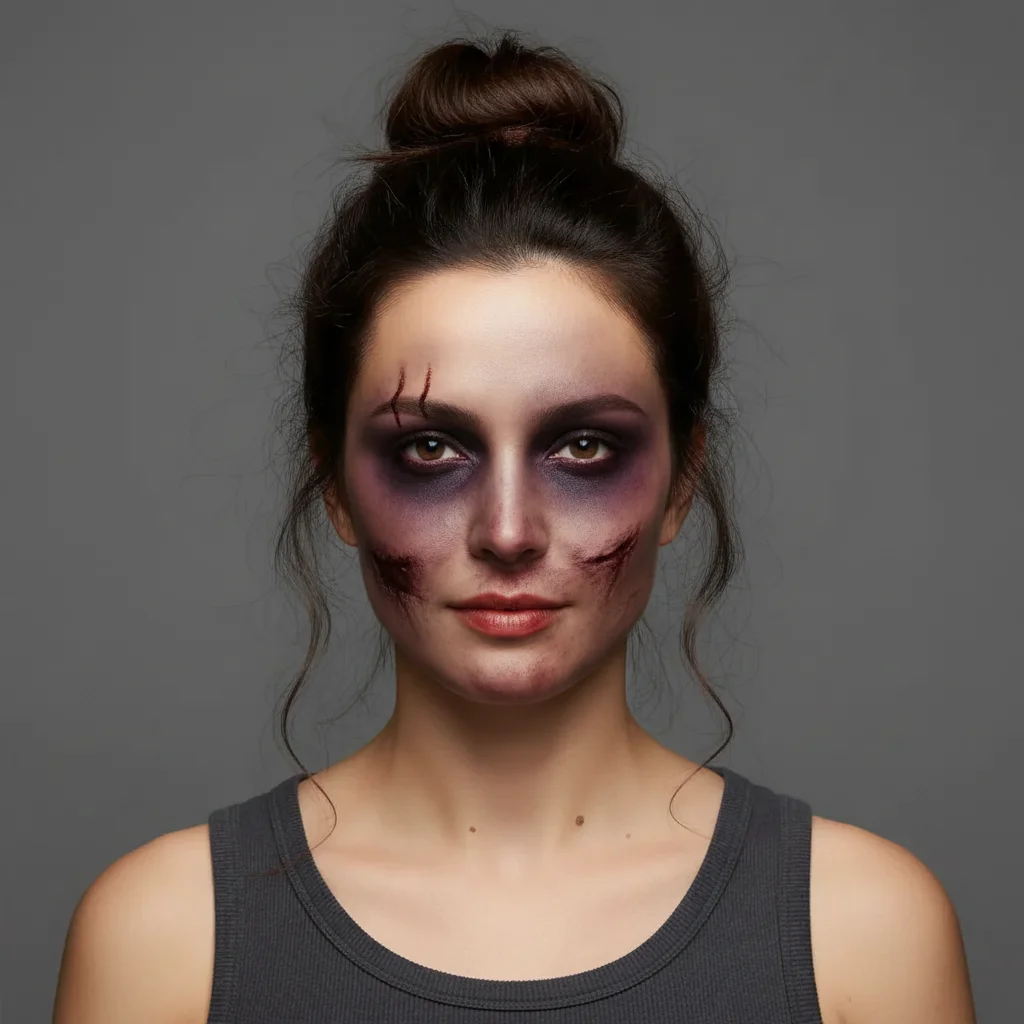
Clean portrait of a woman with no injuries
Before
->
Same portrait with Halloween-style black eyes and bruising added
After

Halloween look β€” boxer zombie

A portrait photo turned into a Halloween-ready fighter look with two black eyes and a cut on the brow.

Prompt: Add two black eyes with heavy bruising β€” dark circles under both eyes, add some dried blood at the eyebrow and a cut on the cheekbone, like a zombie boxer
Clean studio portrait of a man with no injuries
Before
->
Same portrait with a realistic stage makeup-style black eye added
After

Cosplay makeup reference

A portrait used as a reference for stage fight makeup β€” photorealistic black eye with yellow-green aging at the edges.

Prompt: Add a realistic stage makeup black eye β€” purple-blue bruising around the left socket with visible yellow undertones at the edges, subtle swelling, photorealistic not cartoonish

If something looks off

The black eye looks painted on, not realistic

Why: When the prompt is too vague, the AI adds generic color without matching the skin's underlying texture, shadows, or lighting.

Try: Add a realistic black eye β€” match the skin texture and the existing lighting direction. Include swelling that slightly distorts the eyelid shape, with purple-blue bruising at the socket and a yellow-green tinge at the edges

Tip: Reference the lighting in your photo: 'lit from the left side' helps the AI place shadows correctly so the bruise sits on the face rather than floating over it

The wrong eye got the black eye

Why: Left and right can be ambiguous when describing faces β€” the AI may interpret it from the viewer's perspective rather than the subject's.

Try: Add the black eye to the eye on the LEFT side of the photo as I'm looking at it β€” the one on the same side as [a nearby feature like an earring or mole if visible]

Tip: If the face is at an angle, describe which eye by referencing something visible near it: 'the eye closest to the window' or 'the eye near the scar on their cheek'

The bruising is too dramatic and looks fake

Why: Without guidance on severity, the AI often defaults to a very obvious bruise to clearly show the edit.

Try: Add a subtle black eye β€” just mild purple discoloration and slight puffiness, early-stage bruising, not dramatically swollen or dark

Tip: For pranks aimed at someone who would notice a dramatic injury instantly, a subtle bruise is actually more believable β€” and makes for a better double take

The eye area looks blurry or distorted

Why: The AI may have over-applied texture when adding swelling, especially on lower-resolution photos where the eye area has limited detail.

Try: Add a realistic black eye with natural skin texture preserved β€” bruising and discoloration only, keep the skin surface sharp and detailed, just the coloring and subtle swelling

Tip: Start with the highest resolution photo you have. The AI has more to work with on a 2MP+ image than a compressed social media export

It added a bruise but no swelling β€” looks like just makeup

Why: Bruising (color) and swelling (shape change) are separate effects. The AI may add one without the other if the prompt doesn't ask for both.

Try: Add a black eye with both the bruising AND the swelling β€” the eyelid should look puffy and partially closed, not just discolored

Tip: Explicitly asking for 'swollen eyelid' and 'puffiness' in the same prompt ensures you get the full injury look, not just a color overlay

Quick answers

Do I need to mark the eye area before describing the edit?

No. Just describe what you want and the AI finds the face and eye area automatically. If you want to be precise about which eye or limit changes to a specific area, you can tap the image to place a marker β€” but for most black eye pranks, typing 'left eye' or 'right eye' in the description is enough.

Is this free?

Yes. EditThisPic gives you one free edit per week with no account needed. For more edits, packs start at $1.99 or you can subscribe for a monthly allowance. The black eye edit typically completes in one try, so the free edit covers most use cases.

Will this look realistic enough to actually fool someone?

For most portraits with decent lighting, yes β€” the AI adds bruising, swelling, and discoloration that blends with the face's existing shadows and skin tone. The result works well for texting a worried family member or posting to a group chat. It may not hold up to close inspection at full zoom, so for maximum effect, send it at a size that looks like a phone camera shot rather than a studio portrait.

Can I use this for Halloween or cosplay, not just pranks?

Absolutely. The same tool works for generating makeup reference images for Halloween looks, film student projects, cosplay fight scenes, or theatrical stage makeup planning. Just describe the severity and style you want β€” 'zombie boxer' gives you something different from 'fresh bar fight' or 'aged-out two-day bruise.'

Can I specify which eye gets the black eye?

Yes. Say 'left eye' or 'right eye' in your prompt β€” the AI interprets this as the subject's left or right (from their perspective, not the viewer's). If you want to be certain, reference something visible near that eye: 'the eye on the same side as the earring.' You can also tap the eye in the image to place a marker and make the targeting unmistakable.

Can I control how severe the black eye looks?

Yes. Describe the stage: 'subtle early bruising with slight puffiness' gives a mild result. 'Severely swollen, nearly shut, deep purple-black bruising' gives the full knockout look. You can also describe the age of the injury β€” fresh bruises are dark red-purple, older ones show yellow-green at the edges.

Is there an app that does this automatically without describing anything?

Dedicated apps like Scar Booth use fixed templates β€” you get one preset bruise applied mechanically. EditThisPic lets you describe exactly what you want: which eye, how swollen, what color stage, whether to add a cut or a cheekbone bruise alongside it. It takes two extra seconds to type but the result looks significantly more natural because it adapts to your specific photo's lighting and skin tone.

Does my photo get stored anywhere?

EditThisPic processes your photo to generate the edit and does not store or share your images. Once your session ends, the photo is not retained. You can edit photos of yourself or others without worrying about the image being saved to a public gallery.

How much does EditThisPic cost?

You get 1 free edit per week β€” no account needed. After that, credit packs start at $1.99 for 3 edits. Monthly plans start at $4.99/mo for 15 edits with unused credits rolling over. All edits are full resolution with no watermark.

Ready to add a black eye to your photo?

Free to try. No signup required.

1 free edit included·Credit packs from $1.99