Free β€’ No signup Enhance Shoulders Β· Free

AI Shoulder Enhancer for Photos

Enhance your shoulders with AI - just describe what you want, no marking needed
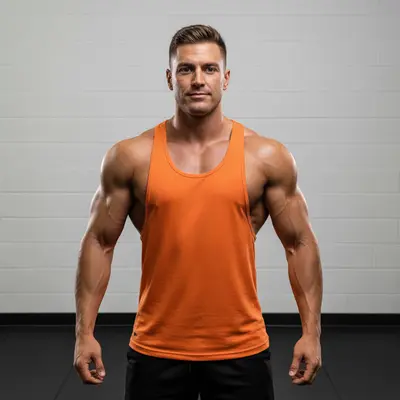
Man in orange tank top with original shoulder muscle definition
Before
β†’
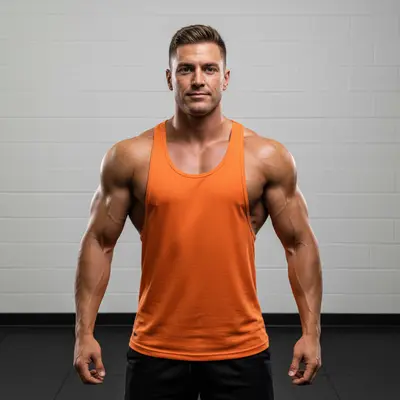
Same man with enhanced shoulder muscles looking more defined and athletic
After

Enhance Shoulders in Photo

Drop your photo here

or click to browse

Release to upload

Free β€’ No signup

Popular use cases:
  • shoulder enhancement
  • muscle definition
  • fitness photos
  • athletic appearance

Cost
Free No signup required
Time
Instant results in 15-30 seconds
Works on
Any device - browser, phone, tablet, desktop
Powered by
AI-powered photo editing
Scenario Prompt Time
Basic enhancement Enhance my shoulders to look more defined and athletic 30s
Muscle definition Make my shoulder muscles more visible and toned 45s
Natural enhancement Naturally enhance my shoulder definition without overdoing it 30s

How it works

  1. Upload your photo

    Choose a photo where your shoulders are clearly visible. Tank tops, sleeveless shirts, or shirtless photos work best. Good lighting helps the AI understand your natural shoulder shape and muscle structure.

    Expect: Simple enhancements: 30 seconds. Complex muscle definition: 60 seconds and may need refinements for natural results.
  2. Describe what you want

    THIS IS THE KEY STEP. Type your instruction like 'enhance my shoulders' or 'make my shoulders more defined'. No marking needed. The AI understands muscle enhancement. Be specific about definition, broadness, or athletic appearance you want.

    Tip: Use fitness terms like 'defined', 'toned', or 'athletic' for the best muscle enhancement results

    Copy one of these to get started:

    Basic shoulder enhancement Enhance my shoulders to look more defined and athletic
    Muscle definition Make my shoulder muscles more visible and toned
    Broader appearance Make my shoulders appear broader and more masculine
    Natural enhancement Naturally enhance my shoulder definition without overdoing it
    2 more prompts
    Deltoid focus Enhance the deltoid muscles on my shoulders for better definition
    Athletic look Give my shoulders a more athletic and powerful appearance
  3. Review the result

    Check that the shoulder enhancement looks natural and proportionate to your body frame. Zoom in to ensure muscle definition appears realistic and lighting matches the original photo.

  4. Refine with markers if needed

    OPTIONAL. If the AI enhanced the wrong muscle groups or you want to target specific shoulder areas, tap markers on the exact spots and regenerate. Most shoulder enhancement works perfectly from description alone.

    Tip: Markers are for precision targeting of specific deltoid muscles, not a required step.
Try it free ↓

Enhance Shoulders in Photo

Drop your photo here

or click to browse

Release to upload

Free β€’ No signup

"Amazing for my fitness photos! Made my shoulders look more defined and athletic." @GymLife2026

See it in action

Man in orange tank top with original shoulder muscle definition
Before
->
Same man with enhanced shoulder muscles looking more defined and athletic
After

Gym progress photo enhancement

Fitness enthusiast wanted to show shoulder development in workout progress photos.

Prompt: Enhance my shoulders to look more defined and athletic
Business professional with original shoulder proportions in dress shirt
Before
->
Same professional with enhanced broader shoulders for stronger presence
After

Professional headshot improvement

Business professional wanted stronger shoulder presence in corporate photos.

Prompt: Make my shoulders appear broader and more masculine
Athletic woman in purple sports bra with original deltoid definition
Before
->
Same woman with enhanced deltoid muscles showing improved definition
After

Athletic portrait enhancement

Personal trainer needed enhanced shoulder definition for marketing materials.

Prompt: Enhance the deltoid muscles on my shoulders for better definition

If something looks off

AI changed the wrong area or something I didn't want changed

Why: The AI couldn't determine exactly which shoulder muscles you meant from description alone.

Try: Tap a marker on the specific shoulder muscles you want to enhance, then regenerate with the same prompt

Tip: Markers tell the AI 'I mean THIS shoulder area specifically.' Use them when description alone is ambiguous.

The shoulder enhancement looks unnatural or over-muscled

Why: The enhancement was too dramatic for the photo's lighting and your natural frame.

Try: Add 'naturally' or 'subtly' to your prompt: 'naturally enhance my shoulder definition'

Tip: Start with subtle enhancements - you can always make additional edits for more dramatic muscle definition.

Clothing got distorted around the enhanced shoulders

Why: The AI enhanced muscle beyond the clothing boundaries.

Try: Use markers to target only visible skin areas, or try 'enhance shoulders without changing clothing'

Tip: For clothed photos, be specific about enhancing only what's visible or mention clothing in your prompt.

One shoulder looks different from the other after enhancement

Why: The AI processed each shoulder independently and created asymmetry.

Try: Add 'evenly on both shoulders' to your prompt or use separate markers for each shoulder

Tip: For symmetrical results, mention both shoulders in your instruction or mark each shoulder separately.

The lighting doesn't match the enhanced muscle definition

Why: The original lighting was flat and doesn't support dramatic muscle enhancement.

Try: Try 'enhance shoulders while maintaining natural lighting' or use a photo with better directional lighting

Tip: Photos with side or overhead lighting show enhanced muscles more naturally than flat lighting.

Quick answers

Do I need to mark my shoulder area before describing what I want?

No! Just describe what you want like 'enhance my shoulders' and the AI will automatically detect and improve the shoulder muscles. Only use markers if you want to target very specific deltoid areas or if the first result wasn't quite right.

How do I enhance shoulders in a photo for free?

Upload your photo to EditThisPic and type 'enhance my shoulders' in the description box. The AI will automatically improve your shoulder muscle definition. It's free to try with no account needed and no watermarks on your edited photos.

Is there a free shoulder enhancement tool that doesn't require login?

Yes, EditThisPic offers free shoulder enhancement with no signup required. You can edit your photos immediately without creating an account, downloading apps, or dealing with watermarks on basic edits.

Will the shoulder enhancement look natural and realistic?

Yes, the AI understands natural muscle proportions and lighting. Use words like 'naturally' or 'subtly' in your description for the most realistic-looking muscle enhancement that matches your body frame.

Can I enhance shoulders in photos where I'm wearing clothes?

Yes, the AI can enhance visible shoulder areas even when wearing tank tops or sleeveless shirts. For best results with clothing, mention 'enhance visible shoulder muscles' or 'enhance shoulders without changing clothing'.

Ready to enhance your shoulders?

Free to try. No signup required.

Try it free β†’