Free β€’ No signup Enhance Arms Β· Free

AI Arm Enhancer Tool

Tone and enhance your arms naturally - just describe the look you want to achieve.
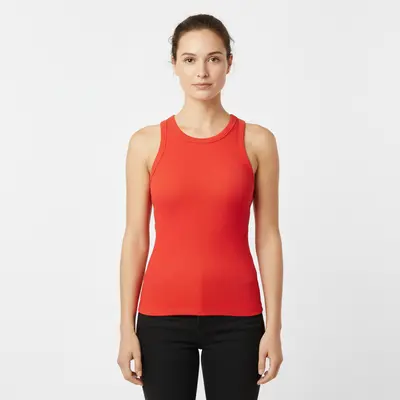
Woman in red tank top with regular arm appearance
Before
β†’
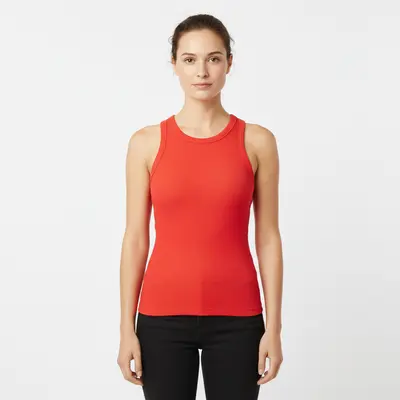
Same woman with naturally toned and defined arms
After

Enhance Arms in Photo Online Free

Drop your photo here

or click to browse

Release to upload

Free β€’ No signup

Popular use cases:
  • arm enhancement
  • muscle definition
  • fitness photos
  • arm toning
  • bicep enhancement
  • athletic arms

Cost
Free No signup required
Time
Instant results in 15-30 seconds
Works on
Any device - browser, phone, tablet, desktop
Powered by
AI-powered photo editing
Scenario Prompt Time
Natural Toning Tone arms naturally with subtle definition 45s
Athletic Look Add athletic muscle definition 60s
Bicep Focus Enhance bicep muscles specifically 50s
Overall Strength Make arms look stronger and fitter 60s

How it works

  1. Upload your photo

    Choose a photo where your arms are clearly visible and well-lit. Sleeveless tops or tank tops work best for accurate enhancement. Good lighting helps the AI understand your natural arm shape.

    Expect: Simple toning: 45 seconds. Detailed muscle definition: 1-2 minutes and may need refinements.
  2. Describe the enhancement you want

    THIS IS THE KEY STEP. Type exactly how you want your arms enhanced: 'tone my arms and add muscle definition', 'slim my upper arms', or 'enhance arm muscles naturally'. Be specific about the type of enhancement. No need to mark your arms - the AI finds them automatically.

    Tip: Use descriptive terms like 'subtle toning', 'athletic definition', or 'natural muscle enhancement' for best results

    Copy one of these to get started:

    Natural arm toning Tone my arms naturally with subtle muscle definition
    Slim upper arms Slim and tone my upper arms
    Athletic definition Add athletic muscle definition to my arms
    Bicep enhancement Enhance my bicep muscles with natural definition
    4 more prompts
    Overall arm strength Make my arms look stronger with subtle muscle enhancement
    Fitness transformation Transform my arms to look fit and toned like after months of training
    Professional athlete look Give my arms professional athlete-level muscle definition
    Beach-ready arms Tone my arms to look beach-ready with defined shoulders
  3. Review the enhancement

    Check how the arm enhancement looks natural and proportional to your body. Zoom in to see muscle definition details. The AI maintains realistic proportions and skin texture.

  4. Fine-tune specific areas if needed

    OPTIONAL. If you want to adjust specific areas like biceps or triceps definition, tap markers on those areas and regenerate with more specific instructions. Most enhancements look perfect without markers.

    Tip: Markers help when targeting specific muscle groups like biceps vs. triceps
Try it free ↓

Enhance Arms in Photo Online Free

Drop your photo here

or click to browse

Release to upload

Free β€’ No signup

"Enhanced my arms for wedding photos and they looked perfectly natural. Nobody could tell it was edited!" @FitnessGoals

See it in action

Woman in red tank top with regular arm appearance
Before
->
Same woman with naturally toned and defined arms
After

Natural Arm Toning

Enhancing arms for a fitness progress photo with subtle, natural-looking definition.

Prompt: Tone my arms naturally with subtle muscle definition
Man in blue sleeveless shirt with regular arms
Before
->
Same man with enhanced athletic arm muscle definition
After

Athletic Arm Definition

Adding athletic muscle definition for a sports team photo and social media presence.

Prompt: Add athletic muscle definition to my arms
Person flexing arms without visible muscle definition
Before
->
Same pose with enhanced bicep muscle definition
After

Bicep Enhancement

Targeting bicep muscles specifically for a strength-focused fitness photo.

Prompt: Enhance my bicep muscles with natural definition

If something looks off

AI changed the wrong area or enhanced something I didn't want changed

Why: The AI couldn't determine exactly which part of your arms you meant to enhance from description alone.

Try: Tap markers on the specific arm areas you want enhanced (biceps, triceps, forearms), then regenerate with the same prompt

Tip: Markers tell the AI 'enhance THIS muscle group specifically.' Use them when targeting particular areas like just biceps or just upper arms.

Enhancement looks too fake or overdone

Why: The AI applied maximum enhancement rather than the subtle look you wanted.

Try: Add modifying words to your prompt: 'subtle', 'natural', 'slight' for softer enhancement

Tip: Photos with good lighting and clear arm definition produce the most natural-looking results.

Arms look disproportionate to the rest of my body

Why: Enhancement was too strong for your body frame or the photo angle.

Try: Request 'proportional enhancement' or 'natural enhancement that matches my body type'

Tip: Front-facing or side-angle photos work better than extreme angles for proportional results.

Only one arm was enhanced

Why: Photo angle or lighting made one arm more visible to the AI than the other.

Try: Specify 'both arms' in your prompt or place markers on both arms before regenerating

Tip: Symmetric poses with both arms equally visible work best for even enhancement.

Enhancement looks unnatural or plastic

Why: Photo quality or compression made it difficult to blend the enhancement seamlessly.

Try: Use a higher quality photo with good natural lighting, or specify 'natural skin texture'

Tip: Photos taken in natural daylight with minimal filters produce the most realistic enhancements.

Quick answers

Do I need to mark my arms before describing what enhancement I want?

No! Just describe the type of arm enhancement you want - the AI automatically finds your arms and applies the enhancement. Only use markers when you need to target specific muscle groups or when one arm isn't clearly visible in the photo.

How do I enhance my arms for free?

Simply upload your photo and describe the arm enhancement you want. EditThisPic's AI arm enhancer is completely free to try with no account needed. Perfect for fitness photos or improving your appearance in pictures.

Is there a free arm enhancement tool that doesn't require login?

Yes, EditThisPic is free to try with no account needed. Upload any photo and instantly see how enhanced arm muscles would look on you - from subtle toning to athletic definition.

Will the arm enhancement look natural?

Yes, the AI creates realistic muscle definition that maintains natural skin texture and proportions. The enhancement blends seamlessly with your existing features for natural-looking results.

Can I enhance specific muscle groups?

Absolutely! You can target specific areas like biceps, triceps, or forearms by mentioning them in your description or using markers to specify exact locations.

Ready to enhance your arms?

Free to try. No signup required.

Try it free β†’