AI Photo Editor for UK Visa Photos
Last updated
Get UK visa-compliant photos without the photo booth trip or application rejection.
Drop your photo here
"change background to plain light grey for UK visa, remove all shadows, biometric compliant"
Release to upload
Built for UK Visa Applicants
UK visa photos have strict requirements that differ from most other countries. The background must be light grey (not white), completely shadow-free, and meet exact biometric standards. Photo booths often get this wrong. EditThisPic transforms any decent photo into a compliant UK visa photo in seconds, for free.
Tools for UK Visa Photos
Replace Background
Change to UK-required light grey background
Remove Shadow
Remove facial shadows that cause rejection
Fix Color
Correct color balance for natural skin tones
How to AI Photo Editor for UK Visa Photos
-
Choose a recent photo
Use a photo taken within the last month. You must be looking directly at camera, neutral expression (slight smile okay), face clearly visible. Avoid hats, sunglasses, or anything covering your face. Indoor or outdoor photos work as long as lighting is even.
Background replacement: 25-30 seconds. Shadow removal if needed: additional 20 seconds.Photos with even lighting (shade or overcast day) work best - harsh shadows are harder to remove. -
Upload and describe UK requirements
Drop your photo into EditThisPic and describe what you need: 'change background to plain light grey for UK visa, remove all shadows' or 'replace background with light grey, ensure biometric compliance for UK visa application.'
Say 'light grey' not just 'grey' - UK requires a specific shade. Add 'no shadows' to ensure clean background. -
Verify UK biometric standards
Check that: background is light grey (not white), no shadows on face or background, eyes clearly visible (no glare if wearing glasses), face centered and straight, neutral expression maintained. Your photo should look like an official passport photo.
-
Print at correct size
Download your photo and print at exactly 45mm x 35mm (standard UK visa size). Most photo printing services offer 'passport photo' size. You need 2 identical copies for your application. Verify the print shows your full face clearly.
Print on photo-quality paper - standard office paper may cause rejection. Many pharmacies offer same-day passport photo printing.
Copy-Paste Prompts for UK Visa Photos
change background to plain light grey for UK visa, remove all shadows, biometric compliant
Light grey (not white) is the key UK requirement - this prompt gets the exact shade
replace white background with light grey UK visa standard, remove facial shadows, ensure even lighting
If you have a US-style white background photo, this converts it to UK grey
change to light grey background for UK visa, remove all shadows from face and behind head, no gradients
Shadows are the #1 rejection cause - this prompt handles both background and facial shadows
replace background with UK visa light grey, remove glare from glasses so eyes are clearly visible
UK biometric system must see your eyes clearly - glare causes automatic rejection
Show 4 more prompts
change to plain light grey background, remove the shadow on the left side of my face and behind my head, make lighting completely even
Photo booths often create one-sided shadows - be specific about which side
replace background with light grey UK visa standard, enhance lighting to passport photo quality, remove any shadows, neutral expression
Recent selfies can work if face is clear and well-lit - this adds the professional touch
fix the yellow indoor lighting to neutral, change background to light grey, remove shadows for UK visa compliance
Indoor bulbs create yellow/orange color casts that look unprofessional
create UK visa compliant photo: light grey background, no shadows anywhere, even lighting on face, eyes clearly visible, head straight and centered
Comprehensive prompt that covers all major rejection causes in one go
| Edit Type | Prompt | Time | |
|---|---|---|---|
| Light grey background | change background to light grey UK visa standard |
25s | Try This → |
| Remove shadows | remove all shadows from face and background |
20s | Try This → |
| Fix glasses glare | remove glare from glasses, eyes clearly visible |
20s | Try This → |
| Full compliance | light grey background, no shadows, biometric compliant |
30s | Try This → |
Real Examples
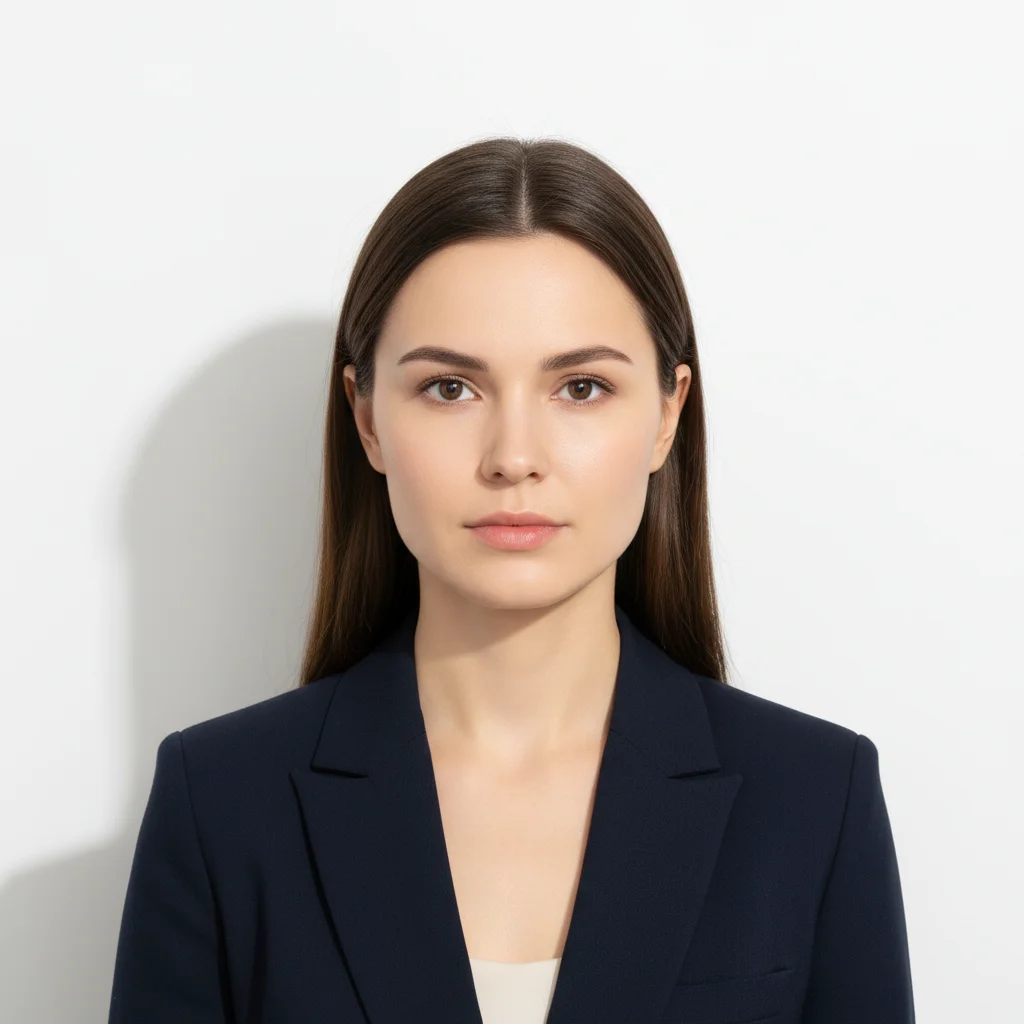
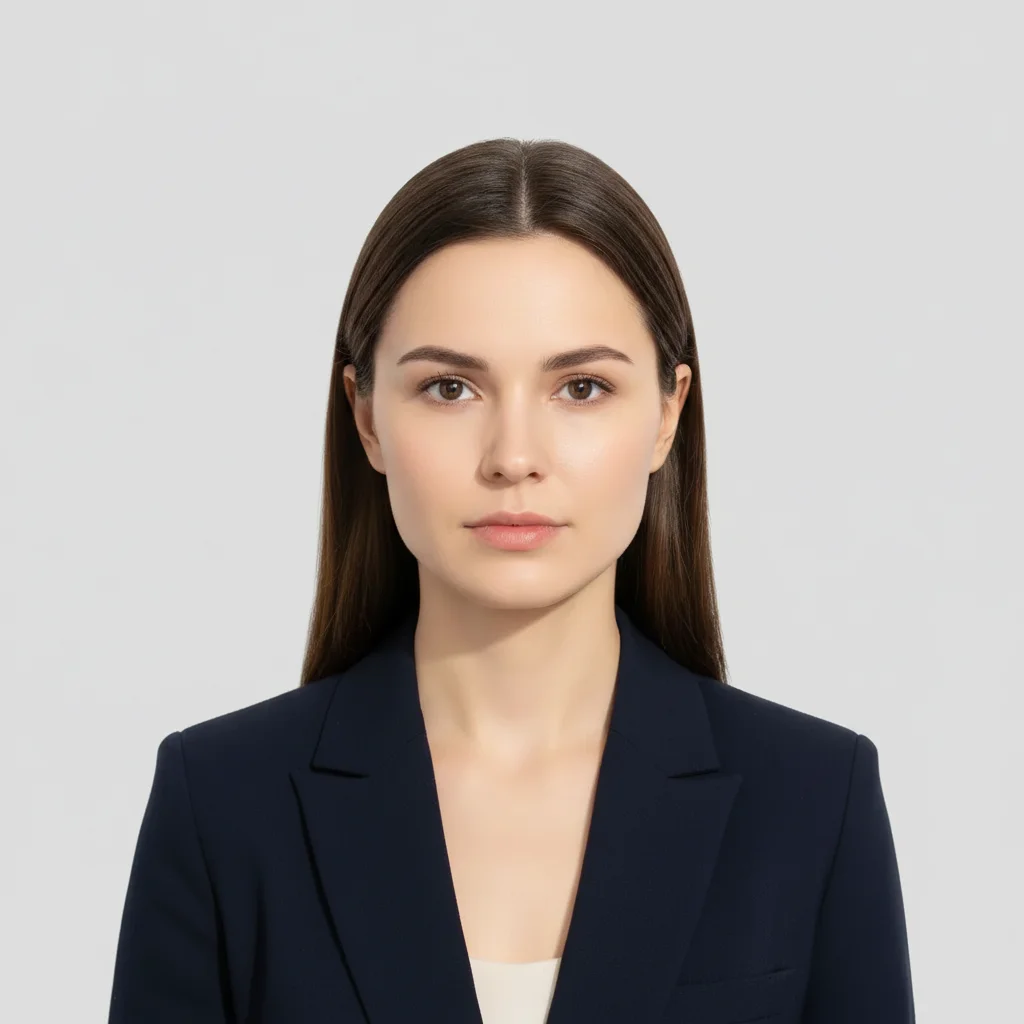
White background to UK grey
Existing passport photo had white background (US standard). UK requires light grey. One prompt converted it.
replace white background with light grey UK visa standard, remove the shadow behind head
Photo booth shadow removal
Photo booth created harsh shadow on one side of face. UK biometric system would reject this. Shadow removed completely.
change background to light grey for UK visa, remove the dark shadow on the right side of my face, make lighting completely even
When Things Go Wrong
Background looks too dark or too light, not the right grey
Why: UK visa grey is specific - not dark charcoal, not almost-white. The AI may have interpreted 'grey' too broadly.
change background to light grey exactly matching UK passport photo standard, neutral medium grey
Say 'light grey UK visa standard' - this references the official requirement.
Face looks unnatural or skin tone changed
Why: Strong shadow removal or color correction may have over-processed your skin.
keep my natural skin tone and facial features exactly as is, only change background to light grey and remove background shadows
Specify 'natural skin tone' to prevent AI from adjusting face when fixing lighting.
Glasses frames look weird after glare removal
Why: Aggressive glare removal may have altered the glasses frames or lenses.
remove only the bright glare reflections, keep glasses frames and lenses natural and clear
If possible, retake photo without glasses - UK allows glasses but recommends without.
Frequently Asked Questions
Does the output meet the official AI Photo Editor for UK Visa Photos size and background requirements?
Yes. The result is delivered on a plain off-white/light-grey background at the correct aspect ratio. Re-run with 'pure white background, head centered, neutral expression' if the first crop is off. Each pass takes 20-45 seconds. Free first edit per week, no signup.
What's the difference between UK and US passport photo requirements?
UK requires a LIGHT GREY background, while US requires pure white. UK photos are 45mm x 35mm, US are 2x2 inches (51x51mm). Both require no shadows and clear facial features, but the background color is the critical difference - using white for UK will cause rejection.
Can I use a selfie or does it need to be professional?
You can use a selfie if: taken within last month, face clearly visible and in focus, looking directly at camera, neutral expression, even lighting (no harsh shadows). EditThisPic will convert it to meet UK biometric standards. Avoid wide-angle distortion from phone cameras held too close - arm's length works best.
Will UK immigration accept AI-edited photos?
Yes. UK visa requirements focus on the technical standards: light grey background, no shadows, clear facial features, correct dimensions. The method used to achieve compliance (photo booth, professional photographer, or AI editing) doesn't matter - only that the final photo meets biometric standards. Tens of thousands use EditThisPic for visa photos.
What if my photo gets rejected?
UK rejection reasons are specific: wrong background color (too white/too dark), shadows present, glasses glare obscuring eyes, face not centered, or head tilted. Check the rejection notice, then regenerate with a more specific prompt addressing that exact issue. Most rejections are fixable with one targeted edit.
Can I wear glasses in UK visa photos?
UK allows glasses but recommends removing them. If you wear glasses: no tinted lenses, no thick frames covering eyes, and absolutely no glare or reflections. Your eyes must be completely visible for biometric scanning. If unsure, safer to remove glasses for the photo.
Is EditThisPic's AI photo editor for uk visa photos really free?
Yes — you get 1 free edit per week, no account needed. Plans start at $4.99/month for 15 edits.
Can I uk visa on my phone?
Yes. EditThisPic works in any mobile browser — iPhone, Android, tablet. No app download needed.
Popular use cases
Ready to create your UK visa photo?
Free to try. No signup required. No watermarks.
Create Compliant PhotoTrusted by 15,000+ users