Free β€’ No signup Fix Rejected visa photo Β· Free

Your visa photo was rejected. Need to resubmit today?

Rejected for wrong background color or lighting issues. Fix compliance problems in 20 seconds and resubmit immediately.

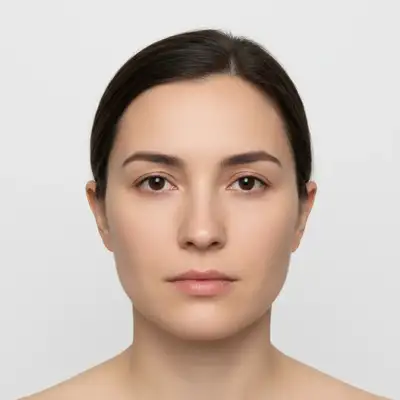
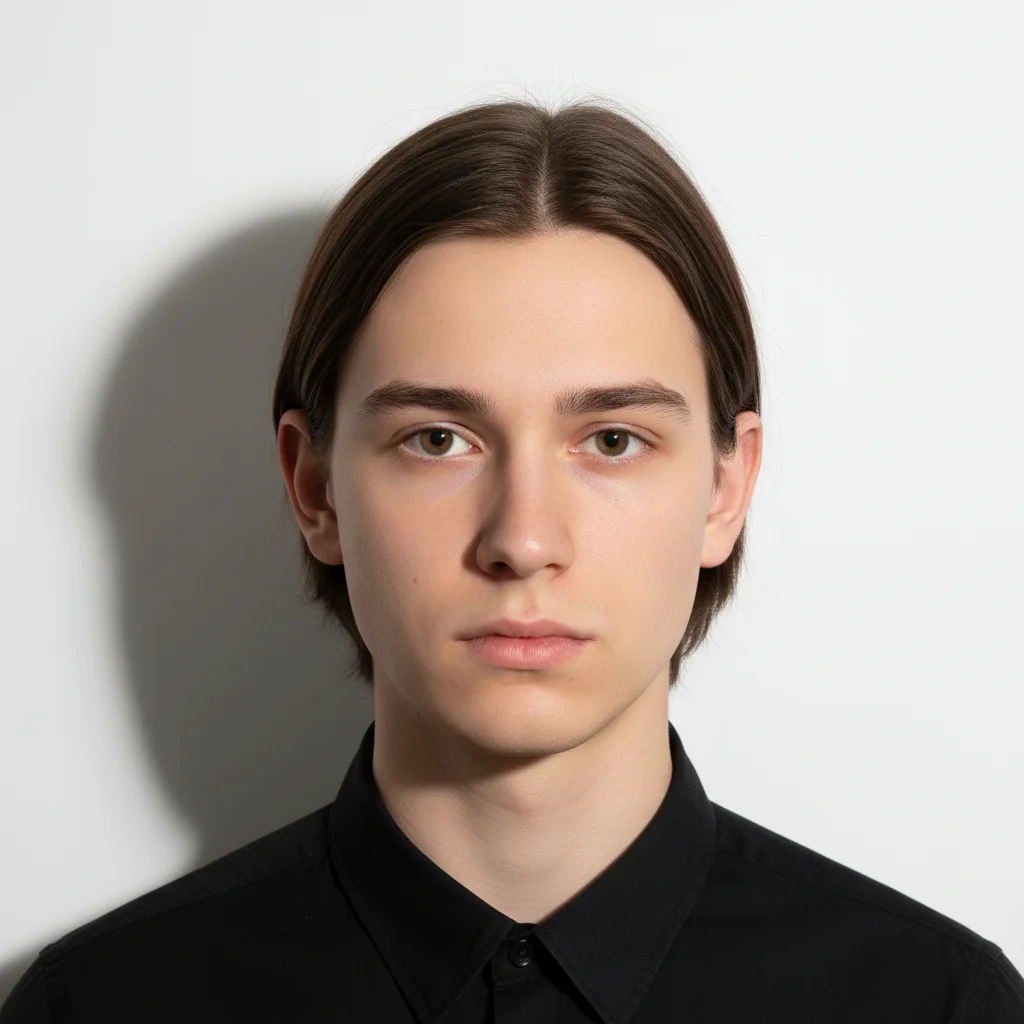
Visa photo with off-white grayish background causing rejection
Before
β†’
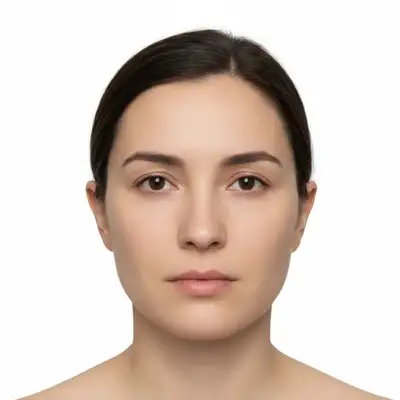
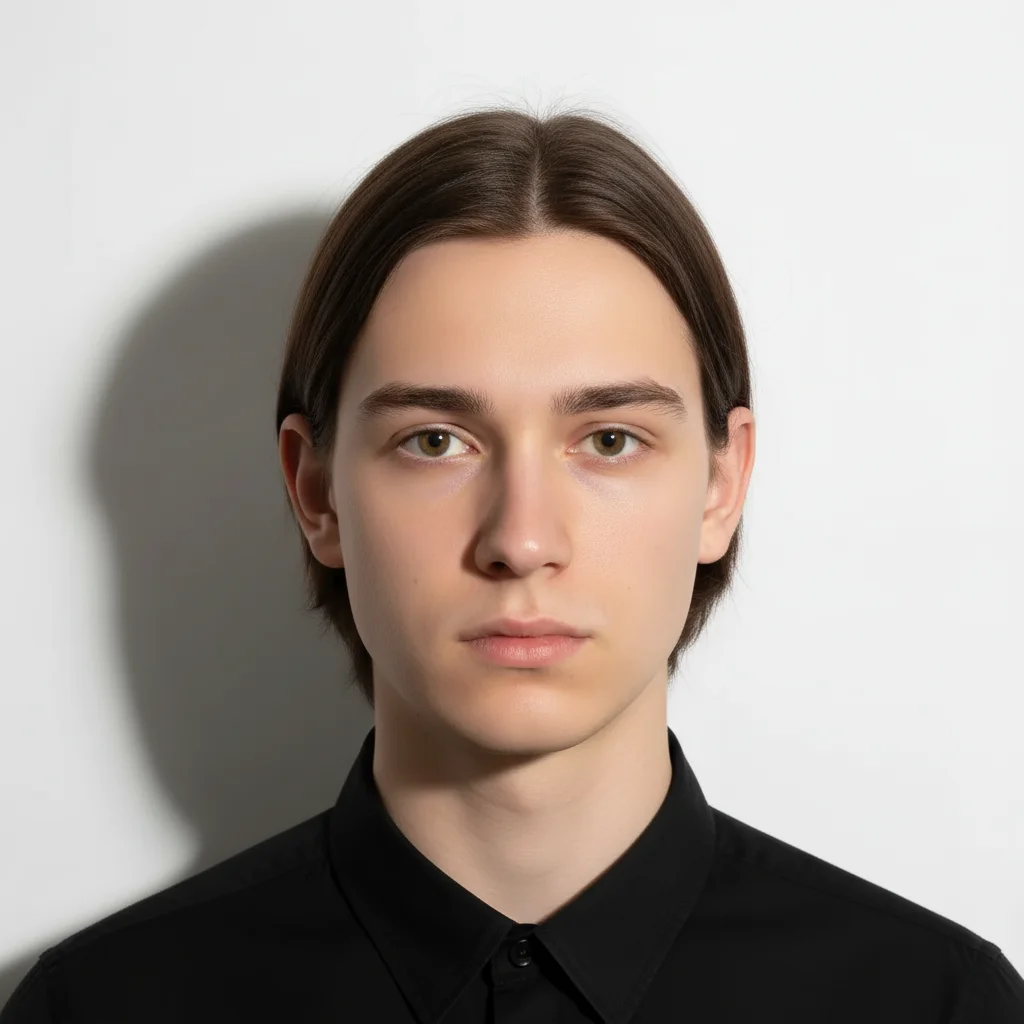
Same photo with pure white background meeting biometric standards
After

Visa Photo Rejected Need to Resubmit | EditThisPic

Upload photo to fix rejected visa photo

Free β€’ Results in 30 seconds β€’ No signup

Release to upload

FreeNo signupNo watermark

1 free edit·then from $1.99

Popular use cases:
  • visa photo rejected
  • passport photo compliance
  • biometric photo fix
  • visa resubmission
  • government ID photo
  • photo meets visa requirements

Cost
Free No signup required
Time
Instant results in 15-30 seconds
Works on
Any device - browser, phone, tablet, desktop
Powered by
AI-powered photo editing
Scenario Prompt Time
Background not white replace with pure white, uniform color, biometric standards 20s
Shadows on face remove all shadows, even lighting, no dark spots 30s
Multiple issues pure white background, remove shadows, biometric lighting 40s

How it works

  1. Check your rejection reason

    Read the rejection notice carefully. Common reasons: background not pure white/light gray, shadows on face, uneven lighting, head position wrong, reflections on glasses. Note the specific compliance requirement you failed. You need to fix that exact issue.

    Expect: Background fixes: 20-25 seconds. Lighting and shadow fixes: 25-35 seconds. Complex fixes (multiple issues): 40-50 seconds.
  2. Describe the exact fix needed

    Upload your rejected photo. Type the exact fix: 'replace background with pure white, no gray tones' or 'remove shadows from face, even lighting for biometric compliance' or 'change background to light gray, ensure uniform color.' Be specific about the requirement.

    Tip: Use exact wording from the rejection notice. If it says 'pure white background,' type exactly that. If it says 'no shadows on face,' include that phrase.

    Copy one of these to get started:

    Rejected for background not pure white replace background with pure white, no gray tones, perfectly uniform color, meet biometric photo standards
    Rejected for shadows on face remove all shadows from face and background, create even lighting that meets biometric requirements, no dark spots
    Background needs to be light gray not white replace background with uniform light gray (80% brightness), no white areas, perfectly even color across entire background
    Lighting too dark or uneven enhance lighting to meet biometric standards, illuminate face evenly with no shadows, match official visa photo lighting requirements
    4 more prompts
    Shadows behind head on background remove the shadow behind my head on background, make background uniformly white with no variations or dark spots
    Background has slight color tint replace background with pure neutral white, remove any yellow/blue/gray tint, achieve perfect white balance
    Glare on glasses remove glare and reflections from glasses, keep lenses clear, maintain eye visibility for biometric scan
    Multiple issues (background and lighting) replace background with pure white uniform color, remove all shadows from face and background, enhance lighting to biometric standards
  3. Verify compliance requirements

    Check that the fixed photo meets ALL requirements: background is exact color specified, no shadows on face or behind head, lighting is even, no glare on glasses, your expression is neutral. Zoom in to verify edges are clean. Compare against the official guidelines.

  4. Resubmit immediately

    Download your corrected photo. Verify file size and dimensions match requirements (usually 600x600px or 2x2 inches at 300dpi). Resubmit to the visa/passport portal immediately. Most systems accept resubmissions within hours.

    Tip: Save 2 versions: one optimized for online submission, one high-res for print if needed. Some systems require both.
Try it free ↓

Visa Photo Rejected Need to Resubmit | EditThisPic

Upload photo to fix rejected visa photo

Free β€’ Results in 30 seconds β€’ No signup

Release to upload

Free β€’ No signup

See it in action

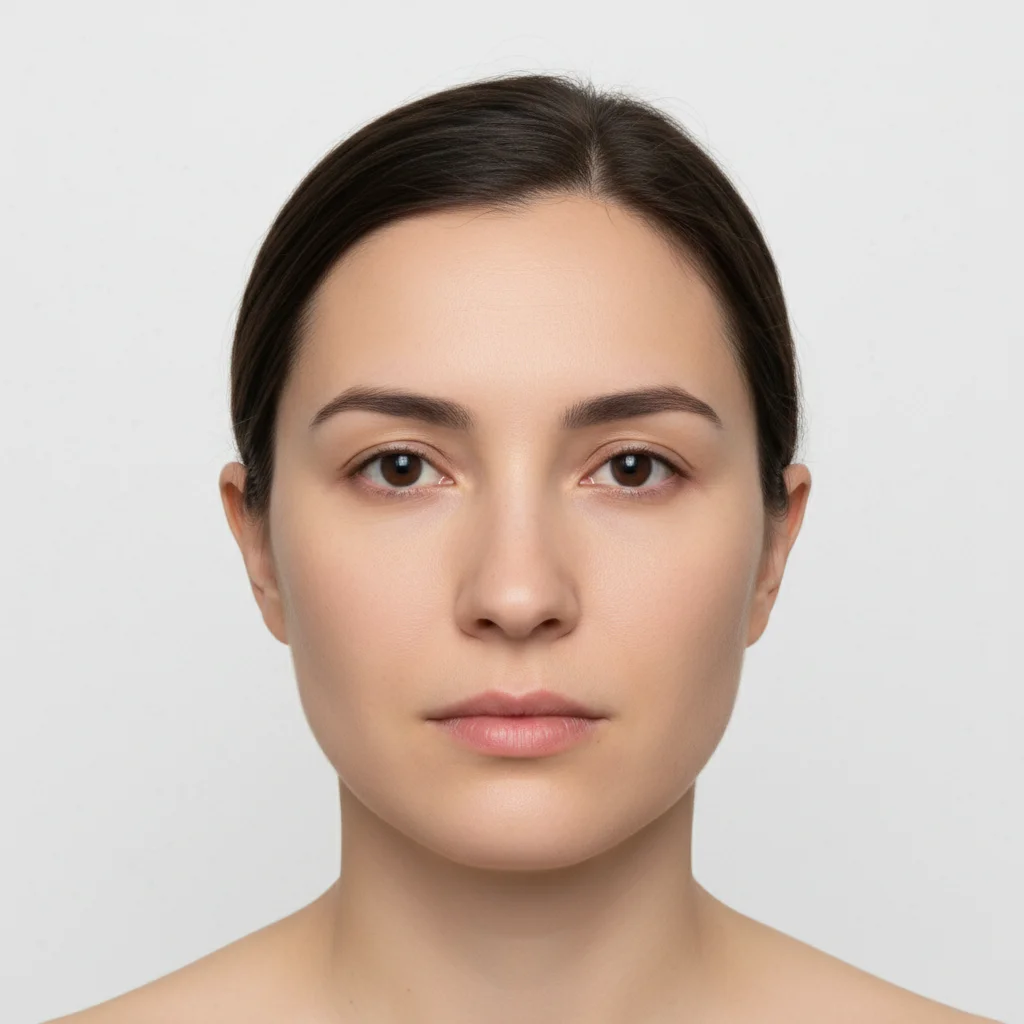
Visa photo with off-white grayish background causing rejection
Before
->
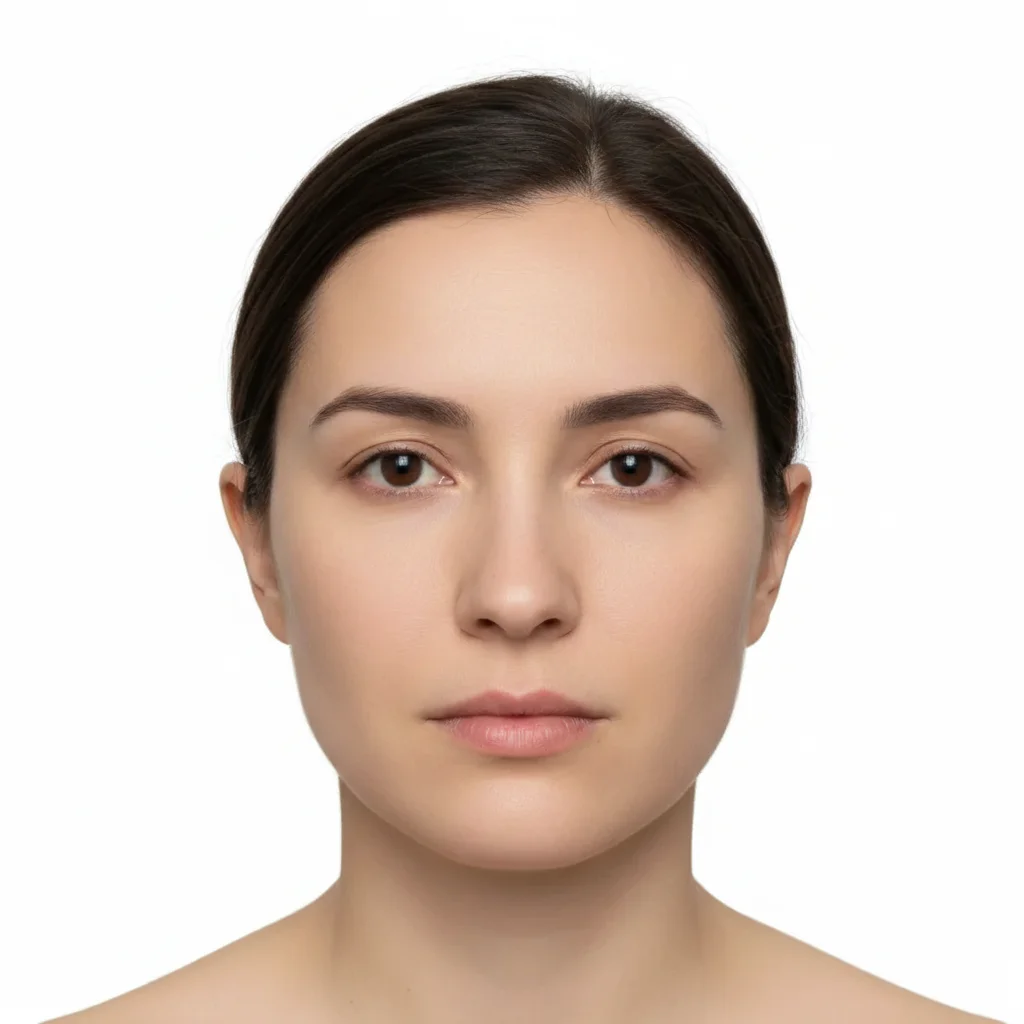
Same photo with pure white background meeting biometric standards
After

Rejected for off-white background

Visa application rejected with reason 'background must be pure white.' The photo background looked white but had slight gray tone. Fixed in 20 seconds, resubmitted same day, approved within 24 hours.

Prompt: replace background with pure white, no gray tones, perfectly uniform color, meet biometric photo standards
Passport photo with visible shadows on face and behind head
Before
->
Same photo with all shadows removed, even lighting throughout
After

Rejected for shadows on face

Passport photo rejected: 'shadows detected on face and behind head.' Automated biometric system flagged both facial shadows and background shadow. One prompt removed all shadows, compliant immediately.

Prompt: remove all shadows from face and background, create even lighting that meets biometric requirements, no dark spots anywhere

Detailed Guides by Scenario

πŸ“·

Career Advancement

A polished your visa photo was rejected. need to resubmit today? headshot signals competence and approachability β€” critical for LinkedIn, company directories, and conference speaker bios.

Common Scenarios

  • Updating your LinkedIn profile with a your visa photo was rejected. need to resubmit today? headshot that reflects your current role
  • Providing a professional your visa photo was rejected. need to resubmit today? photo for an internal company directory or 'About Us' page
  • Submitting a speaker or panelist headshot for an upcoming your visa photo was rejected. need to resubmit today? industry event

Best Practices

  • Use a plain or softly blurred background β€” avoid busy environments that pull focus from your face
  • Wear solid colors typical of your industry; avoid loud patterns that distract on small thumbnails
  • Ensure the crop is head-and-shoulders β€” the standard framing for your visa photo was rejected. need to resubmit today? headshots
πŸ“·

Industry-Specific Requirements

Many your visa photo was rejected. need to resubmit today? roles have specific headshot standards for directories, licensing boards, or institutional profiles.

Common Scenarios

  • Meeting association or licensing board photo requirements for your visa photo was rejected. need to resubmit today? professionals
  • Preparing a headshot for a your visa photo was rejected. need to resubmit today? firm website that matches the team's visual style
  • Creating a your visa photo was rejected. need to resubmit today? photo for a professional directory or industry publication

Best Practices

  • Research your specific your visa photo was rejected. need to resubmit today? organization's photo guidelines before editing β€” some require formal attire or specific backgrounds
  • Keep the expression confident yet approachable β€” avoid overly casual or overly stiff poses
  • Match the lighting and background style of existing team photos if the headshot will appear alongside colleagues
πŸ“·

Personal Branding

Build a recognizable personal brand as a your visa photo was rejected. need to resubmit today? with a consistent, high-quality headshot across all platforms.

Common Scenarios

  • Creating a signature your visa photo was rejected. need to resubmit today? headshot for coaching, consulting, or freelance profiles
  • Using the same professional your visa photo was rejected. need to resubmit today? photo across LinkedIn, personal website, and email signature
  • Refreshing an outdated your visa photo was rejected. need to resubmit today? headshot without booking a new photo session

Best Practices

  • Use the same headshot everywhere β€” consistency builds recognition and trust
  • Choose lighting that flatters your features: soft, diffused light minimizes harsh shadows
  • If you already have a good selfie, the AI can transform it into a your visa photo was rejected. need to resubmit today?-grade headshot

If something looks off

Background still not pure enough white after fix

Why: Subtle gray tones or color variations remain. Biometric systems are extremely sensitive to background color uniformity.

Try: replace background with absolute pure white RGB(255,255,255), no variations anywhere, perfectly uniform across entire background

Tip: Download and check in photo editor - background should be exactly RGB(255,255,255) for true pure white.

Shadows remain after attempting to remove them

Why: Deep shadows require strong correction. Subtle attempts may not fully eliminate shadows that biometric systems detect.

Try: aggressively remove all shadows, flood face with even light from all directions, eliminate any darkness on face or background

Tip: Use Pro mode for stubborn shadow removal - it applies stronger corrections while maintaining natural appearance.

Fixed photo looks over-processed or unnatural

Why: Strong corrections to meet biometric standards can make photos look artificial if applied too heavily.

Try: meet biometric lighting requirements but maintain natural skin texture and facial appearance, no plastic look

Tip: Balance is key - photo must pass automated checks but still look like you. Start conservative, strengthen if rejected again.

Still getting rejected after fixing stated issue

Why: Multiple compliance issues may exist. The system may flag a different issue after you fix the first one.

Try: meet all US/UK/EU biometric standards: pure white background, no shadows anywhere, even lighting, neutral expression, no glare

Tip: Address all potential issues at once with comprehensive prompt rather than fixing one issue at a time.

Hair edges look weird against new background

Why: Background replacement can create halos or choppy edges around hair, especially fine hair strands.

Try: blend hair edges naturally with pure white background, smooth transition, no halos or artifacts

Tip: Hair against white background is challenging - ensure original photo has good hair separation from background.

Quick answers

Do I need to mark anything before fixing my rejected visa photo?

No. Just describe exactly what needs fixing: 'replace background with pure white' or 'remove shadows from face.' The AI understands visa compliance requirements and handles it automatically. Only use markers if you need to target a specific shadow or problem area after your first attempt.

Will this actually meet official visa and passport requirements?

Yes, if you specify the exact requirements correctly. EditThisPic can create pure white backgrounds (RGB 255,255,255), remove shadows completely, and adjust lighting to biometric standards. The key is being specific: if the requirement says 'pure white,' emphasize that in your prompt. Works for US passports, UK visas, Schengen visas, and most international standards.

What are the most common visa photo rejection reasons?

Top rejections: background not pure white (has gray tone), shadows on face or behind head, uneven lighting, glare on glasses, wrong head position, facial expression not neutral, photo too old. Background and shadow issues are most common and easiest to fix with AI. Head position and expression issues may require retaking the photo.

Can I fix multiple compliance issues at once?

Yes. Combine fixes in one prompt: 'replace background with pure white, remove all shadows from face and background, enhance lighting to biometric standards, remove glare from glasses.' This addresses multiple rejection reasons simultaneously and saves time.

How do I know if my fixed photo will be accepted?

Check against official guidelines for your country. Background should be perfectly uniform white (or specified gray), no visible shadows anywhere, lighting even across face, neutral expression, eyes clearly visible. Some countries provide online validation tools - run your fixed photo through those before resubmitting.

My visa application deadline is tomorrow - is there time?

Yes. Fixing a rejected photo takes 20-30 seconds. Resubmission is usually instant online. Most visa systems accept resubmissions immediately after rejection. If you fix and resubmit within hours, you typically don't lose your application deadline. Just ensure the fix is correct to avoid a second rejection.

Is EditThisPic's AI rejected visa photo fixer really free?

Yes β€” you get 1 free edit per week, no account needed. For unlimited edits, plans start at $3.99/month.

Can I fix rejected visa photo on my phone?

Yes. EditThisPic works in any mobile browser β€” iPhone, Android, tablet. No app download needed.

How much does EditThisPic cost?

You get 1 free edit per week β€” no account needed. After that, credit packs start at $1.99 for 3 edits. Monthly plans start at $4.99/mo for 15 edits with unused credits rolling over. All edits are full resolution with no watermark.

Visa photo rejected? Fix it now and resubmit today.

Free to try. No signup required. Meets international biometric standards.

1 free edit included·Credit packs from $1.99