Free • No signup Simulate Makeup · Free

AI Makeup Simulator

Describe the makeup look you want and AI applies it to your photo instantly. No marking needed.
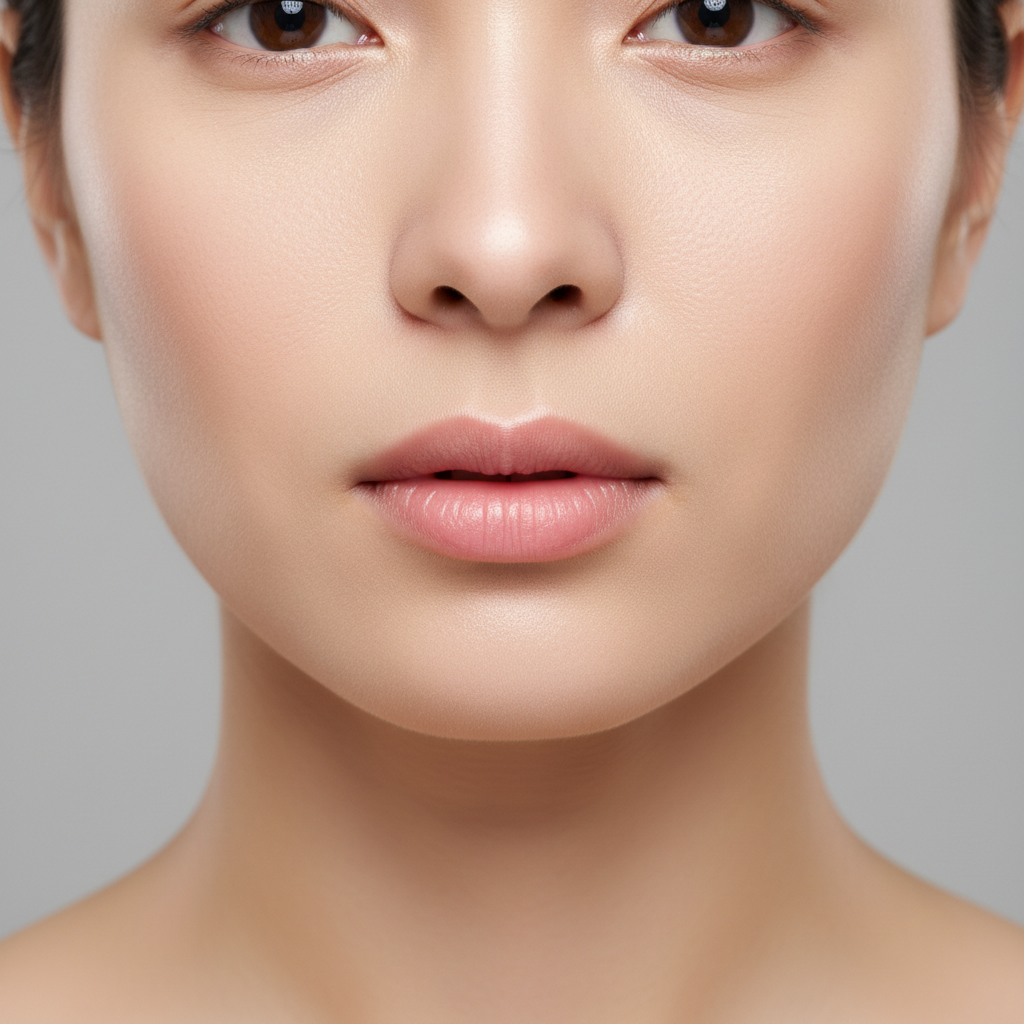
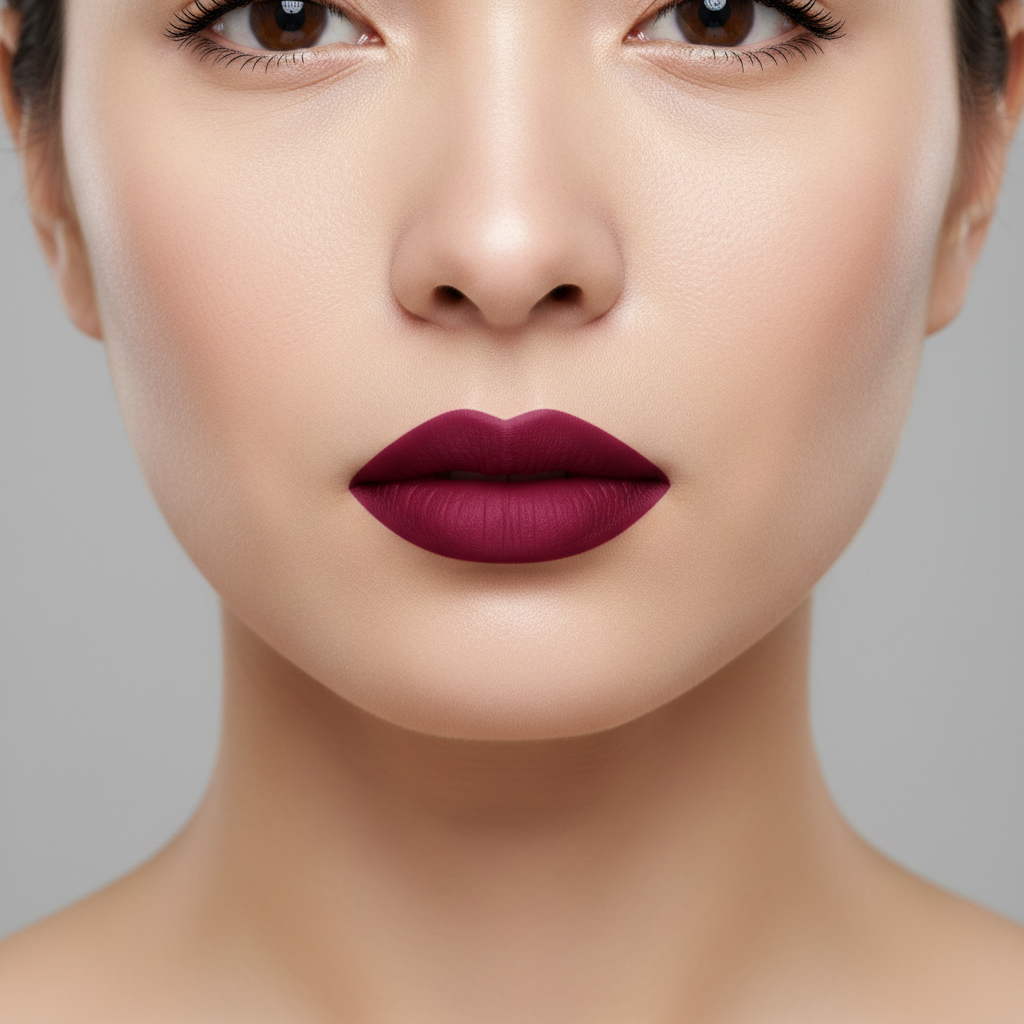
Woman with bare face and no makeup
Before
Same woman with natural everyday makeup applied
After

AI Makeup Simulator

Drop your photo here

or click to browse

Release to upload

Free • No signup

Advertisement
Popular use cases:
  • virtual makeup try-on
  • makeup simulation
  • lipstick preview
  • eyeshadow try-on
  • beauty look testing
  • makeup before buying
  • bridal makeup preview
  • cosmetics virtual trial

Cost
Free No signup required
Time
Instant results in 15-30 seconds
Works on
Any device - browser, phone, tablet, desktop
Powered by
AI-powered photo editing
Scenario Prompt Time
Single product (lipstick) apply a bold red lipstick 30s
Everyday natural look apply natural makeup - foundation, blush, nude lip 40s
Full glam look add glamorous evening makeup with smoky eyes and red lips 50s

How it works

  1. Upload your photo

    Drop your image into EditThisPic. JPG, PNG, WebP up to 7MB. Clear, well-lit photos with face visible work best. Bare-face photos show the most dramatic transformation, but you can also modify existing makeup.

    Expect: Simple makeup (lipstick only): 30-35 seconds. Full glam look (multiple products): 40-55 seconds and may need refinements.
  2. Describe the makeup look

    Type what you want: 'apply natural everyday makeup with nude lipstick and light mascara' or 'add glamorous evening makeup with smoky eyeshadow, red lipstick, and contoured cheeks.' Be specific about colors, styles, and products. No marking needed—the AI knows where eyes, lips, and cheeks are.

    Tip: Name specific products or looks: 'berry lip', 'cat eye liner', 'dewy foundation' for precise results that match real makeup styles.

    Copy one of these to get started:

    Natural everyday makeup apply natural everyday makeup - light foundation, subtle blush, nude pink lipstick, and light mascara
    Glamorous evening look add glamorous evening makeup with smoky black eyeshadow, winged eyeliner, bold red lipstick, and contoured cheekbones
    Professional office-ready look apply professional office makeup - matte foundation, neutral eyeshadow, thin eyeliner, and a mauve lip color
    Bold lip only apply a bold deep berry lipstick with a slight gloss finish, nothing else on the face
    3 more prompts
    Bridal makeup look apply bridal makeup - soft glowing foundation, rose gold eyeshadow, defined lashes, pink blush, and a soft pink lip
    Dewy no-makeup makeup apply a 'no-makeup' makeup look - dewy skin, tinted brows, barely-there lip tint, and subtle highlight on cheekbones
    Festival/creative look apply colorful festival makeup - bright turquoise eyeshadow, glitter accents on cheekbones, and coral lips
  3. Review the makeup

    Check that makeup looks natural and well-blended. Zoom in on each area—eyes, lips, cheeks—to verify even application. Ensure the makeup style matches the lighting and overall mood of the photo.

  4. Refine with markers if needed

    If one feature like eyeliner or lip color needs adjustment, tap a marker on that area and regenerate with a more specific prompt. Most makeup simulations work well on the first try.

    Tip: Markers are for precision refinement only. Try without them first—you usually won't need them.
Try it free

AI Makeup Simulator

Drop your photo here

or click to browse

Release to upload

Free • No signup

"I test makeup looks before buying anything now. Upload a bare-face selfie, describe the products I'm considering, and see exactly how they'd look. Saved me from so many bad purchases." @BeautyTester_Lia

See it in action

Woman with bare face and no makeup
Before
->
Same woman with natural everyday makeup applied
After

Bare face to natural everyday look

A bare-face selfie transformed with natural everyday makeup including foundation, blush, and lipstick.

Prompt: apply natural everyday makeup - light foundation, subtle blush, nude pink lipstick, and light mascara
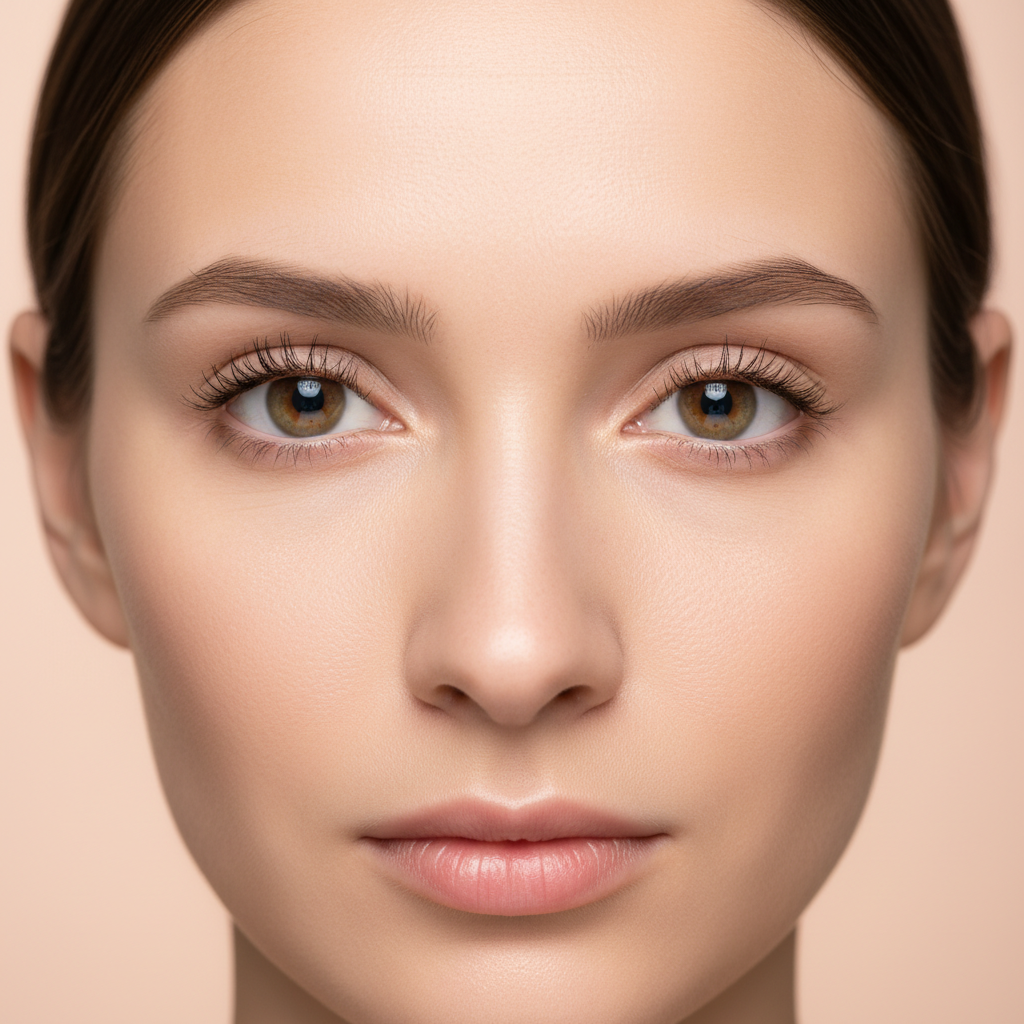
Woman with minimal makeup in casual setting
Before
->
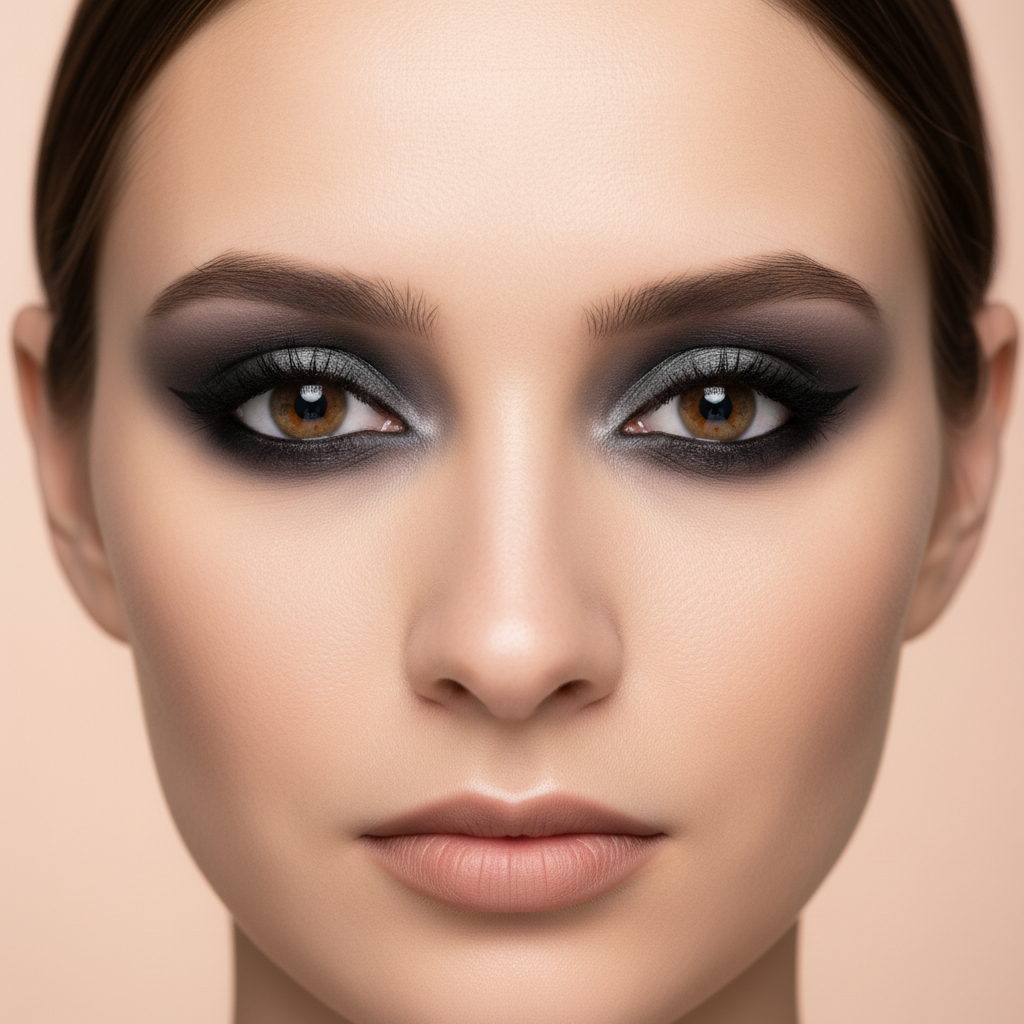
Same woman with glamorous smoky eye and red lip makeup
After

Simple selfie to glamorous evening look

A casual selfie elevated with full evening makeup including smoky eyes and red lipstick.

Prompt: add glamorous evening makeup with smoky black eyeshadow, winged eyeliner, bold red lipstick, and contoured cheekbones
Advertisement

If something looks off

AI changed the wrong area or something I didn't want changed

Why: The AI couldn't determine exactly which facial feature you meant from description alone. This happens when you want makeup on one area but the AI applied it broadly.

Try: Tap a marker on the specific area (lips, eyes, or cheeks) you want makeup applied to, then regenerate with your prompt

Tip: Markers tell the AI 'I mean THIS area specifically.' Use them when description alone is ambiguous.

Makeup looks too heavy or unnatural

Why: The AI interpreted the description as requiring more coverage than intended, especially with words like 'bold' or 'dramatic'.

Try: apply the same makeup but lighter and more subtle, blend naturally into the skin with softer coverage

Tip: Adding 'lighter', 'softer', or 'sheer' dials back the intensity while keeping the same color scheme.

Eyeshadow or lipstick color is wrong

Why: Color terms can be interpreted differently by the AI. 'Red' could mean cherry red, brick red, or burgundy.

Try: change the lipstick to a specific [cherry red / warm coral / deep burgundy] shade instead

Tip: Use specific shade names like 'cherry', 'mauve', 'burnt sienna' rather than generic color words.

Makeup edges look patchy or unblended

Why: The AI struggled with smooth gradients at the edges of eyeshadow or blush, creating visible boundaries.

Try: reapply the makeup with better blending, smooth gradients between eyeshadow colors and natural skin transitions

Tip: Mentioning 'smooth gradients' and 'natural transitions' explicitly tells the AI to blend edges properly.

Skin texture changed under the makeup

Why: The AI applied makeup by altering the skin texture rather than layering on top, making skin look artificial underneath.

Try: apply makeup as a layer on top of the natural skin, keep the original skin texture visible beneath the cosmetics

Tip: 'Layer on top' tells the AI to simulate real makeup application rather than digitally replacing skin.

Quick answers

Do I need to mark my face before describing the makeup I want?

No! Just describe the look you want: 'apply natural makeup with pink lipstick and subtle eyeshadow.' The AI knows where eyes, lips, and cheeks are on a face. Only use markers when you want to adjust a specific feature—like changing just the eyeliner without affecting the rest of the makeup.

How do I try on makeup looks virtually using a photo?

Upload a clear photo of your face (bare-face works best for the most dramatic preview). Then describe the makeup look you want to try: colors, products, and style. The AI applies it realistically so you can see exactly how it would look before buying any products or committing to a look.

Is there a free AI makeup simulator that doesn't require an account?

Yes, EditThisPic is free to try with no account needed. Upload your photo, describe any makeup look, and download the result. No watermarks on outputs. Works for everything from subtle everyday looks to dramatic evening glam without any signup.

What's the best free AI tool for virtual makeup try-on?

EditThisPic offers free AI makeup simulation with no signup required. Unlike apps limited to preset filters, you describe any look you want in your own words. It handles specific products, colors, and complete makeup looks, generating realistic results in seconds.

Ready to try on makeup looks?

Free to try. No signup required.

Try it free