Free โ€ข No signup Add Halo ยท Free

Add Halo to Memorial Photo

Create a gentle, glowing tribute above your loved one that symbolizes their angelic presence in your heart.
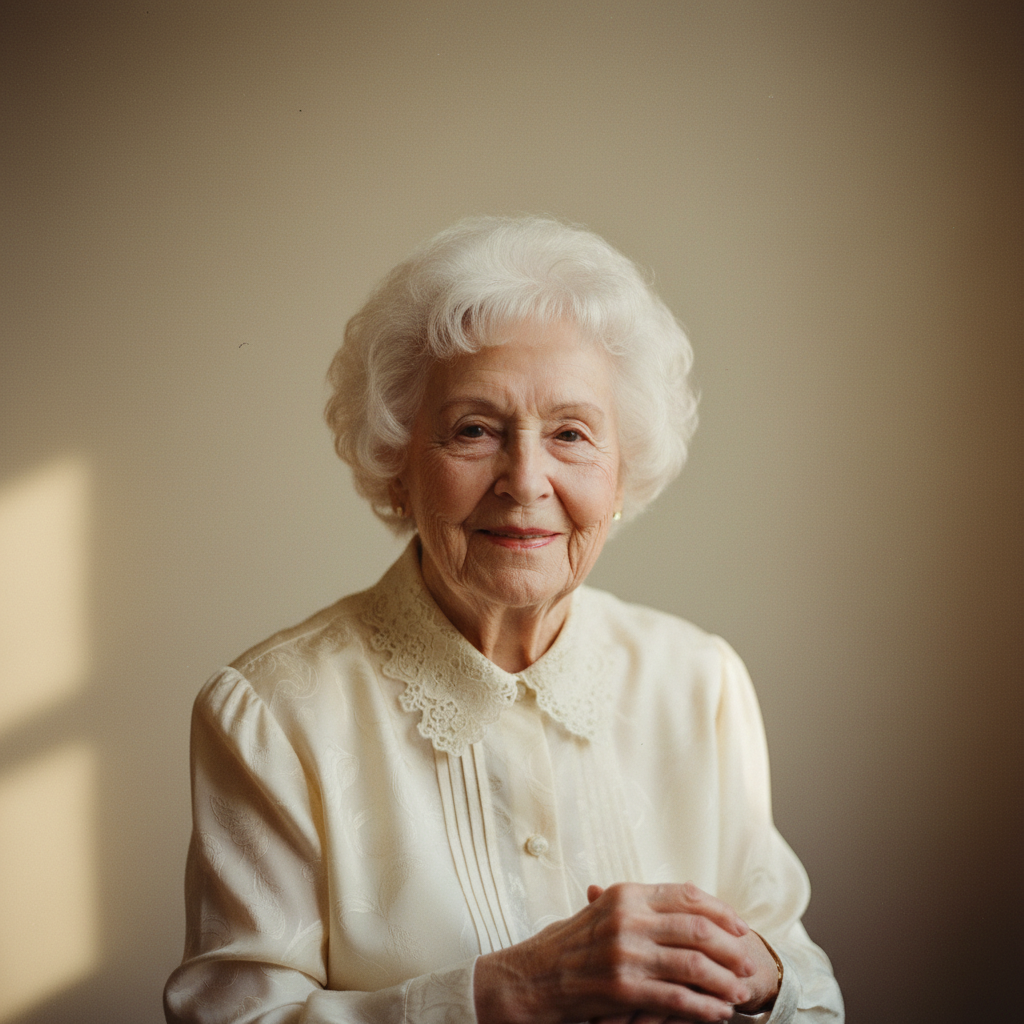
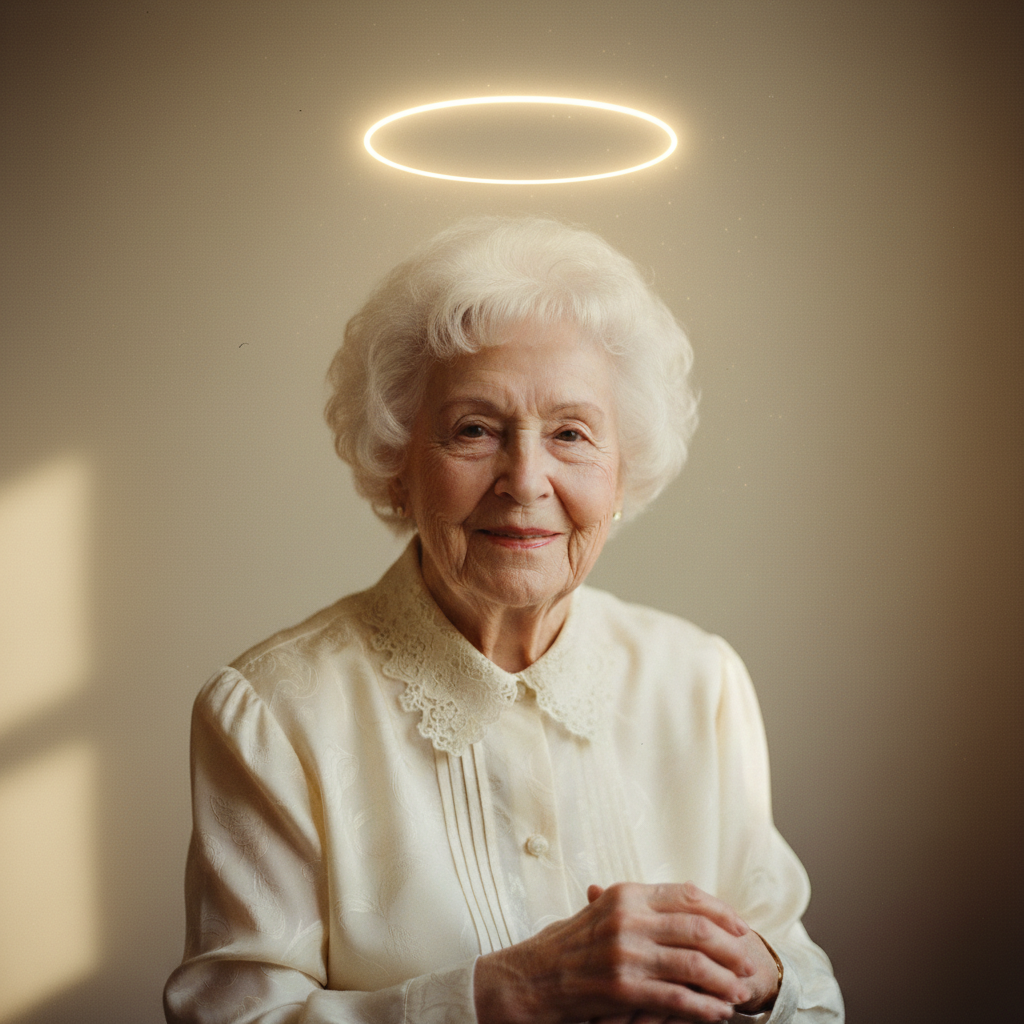
Portrait of elderly woman with loving smile
Before
โ†’
Same portrait with soft golden halo added
After

Add Halo to Memorial Photo

Drop your photo here

or click to browse

Release to upload

Free โ€ข No signup

Advertisement
Popular use cases:
  • add halo to photo
  • memorial photo with halo
  • halo photo editor
  • create angelic photo
  • heavenly halo tribute
  • halo memorial picture
  • add halo to picture of deceased
  • glowing halo for memorial

Cost
Free No signup required
Time
Instant results in 15-30 seconds
Works on
Any device - browser, phone, tablet, desktop
Powered by
AI-powered photo editing

How it works

  1. Choose a cherished photo

    Select a photo where your loved one's face and especially the top of their head is clearly visible. Photos with some space above their head work best. The background doesn't need to be plain - the AI will blend the halo naturally.

    Expect: Most halo additions take 20-30 seconds. The first result usually works well, but you can adjust the style or intensity easily.
  2. Describe the halo you envision

    Type your instruction: 'add a soft golden halo above their head' or 'add a glowing white halo with gentle light rays.' Describe the color, brightness, and style. No marking needed - the AI knows halos go above the head.

    Tip: Golden halos feel warm and comforting. White halos feel pure and peaceful. Soft, slightly transparent halos often look more natural than solid rings.

    Copy one of these to get started:

    Soft golden halo add a soft golden halo above this person's head, gently glowing with warm light, like a peaceful angelic presence
    Pure white halo add a soft glowing white halo above this person's head, pure and peaceful with a gentle luminous glow
    Subtle ethereal halo add a very subtle, nearly transparent halo above this person's head, more like a gentle glow than a visible ring
    Halo with light rays add a golden halo above this person's head with soft light rays emanating outward, like divine light
    3 more prompts
    Classic renaissance halo add a classic golden ring halo above this person's head in the style of renaissance religious art, solid and defined
    Halo with wings combination add a soft golden halo above their head and gentle angel wings behind them, creating a complete angelic tribute
    Child's gentle halo add a small, delicate halo above this child's head, soft and innocent like a little angel watching over us
  3. Review the tribute

    Look at how the halo complements your loved one's photo. It should feel like a gentle addition that honors them without overwhelming their image. Check that the glow feels natural and the color matches the photo's warmth.

  4. Refine if needed

    If the halo is too bright, too dim, or not quite the right style, describe the change: 'make the halo softer and more subtle' or 'add a warmer golden tone to the halo.' Take your time until it feels right.

    Tip: For memorial displays viewed from a distance, a slightly brighter halo is visible. For personal keepsakes, a softer, more subtle halo keeps the focus on your loved one's face.
Try it free โ†“

Add Halo to Memorial Photo

Drop your photo here

or click to browse

Release to upload

Free โ€ข No signup

"Added a soft golden halo to my dad's photo for his memorial. It was so simple but it captured exactly what we all felt - that he's watching over us now. My mom keeps it on her nightstand." @DaughterRemembering

See it in action

Portrait of elderly woman with loving smile
Before
->
Same portrait with soft golden halo added
After

Grandmother with golden halo

A treasured portrait given a soft golden halo for her memorial service, symbolizing the warmth she brought to the family.

Prompt: add a soft golden halo above this person's head, gently glowing with warm light, like a peaceful angelic presence
Portrait of dignified man with gentle expression
Before
->
Same portrait with pure white halo added
After

Father with pure white halo

A dignified portrait of a father enhanced with a pure white halo, representing the peace he's found.

Prompt: add a soft glowing white halo above this person's head, pure and peaceful with a gentle luminous glow

Portrait of young woman with loving smile
Before
->
Same portrait with golden halo and light rays
After

Young mother with halo and rays

A photo of a mother who passed young, given a halo with soft light rays to symbolize how she watches over her children.

Prompt: add a golden halo above this person's head with soft light rays emanating outward, like divine light
Advertisement

If something looks off

Halo is too bright or distracting

Why: The AI created a more prominent halo than you wanted, drawing attention away from your loved one.

Try: add a very subtle, softly glowing halo that's visible but doesn't distract from the face

Tip: Words like 'subtle,' 'gentle,' and 'soft' create halos that complement rather than dominate

Halo position is wrong

Why: The halo might be placed too high, too low, or at an odd angle.

Try: add a halo positioned naturally just above their head, centered and level

Tip: If positioning issues persist, tap a marker just above their head to show the AI exactly where you want it

Color doesn't match the photo

Why: The halo's color temperature clashes with the photo's overall warmth or coolness.

Try: add a halo with warm golden tones that match the photo's lighting

Tip: Match warm photos with golden halos, cooler photos with white or silver halos

AI changed the wrong part of the photo

Why: The AI may have affected your loved one's appearance while adding the halo.

Try: Tap a marker on the space above their head, then regenerate with 'add a halo here only, preserve everything else'

Tip: Markers tell the AI 'work only HERE' - use them when you need precision

Halo looks too much like a physical object

Why: The AI created a solid ring that looks more like jewelry than a spiritual glow.

Try: add an ethereal, luminous halo that glows softly like spiritual light, not a solid object

Tip: Words like 'ethereal,' 'luminous,' and 'glowing' help achieve a spiritual rather than physical look

Quick answers

Do I need to mark where to put the halo?

No. Just describe what you want: 'add a golden halo above their head.' The AI knows halos go above the head. Only use markers if the AI positions it incorrectly and you need to show the exact spot you want.

How do I add a halo to a memorial photo for free?

Upload your photo to EditThisPic, type a description like 'add a soft golden halo above their head,' and the AI creates the tribute in about 30 seconds. It's completely free, requires no account, and your photo remains private. Download the result with no watermark.

Is there a free halo photo editor that doesn't need an account?

Yes. EditThisPic adds halos to photos for free without requiring login or signup. Simply upload your photo, describe the halo you want, and download the result. No watermarks, no account needed, completely private.

What color halo is best for memorial photos?

Golden halos are most popular because they feel warm and comforting. White halos feel pure and peaceful. Some families prefer a subtle, nearly transparent glow. Choose what feels right for your loved one and matches the emotion you want to capture.

Can I add a halo and angel wings together?

Yes. You can combine them in one prompt: 'add a golden halo above their head and soft angel wings behind them.' This creates a complete angelic tribute. You can also add them separately if you prefer to see each change individually.

Will the halo look natural in the photo?

The AI blends the halo with your photo's lighting and style. Most results look natural and spiritual rather than obviously edited. You can adjust the intensity - make it more subtle or more visible - until it feels right for your memorial.

Create a glowing tribute to your loved one

Honor their memory with a beautiful memorial photo.

Try it free โ†’