Free • No signup Apply Vaporwave aesthetic · Free

AI Vaporwave Filter

Transform photos into retro-futuristic vaporwave art with one description.
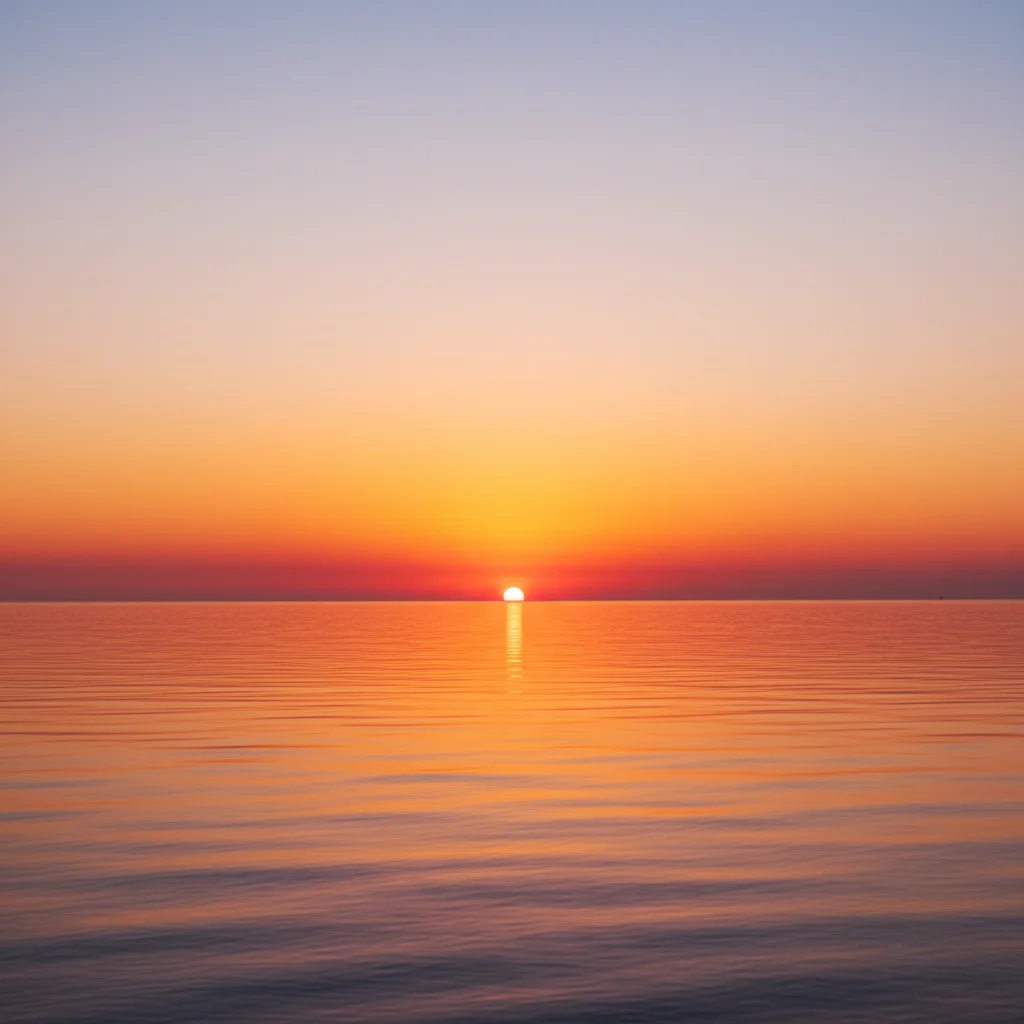
Sunset photo with clear sky
Before
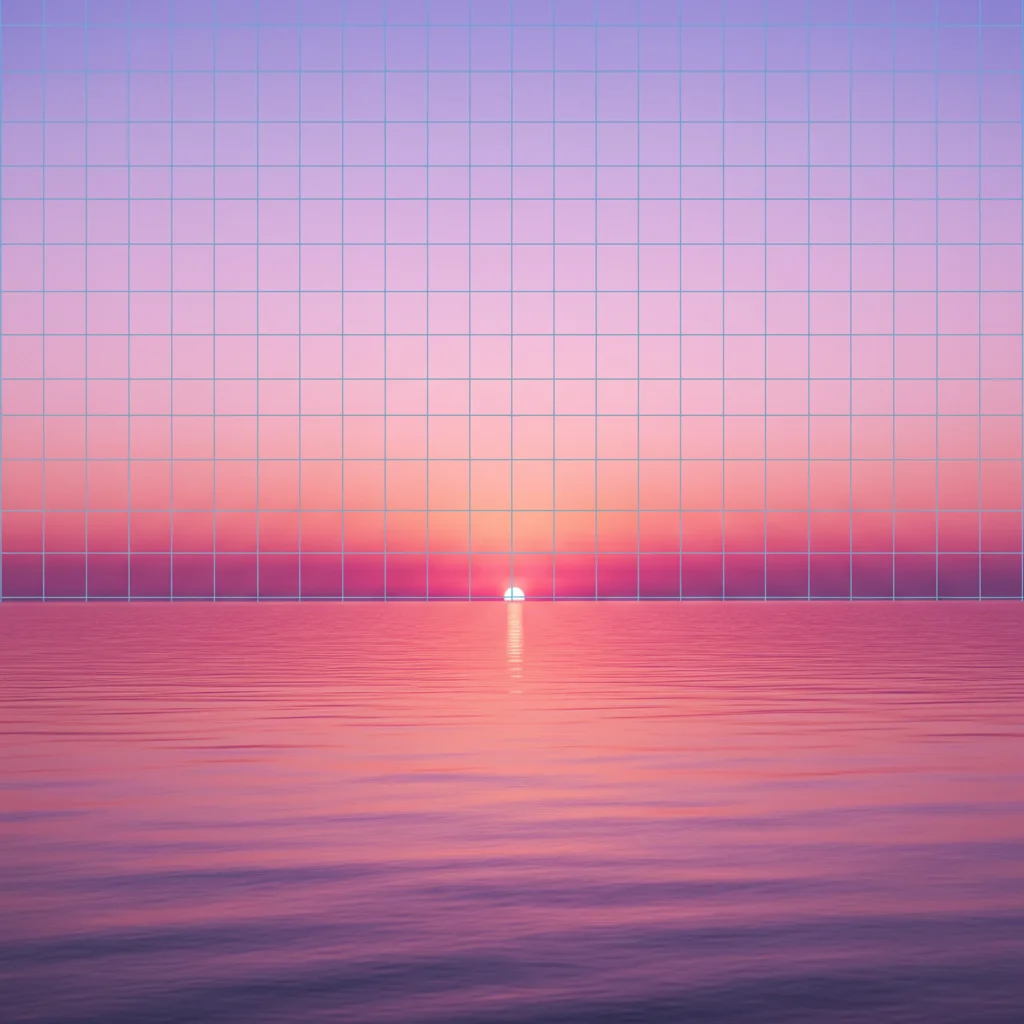
Vaporwave sunset with pink and purple gradient and grid
After

Apply Vaporwave Filter to Photos

Drop your photo here

or click to browse

Release to upload

Free • No signup

Advertisement
Popular use cases:
  • vaporwave art
  • retro photography
  • album covers
  • 80s aesthetics
  • social media posts
  • creative projects

Cost
Free No signup required
Time
Instant results in 15-30 seconds
Works on
Any device - browser, phone, tablet, desktop
Powered by
AI-powered photo editing
Scenario Prompt Time
Classic pink purple apply vaporwave filter with pink and purple gradient sky, grid overlay, and pastel color grading 30s
Tropical vaporwave transform into vaporwave aesthetic with palm trees silhouettes against pink sunset gradient 25s
Pastel dreamy transform into soft vaporwave style with pastel pink, lavender, and mint green color palette 20s

How it works

  1. Upload your photo

    Drop your image into EditThisPic. JPG, PNG, WebP up to 7MB. Cityscapes, sunsets, portraits, and abstract compositions work especially well for vaporwave transformation. Photos with clear skies or simple backgrounds create the most dramatic retro effects.

    Expect: Simple vaporwave conversions: 20-30 seconds. Complex adjustments with custom elements: may need 2-3 refinements for perfect 80s aesthetic.
  2. Describe what you want

    Type your instruction: 'apply vaporwave filter with pink and purple gradient sky' or 'transform into vaporwave aesthetic with grid lines and pastel colors.' Specify color palette, retro elements, and mood. No marking needed—the AI understands vaporwave aesthetics.

    Tip: Mention specific vaporwave elements like 'grid overlay,' 'palm trees,' 'sunset gradient,' or 'glitch effects' to customize the retro style.

    Copy one of these to get started:

    Classic pink and purple apply vaporwave filter with pink and purple gradient sky, grid overlay, and pastel color grading
    Tropical vaporwave transform into vaporwave aesthetic with palm trees silhouettes against pink sunset gradient
    Neon grid cityscape apply vaporwave filter with cyan and magenta colors, neon grid floor, and retro-futuristic atmosphere
    Pastel dreamy aesthetic transform into soft vaporwave style with pastel pink, lavender, and mint green color palette
    2 more prompts
    Glitch vaporwave apply vaporwave filter with digital glitch effects, chromatic aberration, and VHS scan lines
    Marble statue aesthetic transform into vaporwave style with classical marble statues and pink purple gradient background
  3. Generate and review

    Click Generate and the AI applies vaporwave styling with pastel colors, retro gradients, and nostalgic 80s atmosphere. Review the color grading and retro elements at full zoom to ensure the aesthetic matches your vision.

  4. Refine with markers if needed

    If specific areas need different color tones or additional vaporwave elements, tap markers on those spots and regenerate with adjusted instructions. This is optional—most vaporwave filters work without markers.

    Tip: Markers are for precision refinement, not required. Try without them first.
Try it free

Apply Vaporwave Filter to Photos

Drop your photo here

or click to browse

Release to upload

Free • No signup

"The vaporwave filter nailed the 80s aesthetic perfectly. Pastel colors and retro vibe are spot on." @retroartist

See it in action

Sunset photo with clear sky
Before
->
Vaporwave sunset with pink and purple gradient and grid
After

Sunset to vaporwave gradient

Transformed sunset into classic vaporwave with pink and purple gradient and grid overlay.

Prompt: apply vaporwave filter with pink and purple gradient sky, grid overlay, and pastel color grading
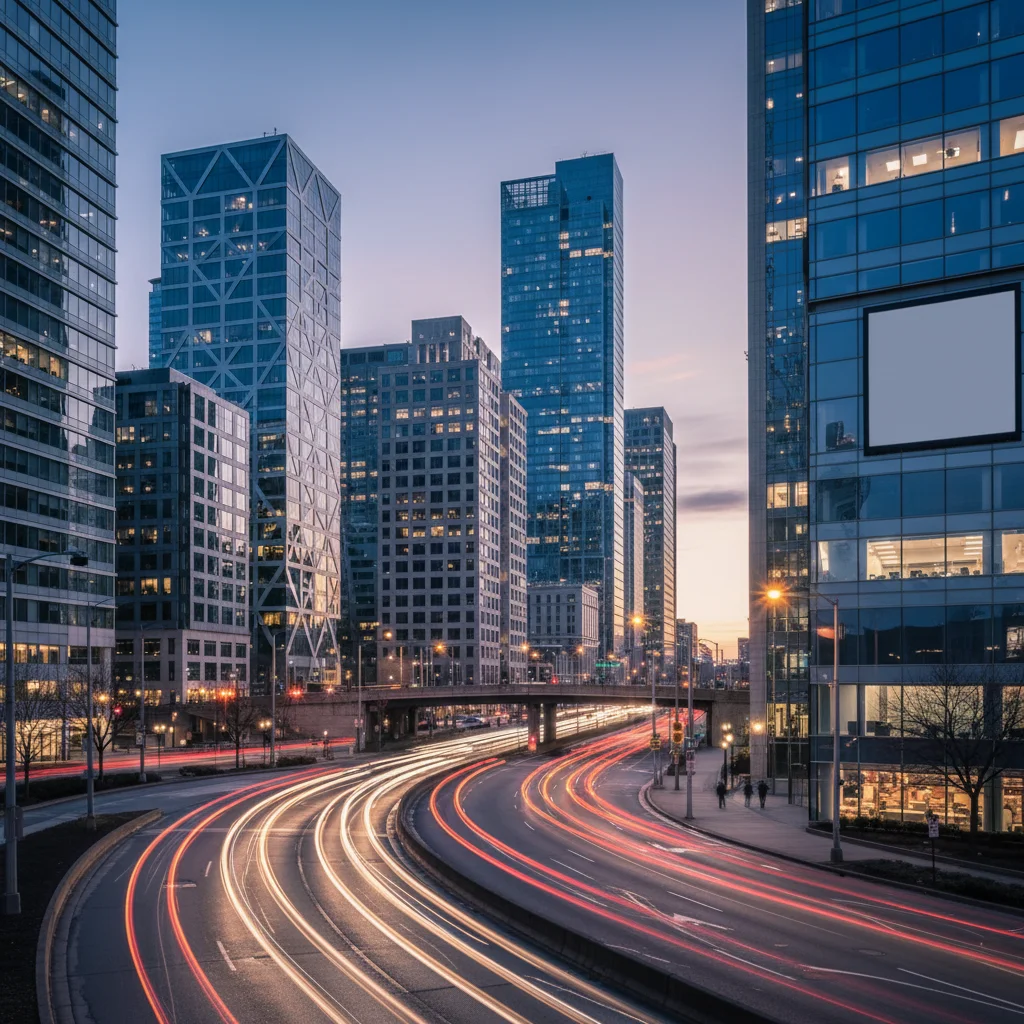
City street at dusk
Before
->
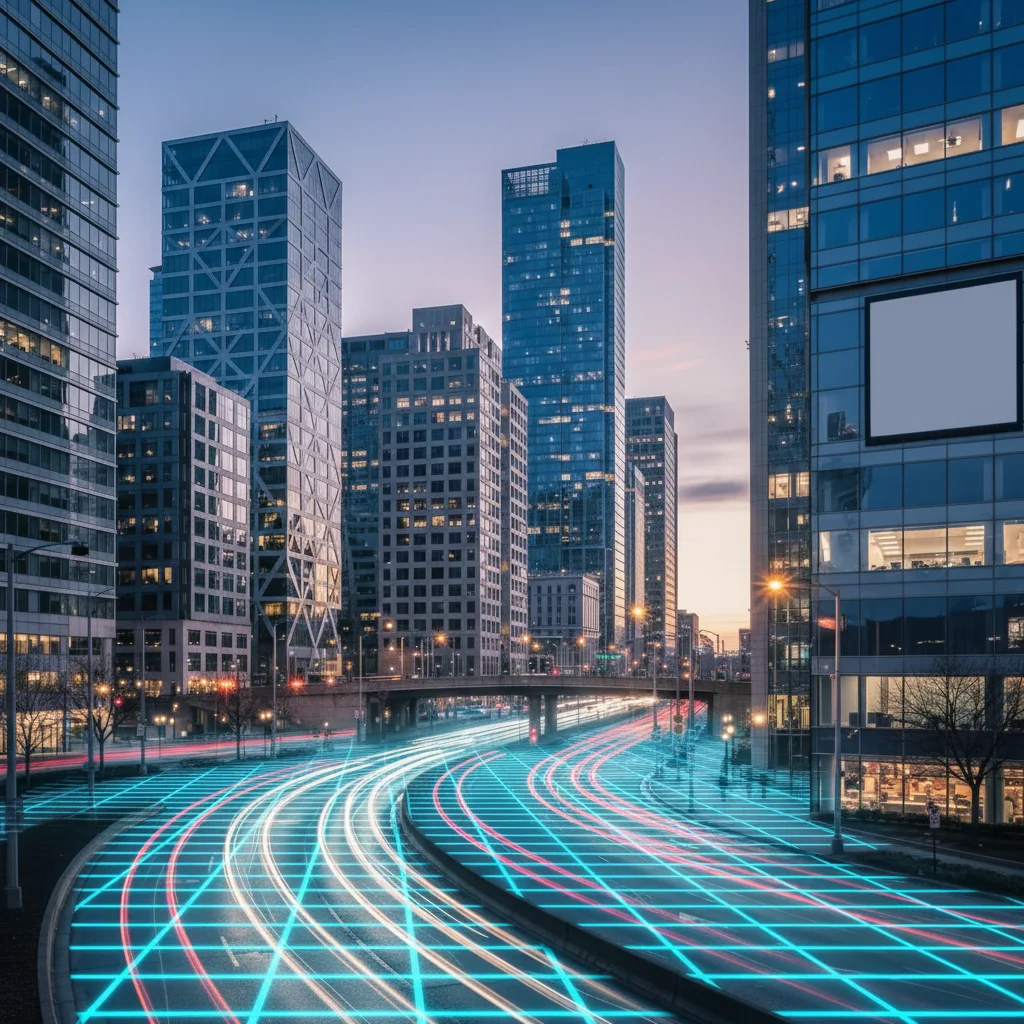
Vaporwave cityscape with cyan and magenta neon grid
After

Cityscape to neon vaporwave

Converted city photo into vaporwave with cyan and magenta colors and neon grid floor.

Prompt: apply vaporwave filter with cyan and magenta colors, neon grid floor, and retro-futuristic atmosphere
Portrait with simple background
Before
->
Soft pastel vaporwave portrait with dreamy colors
After

Portrait with pastel vaporwave

Created soft vaporwave portrait with pastel pink, lavender, and mint green colors.

Prompt: transform into soft vaporwave style with pastel pink, lavender, and mint green color palette
Advertisement

If something looks off

AI changed the wrong area or something I didn't want changed

Why: The AI couldn't determine exactly which area you meant from description alone. This happens with ambiguous requests.

Try: Tap a marker on the specific area you want to change, then regenerate with the same prompt

Tip: Markers tell the AI 'I mean THIS one specifically.' Use them when description alone is ambiguous.

Colors look too saturated or unnatural

Why: The vaporwave color grading was applied too intensely without balancing the overall tone.

Try: Request balanced colors: 'apply vaporwave filter with soft pastel colors and subtle gradient'

Tip: Add 'soft,' 'subtle,' or 'gentle' to tone down intensity while keeping vaporwave aesthetic.

Missing classic vaporwave elements like grids or gradients

Why: The transformation focused on color grading without adding the iconic vaporwave visual elements.

Try: Specify elements: 'apply vaporwave filter with grid overlay, sunset gradient, and retro elements'

Tip: Name specific vaporwave elements: grid overlay, palm trees, sunset gradient, glitch effects, scan lines.

Doesn't capture the 80s retro feel

Why: Insufficient nostalgic or retro-futuristic styling that defines vaporwave aesthetic.

Try: Add retro context: 'apply vaporwave filter with 80s retro aesthetic, VHS quality, and nostalgic atmosphere'

Tip: Include '80s,' 'retro,' 'nostalgic,' or 'VHS' to amplify the period-authentic vaporwave mood.

Vaporwave effect too subtle or barely visible

Why: The transformation was too conservative, not applying enough vaporwave characteristics.

Try: Request stronger effect: 'apply intense vaporwave filter with vibrant pastel colors and prominent retro elements'

Tip: Use 'intense,' 'strong,' or 'vibrant' to amplify the vaporwave transformation.

Quick answers

Do I need to mark areas before applying the vaporwave filter?

No! Just describe what you want: 'apply vaporwave filter with pink and purple gradient' or 'transform into vaporwave aesthetic with pastel colors.' The AI understands vaporwave aesthetics and applies the effect to the entire image. Only use markers when you need precision control over where specific colors or elements appear.

How do I apply a vaporwave filter to my photo for free?

Upload your photo to EditThisPic and type 'apply vaporwave filter with pink and purple gradient sky.' The AI transforms your image with pastel colors, retro gradients, and nostalgic 80s atmosphere in 20-40 seconds. Free to use, no account required, no watermark on downloads.

What colors are typical for vaporwave aesthetic?

Classic vaporwave uses pink and purple gradients, cyan and magenta neon, soft pastels (lavender, mint, peach), and sunset colors (orange, pink, purple). These colors evoke 80s nostalgia and retro-futuristic vibes. Specify your preferred color palette in the prompt for custom vaporwave styling.

What elements make a photo look vaporwave?

Key vaporwave elements include pink/purple gradient skies, grid overlays, palm tree silhouettes, classical marble statues, glitch effects, VHS scan lines, and pastel color grading. Combining these retro-futuristic and nostalgic elements creates the signature vaporwave aesthetic. Mention specific elements in your prompt.

Can I create different vaporwave styles?

Yes, vaporwave has many variants. Use 'soft pastel vaporwave' for dreamy aesthetics, 'neon grid vaporwave' for futuristic Tron-style, 'tropical vaporwave' for Miami Vice vibes, or 'glitch vaporwave' for digital nostalgia. Specify the style variant in your prompt and the AI will adjust colors and elements accordingly.

Ready to apply vaporwave aesthetic to your photos?

Free to try. No signup required.

Try it free