Free • No signup Fix Bad lighting · Free

Perfect Moment, Bad Lighting? Fix It Instantly

Just describe the lighting problem—no technical skills needed
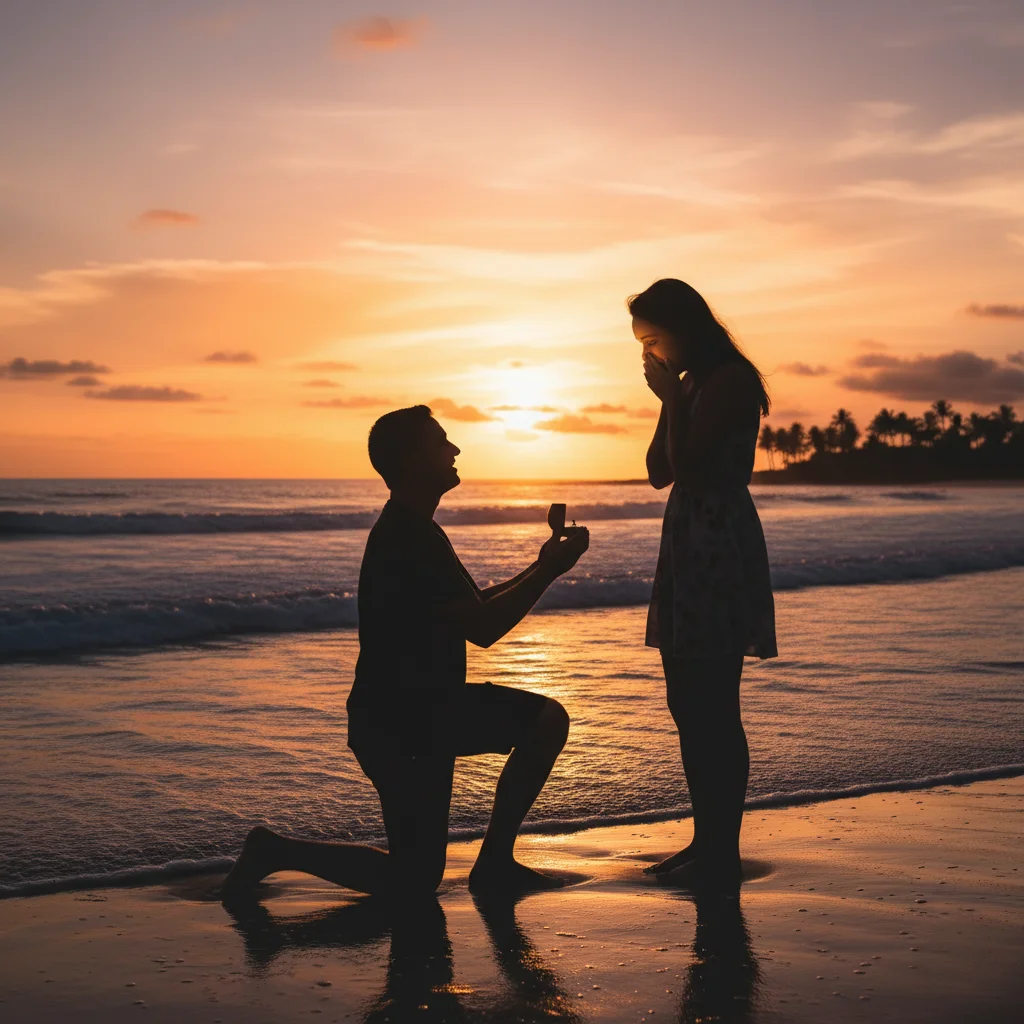
Couple at sunset with faces completely backlit and dark
Before
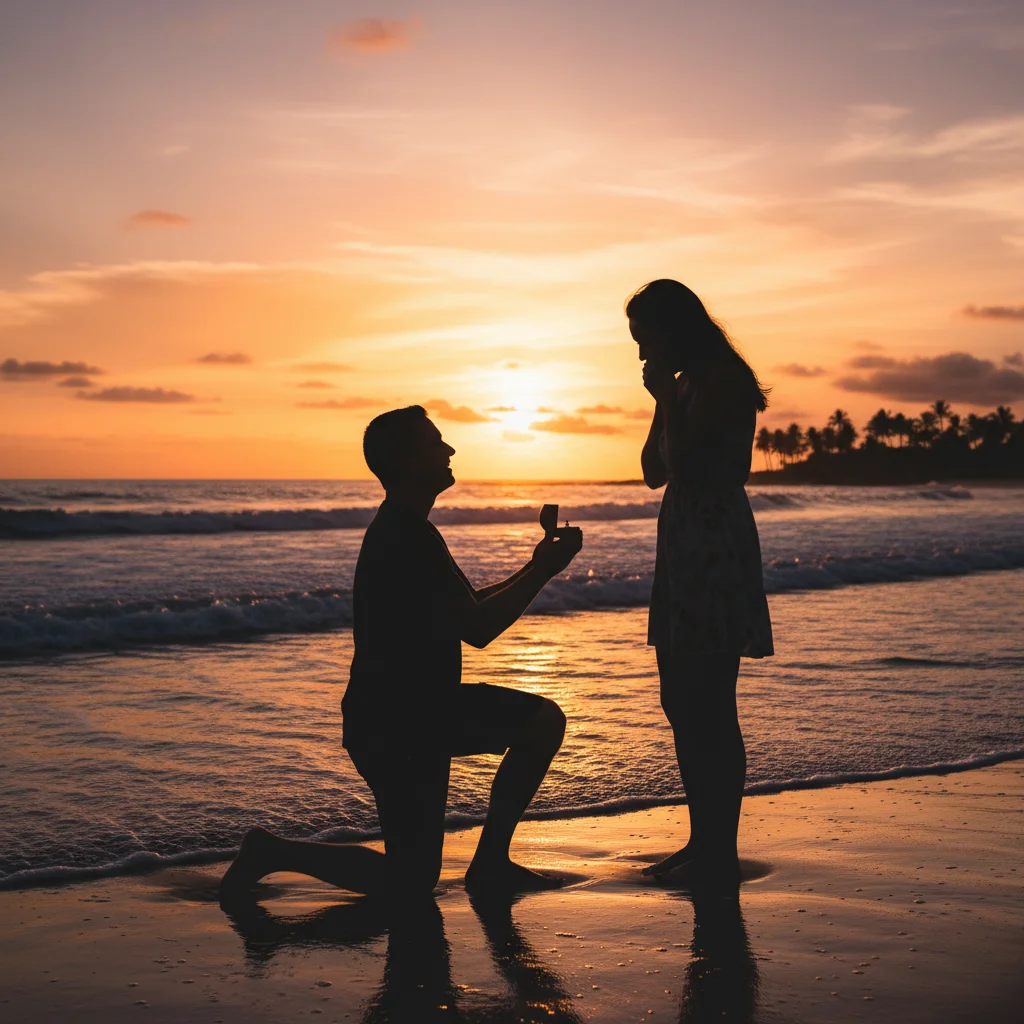
Same photo with faces beautifully lit while sunset glow preserved
After

Fix Bad Lighting in Photos

Drop your photo here

or click to browse

Release to upload

Free • No signup

Advertisement
Popular use cases:
  • backlit photos
  • harsh shadows
  • indoor lighting
  • yellow color cast
  • flash photography
  • underexposed faces
  • sunset photos
  • wedding venue lighting
  • birthday photos
  • baby photos
  • family gatherings
  • restaurant photos
  • candle lighting
  • window backlight
  • mixed lighting

Cost
Free No signup required
Time
Instant results in 15-30 seconds
Works on
Any device - browser, phone, tablet, desktop
Powered by
AI-powered photo editing
Scenario Prompt Time
Backlit faces brighten the faces without overexposing the sunset 20s
Harsh shadows reduce the harsh shadows on their faces 15s
Yellow indoor cast correct the yellow indoor lighting to natural tones 15s
Dark faces brighten the faces so expressions are visible 18s

How it works

  1. Upload your photo

    Drop in that precious moment with terrible lighting. JPG, PNG, WebP up to 7MB. No account needed, works in your browser.

    Expect: Simple lighting fixes (brighten faces, reduce shadows): 15-30 seconds. Complex mixed lighting or severe backlight: may need 2-3 refinements with adjusted prompts.
  2. Describe what you want fixed

    Type your instruction: 'fix the harsh shadows on their faces' or 'brighten the backlit faces without overexposing the sunset.' Be specific about what's wrong—harsh shadows, backlight, yellow indoor cast, dark faces. No marking needed—the AI understands lighting concepts.

    Tip: Mention what to preserve if important: 'brighten faces but keep the sunset glow' or 'fix shadows without losing the candle ambiance'

    Copy one of these to get started:

    Faces too dark from backlight (sunset, window) brighten the faces without overexposing the sunset background
    Harsh shadows from direct sun or flash reduce the harsh shadows on their faces and even out the lighting
    Yellow/orange indoor lighting color cast correct the yellow indoor lighting to natural skin tones
    Faces underexposed (too dark to see expressions) brighten the faces so expressions are visible and add natural light
    4 more prompts
    Flash created harsh shadows under eyes and nose soften the shadows from the flash and balance the lighting on faces
    Mixed lighting sources (window + indoor lights) balance the lighting and fix the mixed color temperatures throughout
    Wedding venue with poor stage lighting fix the harsh venue lighting on their faces during the first dance
    Restaurant with terrible dim yellow lights correct the yellow lighting and brighten faces while keeping it warm and intimate
  3. AI balances the lighting

    AI analyzes exposure zones, identifies underlit areas, removes harsh shadows, and corrects color casts. Check the result at full zoom—look at faces, skin tones, shadow edges.

  4. Refine with markers if needed

    If a specific area needs more work (one face still too dark, one shadow not removed), tap markers on those spots and regenerate. This is optional—most lighting fixes work without markers.

    Tip: Markers are for precision refinement on specific faces or areas, not a required step. Try without them first.
Try it free

Fix Bad Lighting in Photos

Drop your photo here

or click to browse

Release to upload

Free • No signup

"Baby's first steps were perfectly captured... in terrible yellow lighting. This fixed it and I can actually frame it now." @melissa_h

See it in action

Couple at sunset with faces completely backlit and dark
Before
->
Same photo with faces beautifully lit while sunset glow preserved
After

Backlit Proposal Fixed

Sunset proposal—beautiful background but faces completely in shadow. AI brightened faces while preserving the golden hour glow.

Prompt: brighten the faces without overexposing the sunset background
Birthday photo with harsh flash shadows on child's face
Before
->
Same moment with soft natural lighting and no harsh shadows
After

Harsh Flash Shadows Removed

Birthday candle moment ruined by on-camera flash creating dark shadows under eyes and nose. Shadows softened to natural levels.

Prompt: soften the shadows from the flash and balance the lighting on faces
Baby's first steps with yellow indoor lighting color cast
Before
->
Same photo with natural skin tones and corrected colors
After

Yellow Indoor Lighting Corrected

Baby's first steps captured under terrible warm indoor lights creating a sickly yellow-orange tint. Colors corrected to natural daylight tones.

Prompt: correct the yellow indoor lighting to natural skin tones
Wedding dance with faces too dark and purple stage lighting
Before
->
Same dance with faces clearly visible and natural lighting
After

Underexposed Faces Brightened

Wedding first dance in dim venue—couple barely visible with purple-blue stage light tint. Faces brightened and color balanced.

Prompt: brighten the faces and fix the venue lighting so expressions are visible
Advertisement

If something looks off

AI brightened the whole photo instead of just the dark faces

Why: Generic prompts like 'fix the lighting' apply to the entire image. The AI needs to know what specific area has the lighting problem.

Try: brighten only the faces and leave the background as-is

Tip: Use words like 'only', 'just', or 'without changing' to isolate the correction area

Faces look unnaturally bright or washed out

Why: The AI over-corrected. Happens when you ask to 'remove all shadows' or 'make it bright' without limits.

Try: brighten the faces subtly to look naturally lit, not artificially bright

Tip: Add 'naturally', 'subtly', or 'realistic' to prevent over-correction

Colors look wrong after fixing lighting

Why: Brightening can shift color balance. Indoor lights have color temperature that needs correcting along with brightness.

Try: brighten faces and correct the color temperature to natural daylight tones

Tip: Combine brightness and color correction in one prompt for best results

Background got overexposed when fixing dark faces

Why: The AI raised overall exposure. For backlit photos, you need to specify selective adjustment.

Try: brighten the faces without overexposing the bright background

Tip: Always specify what NOT to change when fixing selective areas

AI changed the wrong face in a group photo

Why: Multiple faces with different lighting—description alone wasn't specific enough about which person.

Try: Tap a marker on the specific face that needs brightening, then use the same prompt

Tip: Markers tell the AI 'I mean THIS face specifically' when description is ambiguous

Lighting looks fake or obviously edited

Why: Too aggressive correction or not preserving the original mood and light direction.

Try: gently brighten the faces while preserving the natural lighting mood and direction

Tip: Words like 'gently', 'preserve the mood', and 'natural' keep edits subtle

Quick answers

Do I need to mark the faces or dark areas before describing?

No! For most lighting issues, just describe what's wrong: 'brighten the faces' or 'fix the harsh shadows.' The AI understands what faces, backgrounds, and shadows are. Only use markers when you need precision—like specifying which of several faces needs more light, or refining edges after your first attempt.

How do I fix bad lighting in photos for free?

Upload your photo to EditThisPic, type what's wrong with the lighting ('fix backlight', 'reduce harsh shadows', 'correct yellow indoor lighting'), and download the corrected version. No login required. First edit is free, then you can purchase credits or subscribe for unlimited edits.

Can AI really fix severe backlight where faces are completely black?

Yes, if there's some detail visible in the shadows. The AI can brighten very dark faces and recover shadow detail that's barely visible. If faces are 100% pure black (no data captured), results will be limited—but for typical backlit photos where faces are dark but not totally clipped, AI can make dramatic improvements.

Will the lighting fix look natural or obviously edited?

When you use prompts like 'natural lighting' or 'subtle' in your description, the AI preserves the mood and makes realistic adjustments. Avoid extremes like 'remove all shadows completely'—some shadows create dimension. Ask for balance rather than perfection for the most natural results.

What's the best free AI tool for fixing photo lighting?

EditThisPic specializes in lighting correction with AI. Unlike generic filters that apply the same adjustment to everything, you describe the specific lighting problem (backlight, harsh shadows, color cast) and the AI applies targeted fixes. Free to try, no download or account required.

Can this fix mixed lighting (warm indoor + cool window light)?

Yes. Use prompts like 'balance the lighting and fix the mixed color temperatures throughout.' The AI can correct scenes with multiple light sources creating different color casts and exposure levels across the frame.

Ready to fix that bad lighting?

Free to try. No signup required. Just describe what's wrong.

Try it free