AI Virtual Staging for Real Estate Photos
Turn empty rooms into inviting spaces buyers want to see. Free alternative to $50-100/room professional staging.
Drop your photo here
or click to browse
Release to upload
Free • No signup
"Saved $3,000 on professional staging. Virtually staged 6 empty rooms in an hour. Had three offers within a week. Buyers said the photos helped them see the potential." @RealtorSarah_FL
Built for Real Estate Professionals
Real estate agents know staged homes sell faster and for higher prices, but professional staging is expensive and time-consuming. Virtual staging delivers the same visual impact for online listings where 95% of buyers start their search. EditThisPic lets you stage rooms with realistic furniture in minutes - just describe the pieces and placement, and AI handles perspective, shadows, and lighting.
Virtual Staging Workflow
Add Furniture
Stage empty rooms with sofas, beds, tables, and complete furniture sets
Remove Furniture
Clear out old furniture before restaging with fresh pieces
Remove Clutter
Clean up personal items and clutter before staging
Enhance Lighting
Brighten dark rooms to make spaces feel larger and more inviting
How to Virtually Stage a Room
-
Upload your empty room photo
Drop your vacant room image into EditThisPic. Best results come from well-lit, straight-on shots that clearly show the floor, walls, and room dimensions. JPG, PNG, WebP up to 7MB. Works with living rooms, bedrooms, dining rooms, offices, basements, and outdoor spaces.
Simple furniture placement: 30 seconds. Full room staging with multiple pieces: may need 2-3 refinements for perfect layout. -
Optionally upload reference furniture photos
For specific furniture pieces, click '+ Add reference image' and upload a photo of the exact sofa, bed, or table you want. This is perfect for matching furniture across rooms in a listing, showing actual pieces the seller is including, or previewing furniture you're considering purchasing. Skip this if you want AI to generate stylish furniture from your description.
Use reference images to maintain consistent style across all staged rooms in a listing. -
Describe the furniture and placement
Type what you want staged: 'add a modern gray sectional sofa facing the window with a round coffee table and two accent chairs in cream.' Be specific about furniture style, colors, and placement. Include room-specific details like 'bed centered on the main wall' or 'dining table under the light fixture.' The AI understands interior design terminology and room layouts.
Mention design style in every prompt - 'mid-century modern,' 'contemporary farmhouse,' 'coastal minimalist' - for cohesive staging across all rooms. -
Review the staged room
Check that furniture scale looks realistic for the room size, pieces are grounded on the floor with natural shadows, and the style is consistent. Verify nothing floats or clips through walls. Zoom in to check details like table legs and sofa cushions. Download your MLS-ready staged photo.
-
Add accent pieces if needed
Stage rooms in layers for the most realistic results. After placing main furniture, add details: 'add a floor lamp in the corner and a rug under the coffee table' or 'place decorative pillows on the sofa and a plant by the window.' These finishing touches make rooms feel lived-in and inviting.
Real estate photos need just enough staging to help buyers visualize - avoid over-decorating which can distract from the actual space.
Copy-Paste Staging Prompts by Room
add a modern charcoal gray L-shaped sectional sofa facing the window with a round glass coffee table, two cream accent chairs, and a floor lamp in the corner
Sectionals show how large furniture fits and make living rooms feel anchored and functional
add a king-size upholstered bed with gray bedding centered on the main wall, two white nightstands with modern lamps on each side, and a bench at the foot of the bed
Symmetrical bedroom layouts with nightstands on both sides show the room is spacious enough for a king bed
add a rectangular wooden dining table for six with upholstered chairs centered under the light fixture, with a simple centerpiece on the table
Mentioning the light fixture helps AI place the table in the natural focal point of the room
add a modern white desk with an ergonomic office chair facing the window, a bookshelf against the side wall filled with books and decor
Home offices staged with desks facing windows show good natural light and appeal to remote workers
Show 4 more staging prompts
add a queen bed with white and navy bedding against the wall, one nightstand with a reading lamp, and a small upholstered chair in the corner
Guest bedrooms need simpler staging than masters - one nightstand is fine and keeps the room feeling spacious
add a twin bed with colorful bedding, a small white desk for homework, and open storage cubbies with books and toys visible
Kid-friendly staging with visible toys and bright colors helps families visualize their children in the space
add a luxury velvet navy sofa with brass accent tables, a white marble coffee table, and a designer arc floor lamp in a contemporary style
Material callouts like 'velvet,' 'marble,' and 'brass' create upscale staging for luxury listings
add Scandinavian style furniture with a light oak coffee table, a white linen sofa with natural wood legs, and minimal decor with plants
Naming specific design styles ensures all furniture pieces work together cohesively across the whole listing
| Edit Type | Prompt | Time | |
|---|---|---|---|
| Living room | add modern sectional sofa with coffee table and accent chairs |
30s | Try This → |
| Master bedroom | add king bed with nightstands and lamps on both sides |
30s | Try This → |
| Dining room | add dining table for six centered under light |
25s | Try This → |
| Home office | add desk facing window with office chair and bookshelf |
25s | Try This → |
Real Virtual Staging Examples
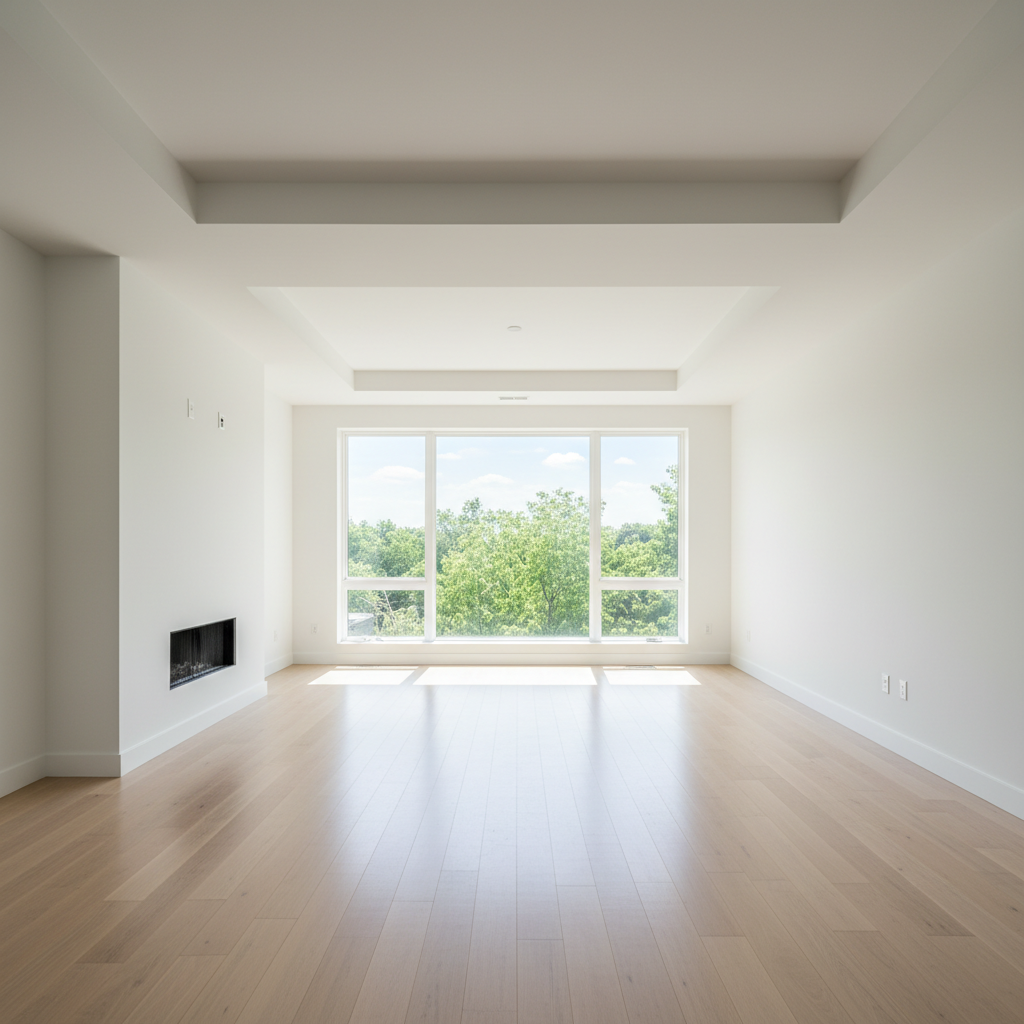
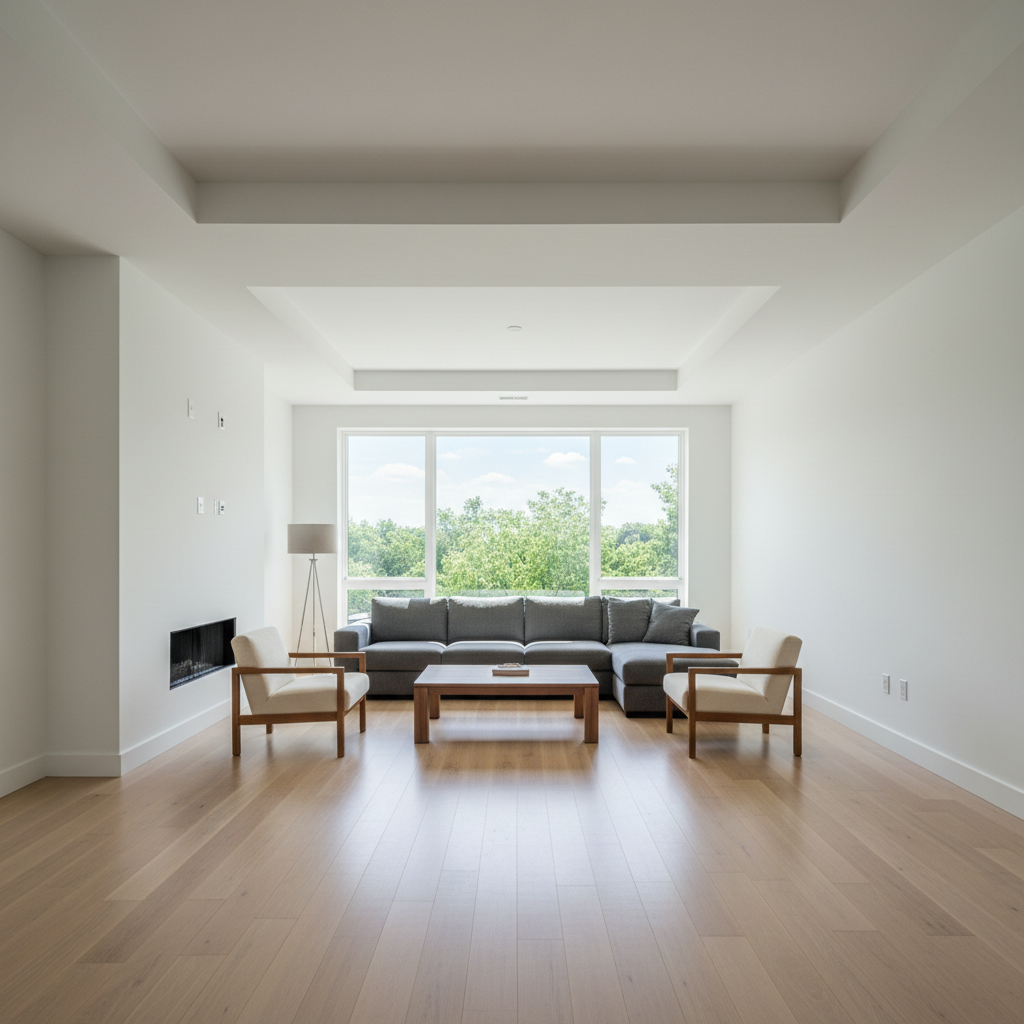
Vacant living room staged for MLS listing
An empty living room transformed with modern furniture to help buyers visualize the space. Staged with sectional sofa, coffee table, and accent chairs showing functional furniture arrangement.
add a modern charcoal gray sectional sofa with a walnut coffee table, two cream accent chairs, and a floor lamp in the corner
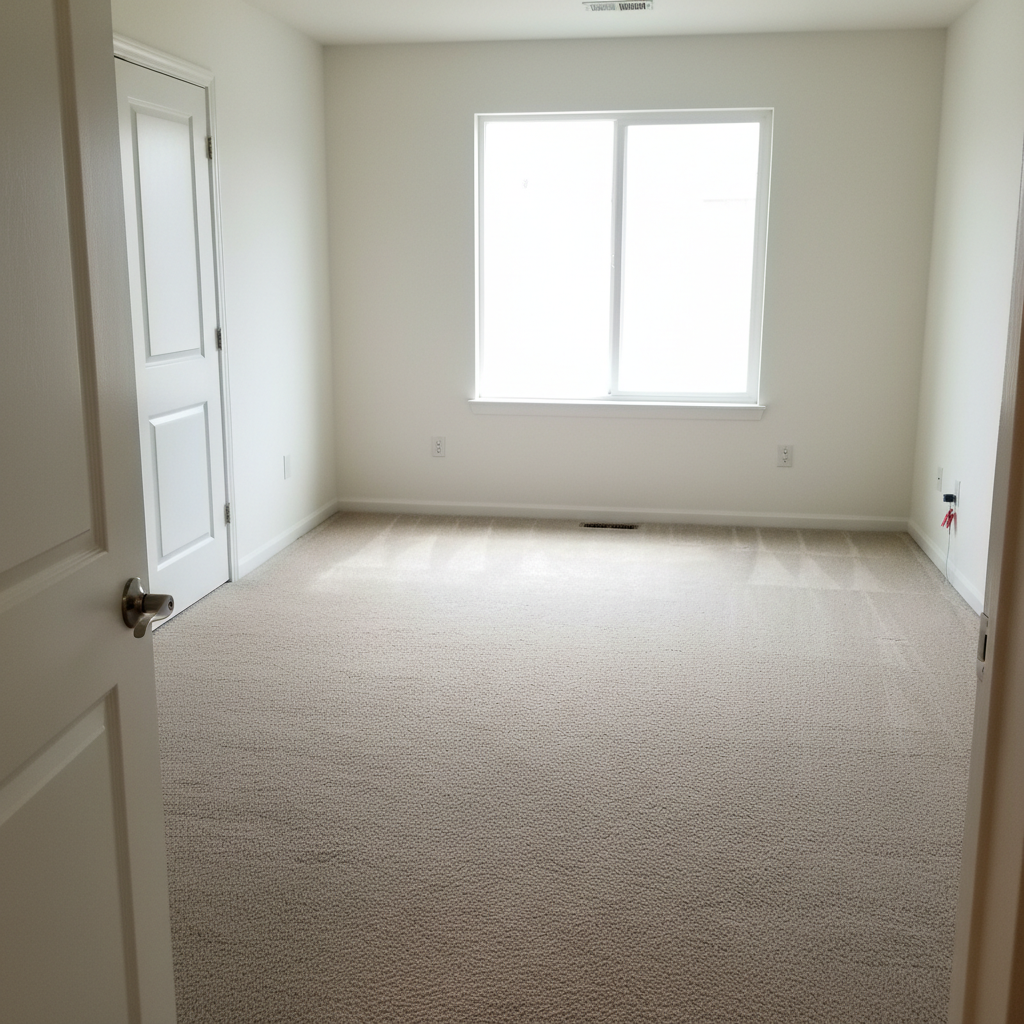
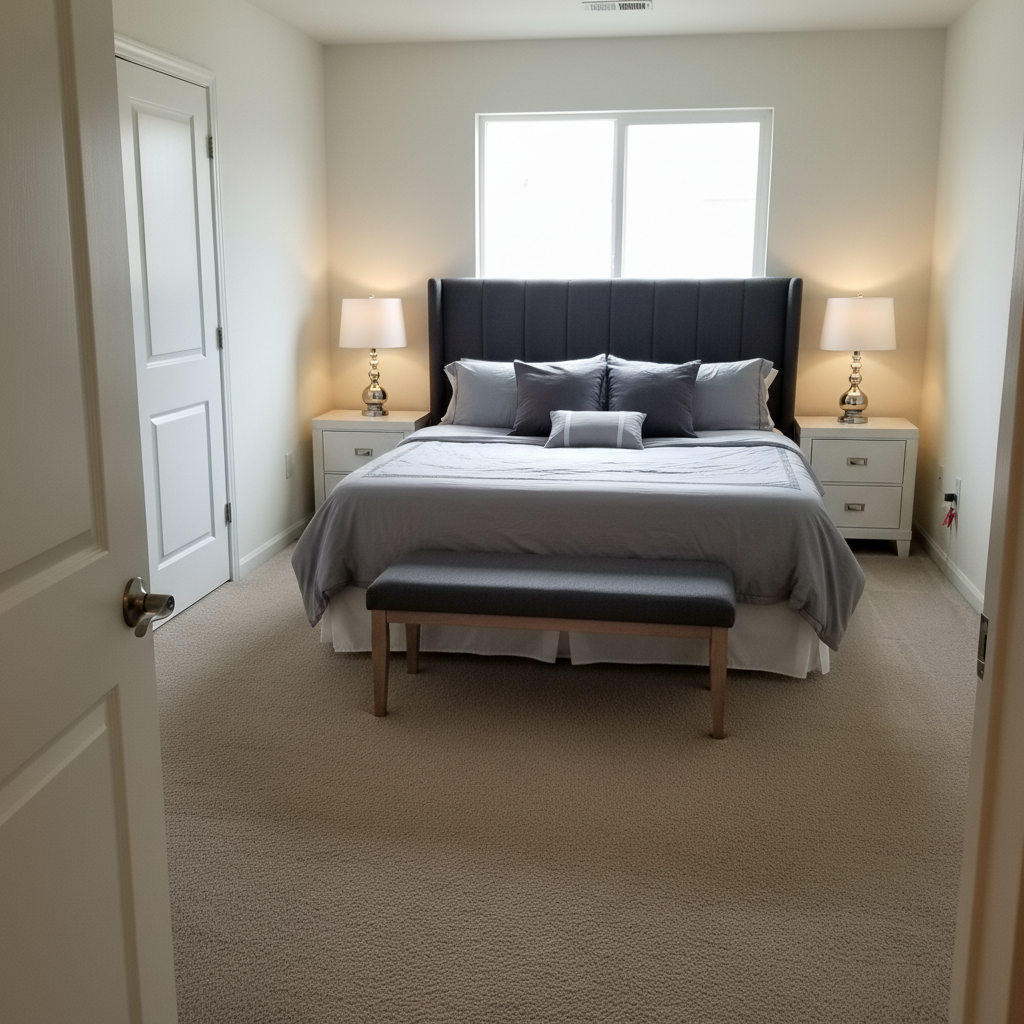
Empty master bedroom virtually staged
A vacant master bedroom staged with complete bed setup for real estate marketing. Shows how king bed fits with room for nightstands and walking space.
add a king-size upholstered bed with gray bedding centered on the main wall, two white nightstands with modern lamps on each side, and a bench at the foot of the bed
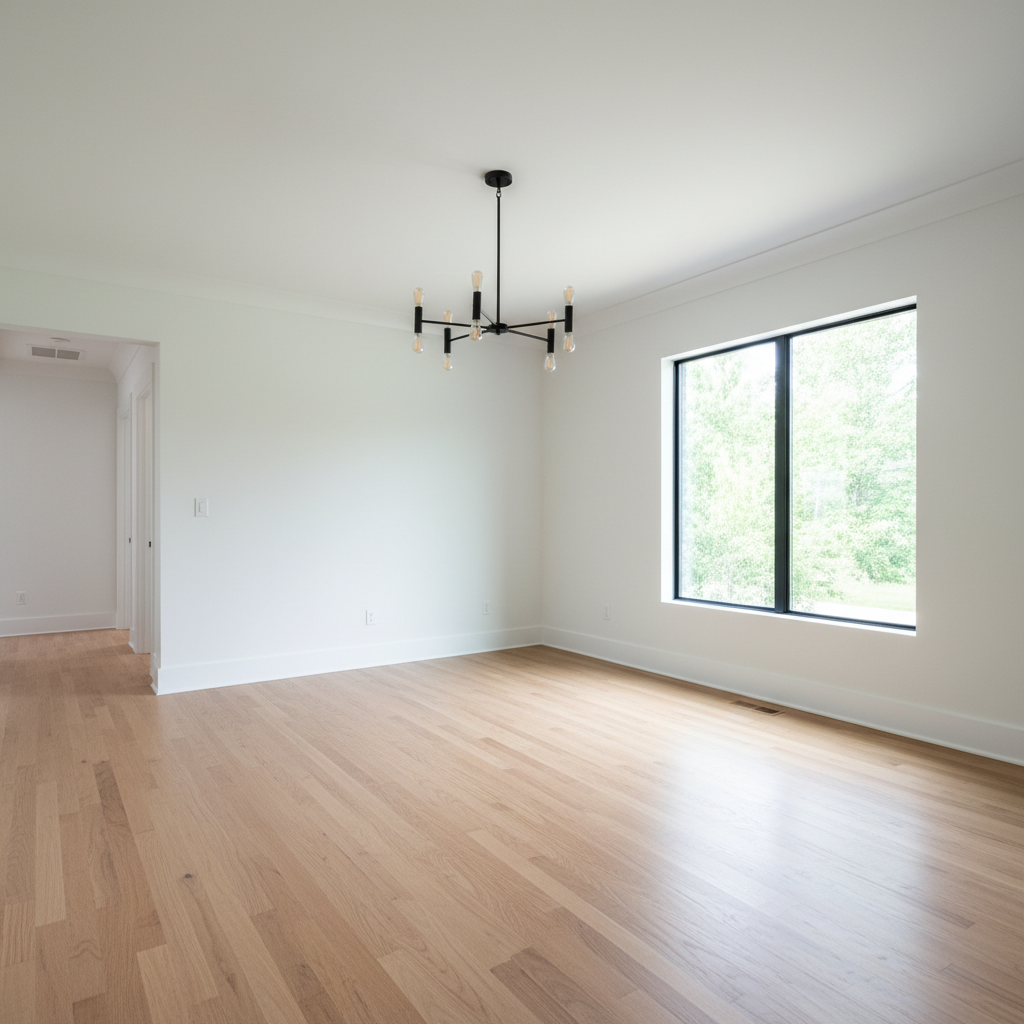
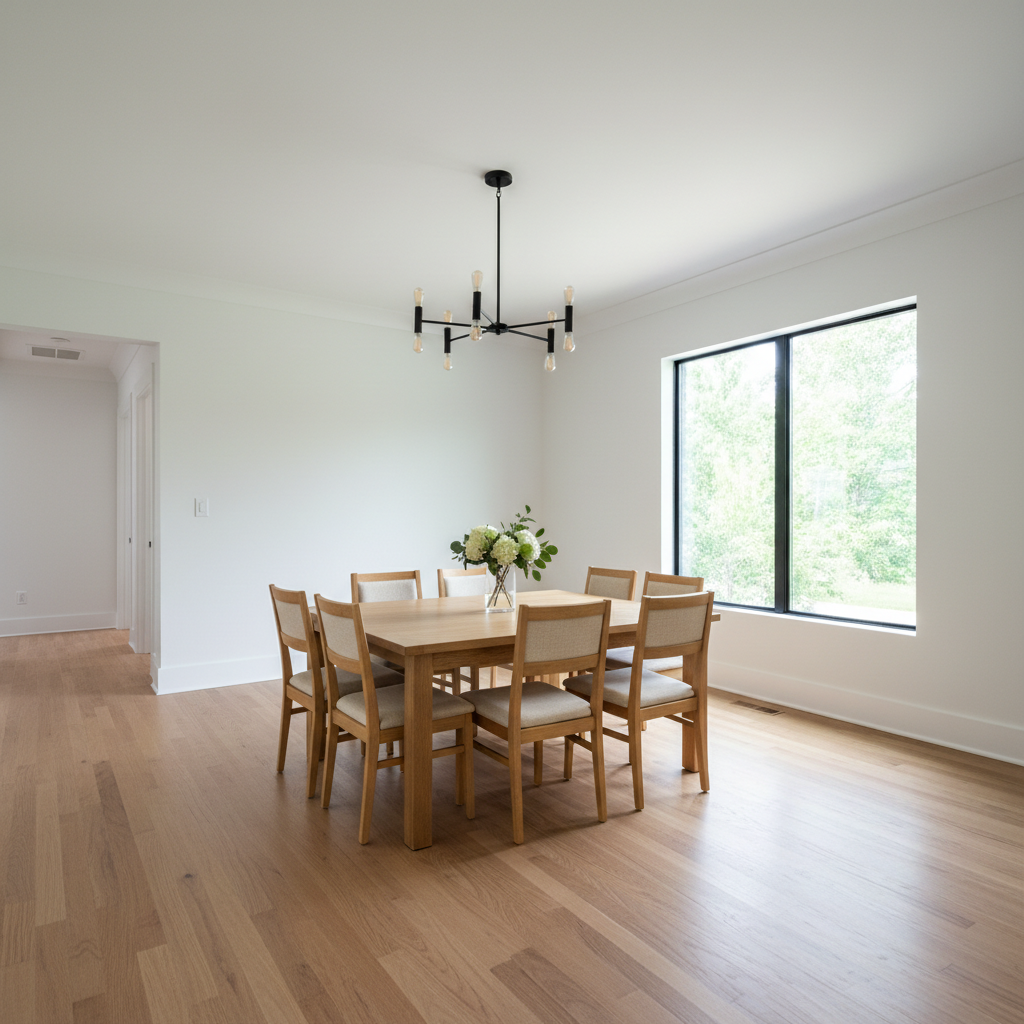
Vacant dining room staged to show capacity
An empty dining area staged with table for six showing the room can accommodate family meals and entertaining. Centered under light fixture in natural position.
add a rectangular wooden dining table for six with upholstered chairs centered under the light fixture, with a simple vase centerpiece
Virtual Staging Troubleshooting
Furniture looks too big or too small for the room
Why: The AI misjudged room dimensions from the photo perspective, creating unrealistic furniture scale.
add apartment-sized furniture that fits proportionally in this room, properly scaled
Include size hints in your prompt: 'apartment-sized sofa' or 'oversized sectional' to guide scale. Straight-on room photos (not wide angle) help AI judge dimensions accurately.
Furniture appears to float above the floor
Why: The AI didn't properly ground the furniture with realistic contact shadows and floor placement.
add furniture grounded naturally on the floor with realistic shadows beneath each piece
Clear, well-lit floor photos help AI place furniture correctly. Mention 'grounded on the floor with natural shadows' if floating persists.
Furniture style doesn't match across different rooms
Why: Without style guidance, the AI generates different aesthetics for each room in your listing.
add mid-century modern furniture with consistent wood tones and clean lines matching the other staged rooms
Name the exact design style in every staging prompt: 'contemporary farmhouse,' 'coastal minimalist,' 'Scandinavian modern.' Save your style prompt and reuse it for every room.
Staged furniture blocks walkways or looks cramped
Why: The AI prioritized filling empty space over practical furniture arrangement and traffic flow.
place furniture leaving clear walking paths between pieces and natural conversation groupings
Describe function, not just items: 'sofa and chairs arranged for conversation' or 'desk positioned with walking space to closet.'
AI added furniture to wrong part of room
Why: Description wasn't specific enough about placement location in the space.
Tap a marker on the exact wall or area where you want furniture, then describe: 'add sofa against this wall facing the window'
Use spatial references in prompts: 'against the far wall,' 'centered under the window,' 'in the corner by the door.' Markers help when verbal description isn't precise enough.
Staged room looks too empty or too cluttered
Why: Balance of furniture pieces doesn't match real estate staging best practices for the room size.
For too empty: add accent pieces like a rug under the coffee table, side table with lamp, and decorative pillows. For too cluttered: remove the small accent pieces and keep only the main furniture
Stage in layers: main furniture first (sofa, bed, table), then add accents (lamps, rugs, pillows) in a second pass. You can always add more but removing is harder.
Virtual Staging Questions
Is virtual staging ethical and legal for real estate listings?
Yes, virtual staging is widely accepted in real estate when disclosed. The NAR (National Association of Realtors) and most MLS systems allow virtually staged photos with disclosure. Always add a note like 'Photos are virtually staged' in your listing description. Virtual staging shows the potential of a space, similar to physically staged homes. Never misrepresent permanent features - stage furniture and decor only, don't add windows or hide structural issues.
Do I need to disclose that photos are virtually staged?
Yes, you must disclose virtual staging in your listing. Most MLS systems and real estate platforms (Zillow, Realtor.com, Redfin) require a note stating 'Photos are virtually staged' or 'Furniture shown is virtual staging.' This protects you legally and manages buyer expectations. Buyers appreciate seeing the space furnished even when disclosed - it helps them visualize room layout and function.
How much does virtual staging cost vs professional staging?
Professional staging costs $50-100 per room on average, with 3-month minimums often totaling $2,000-$5,000 for a typical home. EditThisPic virtual staging is free to try and costs pennies per room for unlimited edits. Even paid virtual staging services charge $30-70 per room. For vacant properties where physical staging isn't practical, virtual staging delivers 90% of the visual impact at 2% of the cost.
Do virtually staged photos sell homes faster?
Yes. Data from the Real Estate Staging Association shows staged homes (physical or virtual) sell 73% faster than vacant listings. The key factor is that 95% of buyers search online first - your photos need to stand out. Virtually staged photos perform nearly as well as physical staging in generating showing requests. Buyers scroll past empty rooms but stop to look at furnished spaces where they can visualize living.
Can I stage multiple rooms to match each other?
Yes. To maintain consistent style across all rooms in a listing, name the specific design style in every staging prompt: 'add modern farmhouse furniture' or 'add mid-century modern pieces.' Save your exact style prompt and reuse it for living room, bedrooms, dining room, and office. Consistent staging makes the whole property feel cohesive and professionally presented.
What if the furniture scale looks wrong or unrealistic?
If furniture appears too large or small, add scale hints to your prompt: 'add apartment-sized sofa' for small rooms or 'add oversized sectional' for large spaces. Straight-on room photos (avoiding extreme wide angle lenses) help the AI judge room dimensions accurately. You can also regenerate with 'smaller furniture' or 'larger pieces' to adjust scale until it looks realistic for the room size.
Ready to stage your vacant listing?
Free to try. No signup required. Save thousands on staging costs.
Stage Your First Room