Free β€’ No signup Add A realistic bear to backyard photo Β· Free

Add Bear to Backyard Photo

Upload a backyard photo and AI drops a bear right in your yard. 'Don't let the dog out.'

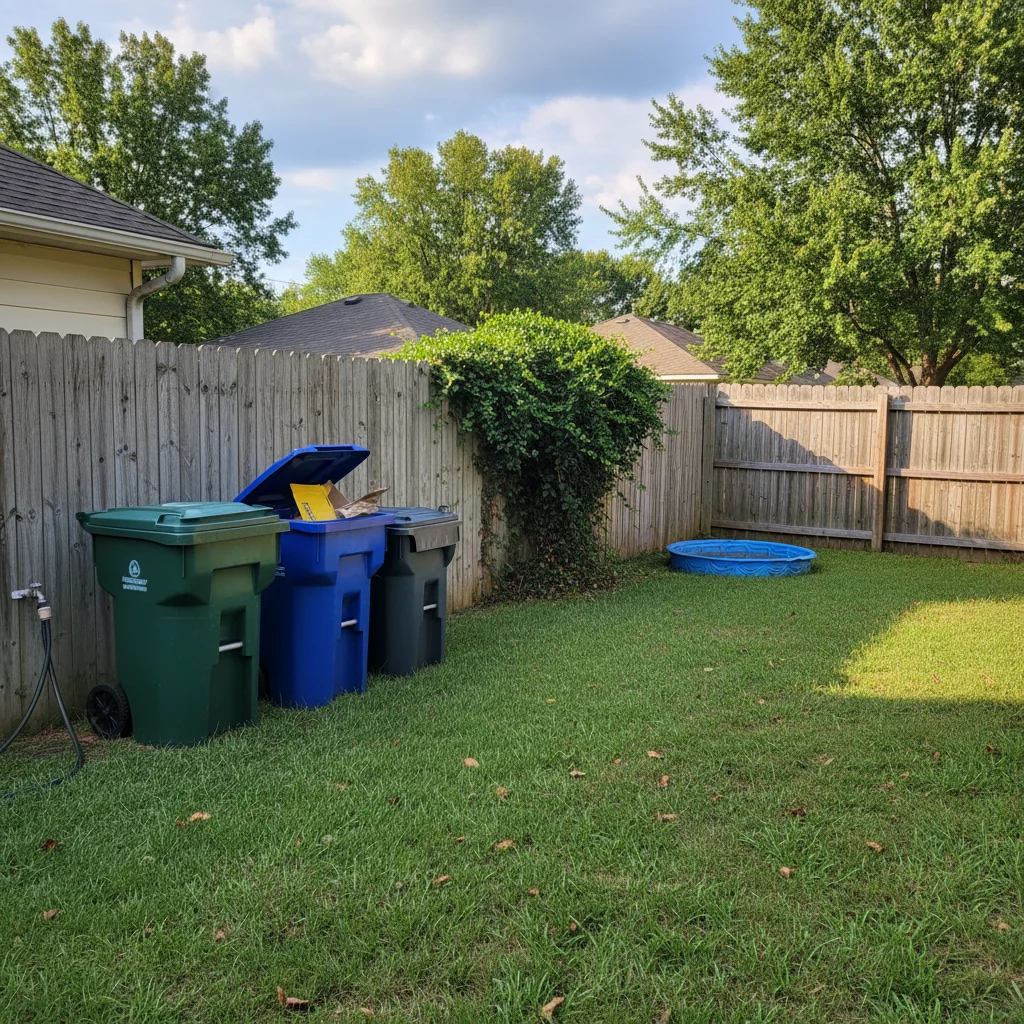
Original photo before edit
Before
β†’
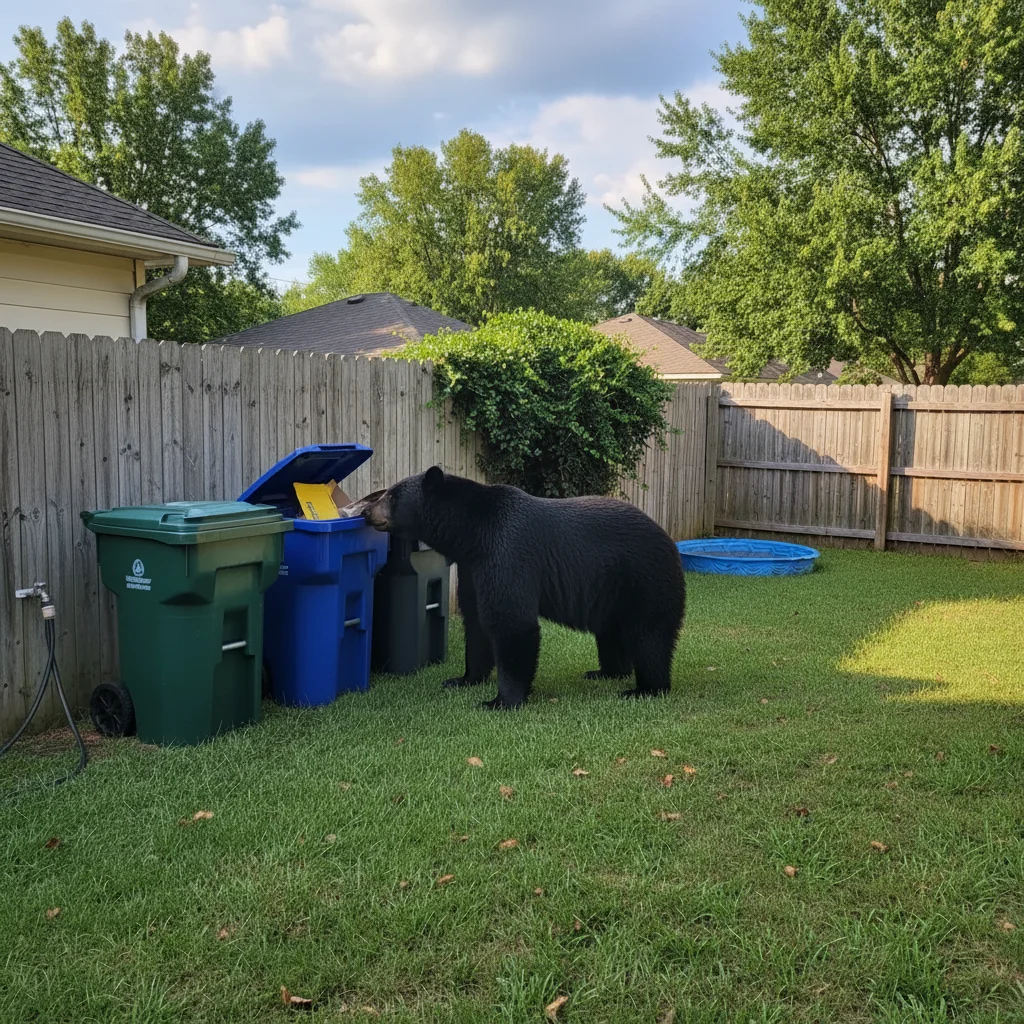
Photo after add with AI
After

Add Bear to Backyard Photo

Upload photo to add a realistic bear to backyard photo

Free β€’ Results in 30 seconds β€’ No signup

Release to upload

FreeNo signupNo watermark

1 free edit·then from $1.99

Popular use cases:
  • add bear to backyard photo
  • bear in yard prank
  • fake bear photo
  • AI bear prank photo

Cost
Free No signup required
Time
Instant results in 15-30 seconds
Works on
Any device - browser, phone, tablet, desktop
Powered by
AI-powered photo editing

How it works

  1. Upload a backyard photo

    Drop a photo of your yard, patio, or outdoor space into EditThisPic. JPG, PNG, WebP up to 7MB. Use your actual backyard for the most convincing prank.

    Expect: Most edits complete in 20-45 seconds.
  2. Describe the bear

    Tell the AI: 'Add a large black bear near the trash cans' or 'Put a bear on the lawn facing the house.' Specify the bear type and pose.

    Tip: Bears near trash cans or bird feeders are the most believable suburban sightings.

    Copy one of these to get started:

    Bear in the trash β€” classic Add a large black bear standing near the trash cans, sniffing at the garbage, looking alert
    Bear on the lawn Add a big brown bear casually walking across this yard, as if it just wandered from the woods
    Bear on the deck Add a black bear standing on the deck, looking in through the sliding glass door like it's trying to get inside
    Mama bear with cubs Add a mother bear with two small cubs in this backyard β€” mom standing alert, cubs playing on the grass
    2 more prompts
    Bear climbing the fence Add a bear climbing over the backyard fence, halfway over, entering from the neighbor's side
    Bear near the pool Add a bear standing at the edge of the pool, looking at the water like it's about to take a dip
  3. Review and send

    Check the bear's size, lighting, and shadows match the scene. Download and send with 'LOOK WHAT'S IN OUR BACKYARD.'

Try it free ↓

Add Bear to Backyard Photo

Upload photo to add a realistic bear to backyard photo

Free β€’ Results in 30 seconds β€’ No signup

Release to upload

Free β€’ No signup

See it in action

Original photo before edit
Before
->
Photo after add with AI
After

Bear near trash cans

Backyard with realistic black bear near the garbage area.

Prompt: Add a large black bear near the trash cans, sniffing at the garbage
Original photo before edit
Before
->
Photo after add with AI
After

Bear on the lawn

Backyard with a brown bear walking across the grass.

Prompt: Add a big brown bear walking across this yard

If something looks off

Bear too small or too large

Why: AI misjudged scale relative to yard elements.

Try: Reference known objects: 'bear about the height of the fence'

Tip: Referencing fence, trash can, or chair helps the AI nail scale.

Bear's lighting doesn't match

Why: Bear was generated with different lighting.

Try: Add: 'match the lighting direction and color temperature to the rest of the yard'

Tip: Overcast lighting is most forgiving for adding animals.

Bear looks like it's floating

Why: Bear's feet aren't grounded.

Try: Add: 'bear standing firmly on the grass with proper ground contact and shadow underneath'

Tip: Always mention 'shadow underneath' β€” it grounds added elements.

Background around bear modified

Why: AI changed nearby elements.

Try: Add: 'keep all yard elements exactly as-is β€” only add the bear'

Tip: Protecting the background ensures only the bear is new.

Quick answers

Do I need to mark where the bear should go?

Not required β€” AI places the bear naturally. Tap a marker for precise placement if needed.

Is the add bear tool free?

Yes, one free Fast edit per week. No signup required. Credit packs start at $1.99.

Will the bear look real enough?

AI generates photorealistic bears with proper fur, shadows, and scene-matched lighting. Very convincing.

Can I choose the type of bear?

Yes β€” black bear, brown bear, grizzly, or polar bear. Black bears are most believable for suburban settings.

Will there be a watermark?

No, EditThisPic never adds watermarks, even on free edits.

Does this work on mobile?

Yes, works in any mobile browser. No app needed.

Can I add other animals?

Yes! Snakes, spiders, raccoons, and more. Check our related prank tools.

How much does EditThisPic cost?

You get 1 free edit per week β€” no account needed. After that, credit packs start at $1.99 for 3 edits. Monthly plans start at $4.99/mo for 15 edits with unused credits rolling over. All edits are full resolution with no watermark.

Ready to put a bear in your backyard?

Free to try. No signup required.

1 free edit included·Credit packs from $1.99