Free β€’ No signup Add A unibrow to a portrait photo Β· Free

Give Someone a Unibrow

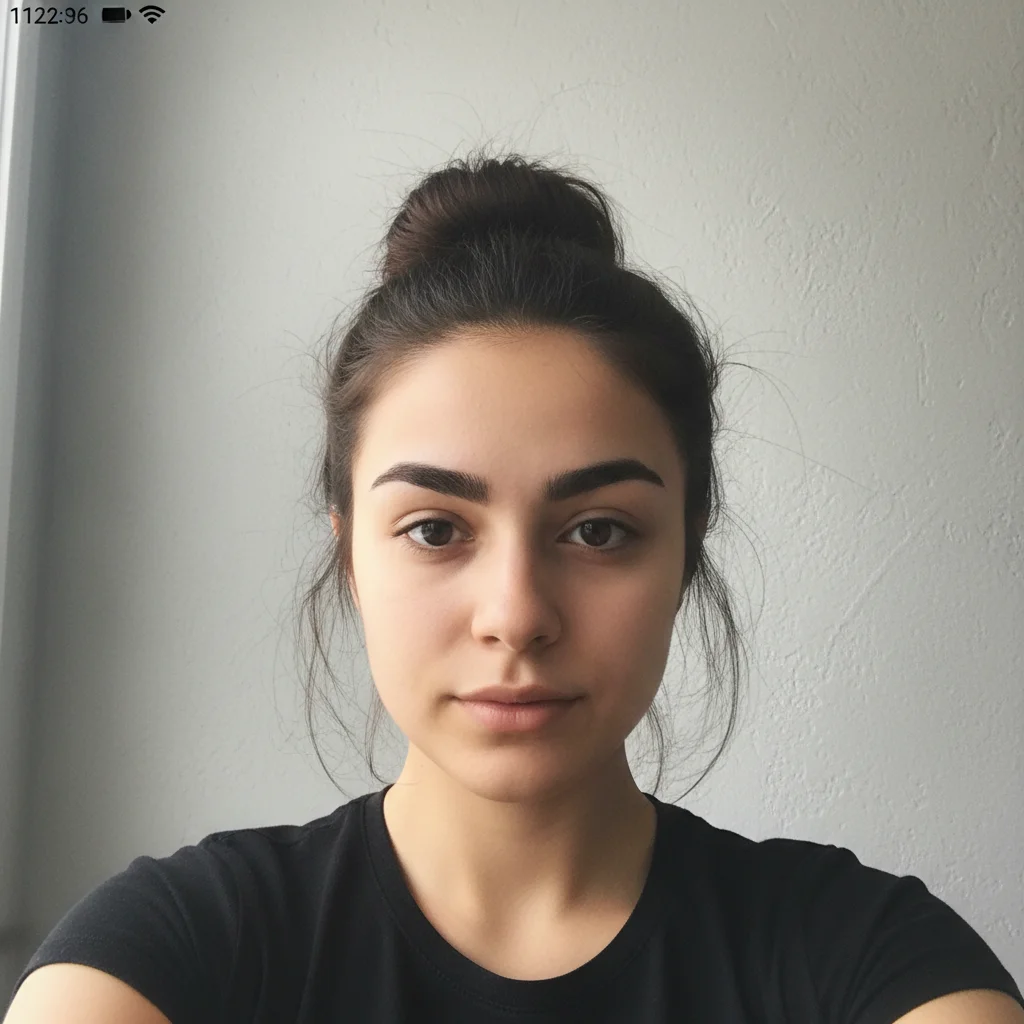
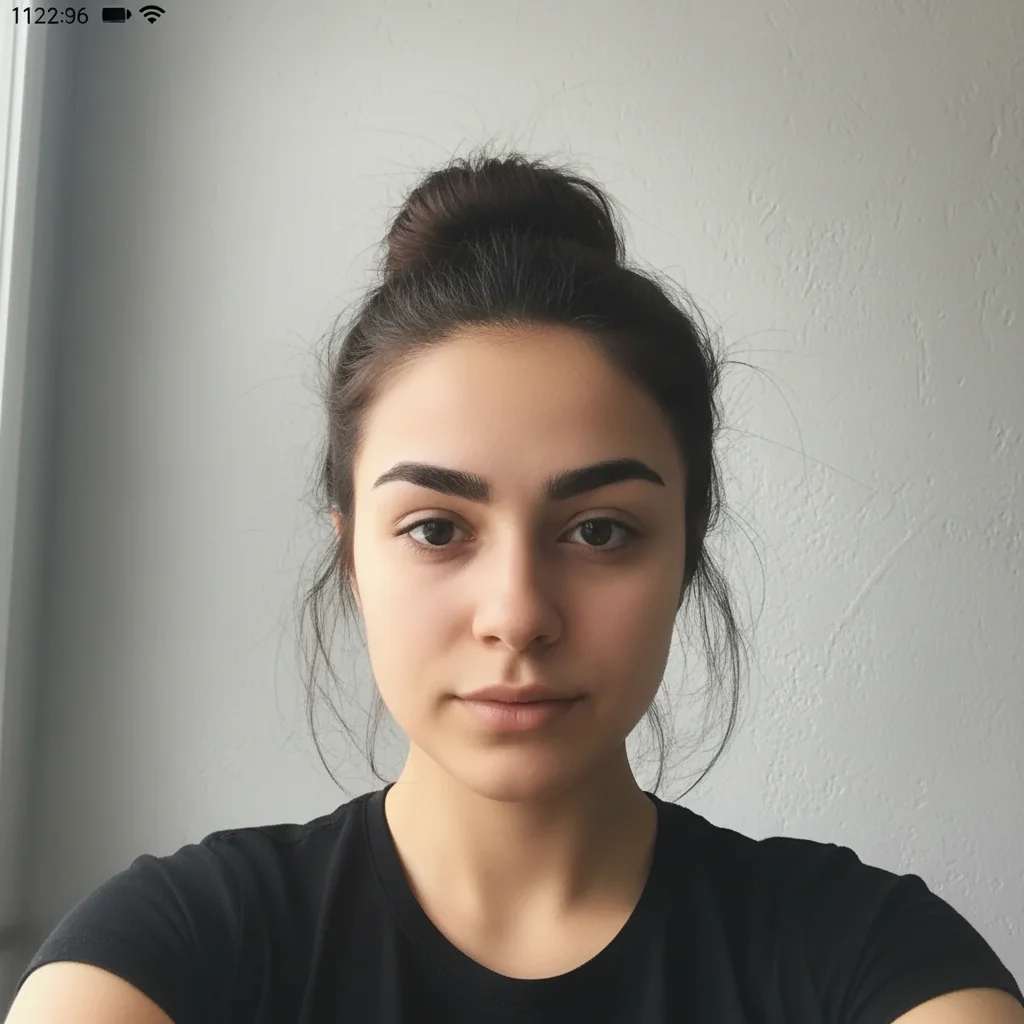
Upload a portrait photo and the AI connects the eyebrows into one thick, natural-looking unibrow. The subtlety is what makes it work β€” people look twice before they realize something is off.

Young woman selfie with normal separate eyebrows
Before
β†’
Same woman with a thick connected unibrow matching her dark brown hair
After

Give Someone a Unibrow in a Photo

Upload photo to add a unibrow to a portrait photo

Free β€’ Results in 30 seconds β€’ No signup

Release to upload

FreeNo signupNo watermark

1 free edit·then from $1.99

Popular use cases:
  • prank photos
  • funny photo edits
  • unibrow photo editor
  • monobrow filter
  • face prank photo maker
  • AI eyebrow editor
  • subtle photo prank
  • portrait face editor free

Cost
Free No signup required
Time
Instant results in 15-30 seconds
Works on
Any device - browser, phone, tablet, desktop
Powered by
AI-powered photo editing
Scenario Prompt Time
Subtle prank Thin unibrow connecting both brows β€” natural texture, matching hair color, narrow bridge 15s
Classic bushy Very thick bushy unibrow, full and prominent, matching natural hair color, never-groomed look 15s
Frida Kahlo style Bold intentional unibrow, thick and defined, as if the person chose to grow it out 15s
Escalation text Moderately thick connected brow, realistic texture, prominent but not cartoon-level 15s

How it works

  1. Upload your photo

    Use a portrait or selfie where the face is clearly visible and the eyebrows are easy to see. Front-facing shots work best β€” the more clearly the brow area is lit and in focus, the more convincing the result.

    Expect: Upload takes a few seconds. JPG, PNG, and HEIC all work.
  2. Describe the unibrow you want

    Type what you want the AI to add. For a realistic prank, try: "Add a thick, natural-looking unibrow that connects both eyebrows into one continuous brow β€” match the hair color and texture exactly to the existing brows, and keep it subtle enough to look like it could be real."

    Tip: The phrase 'match the existing brow color and texture' is the key to realism. Without it the AI sometimes adds a generic dark patch that looks obviously edited.

    Copy one of these to get started:

    Subtle realistic unibrow Add a thick, natural-looking unibrow that connects both eyebrows into one continuous brow β€” match the hair color and texture exactly to the existing brows, keep the bridge narrow enough to look like they just forgot to pluck for a few weeks
    Thick bushy unibrow Add a very thick, bushy unibrow connecting both eyebrows β€” full and prominent, like it's never been groomed, matching the natural hair color but noticeably heavy
    Slight overgrowth Extend both eyebrows slightly toward the center so they almost but don't quite touch β€” like someone who shaves between their brows but hasn't gotten around to it this week
    Full Frida Kahlo-style Add a bold, defined unibrow in the style of Frida Kahlo β€” thick, dark, and intentional-looking, as if the person chose to grow it out as a statement
    3 more prompts
    Escalation text message Add a moderately thick unibrow connecting both brows β€” natural hair color, realistic texture, prominent enough to be noticeable but not cartoon-level β€” like they've been neglecting their grooming
    Old photo treatment Add a thick, connected unibrow and make the photo look slightly aged and faded β€” like an old family portrait from the 80s where unibrows were just more common
    Villain unibrow Add a dramatic thick unibrow with a slight arch in the middle, connecting both brows β€” dark, imposing, slightly furrowed β€” like a cartoon villain who takes themselves very seriously
  3. Send it

    Download the edited photo and send it to your group chat or text it directly to the person. Works especially well when you use it to replace their actual profile picture or drop it into an old photo thread where they won't expect it.

Try it free ↓

Give Someone a Unibrow in a Photo

Upload photo to add a unibrow to a portrait photo

Free β€’ Results in 30 seconds β€’ No signup

Release to upload

Free β€’ No signup

See it in action

Young woman selfie with normal separate eyebrows
Before
->
Same woman with a thick connected unibrow matching her dark brown hair
After

Subtle overgrowth on a selfie

A straight-on selfie got a realistic unibrow added with matching hair color β€” the bridge was kept narrow enough that several people who saw it in a group chat were unsure if it was real.

Prompt: Add a thick, natural-looking unibrow connecting both eyebrows β€” match the hair color and texture to the existing brows, keep the bridge narrow enough to look like they just skipped grooming
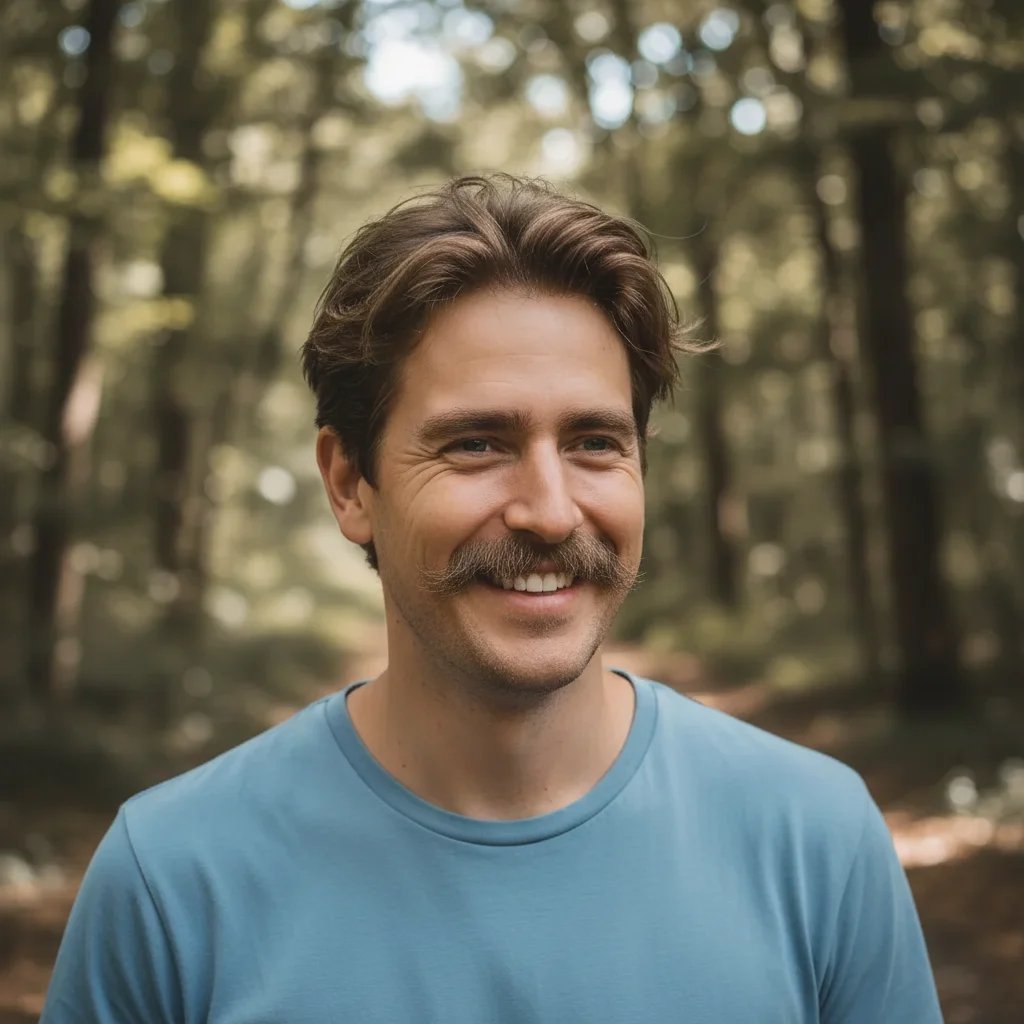
Man in outdoor portrait with normal separate eyebrows
Before
->
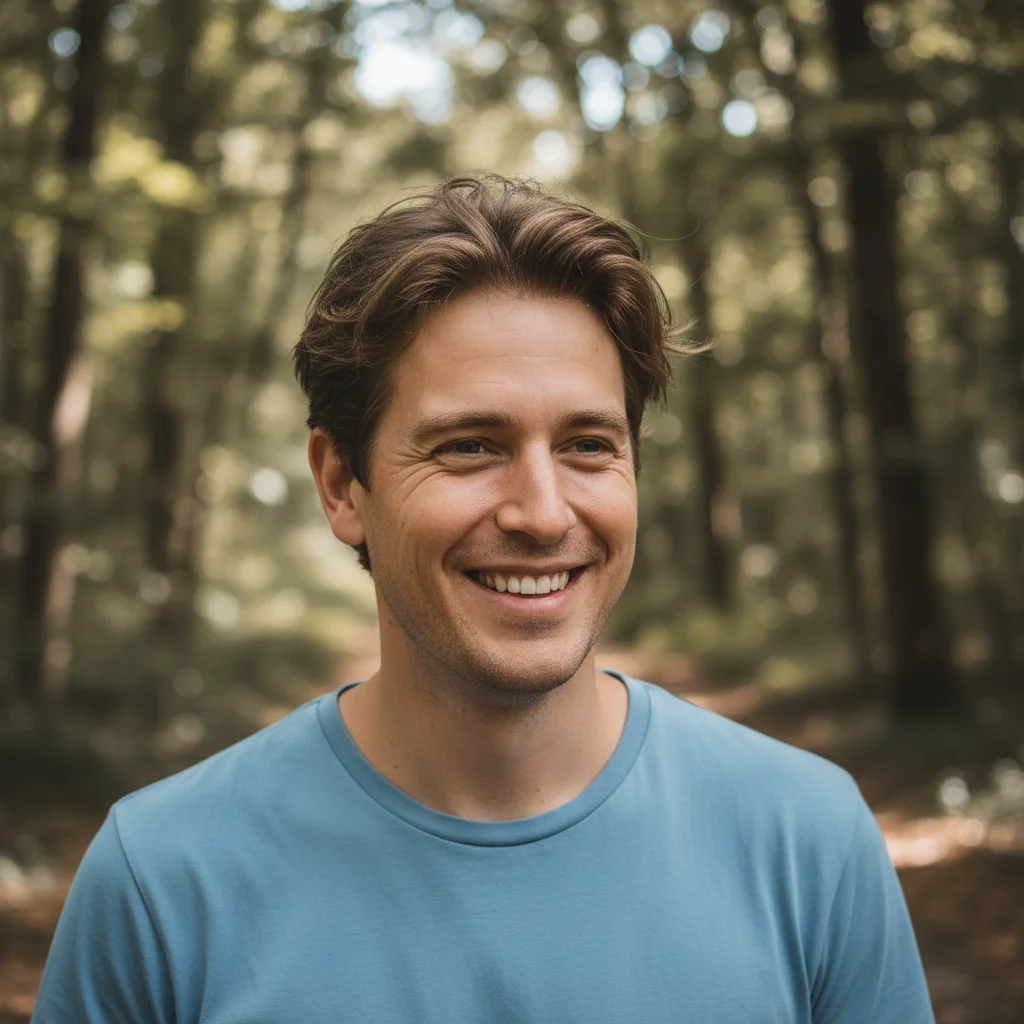
Same man with a thick bushy unibrow connected across the bridge of his nose
After

Bushy unibrow on a casual portrait

A casual outdoor portrait got a full, bushy unibrow added. The hair color matching made it look like the person had simply never groomed between their brows.

Prompt: Add a very thick, bushy unibrow connecting both eyebrows β€” full and prominent, like it's never been groomed, matching the natural hair color

If something looks off

The unibrow color doesn't match the person's natural brows

Why: Without specific instruction, the AI sometimes defaults to a generic dark brown regardless of the person's actual brow color.

Try: Add a unibrow that exactly matches the color and shade of the person's existing eyebrows β€” use the same hair texture and density so it blends seamlessly.

Tip: Always include 'match the existing brow color and texture' in your prompt. It's the single most important phrase for a convincing result.

The unibrow looks like a painted-on patch rather than real hair

Why: A flat-colored fill instead of hair-textured strokes is the most common failure mode for eyebrow edits.

Try: Make the unibrow look like real individual hair strands β€” fine hair texture with natural variation, not a solid fill or painted look.

Tip: Describe it as 'individual hair strands' or 'fine hair texture' rather than just 'hair' β€” more specific language gives better texture results.

The rest of the face changed or looks distorted

Why: The AI occasionally shifts adjacent areas when making targeted facial edits.

Try: Add a unibrow only β€” do not change anything else. Keep the eyes, nose, skin, and all other facial features exactly as they are in the original photo.

Tip: Adding 'do not change anything else' to your prompt significantly reduces unwanted changes to the surrounding face.

The unibrow looks too obvious and not believable

Why: An overly thick or perfectly symmetrical brow immediately reads as edited.

Try: Make the unibrow look natural and slightly imperfect β€” not perfectly shaped or uniform. A bit of variation in thickness, just like real unshaped brow hair.

Tip: Real unibrows have natural irregularities. Ask for 'slight variation in thickness' or 'naturally uneven' to avoid the too-perfect edited look.

The skin bridge between the brows looks patchy or unnatural

Why: The area between the brows has different skin texture from the brow itself, and the AI can struggle to blend the two.

Try: Blend the center bridge of the unibrow naturally into the surrounding skin β€” no harsh edges, no discoloration, smooth skin texture underneath the hair.

Tip: If the bridge area still looks off, try describing the skin under the brow hair as 'normal skin tone, no redness or discoloration'.

Quick answers

Do I need to mark the eyebrow area before describing what I want?

No. Just describe the unibrow in the text box and the AI finds the brow area automatically. You don't need to draw a box around the eyebrows or mark anything. Use the marker tool only if you want to add the unibrow to one specific part of the face and keep everything else completely untouched.

Is this free?

Yes. EditThisPic gives you 1 free edit per week with no account needed. If you want more edits, paid packs start at $1.99. No signup is required for the free edit and there's no watermark on the result.

Will the unibrow look real enough to fool someone?

For most portrait photos with a good prompt, yes. The key is asking the AI to match the existing brow color and texture β€” when the hair matches, most people do a double-take before they're sure whether it's real. Subtle edits (narrow bridge, slight overgrowth) fool people more reliably than an exaggerated bushy brow.

What type of photo works best?

A clear front-facing portrait or selfie works best. The eyebrows should be visible and reasonably in focus. Avoid photos where the brows are obscured by hair, sunglasses, or heavy shadow. Better lighting gives the AI more to work with for texture and color matching.

Can I add the unibrow to someone else's photo?

Yes β€” you can upload any portrait photo and describe the edit. The AI edits whatever face is in the image. Just make sure you have permission to edit and share photos of other people.

How is this different from apps like BaldBooth or Menace?

Apps like BaldBooth and Menace use preset overlays β€” they stamp a fixed image onto the photo regardless of the person's actual features. EditThisPic's AI reads your description and generates a unibrow that's matched to the specific person in the photo β€” their hair color, brow thickness, and face shape. You can also dial in exactly how subtle or dramatic you want it.

Does EditThisPic store my photos?

Photos are processed to generate the edit and not stored long-term. Nothing is used for training data or shared with third parties. Download your result before closing the session if you want to keep it.

Can I adjust the result if the unibrow is too thick or too subtle?

Yes. If the first result isn't right, describe the change and submit again. You can make it thicker ('add more density and volume to the unibrow'), more subtle ('thin the bridge so it looks like a few stray hairs'), or adjust the color. Each edit uses one credit.

How much does EditThisPic cost?

You get 1 free edit per week β€” no account needed. After that, credit packs start at $1.99 for 3 edits. Monthly plans start at $4.99/mo for 15 edits with unused credits rolling over. All edits are full resolution with no watermark.

Ready to give someone a unibrow?

Free to try. No signup required.

1 free edit included·Credit packs from $1.99