Free • No signup Try on Wig · Free

AI Wig Try-On

Describe the wig you want to try and AI shows it on you instantly. No marking needed.
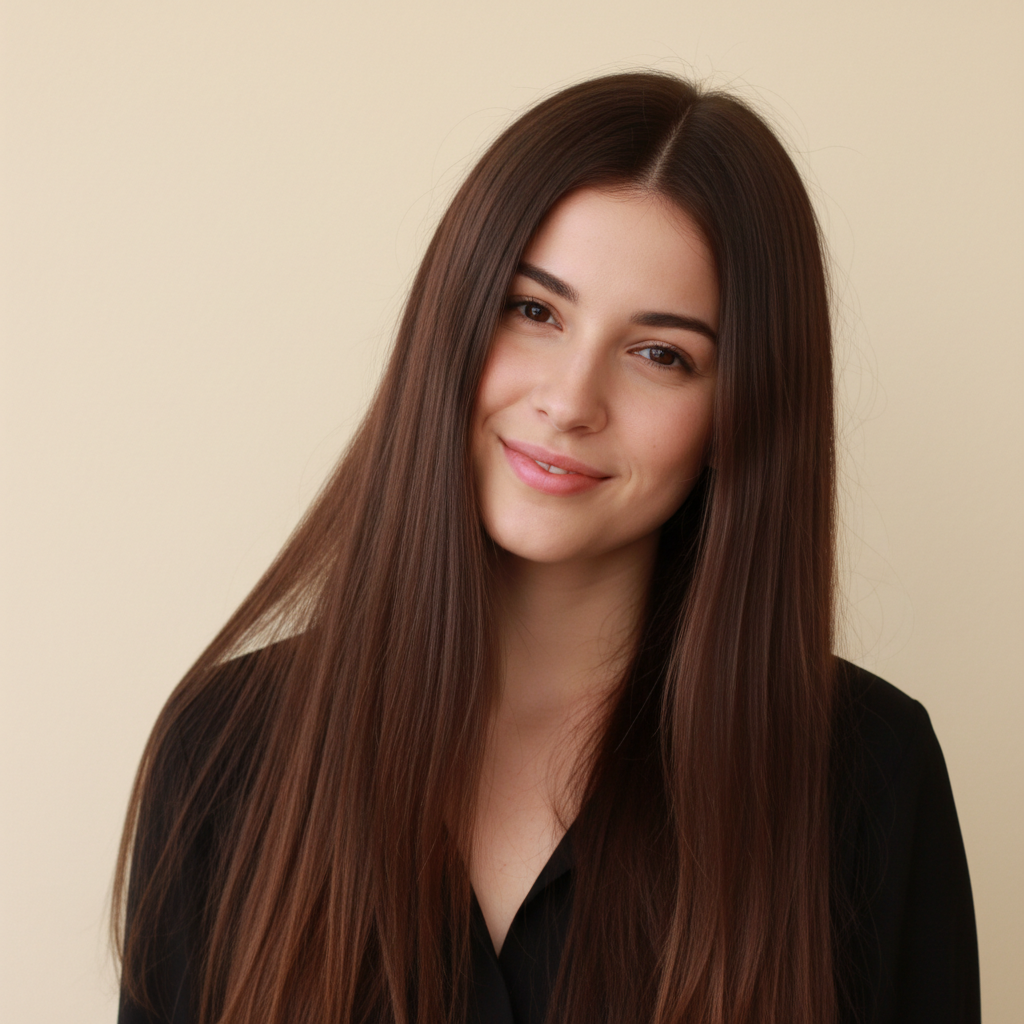
Woman with very short cropped natural hair
Before
Same woman wearing a long straight black wig with center part
After

AI Wig Try-On

Drop your photo here

or click to browse

Release to upload

Free • No signup

Advertisement
Popular use cases:
  • wig shopping preview
  • virtual wig fitting
  • cosplay wig planning
  • wig store visualization
  • hair loss wig preview
  • wig style comparison
  • online wig try-on
  • wig color testing

Cost
Free No signup required
Time
Instant results in 15-30 seconds
Works on
Any device - browser, phone, tablet, desktop
Powered by
AI-powered photo editing
Scenario Prompt Time
Simple wig try-on put a long straight black wig on this person 30s
Styled wig with details try on a chin-length bob wig with lace front 40s
Reference image wig put the wig from the reference image on this person 45s

How it works

  1. Upload your photo

    Drop your image into EditThisPic. JPG, PNG, WebP up to 7MB. Front-facing photos where the head and face are clearly visible work best. The AI needs to see the head shape to place the wig naturally.

    Expect: Standard wig try-on: 30-40 seconds. Complex wig styles like braids or elaborate curls: 45-60 seconds and may need refinements.
  2. Describe the wig

    Type what you want: 'put a long straight blonde wig on this person' or 'try on a short curly black bob wig.' Be specific about length, color, texture, and style. No marking needed—the AI replaces the current hair with the described wig automatically.

    Tip: Include wig-specific details like 'lace front', 'side part', or 'bangs' for more specific wig styles.

    Copy one of these to get started:

    Long straight wig put a long straight black wig on this person, sleek and reaching mid-back with a center part
    Short bob wig try on a chin-length blonde bob wig with a lace front hairline and side part
    Curly volume wig put a voluminous curly brown wig on this person, big bouncy curls with natural shine
    Colorful fashion wig try on a bright purple wig, long and wavy with a lace front
    3 more prompts
    Pixie wig put a short pixie wig on this person, auburn color with layered texture and side-swept bangs
    Cosplay wig try on a long silver-white cosplay wig with straight bangs and hair reaching the waist
    Natural textured wig put a natural kinky curly wig on this person, shoulder-length with defined coils and volume
  3. Review the wig look

    Check that the wig looks natural on the head. Look for proper hairline placement, natural volume, and hair that matches the described texture. Zoom in on the forehead and ear areas.

  4. Refine with markers if needed

    If the wig placement, hairline, or volume needs adjustment, tap markers on those areas and regenerate. Most wig try-ons look great on the first try.

    Tip: Markers are for precision refinement only. Try without them first—you usually won't need them.
Try it free

AI Wig Try-On

Drop your photo here

or click to browse

Release to upload

Free • No signup

"I sell wigs online and clients always ask 'how will this look on me?' Now I just upload their photo and show them. Conversion rate went through the roof." @WigShop_Leena

See it in action

Woman with very short cropped natural hair
Before
->
Same woman wearing a long straight black wig with center part
After

Short hair to long straight wig

A person with short natural hair tries on a long straight black wig to preview a new look for an event.

Prompt: put a long straight black wig on this person, sleek and reaching mid-back with a center part

Woman with short straight dark hair
Before
->
Same woman wearing a voluminous curly brown wig
After

Natural hair to curly fashion wig

Previewing a voluminous curly wig for a client considering a new wig purchase.

Prompt: put a voluminous curly brown wig on this person, big bouncy curls with natural shine
Advertisement

If something looks off

AI changed the wrong area or something I didn't want changed

Why: The AI couldn't determine exactly what you meant from description alone. It may have altered facial features alongside replacing the hair.

Try: Tap a marker on the hair/head area, then regenerate: replace the hair with a wig, keep face and features unchanged

Tip: Markers tell the AI 'I mean THIS area specifically.' Use them when the AI makes unwanted changes beyond the hair.

Wig looks placed on top rather than naturally worn

Why: The AI didn't fully integrate the wig with the head shape, leaving a visible gap or unnatural placement.

Try: put the wig on naturally following the head shape, with a realistic hairline that blends into the forehead

Tip: Adding 'realistic hairline that blends' tells the AI to focus on the most critical area for natural wig appearance.

Original hair is still partially visible under the wig

Why: The AI didn't fully remove the original hairstyle before placing the new wig, especially around the edges.

Try: completely replace all existing hair with the described wig, no original hair visible

Tip: 'No original hair visible' explicitly tells the AI to fully swap rather than overlay.

Wig volume or length is wrong

Why: Without precise length or volume references, the AI estimated differently from what you intended.

Try: adjust the wig to be [specific length: shoulder-length, mid-back, waist-length] with [volume level: flat, medium, voluminous]

Tip: Using body landmarks for length ('shoulder-length', 'mid-back') is more precise than 'long' or 'short.'

Wig color looks flat or unnatural

Why: The AI generated a uniform color without the highlights and dimension that real wigs have.

Try: put on a [color] wig with natural highlights and lowlights for dimension, realistic hair shine

Tip: Real wigs have color variation. Mentioning 'highlights and lowlights' creates more photorealistic results.

Quick answers

Do I need to mark my hair before trying on a wig?

No! Just describe the wig: 'put a long blonde bob wig on this person.' The AI automatically replaces your current hair with the described wig. Only use markers if the AI isn't properly replacing all the original hair in a specific area.

How do I try on a wig virtually for free?

Upload your photo to EditThisPic and type a wig description like 'try on a curly red wig.' The AI replaces your hair with the described wig in 30-45 seconds. Free to use, no account required, no watermarks on the result.

Is there a free virtual wig try-on tool that doesn't require signup?

Yes, EditThisPic offers virtual wig try-on for free with no account needed. Upload your photo, describe any wig style, and download the result. No watermarks. Works for every wig type from bobs to long flowing wigs to cosplay styles.

Can I try on a specific wig from a photo I have?

Yes! Click '+ Add reference image' and upload a photo of the wig you want to try. Then type 'put the wig from the reference image on this person.' The AI matches the style, color, and texture from your reference photo.

Ready to try on a wig virtually?

Free to try. No signup required.

Try it free