Free โ€ข No signup Add Fall background ยท Free

Add Fall Autumn Background to Photo

Transform any photo with the warm colors of fall - golden leaves, pumpkin patches, and autumn sunlight.

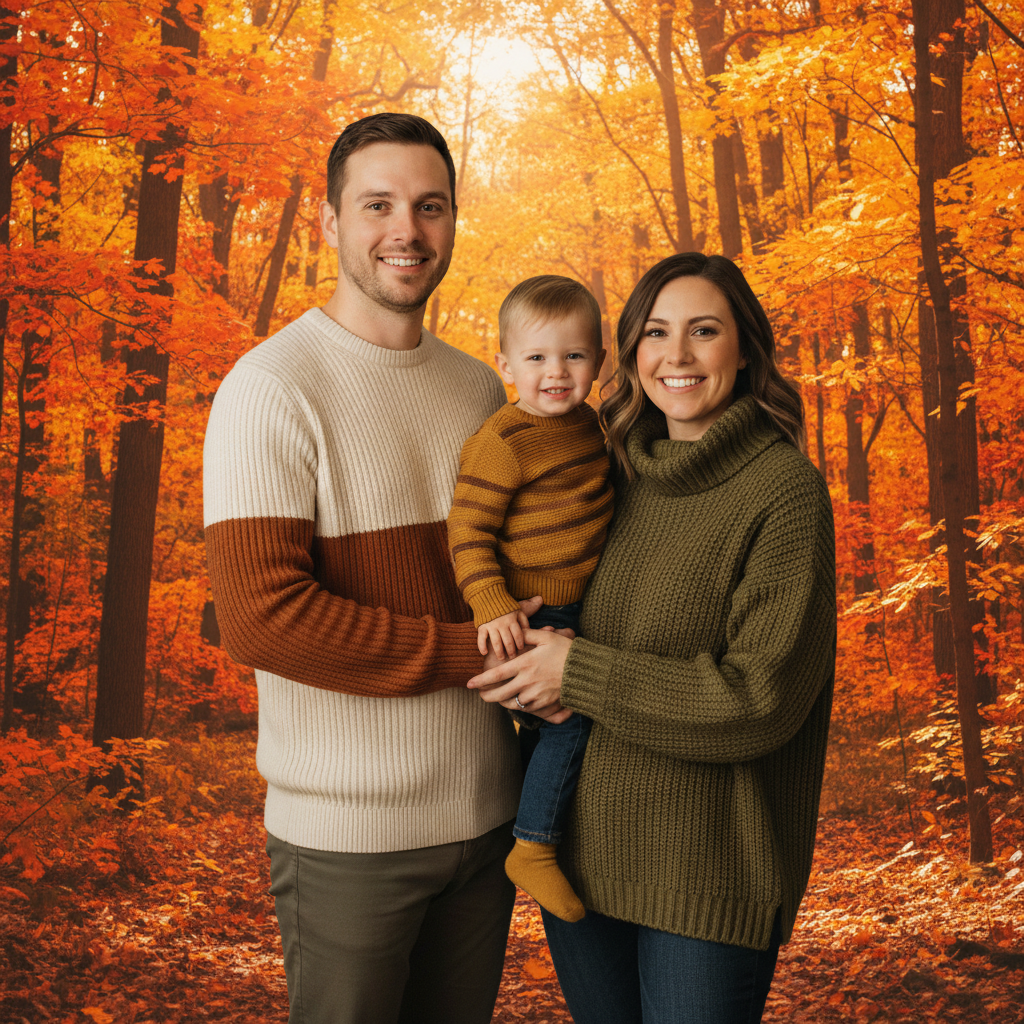
Family of three against plain wall
Before
โ†’
Same family with colorful fall forest background
After

Add Fall/Autumn Background to Photo

Drop your photo here

or click to browse

Release to upload

Free โ€ข No signup

Advertisement
Popular use cases:
  • add fall background to photo
  • autumn photo background
  • fall foliage background
  • pumpkin patch background
  • autumn leaves background
  • fall family photo background
  • seasonal photo editor
  • autumn picture maker

Cost
Free No signup required
Time
Instant results in 15-30 seconds
Works on
Any device - browser, phone, tablet, desktop
Powered by
AI-powered photo editing

How it works

  1. Upload your photo

    Drop your photo into EditThisPic. Portraits, family photos, pet shots, or any photo works well. The AI will replace whatever background is there with your autumn scene.

    Expect: Most fall background additions take 15-20 seconds. The warm autumn colors blend beautifully with most subjects.
  2. Describe your autumn scene

    Type what you want: 'replace background with colorful fall forest, orange and yellow leaves, warm autumn sunlight' or 'change the background to a pumpkin patch with fall decorations.' Include colors and lighting for the best match.

    Tip: Autumn lighting is typically warm and golden. Adding 'warm golden hour sunlight' or 'soft autumn afternoon light' helps the background blend naturally with your subjects.

    Copy one of these to get started:

    Classic fall foliage replace background with beautiful fall forest, vibrant orange red and yellow autumn leaves, warm golden sunlight filtering through trees

    Pumpkin patch scene replace background with a charming pumpkin patch, various sized pumpkins, fall harvest decorations, warm afternoon light
    Country road with fall trees replace background with a scenic country road lined with fall trees, colorful leaves covering the ground, soft autumn afternoon lighting
    Golden hour autumn field replace background with a golden autumn field at sunset, tall grass, warm orange light, beautiful fall sky
    3 more prompts
    Cozy apple orchard replace background with an apple orchard in fall, trees with red apples, fallen leaves on the ground, warm rustic autumn atmosphere
    Blurred fall bokeh replace background with soft blurred autumn colors, bokeh effect with orange yellow and red fall tones, professional portrait style
    Rainy autumn day replace background with a moody autumn scene, colorful fall trees, overcast sky, glistening wet leaves, cozy fall atmosphere
  3. Review the seasonal scene

    Check that the fall colors complement your subjects. Verify the lighting matches and the overall composition creates the autumn feel you wanted. The warm colors of fall work especially well with cozy outfits.

  4. Refine if needed

    If edges need cleanup or you want a different autumn style, tap markers on specific areas or describe adjustments: 'make the fall colors more vibrant' or 'add more orange leaves in the background.'

    Tip: Fall backgrounds are forgiving - the varied colors and textures of leaves naturally hide minor edge imperfections.
Try it free โ†“

Add Fall/Autumn Background to Photo

Drop your photo here

or click to browse

Release to upload

Free โ€ข No signup

"We missed our fall family photo session because of rain. Used EditThisPic to add a gorgeous autumn forest background to our indoor photo. It looks like we went to a professional fall shoot!" @FallPhotoSaver

See it in action

Family of three against plain wall
Before
->
Same family with colorful fall forest background
After

Family photo with fall foliage

A family portrait transformed with vibrant autumn forest colors for a seasonal photo.

Prompt: replace background with beautiful fall forest, vibrant orange red and yellow autumn leaves, warm golden sunlight filtering through trees
Young child against gray backdrop
Before
->
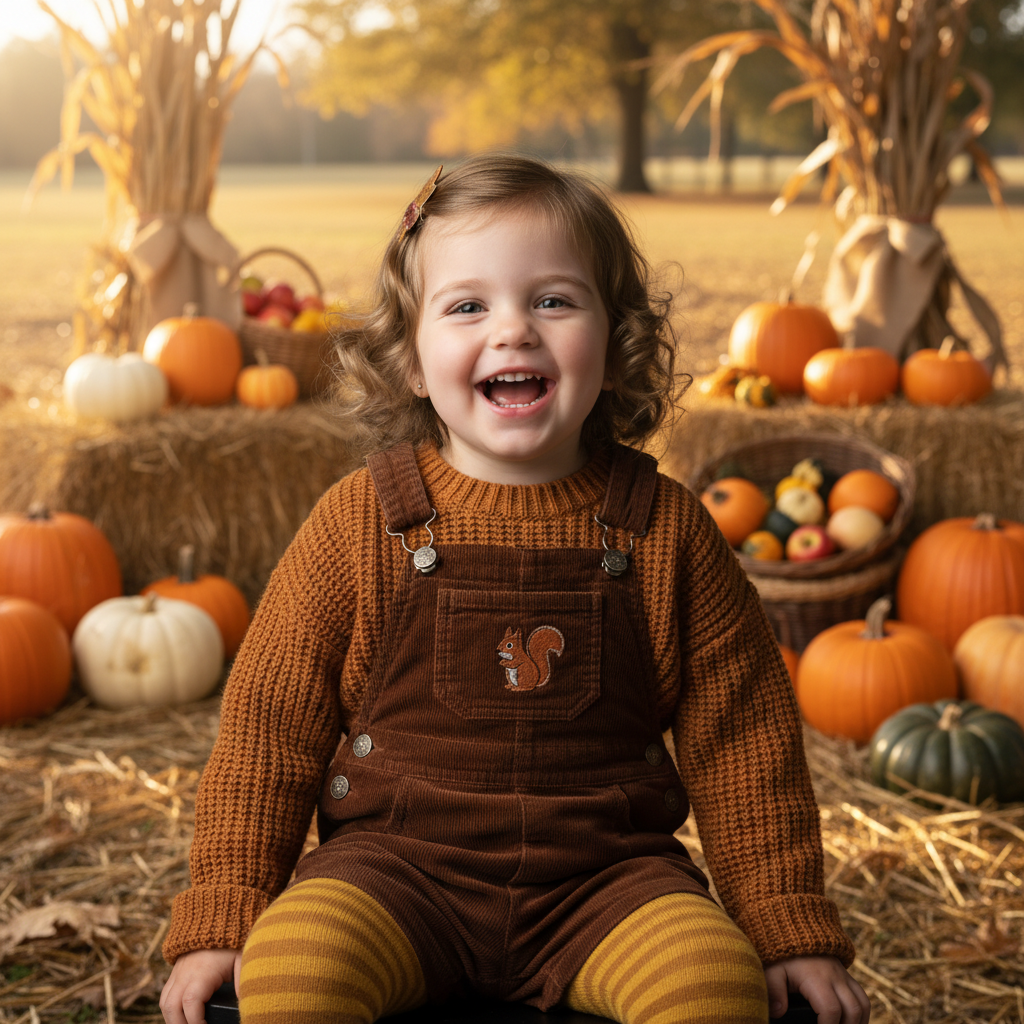
Same child with pumpkin patch background
After

Child portrait in pumpkin patch

A child's portrait given a charming pumpkin patch background for autumn-themed photos.

Prompt: replace background with a charming pumpkin patch, various sized pumpkins, fall harvest decorations, warm afternoon light

Couple against plain white wall
Before
->
Same couple with golden autumn field background
After

Couple with golden hour autumn

A couple's photo enhanced with warm golden autumn field at sunset.

Prompt: replace background with a golden autumn field at sunset, tall grass, warm orange light, beautiful fall sky
Advertisement

If something looks off

Colors clash with subject's clothing

Why: Some outfit colors don't complement the warm fall palette as well as others.

Try: replace background with a softer autumn scene, more muted fall colors that complement the subject's clothing

Tip: Earth tones, burgundy, and navy photograph best against fall backgrounds. If clothing clashes, try a blurred autumn bokeh instead

Lighting doesn't match

Why: Your photo's lighting differs from the typical warm autumn light.

Try: replace background with fall scene that matches the lighting direction in my photo, similar light temperature

Tip: If your photo has cool lighting, try 'overcast autumn day' instead of 'golden hour' for better matching

Background looks too busy

Why: Detailed fall foliage can compete with your subject for attention.

Try: replace background with soft blurred autumn colors, bokeh effect keeping subject as the focus

Tip: Blurred backgrounds maintain the fall feeling without distracting from your subject

AI changed something besides the background

Why: The AI may have interpreted the autumn colors as applying to the subject too.

Try: Tap a marker on your subject, then: 'keep this person exactly as they are, only change the background to autumn scene'

Tip: Markers that protect your subject ensure only the background changes

Edges around hair look unnatural

Why: Fine hair details against colorful autumn leaves can be challenging.

Try: Tap markers along hair edges, then: 'blend the hair edges naturally with the fall background'

Tip: The varied colors of fall leaves actually help hide minor edge issues better than solid backgrounds

Quick answers

Do I need to mark around people before adding the fall background?

No. Just describe what you want: 'replace background with fall forest and colorful leaves.' The AI automatically identifies your subjects and replaces the background. Only use markers if you need to refine edges afterward.

How do I add a fall background to a photo for free?

Upload your photo to EditThisPic and describe the autumn scene: 'replace background with colorful fall foliage and warm golden light.' The AI creates your fall photo in about 15 seconds. It's completely free, requires no account, and downloads with no watermark.

Is there a free fall background tool that doesn't need login?

Yes. EditThisPic adds fall and autumn backgrounds to photos for free without requiring any account or signup. Simply upload your photo, describe the fall scene you want, and download the result. Perfect for seasonal photos and social media.

What colors photograph best with fall backgrounds?

Earth tones (brown, tan, cream), burgundy, navy, forest green, and mustard yellow all complement fall backgrounds beautifully. Avoid bright colors that might clash with the warm autumn palette. Neutral colors also work well.

Can I add fall backgrounds to pet photos?

Yes. Pet photos work wonderfully with fall backgrounds. The warm autumn colors complement most fur colors. Popular options include leaf-covered paths, pumpkin patches, and colorful fall forests. Great for seasonal pet portraits.

Add the warm colors of fall to any photo

Create beautiful autumn photos in seconds.

Try it free โ†’