Free • No signup Enhance Jawline · Free

AI Jawline Enhancer

Describe the jawline enhancement you want and AI defines it instantly. No marking needed.

Man with soft, undefined jawline
Before
Same man with sharp, well-defined jawline
After

AI Jawline Enhancer

Drop your photo here

or click to browse

Release to upload

Free • No signup

Advertisement
Popular use cases:
  • jawline enhancement
  • jawline definition photo
  • sharper jaw in photo
  • jaw contouring
  • chin definition
  • professional headshot jaw
  • face structure editing
  • angular jaw look

Cost
Free No signup required
Time
Instant results in 15-30 seconds
Works on
Any device - browser, phone, tablet, desktop
Powered by
AI-powered photo editing
Scenario Prompt Time
Subtle definition subtly define the jawline, keep it natural 30s
Angular jaw structure enhance jawline to be more angular and squared 35s
Full jaw sculpting define jawline, clean chin-to-neck transition, add shadow 45s

How it works

  1. Upload your photo

    Drop your image into EditThisPic. JPG, PNG, WebP up to 7MB. Front-facing or slightly angled portraits show jawline enhancement best. Good lighting that creates natural shadows along the jaw produces the most realistic results.

    Expect: Subtle jawline definition: 30-40 seconds. Significant sculpting with chin work: 40-55 seconds and may need refinements.
  2. Describe the jawline enhancement

    Type what you want: 'define the jawline for a sharper look' or 'enhance the jawline with more angular definition and a clean chin-to-neck transition.' Be specific about what aspect—sharper angles, better definition, or a cleaner neckline. No marking needed—the AI understands jawline anatomy.

    Tip: Mention shadow direction if visible in your photo: 'define the jawline with natural shadows from the left' for more realistic contouring.

    Copy one of these to get started:

    Natural jawline definition define the jawline for a sharper, more angular look while keeping it natural and proportional to the face

    Clean chin-to-neck transition enhance the jawline definition and create a cleaner, more defined transition from chin to neck
    Masculine jaw structure enhance the jawline to be more angular and squared, adding a stronger masculine jaw structure
    Subtle professional headshot jaw subtly define the jawline for a more polished professional headshot appearance
    3 more prompts
    Contoured V-line jaw contour the jawline into a V-line shape, tapering from defined angles down to a refined chin
    Symmetrical jaw correction enhance the jawline symmetrically, making both sides equally defined and balanced
    Jawline with shadow sculpting define the jawline and add natural shadow sculpting along the jaw edge to enhance the angular structure
  3. Review the enhancement

    Check that the jawline looks naturally defined, not artificially sharp. Zoom in to verify that skin texture along the jaw is consistent and the enhancement blends with the neck and cheeks. Ensure both sides are symmetrical.

  4. Refine with markers if needed

    If one side of the jaw needs more definition or the chin-to-neck area needs further work, tap a marker on that spot and regenerate. Most jawline enhancements work well on the first try.

    Tip: Markers are for precision refinement only. Try without them first—you usually won't need them.
Try it free

AI Jawline Enhancer

Drop your photo here

or click to browse

Release to upload

Free • No signup

"Game changer for my LinkedIn photo. My jaw looked soft in every angle, but one prompt gave me the defined jawline I wanted. Subtle enough that nobody questioned if the photo was real." @LinkedInReady_Dan

See it in action

Man with soft, undefined jawline
Before
->
Same man with sharp, well-defined jawline
After

Soft jawline sharpened for headshot

A portrait with an undefined jawline enhanced to a sharper, more structured look for professional use.

Prompt: define the jawline for a sharper, more angular look while keeping it natural and proportional to the face
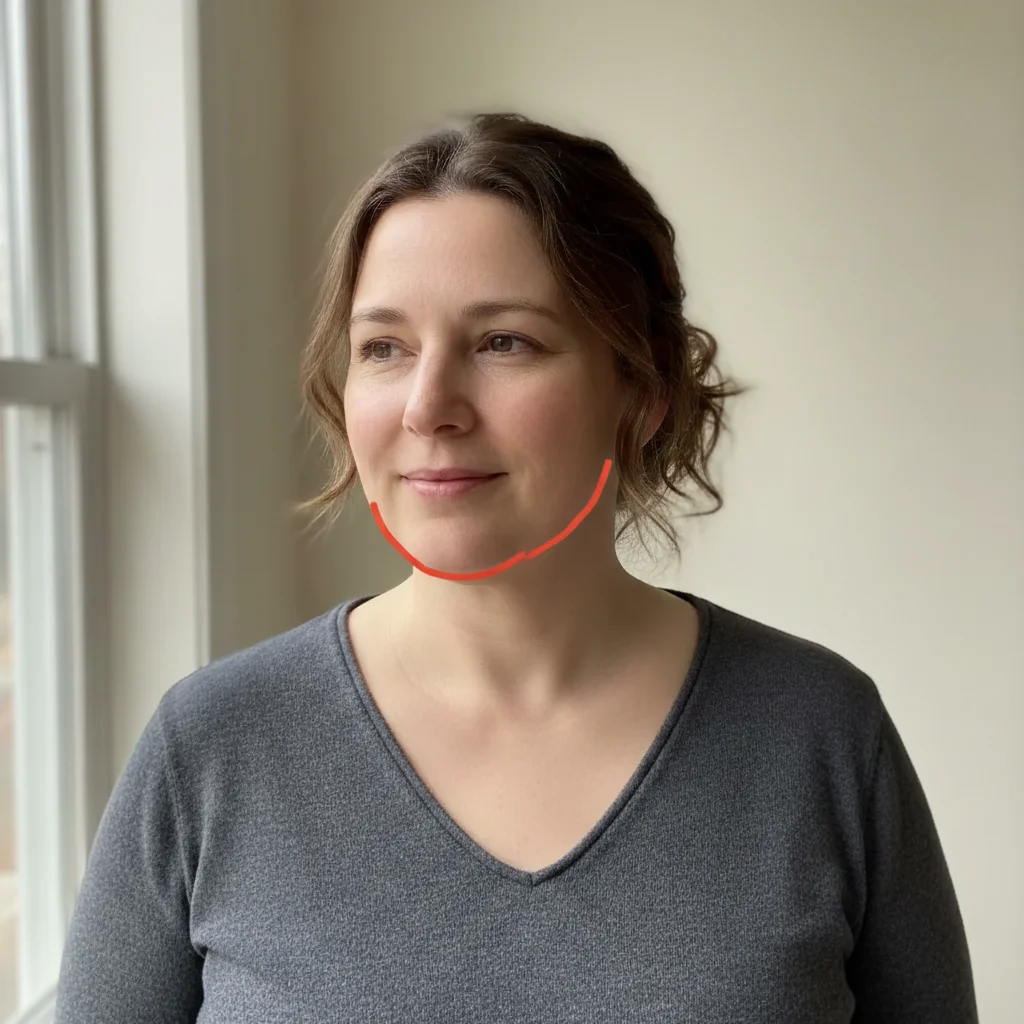
Woman with soft chin-to-neck transition
Before
->
Same woman with clean, defined jawline-neck separation
After

Chin-to-neck transition cleaned up

A portrait with a blurry chin-neck transition refined for a cleaner, more defined appearance.

Prompt: enhance the jawline definition and create a cleaner, more defined transition from chin to neck
Advertisement

If something looks off

AI changed the wrong area or something I didn't want changed

Why: The AI modified cheeks, chin shape, or neck along with the jawline. This happens when the enhancement scope wasn't specific enough.

Try: Tap markers along the jaw edge specifically, then regenerate: enhance only the jawline definition, do not change cheeks, chin shape, or neck

Tip: Markers tell the AI 'I mean THIS area specifically.' Use them when description alone is ambiguous.

Jawline looks unnaturally sharp or chiseled

Why: The enhancement was too aggressive, creating an angular jaw that doesn't match the overall face softness.

Try: define the jawline more subtly - slight enhancement only, keep it consistent with the overall face shape

Tip: Adding 'consistent with overall face shape' ensures the jaw matches the rest of the face.

Jawline enhancement is uneven between left and right

Why: Different lighting or a slight head tilt caused the AI to apply more definition on one side.

Try: enhance both sides of the jawline equally, matching definition and angle on left and right sides symmetrically

Tip: Specifying 'symmetrically' addresses the uneven enhancement that angled photos can cause.

Neck or chin skin looks warped

Why: The reshaping extended into the neck area, creating visible stretching or compression in surrounding tissue.

Try: define the jawline while keeping all neck and chin skin texture completely natural and undistorted

Tip: 'Undistorted' explicitly tells the AI to avoid warping artifacts near the enhanced area.

Shadows along the jaw look artificial

Why: The AI added shadow definition that doesn't match the original light direction in the photo.

Try: enhance the jawline with shadows that match the existing light direction in the original photo exactly

Tip: Mentioning 'match existing light direction' ensures shadow sculpting is consistent with the scene.

Quick answers

Do I need to mark the jawline before describing the enhancement I want?

No! Just describe what you want: 'define the jawline for a sharper look.' The AI understands jawline anatomy and applies enhancement along the jaw edge automatically. Only use markers if the enhancement accidentally affected your cheeks or neck and you need more precision.

How do I enhance a jawline in a photo without it looking fake?

Use 'subtle' or 'natural' in your prompt: 'subtly define the jawline while keeping it proportional.' Small enhancements that add slight shadow and definition look the most realistic. The jaw should look naturally strong, not digitally carved—like good lighting rather than surgery.

Is there a free AI jawline enhancer that doesn't require login?

Yes, EditThisPic is free to try with no account needed. Upload your photo, describe the jawline enhancement you want, and download the result. No watermarks on outputs. Works for subtle definition to significant sculpting without any signup.

What's the best free tool for defining jawline in photos?

EditThisPic offers free AI jawline enhancement with no signup required. Unlike contouring apps with fixed templates, you describe exactly what you want—sharper angles, cleaner neckline, or V-line shaping. It generates natural results that match your face in seconds.

Ready to define your jawline in photos?

Free to try. No signup required.

Try it free