Free • No signup Create Neon portrait · Free

AI Neon Portrait Maker

Describe the neon effect and AI transforms your photo into a glowing neon portrait in seconds.
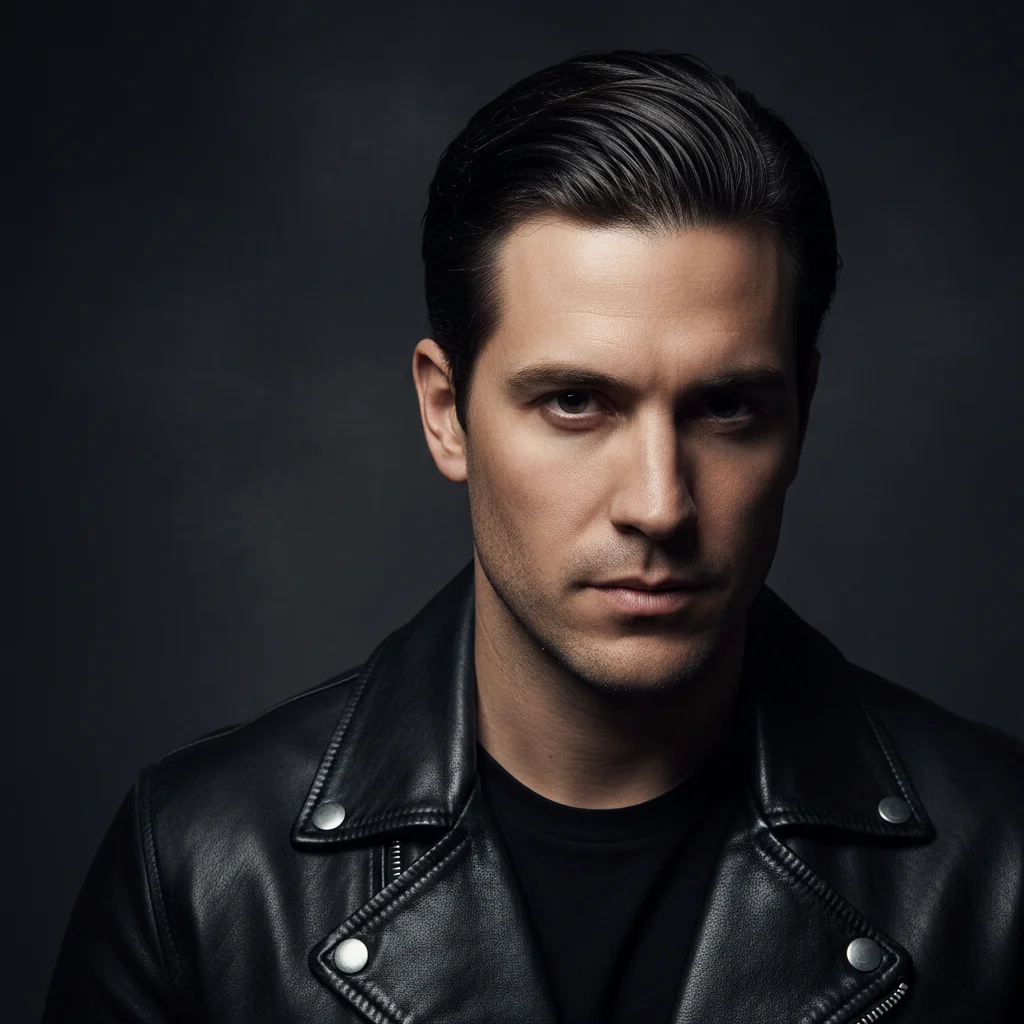
Man in black leather jacket with dramatic side lighting
Before
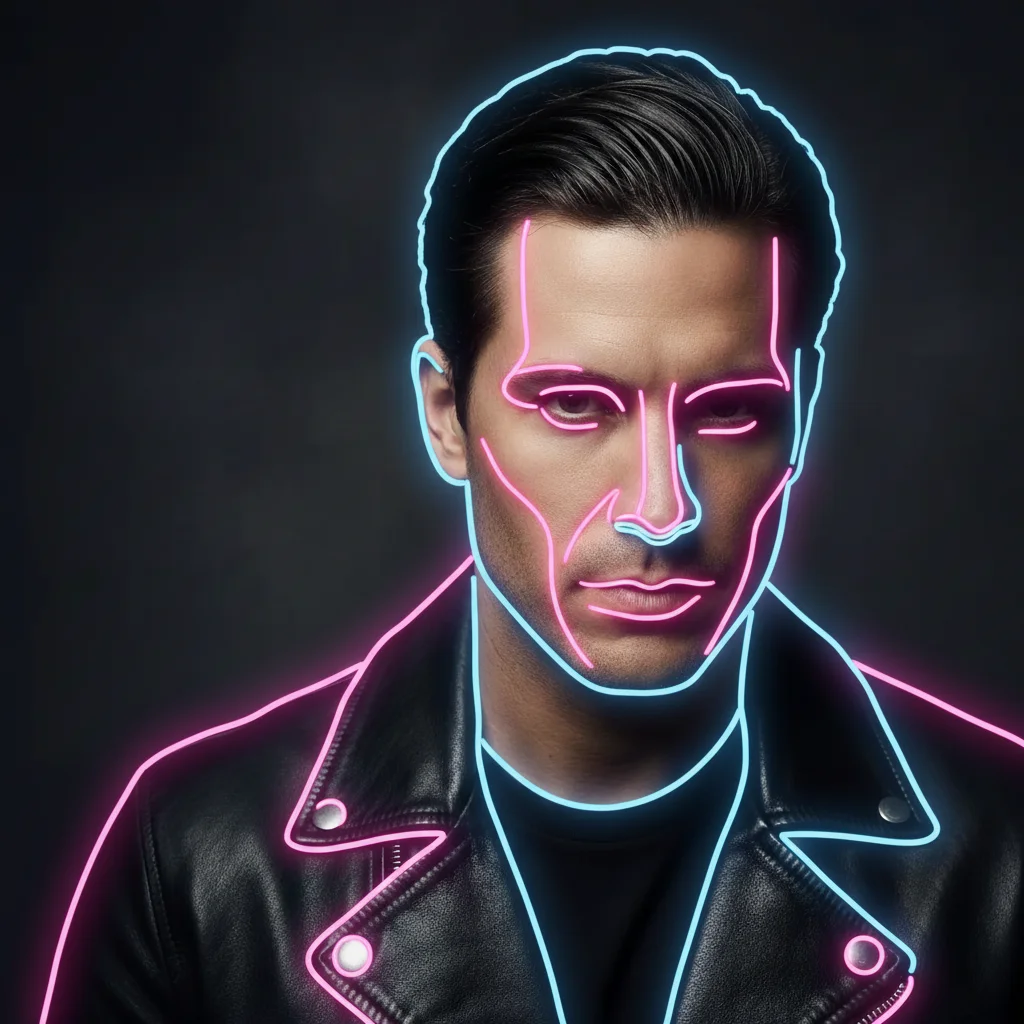
Same man with glowing pink and blue neon outlines on dark background
After

AI Neon Portrait Maker

Drop your photo here

or click to browse

Release to upload

Free • No signup

Advertisement
Popular use cases:
  • DJ branding
  • social media profiles
  • gaming avatars
  • music promotion
  • event flyers
  • cyberpunk aesthetic
  • nightlife photography
  • YouTube channel art

Cost
Free No signup required
Time
Instant results in 15-30 seconds
Works on
Any device - browser, phone, tablet, desktop
Powered by
AI-powered photo editing
Scenario Prompt Time
Classic pink/blue neon transform to neon portrait with pink and blue glow 30s
Cyberpunk neon create cyberpunk neon portrait with green and purple glow 40s
Neon sign style transform into neon sign tubes on dark brick wall 45s

How it works

  1. Upload your photo

    Drop your image into EditThisPic. JPG, PNG, WebP up to 7MB. Photos with clear subjects and good contrast produce the most striking neon effects. Portraits against darker backgrounds work especially well.

    Expect: Simple neon effect: 30-40 seconds. Complex multi-color neon with detailed glow: 45-60 seconds.
  2. Describe the neon style you want

    Type your instruction: 'transform this portrait into neon style with glowing pink and blue outlines on a dark background' or 'create a cyberpunk neon portrait with electric green and purple glow.' Specify the neon colors, glow intensity, and mood. No marking needed—the AI applies the neon effect to the entire image.

    Tip: Specify exact neon colors: 'hot pink and electric blue' or 'neon green and purple' for more controlled results.

    Copy one of these to get started:

    Classic neon glow portrait transform this portrait into a neon-lit style with glowing pink and blue neon outlines, dark background, and electric atmosphere
    Cyberpunk neon portrait create a cyberpunk neon portrait with neon green and purple glow, futuristic lighting, and dark moody atmosphere
    Neon sign style transform this photo into a neon sign style where the person appears as glowing neon tubes on a dark brick wall background
    Subtle neon accent lighting add subtle neon accent lighting to this portrait with soft pink neon glow on one side and blue on the other, keeping the subject realistic
    3 more prompts
    Retro synthwave neon transform this portrait into retro synthwave style with neon grid lines, sunset gradient background, and 80s neon glow aesthetic
    Neon outline art convert this photo to neon outline art where only the glowing neon contour lines are visible on a pure black background
    Multi-color neon explosion create an intense neon portrait with rainbow neon colors, light trails, lens flares, and maximum electric glow intensity
  3. Review the neon result

    Check that neon glow lines follow the subject's contours naturally. Look for consistent glow intensity, proper color bleeding effects, and a dark enough background to make the neon pop. Zoom in on edges and glow areas.

  4. Refine with markers if needed

    If specific areas need more glow, different colors, or adjusted intensity, tap markers on those spots and regenerate. Most neon portraits look striking on the first try.

    Tip: Markers are for precision refinement only. Try without them first—neon effects usually cover the right areas automatically.
Try it free

AI Neon Portrait Maker

Drop your photo here

or click to browse

Release to upload

Free • No signup

"Used this for my DJ brand photos. The neon glow effect is exactly the cyberpunk vibe I needed. Saved me hundreds on a neon photo shoot." @NeonBeatsDJ

See it in action

Man in black leather jacket with dramatic side lighting
Before
->
Same man with glowing pink and blue neon outlines on dark background
After

Headshot to neon glow portrait

A standard headshot transformed into a striking neon portrait with glowing pink and blue outlines against a dark background.

Prompt: transform this portrait into a neon-lit style with glowing pink and blue neon outlines, dark background, and electric atmosphere
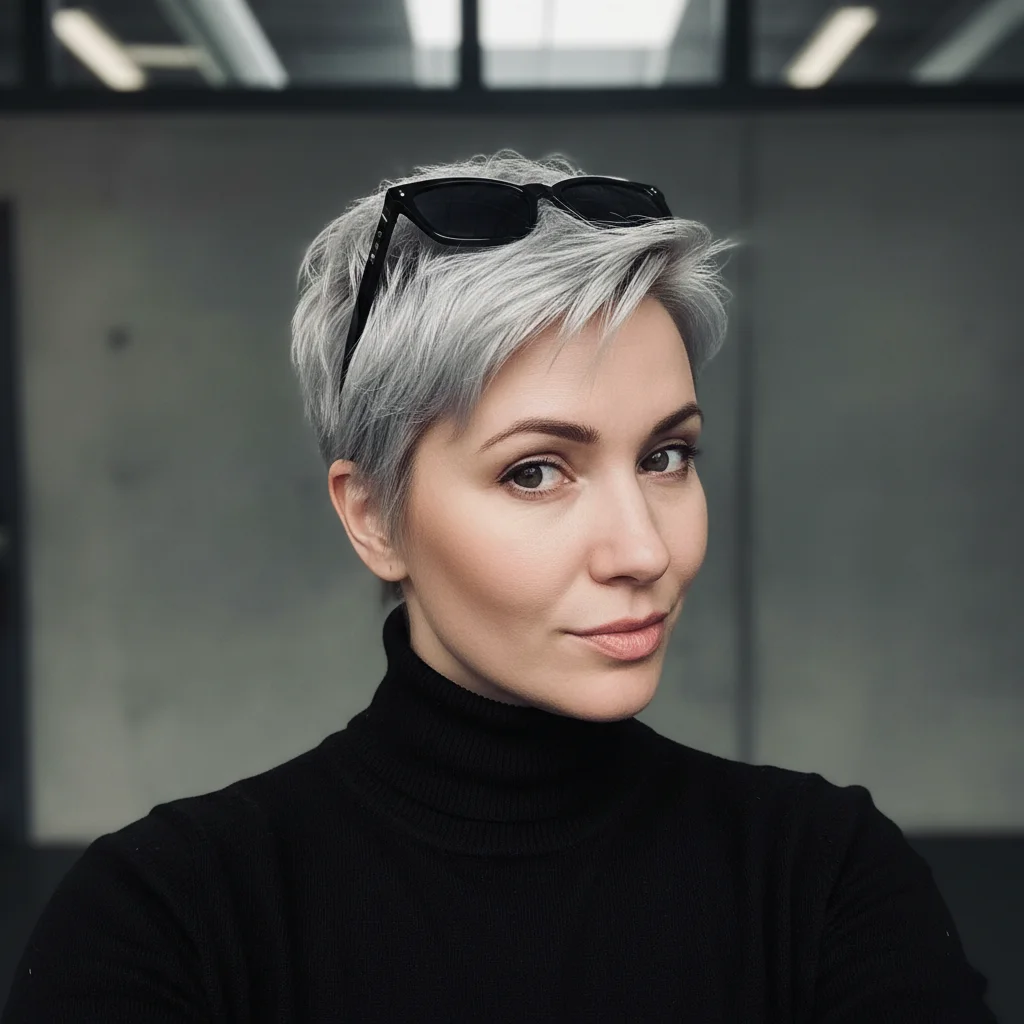
Woman with silver pixie cut and sunglasses in dark turtleneck
Before
->
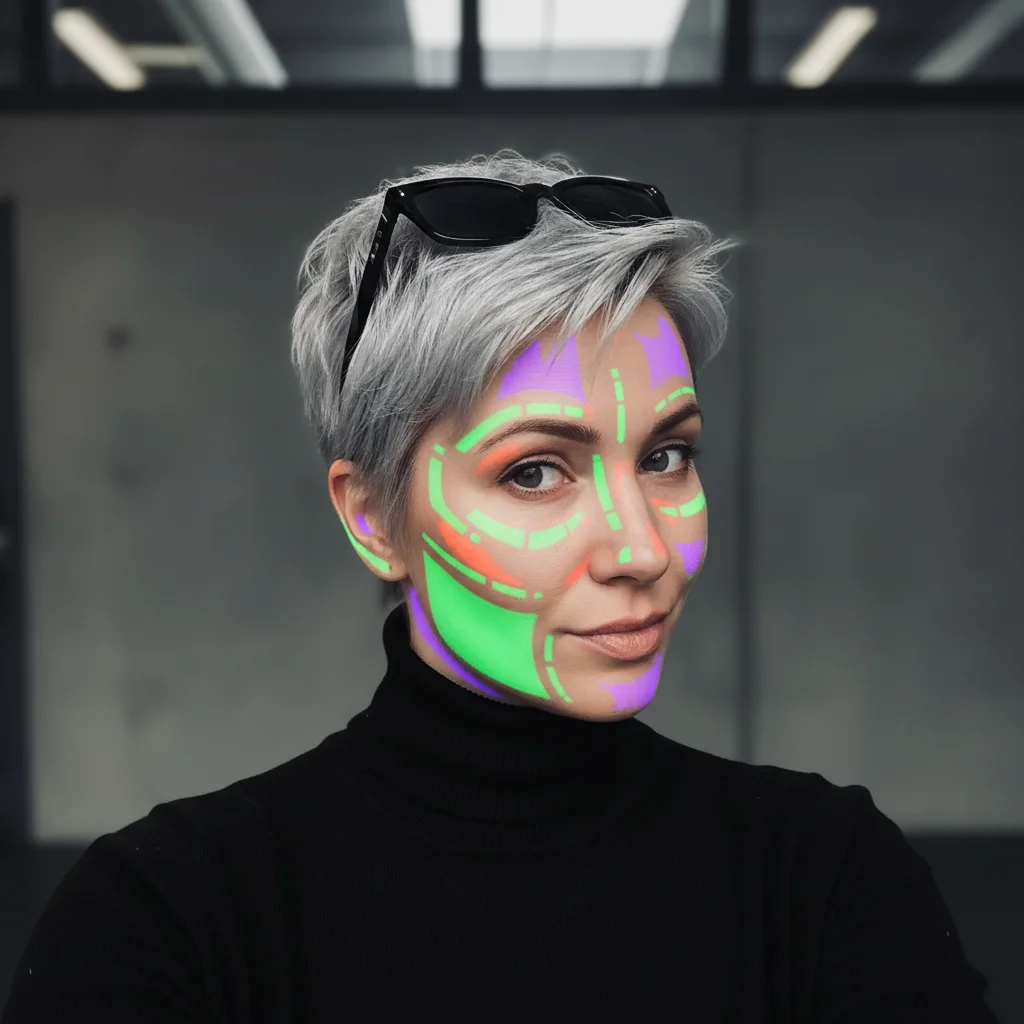
Same woman in cyberpunk style with neon green and purple glow effects
After

Selfie to cyberpunk neon style

A casual selfie converted into a futuristic cyberpunk neon portrait with green and purple glow effects.

Prompt: create a cyberpunk neon portrait with neon green and purple glow, futuristic lighting, and dark moody atmosphere
Advertisement

If something looks off

AI changed the wrong area or something I didn't want changed

Why: The AI couldn't determine where you wanted the neon effect from description alone.

Try: Tap a marker on the specific area you want the neon glow applied to, then regenerate with the same prompt

Tip: Markers tell the AI 'I mean THIS area specifically.' Use them for targeted neon placement.

Neon glow is barely visible or too subtle

Why: The AI applied a soft neon effect that doesn't stand out enough, especially on lighter backgrounds.

Try: create an intense neon portrait with very bright, highly saturated neon glow on a very dark black background for maximum contrast

Tip: Neon needs contrast. Say 'very dark black background' and 'highly saturated' to make the glow pop.

Background is too bright for the neon to show

Why: Neon effects need dark backgrounds to appear glowing. Light backgrounds wash out the effect.

Try: transform to neon portrait on a pure black or very dark background so the neon colors glow and pop vividly

Tip: Always specify a dark background for neon portraits—the darkness is what makes neon look like it's glowing.

Neon colors don't match what I wanted

Why: The AI chose its own neon color palette instead of the specific colors you intended.

Try: create neon portrait using only [specific color] and [specific color] neon glow, no other colors

Tip: Be very specific: 'hot pink' not just 'pink', 'electric cyan' not just 'blue' for precise neon colors.

Face is completely lost behind the neon effects

Why: The AI prioritized the neon glow over preserving the subject's facial features and details.

Try: create neon portrait where the person's face and features are clearly visible with neon glow accents around the outlines only

Tip: Specify 'face clearly visible' and 'glow on outlines only' to balance neon effect with subject recognition.

Quick answers

Do I need to mark any areas before creating a neon portrait?

No! Just upload your photo and describe the neon style: 'transform this into a neon portrait with glowing pink and blue outlines.' The AI applies the neon effect automatically. Only use markers if you want neon glow on specific areas while keeping others untouched.

How do I create a neon portrait from a photo for free?

Upload your photo to EditThisPic and type 'transform this portrait into neon style with glowing outlines and dark background.' The AI generates the neon portrait in about 30 seconds. Free to use, no account needed, no watermark.

Is there a free neon portrait maker that doesn't require login?

Yes. EditThisPic creates neon portraits from photos with no signup required. Upload your image, describe the neon colors and style, and download. No watermarks, no account walls.

What's the best free AI tool for making neon glow portraits?

EditThisPic lets you specify exact neon colors, glow intensity, and style—from subtle accent lighting to full cyberpunk neon explosion. Unlike preset filters, you describe the exact look. Free, no login, results in 30 seconds.

Ready to create your neon portrait?

Free to try. No signup required.

Try it free