AI Photo Editor for Depop Product Photos
Turn basic phone pics into Depop-worthy shots that actually sell.
Drop your photo here
or click to browse
Release to upload
Free • No signup
"My depop sales literally doubled when I started making my backgrounds match. Same clothes, way more saves. The vintage preset vibes go crazy." @thriftedtreasures
Built for Depop Sellers
Depop's algorithm and buyers reward aesthetic photos. Clean backgrounds, cohesive vibes, and that vintage look make people stop scrolling and hit save. EditThisPic lets you upgrade your entire inventory without reshooting - just describe the vibe you want.
Tools for Depop Photos
Replace Background
Swap messy rooms for aesthetic gradients and clean backdrops
Remove Background
Create clean cutouts for layered aesthetic posts
Add Filter
Vintage film grain and Y2K color grading
Enhance Lighting
Fix harsh shadows and uneven phone flash
Fix Color
True-to-life colors that match the actual item
Step-by-Step Guide
-
Upload your product photo
Drop your photo into EditThisPic. Works with any phone photo - flat lays, hangers, even worn shots. JPG, PNG, WebP up to 7MB.
Quick background swap: 25-30 seconds. Multiple edits (background + filter + lighting): 45-60 seconds.Daylight photos edit best, but we can fix indoor lighting too. -
Describe your aesthetic
Type what you want: 'replace background with pastel gradient' or 'add Y2K butterfly stickers aesthetic.' Be specific about colors and vibes. No marking needed - the AI knows what 'background' means.
Reference specific aesthetics: 'soft girl aesthetic,' 'Y2K vibes,' 'cottagecore background' - the AI understands these. -
Review your edit
Check that the item looks accurate - colors true to life, no weird artifacts around edges, background matches your shop's vibe. Zoom in on detailed items like jewelry or embroidery.
-
Refine with markers if needed
If edges around delicate items like lace or fringe need cleanup, tap markers on those spots and regenerate. Most photos work without this step.
For consistent shop aesthetic, save your favorite prompts and reuse them across all listings.
Copy-Paste Prompts for Depop Photos
replace background with soft pink to peach gradient, smooth transition, aesthetic and clean
Gradient backgrounds are Depop gold - they make items pop without being distracting
add subtle Y2K aesthetic - soft pink tint, slight blur on background, dreamy vibes
Y2K aesthetic is huge on Depop right now - lean into the nostalgia
add vintage film grain effect, warm faded tones like disposable camera, subtle light leak in corner
Vintage sellers especially benefit from the film aesthetic - it matches the product vibe
replace background with pure white, clean and minimal, soft shadow under item
Clean white works for everything and photographs true colors accurately
Show 4 more prompts
replace background with soft sage green gradient, add subtle flower overlay, warm natural tones
Perfect for vintage dresses, linen items, and romantic pieces
fix the yellow indoor lighting to neutral white, enhance to bright even lighting like near a window
Yellow cast makes items look dingy - fixing this alone can transform a photo
correct color so the fabric shows its true color, neutral white balance, no tint
Accurate colors prevent returns and build buyer trust - especially important for vintage
replace background with concrete texture wall, urban street vibes, slightly desaturated tones
Matches the aesthetic for vintage band tees, sneakers, and streetwear items
| Edit Type | Prompt | Time | |
|---|---|---|---|
| Gradient background | replace with soft pink gradient |
25s | Try This → |
| Y2K aesthetic | add Y2K vibes, dreamy soft pink |
20s | Try This → |
| Vintage film | add film grain, disposable camera look |
15s | Try This → |
| Color fix | fix yellow lighting, show true colors |
15s | Try This → |
Real Examples
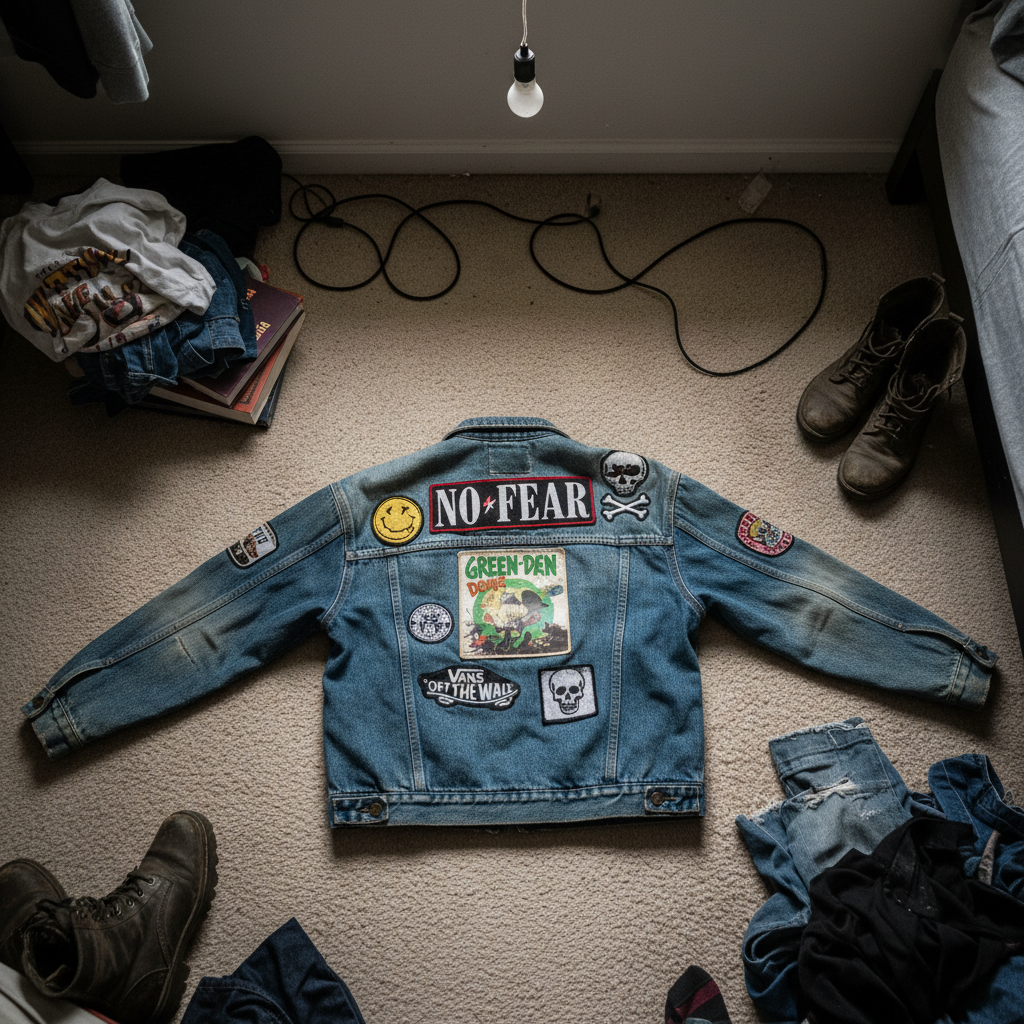
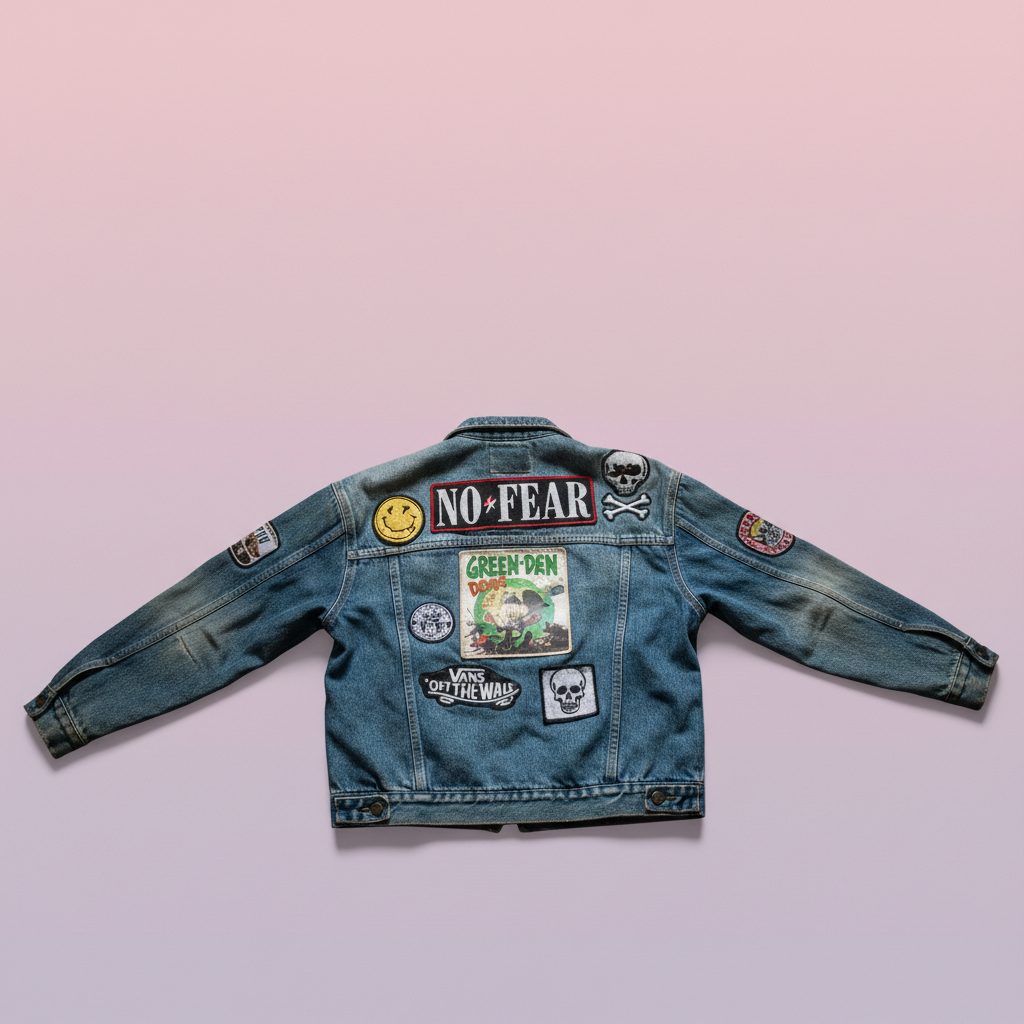
Bedroom floor to aesthetic gradient
Classic Depop problem - you have a fire vintage jacket but the only background is your messy room. Fixed in one prompt.
replace the messy background with soft pink to lavender gradient, clean and aesthetic, keep the jacket exactly as is
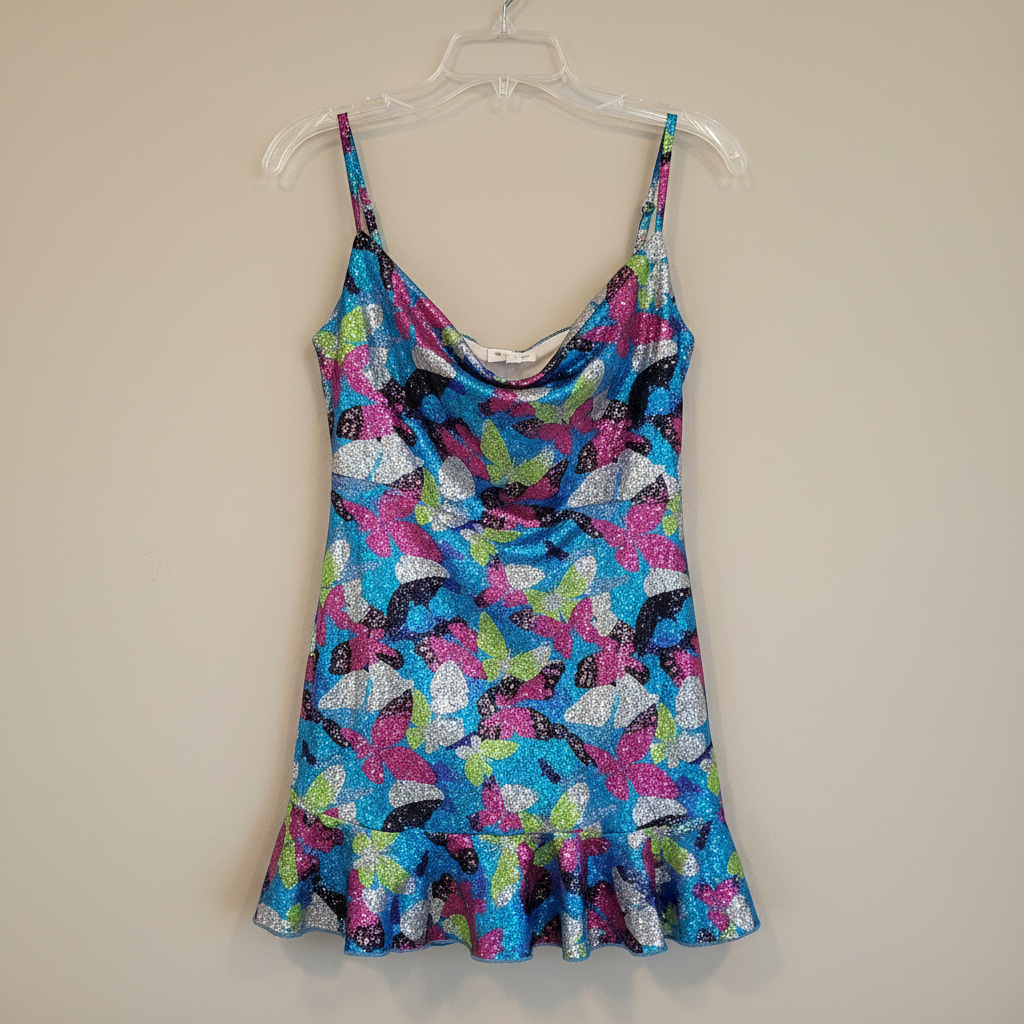
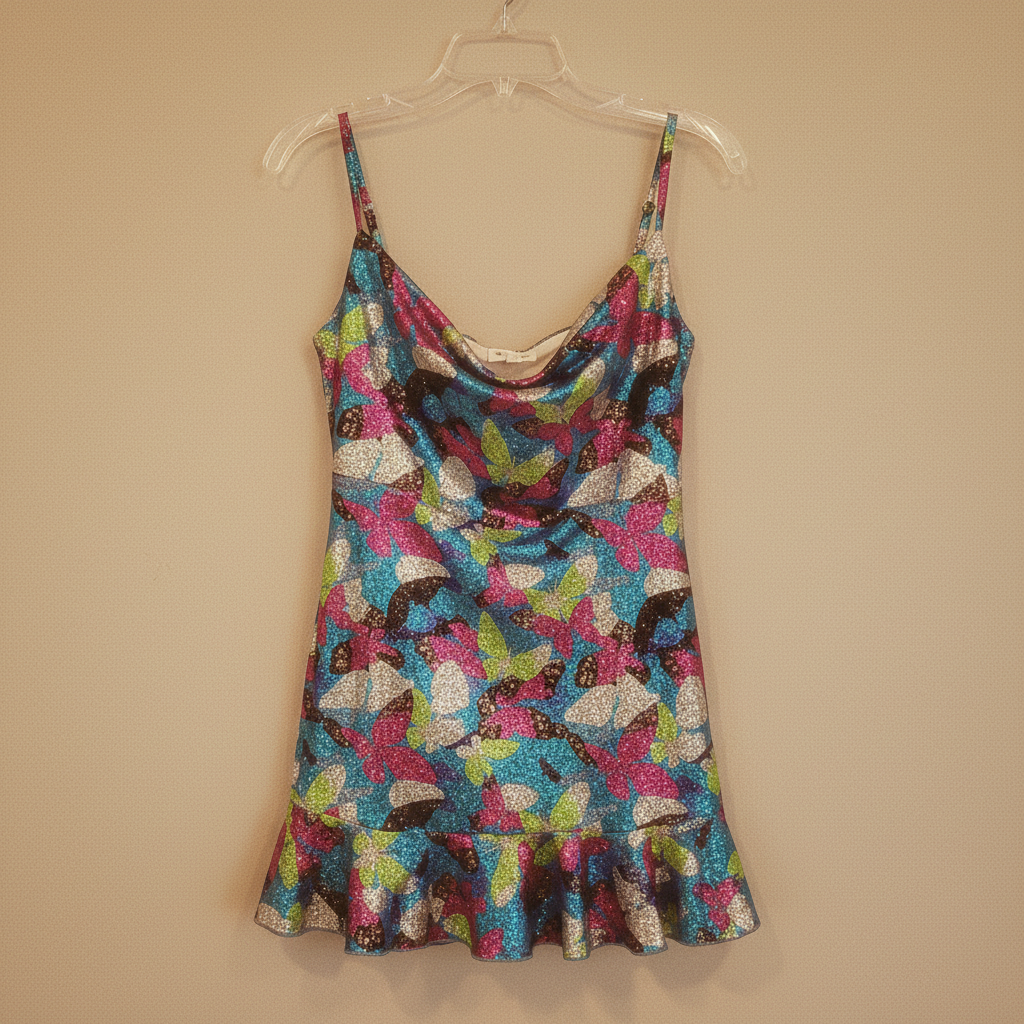
Y2K dress with vintage film vibes
A butterfly clip Y2K mini dress deserves that era's aesthetic. Add the disposable camera look.
add subtle vintage film grain, warm faded tones like 2000s disposable camera, slight soft glow, dreamy Y2K vibes


Vintage band tee true color fix
Yellow indoor lighting made this black vintage tee look faded brown. Color correction reveals the real piece.
fix the yellow indoor lighting to show true black color, neutral white balance, the shirt is actually black not brown
When Things Go Wrong
Background changed but edges around item look choppy
Why: Delicate items like lace, fringe, or fuzzy knits have complex edges that need extra attention.
Tap markers on the choppy edges, then: blend edges naturally with the new background, smooth transition
Items against contrasting backgrounds (dark item, light background) give cleaner automatic edges.
Colors look different after editing
Why: Some edits can shift colors slightly, especially when changing backgrounds or adding filters.
keep the exact original fabric colors, only change the background, do not alter item colors at all
Run color correction as a separate step after background changes if colors shifted.
Vintage filter effect is too strong
Why: Film grain and color shifts can overpower delicate vintage items.
add very subtle vintage tint, barely noticeable grain, keep item details crisp and clear
'Very subtle' and 'barely noticeable' in your prompt keeps effects tasteful.
AI changed the wrong area or something I didn't want changed
Why: The AI couldn't determine exactly which area you meant from description alone.
Tap a marker on the specific area you want to change, then regenerate with the same prompt
Markers tell the AI 'I mean THIS one specifically.' Use them when description alone is ambiguous.
Shadows under item look fake
Why: Generated shadows can sometimes look too harsh or in the wrong direction.
Specify 'soft' and 'subtle' for shadows - they should anchor the item, not dominate.
Frequently Asked Questions
Do I need to mark the background before replacing it?
No! Just describe what you want: 'replace background with pink gradient' or 'remove the messy room behind.' The AI understands these concepts automatically. Only use markers if you need precision - like keeping a specific prop in frame while removing the rest.
Will the edited photos show the true color of my items?
Yes, if you want them to. For background changes, add 'keep exact original item colors' to your prompt. For color-shifted photos, use 'fix color to show true fabric color.' Accurate colors mean fewer returns and happier buyers.
What background works best for Depop listings?
Depends on your shop's aesthetic. Soft gradients (pink, lavender, peach) are popular and algorithm-friendly. Clean white shows true colors and works for any item. Textured backgrounds (concrete, fabric) match specific aesthetics like streetwear or cottagecore. Consistency across your shop matters more than any single style.
Can I batch edit all my listings?
Currently EditThisPic processes one photo at a time. But since you're just typing the same prompt for each photo, you can move through inventory quickly. Pro tip: copy your favorite prompt and paste it for each item for a consistent shop look.
Is there a free Depop photo editor that doesn't need an account?
Yes - EditThisPic is free to try with no account required. Upload your photo, describe what you want, download the result. No watermarks on your images. Create that aesthetic feed without another app login.
How do I get that Y2K or vintage film look?
Ask for it directly: 'add vintage film grain and warm faded tones' or 'Y2K aesthetic with soft pink tint and dreamy blur.' The AI understands aesthetic references. Combine with 'subtle' or 'light' if you want a gentle effect rather than heavy filtering.
Ready to level up your Depop shop?
Free to try. No signup required. No watermarks.
Start Editing