Free β€’ No signup Add Tattoo to photo Β· Free

Add a Tattoo to a Photo

Upload a photo of your arm, back, or neck β€” describe the tattoo you want β€” and the AI adds it realistically in seconds. Then text your mom "I finally did it" and watch your phone explode.

Bare male forearm with no tattoos, resting on a table in natural light
Before
β†’
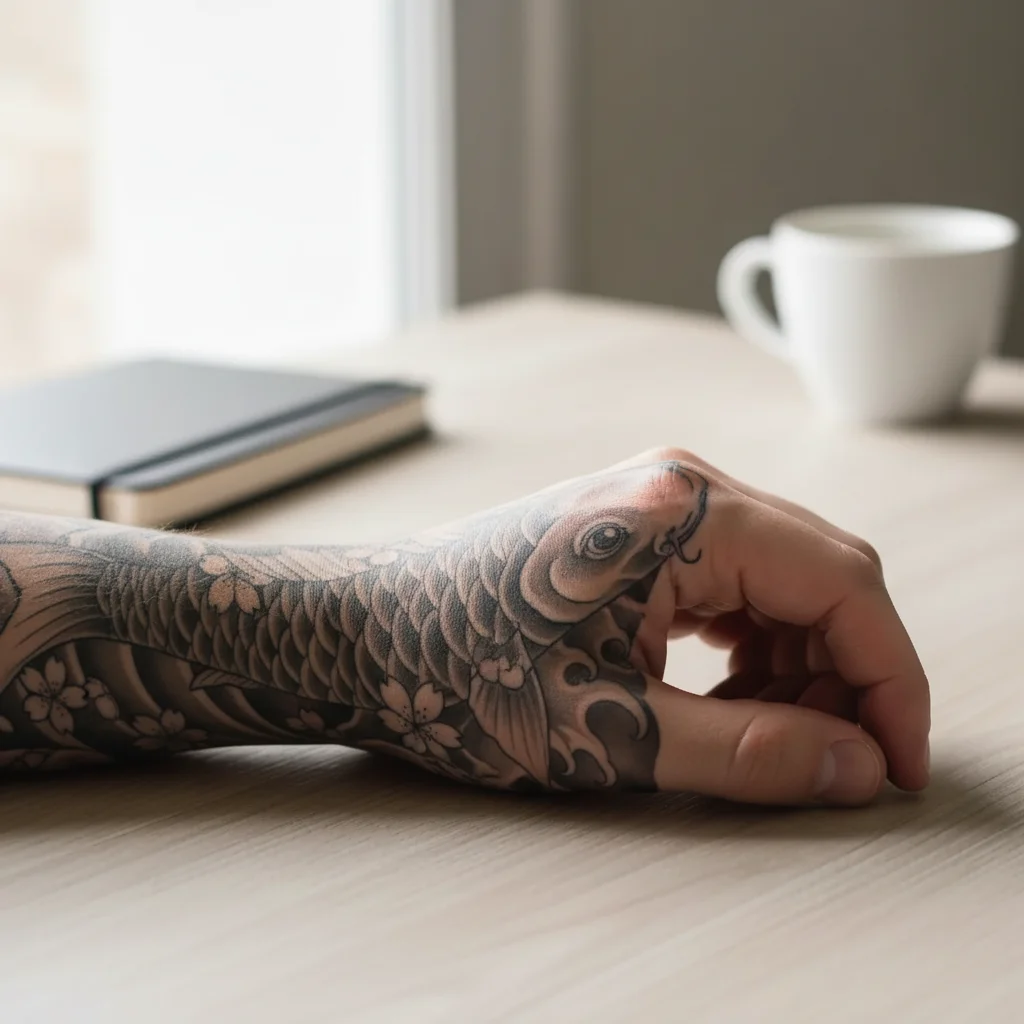
Same forearm now covered with a detailed black and grey Japanese sleeve tattoo featuring koi fish and waves
After

Add Tattoo to Photo Prank

Upload photo to add tattoo

Free β€’ Results in 30 seconds β€’ No signup

Release to upload

FreeNo signupNo watermark

1 free edit·then from $1.99

Popular use cases:
  • tattoo prank photo
  • fake tattoo picture
  • prank parents with tattoo
  • AI tattoo photo editor
  • realistic tattoo photo fake
  • TikTok tattoo prank
  • I got a tattoo prank text
  • sleeve tattoo fake photo

Cost
Free No signup required
Time
Instant results in 15-30 seconds
Works on
Any device - browser, phone, tablet, desktop
Powered by
AI-powered photo editing
Scenario Prompt Time
Full sleeve Full sleeve black and grey Japanese style koi fish and waves, wrist to shoulder, healed look 30s
Neck script Black cursive script tattoo on the side of the neck reading 'no regrets', healed, professional 15s
Small wrist tattoo Small black infinity symbol on the inner wrist, clean lines, 2 inches wide 15s
Back piece Large black and grey angel with wings spread across the full upper back, detailed feathers 30s

How it works

  1. Upload your photo

    Upload a clear photo of the body area where you want the tattoo β€” arm, shoulder, back, neck, or chest. Good lighting and a visible skin area give the AI the most to work with. A straight-on shot works better than a heavily angled one.

    Expect: The upload takes under 5 seconds. The clearer the skin area, the more realistic the result.
  2. Describe the tattoo you want

    Type exactly what tattoo you want and where it should go on the body. Be specific β€” style (black and grey, traditional, fine line, tribal), subject (snake, rose, script, geometric), and placement (full sleeve, inner wrist, upper back). The more detail you give, the more convincing the result.

    Tip: Include tattoo style in your description. "Traditional American eagle on the upper arm" produces a very different result than "fine line minimalist eagle." For sleeve pranks, say "full sleeve from wrist to shoulder" and describe a cohesive theme.

    Copy one of these to get started:

    Full sleeve prank Add a full sleeve tattoo from wrist to shoulder β€” black and grey Japanese style with a koi fish, waves, and cherry blossoms. Make it look like a healed, professional tattoo.

    Neck tattoo β€” maximum panic Add a black script tattoo on the side of the neck that reads 'no regrets' in cursive. Make it look like a professional tattoo that's a few weeks healed.
    Hand tattoo reveal Add a black geometric mandala tattoo on the back of the hand, covering most of the hand from knuckles to wrist. Fine line style, detailed and symmetrical.
    Tiny meaningful one Add a small black ink infinity symbol tattoo on the inside of the wrist. Simple, clean, about 2 inches wide.
    4 more prompts
    Back piece bomb Add a large black and grey back tattoo β€” a detailed angel with wings spread across the upper back, reaching from shoulder to shoulder. Make it look like a serious tattoo commission.
    Face tattoo β€” for the brave Add a small black tribal-style tattoo under the left eye, about the size of a teardrop or small star. Clean lines, professional look.
    Name tattoo drama Add a black script tattoo on the forearm that reads 'Brittany' in large cursive letters, like a name tattoo. Make it look fresh but professional.
    Chest piece reveal Add a large traditional American eagle tattoo centered on the chest, wings spread wide, in bold black and red ink. Old school tattoo style.
  3. Send it

    Download the edited photo and send it to your target with a casual message like "so I finally did it" or just drop the photo with zero context. Works best on parents, partners, and anyone who's told you not to get a tattoo. Screenshot the reaction.

Try it free ↓

Add Tattoo to Photo Prank

Upload photo to add tattoo

Free β€’ Results in 30 seconds β€’ No signup

Release to upload

Free β€’ No signup

See it in action

Bare male forearm with no tattoos, resting on a table in natural light
Before
->
Same forearm now covered with a detailed black and grey Japanese sleeve tattoo featuring koi fish and waves
After

Black and grey forearm sleeve

Bare forearm photo transformed into a detailed Japanese-style sleeve with koi fish and waves. Used in an "I finally did it" text to family.

Prompt: Add a full sleeve tattoo from wrist to shoulder β€” black and grey Japanese style with a koi fish, waves, and cherry blossoms. Make it look like a healed, professional tattoo.
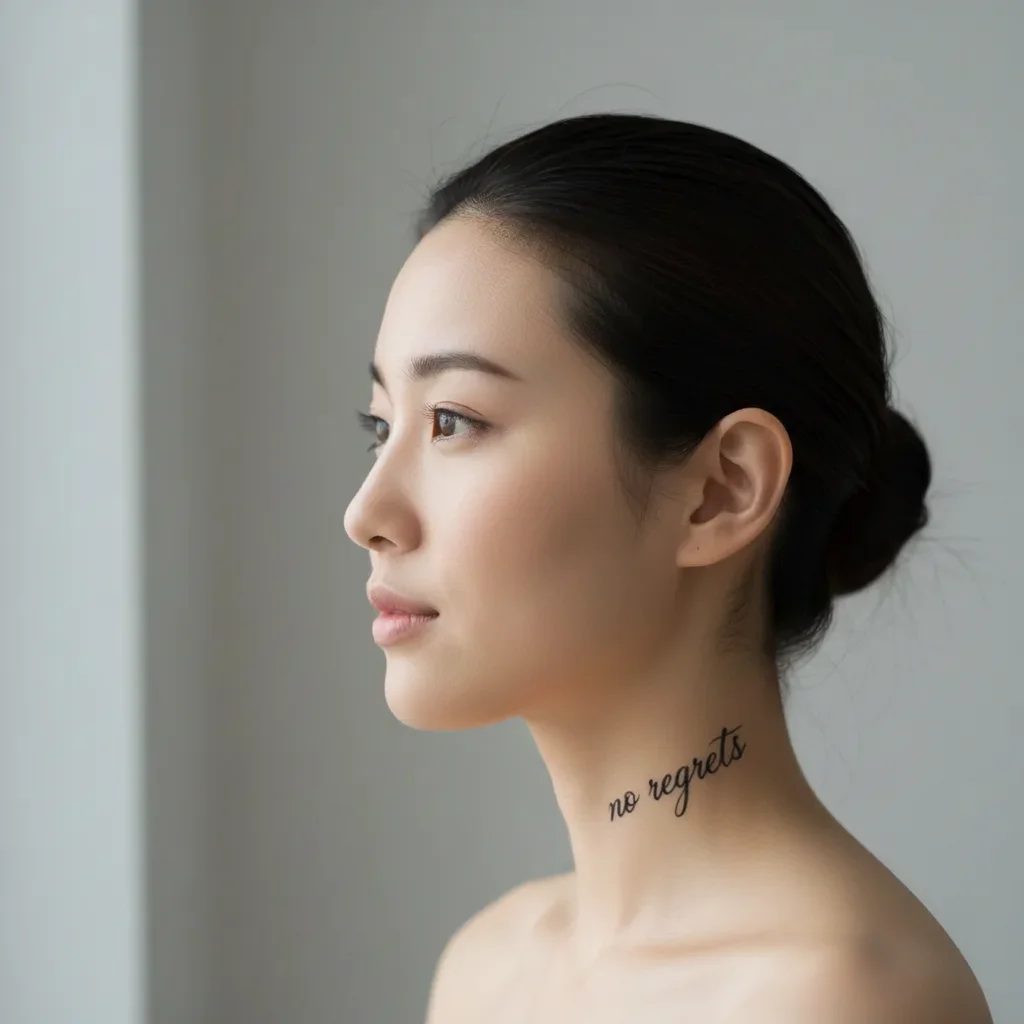
Side portrait of a young woman with clear neck skin and no tattoos
Before
->
Same photo with a cursive 'no regrets' script tattoo added to the side of the neck
After

Neck script tattoo panic text

Side-of-neck photo with a cursive 'no regrets' script tattoo added. Sent to a parent with no caption. Reaction came in under two minutes.

Prompt: Add a black script tattoo on the side of the neck that reads 'no regrets' in cursive. Make it look like a professional tattoo that's a few weeks healed.
Close-up of a bare inner wrist with no tattoos, palm facing up
Before
->
Same wrist with a clean black infinity symbol tattoo added on the inner wrist
After

Wrist infinity symbol β€” subtle and believable

Inner wrist with a small infinity symbol tattoo added. Works because it's exactly the kind of small 'meaningful' tattoo someone gets without telling their family first.

Prompt: Add a small black ink infinity symbol tattoo on the inside of the wrist. Simple, clean, about 2 inches wide.

If something looks off

The tattoo looks painted on instead of embedded in the skin

Why: This usually happens when the source photo has harsh shadows, overexposed skin, or the lighting changes drastically across the area.

Try: Add a realistic healed tattoo β€” make the ink look like it's under the skin, with natural skin texture showing through the design. Match the lighting and shadows of the arm.

Tip: Photos taken in soft, even natural light (near a window, not direct sun) give the AI the most realistic surface to work with.

The design doesn't cover the right area or wraps awkwardly

Why: The AI interprets placement from your description β€” if the photo shows the arm at an angle, wrapping designs can look skewed.

Try: Place the tattoo exactly on [specify body part], centered and proportional to the skin area visible. Follow the natural curves of the arm/back.

Tip: For sleeve designs, use a straight-on photo of the arm rather than a side angle. Flat surfaces are easier to map realistic tattoos onto.

The tattoo is barely visible or looks too faded

Why: Dark skin tones or low-contrast photos can make black ink designs less visible.

Try: Make the tattoo bold and high contrast β€” deep black ink with crisp, clear lines that stand out clearly against the skin.

Tip: For dark skin tones, describing a traditional or tribal style (which uses bold, thick lines) tends to render more convincingly than fine-line styles.

Text in the tattoo looks garbled or misspelled

Why: Script and lettering in AI-generated images can be inconsistent, especially in cursive fonts.

Try: Add a clean, legible script tattoo that reads exactly '[your text]' β€” the letters should be clear and readable, professional lettering style.

Tip: Simple block letters or printed fonts render more reliably than elaborate cursive. If the text must be cursive, try regenerating a couple of times.

The tattoo doesn't look healed β€” it looks fresh and irritated

Why: By default the AI sometimes renders a fresh tattoo with redness around it, which can look fake.

Try: Make the tattoo look fully healed β€” clean skin around the edges, no redness or peeling, ink settled naturally into the skin.

Tip: A healed tattoo is a more convincing prank because it implies you've had it for a while and are just now revealing it.

Quick answers

Do I need to mark the area on my photo before describing the tattoo?

No. Just describe where you want the tattoo in your prompt β€” "on the forearm," "side of the neck," "full back piece" β€” and the AI places it there. You only need to use markers if you want to isolate a very specific small area on a complex photo, like adding a tiny wrist tattoo when the whole arm is visible.

Is this free?

Yes. EditThisPic gives you 1 free edit per week with no account needed. For more edits, credits start at $1.99. No subscription required.

Will this look realistic enough to fool someone?

In a well-lit photo with a clear skin area, the result is convincing enough for a text prank β€” especially at phone screen size. Full sleeves and larger pieces tend to look more believable than tiny fine-line designs. The most realistic results come from photos with even natural lighting and minimal background clutter. If someone is scrutinizing it pixel by pixel, they'll eventually spot it, but for a casual "I got a tattoo" reveal text, it works.

What tattoo styles work best?

Black and grey, traditional American, and Japanese styles tend to render most convincingly because they use bold, clear lines. Fine-line and watercolor styles are harder for the AI to replicate convincingly at photo scale. For prank purposes, black ink styles are also more believable β€” they're the most common real tattoos.

Can I add a tattoo to someone else's photo?

Yes. Any photo of a person with visible skin works. Upload a photo of your friend, describe the tattoo, and you can send the edited version back to them as the prank β€” or use it as material for the "look what they did" angle.

Can I do a full sleeve or back piece, or just small tattoos?

Both work. Describe the scope clearly β€” "full sleeve from wrist to shoulder" or "large back piece covering the entire upper back." Larger pieces on clearly visible body areas tend to render well. The AI works with whatever skin area is visible in the photo, so make sure the body part you want tattooed is fully in frame.

Does EditThisPic store my photos?

Photos are processed to generate your edit and not stored beyond the session. You don't need to create an account, and no login means no personal data is collected by default.

How is this different from apps like BaldBooth or Fotor?

Apps like BaldBooth and Fotor use fixed filters β€” you choose from a preset and the app applies it mechanically. EditThisPic works from a natural language description, so you can specify exactly the tattoo style, subject, placement, and size you want. There's no dropdown for "Japanese sleeve with koi fish" β€” you just describe it.

How much does EditThisPic cost?

You get 1 free edit per week β€” no account needed. After that, credit packs start at $1.99 for 3 edits. Monthly plans start at $4.99/mo for 15 edits with unused credits rolling over. All edits are full resolution with no watermark.

Ready to add a tattoo to your photos?

Free to try. No signup required.

1 free edit included·Credit packs from $1.99