Free • No signup Analyze Posture · Free

AI Posture Analyzer

Upload side-profile photos and let AI normalize lighting to clearly show your posture alignment.
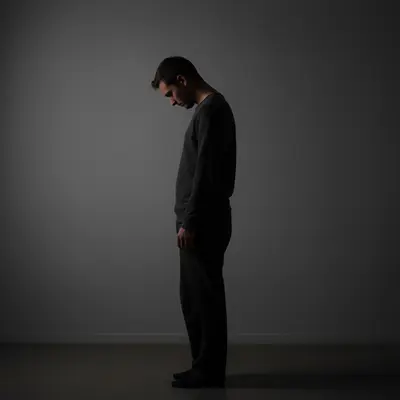
Before: Forward head posture tracking
Before
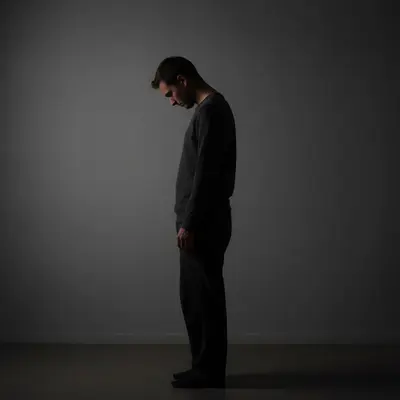
After: Forward head posture tracking
After

AI Posture Analyzer

Drop your photo here

or click to browse

Release to upload

Free • No signup

Popular use cases:
  • posture analyzer
  • posture tracking tool
  • alignment documentation
  • posture improvement tracker
  • posture comparison photos
  • posture assessment tool

Cost
Free No signup required
Time
Instant results in 15-30 seconds
Works on
Any device - browser, phone, tablet, desktop
Powered by
AI-powered photo editing
Scenario Prompt Time
Posture documentation normalize lighting to show alignment clearly 20s
Background cleanup replace background with plain white wall 25s
Contrast enhancement increase body-background contrast for clear silhouette 20s

How it works

  1. Upload your side-profile photo

    Drop a full-body side-profile photo into EditThisPic. Stand naturally — don't pose. Side views show forward head, rounded shoulders, and anterior pelvic tilt most clearly. JPG, PNG, WebP up to 7MB.

    Expect: Standard normalization: 20-30 seconds. Full posture analysis: may need 1-2 refinements.
  2. Describe the adjustment

    Type 'normalize lighting to clearly show body alignment from head to feet' or 'brighten and adjust to show posture silhouette clearly.' The goal is making your body's alignment visible. No marking needed.

    Tip: Side-profile photos against a plain wall give the clearest posture documentation. Contrast between body and background makes alignment visible.

    Copy one of these to get started:

    Side profile posture documentation normalize the lighting on this side profile to clearly show body alignment and posture from head to feet
    Contrast enhancement for silhouette increase the contrast between my body and the background to show posture silhouette clearly, keep body position unchanged
    Remove background distractions replace the cluttered background with a plain white wall, keep my body position and posture exactly as is
    Match previous session photo normalize this posture photo to match bright even lighting conditions with neutral background, preserve exact body position
    3 more prompts
    Forward head posture documentation normalize lighting to clearly show head and neck position relative to shoulders in this side-profile photo
    Brighten gym assessment photo brighten this dim gym posture photo to match daylight conditions, keep all body proportions and position unchanged
    Standing vs sitting comparison normalize this seated side-profile to match the same lighting as my standing posture photo for comparison
  3. Review the result

    Check that your body outline is clearly visible from ear to ankle. Look for the alignment landmarks: ear over shoulder, shoulder over hip, hip over knee, knee over ankle.

  4. Refine if needed

    If the AI adjusted your body position, specify 'normalize ONLY the lighting and contrast — do NOT modify body position, posture, or any physical features.'

    Tip: The AI should never move or straighten your body — you want to document actual posture, not idealized posture.
Try it free

AI Posture Analyzer

Drop your photo here

or click to browse

Release to upload

Free • No signup

"My chiropractor used my AI-normalized posture photos to show me the before-after of 8 weeks of treatment. Seeing the forward head posture correction was incredibly motivating." @PostureCorrect_PT

See it in action

Before: Forward head posture tracking
Before
->
After: Forward head posture tracking
After

Forward head posture tracking

Normalizing a side-profile photo to clearly document forward head posture for chiropractic treatment tracking.

Prompt: normalize lighting to show head-to-shoulder alignment clearly, preserve exact body position
Before: Rounded shoulders documentation
Before
->
After: Rounded shoulders documentation
After

Rounded shoulders documentation

Enhancing contrast on a posture photo to make rounded shoulder position visible for physical therapy records.

Prompt: increase contrast to show body silhouette clearly, keep body position exactly as is
Before: Before-after posture comparison
Before
->
After: Before-after posture comparison
After

Before-after posture comparison

Standardizing lighting between a day-1 and week-8 posture photo for treatment effectiveness comparison.

Prompt: normalize to bright even daylight conditions, preserve exact body alignment and posture

Detailed Guides by Scenario

📷

Personal Posture Improvement

Track your posture correction journey with consistent, comparable side-profile photos.

Common Scenarios

  • Documenting forward head posture correction during ergonomic changes
  • Tracking rounded shoulder improvement from strength training
  • Comparing posture before and after workstation adjustments

Best Practices

  • Stand naturally — don't pose or try to stand straighter for the photo
  • Use the same wall, position, and camera angle every time
  • Compare photos at 2-4 week intervals for visible changes
📷

Clinical Posture Assessment

Help physical therapists and chiropractors document patient posture changes across treatment programs.

Common Scenarios

  • Creating standardized posture timelines for treatment plan reviews
  • Documenting pre and post-treatment alignment for insurance documentation
  • Comparing patient posture across multi-week adjustment programs

Best Practices

  • Use the same wall and camera position for all patient photos
  • Normalize all photos to identical lighting conditions
  • Mark anatomical landmarks if needed for angle measurement
📷

Workplace Ergonomic Assessment

Document employee posture before and after ergonomic workstation adjustments.

Common Scenarios

  • Photographing standing and seated posture at current workstation
  • Documenting posture improvement after ergonomic chair or desk upgrade
  • Creating before-after comparisons for ergonomic investment justification

Best Practices

  • Photograph both standing and seated posture for complete assessment
  • Include the workstation setup in initial photos for context
  • Track changes at 1-week and 4-week intervals after adjustments

If something looks off

AI straightened my posture instead of just fixing lighting

Why: The AI interpreted the request as posture correction rather than documentation.

Try: Be explicit: 'normalize ONLY the lighting — do NOT modify body position, alignment, or any physical features'

Tip: Posture photos must show actual alignment. Never let the AI 'improve' your stance.

AI changed the wrong area or something I didn't want changed

Why: The AI couldn't determine exactly which area you meant from description alone.

Try: Tap a marker on the specific area you want to change, then regenerate with the same prompt

Tip: Markers tell the AI 'I mean THIS one specifically.'

Body outline not visible against background

Why: Low contrast between body and wall makes the posture silhouette hard to see.

Try: Add 'increase contrast between body and background to make silhouette clearly visible'

Tip: Wearing contrasting clothing (dark against light wall, or vice versa) also helps significantly.

Proportions look different after editing

Why: The AI subtly changed body proportions during processing.

Try: Specify: 'maintain exact body proportions and all anatomical landmarks — only change lighting'

Tip: Compare head size, limb length, and torso proportions before accepting the normalized photo.

Photos from different angles look inconsistent

Why: Varying photo angles change how posture appears regardless of normalization.

Try: Mark a spot on the floor where you stand and a fixed camera position for all sessions

Tip: Consistent camera height and distance is as important as consistent lighting for posture tracking.

Quick answers

Do I need to mark my body before describing what I want?

No! Just describe the adjustment: 'normalize lighting to show posture alignment.' The AI adjusts the entire photo. Only use markers if you need to fix a specific area.

Will the AI change my posture or body position?

Not if you specify otherwise. Type 'preserve exact body position and alignment.' The AI normalizes lighting without moving, straightening, or altering your stance in any way.

Is there a free posture analysis tool without signup?

Yes. EditThisPic is free to try with no account needed. Upload your side-profile photo, normalize the lighting, and track posture changes. One free edit per week, credit packs from $1.99.

How do I track posture improvement over time?

Take a side-profile photo against a plain wall each week. Upload to EditThisPic with 'normalize lighting to show alignment clearly.' Compare normalized photos side by side to spot postural changes.

Can I share posture photos with my chiropractor or PT?

Yes. Download normalized photos for appointments. Consistently lit documentation helps practitioners assess treatment effectiveness between visits.

What posture issues can I track?

Forward head posture, rounded shoulders, anterior pelvic tilt, kyphosis, lordosis, and general alignment improvement. The tool normalizes photos regardless of the specific postural concern.

What's the best photo setup for posture tracking?

Stand naturally in a side profile against a plain wall. Wear form-fitting clothes. Have someone photograph you from waist height at about 6 feet distance. Same setup each time.

Does it work on phone photos?

Yes. EditThisPic works in any mobile browser. Take a side-profile photo and normalize it from your phone. No app download needed.

Ready to track your posture improvement?

Free to try. No signup required.

Try it free