Free • No signup Track Skin treatment progress · Free

AI Skin Treatment Tracker

Upload skin photos and let AI normalize lighting for accurate treatment comparison.
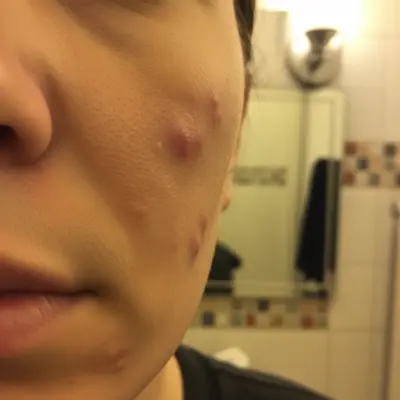
Before: Acne treatment tracking
Before
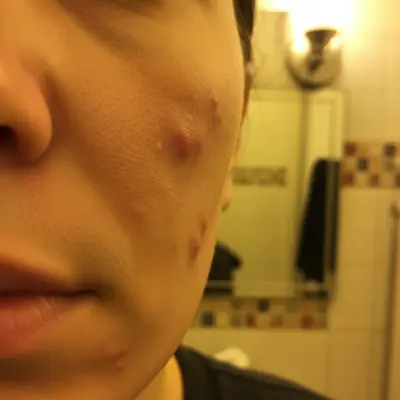
After: Acne treatment tracking
After

AI Skin Treatment Tracker

Drop your photo here

or click to browse

Release to upload

Free • No signup

Popular use cases:
  • skin treatment tracker
  • skincare progress photo
  • skin condition documentation
  • dermatology photo tool
  • treatment progress tracker
  • skin comparison tool

Cost
Free No signup required
Time
Instant results in 15-30 seconds
Works on
Any device - browser, phone, tablet, desktop
Powered by
AI-powered photo editing
Scenario Prompt Time
Light normalization normalize to clinical lighting, preserve skin texture 20s
Color cast removal remove yellow cast, show true skin colors 20s
Full standardization clinical lighting, neutral white balance, preserve all detail 25s

How it works

  1. Upload your skin photo

    Drop a close-up photo of the skin area you're tracking into EditThisPic. Good focus and similar distance each time help. JPG, PNG, WebP up to 7MB.

    Expect: Standard normalization: 20-30 seconds. Color correction for skin tones: may need 1-2 refinements.
  2. Describe the adjustment

    Type your instruction: 'normalize the lighting to bright even clinical lighting to show skin texture' or 'adjust white balance to neutral daylight.' Be specific about preserving skin detail. No marking needed.

    Tip: 'Show skin texture clearly' tells the AI to preserve the actual skin detail rather than smoothing it — critical for tracking treatment progress.

    Copy one of these to get started:

    Clinical lighting normalization normalize the lighting to bright even clinical lighting, preserve all skin texture and blemishes exactly as they are
    Daylight white balance adjust the white balance to neutral daylight, keep skin detail and all imperfections visible
    Remove color cast from bathroom remove the warm yellow color cast from bathroom lighting, show true skin colors under neutral light
    Close-up texture preservation normalize this close-up skin photo to even lighting while keeping every pore, texture, and mark visible at full detail
    3 more prompts
    Match reference photo lighting adjust this photo's lighting and color temperature to match bright clinical exam room conditions
    Reduce flash hotspot reduce the harsh flash hotspot on the skin while keeping all skin texture and blemishes intact
    Standardize for timeline normalize this skin photo to the same standard as my previous photos: bright, even, neutral white balance, no color cast
  3. Review for accuracy

    Verify that skin texture, blemishes, and coloring are accurately preserved. The lighting should be normalized but the actual skin condition should look unchanged.

  4. Refine with markers if needed

    If the AI smoothed your skin or altered blemishes instead of just fixing lighting, tap markers on the affected area and specify 'fix only the lighting, preserve all skin texture.'

    Tip: Never let the AI 'enhance' or 'improve' skin in progress photos — you need documentary accuracy, not beauty retouching.
Try it free

AI Skin Treatment Tracker

Drop your photo here

or click to browse

Release to upload

Free • No signup

"My dermatologist was impressed with how consistent my progress photos looked. The normalized lighting made it easy to see the tretinoin was actually working." @SkinCare_Progress

See it in action

Before: Acne treatment tracking
Before
->
After: Acne treatment tracking
After

Acne treatment tracking

Normalizing a close-up face photo to track acne treatment progress under consistent clinical lighting.

Prompt: normalize to bright clinical lighting, preserve all acne, blemishes, and skin texture exactly
Before: Rosacea documentation
Before
->
After: Rosacea documentation
After

Rosacea documentation

Correcting a photo's color cast to accurately document rosacea redness for dermatologist review.

Prompt: remove warm color cast, show true skin redness under neutral daylight conditions, preserve all texture
Before: Eczema progress photo
Before
->
After: Eczema progress photo
After

Eczema progress photo

Standardizing lighting on a hand photo to track eczema treatment over multiple weeks.

Prompt: normalize lighting to bright even daylight, keep all dry patches and skin texture visible

Detailed Guides by Scenario

📷

Personal Skincare Journey

Track your skincare routine results with consistent, comparable photos over weeks and months.

Common Scenarios

  • Normalizing weekly acne progress photos for consistent comparison
  • Removing bathroom color cast to see true redness levels
  • Documenting retinol or tretinoin results over a 12-week period

Best Practices

  • Take photos at the same distance and angle every session
  • Use the exact same prompt for every normalization
  • Photograph in the same location when possible for best consistency
📷

Dermatology Patient Documentation

Help patients document treatment progress with standardized clinical-quality photos between visits.

Common Scenarios

  • Standardizing patient selfies to match clinical lighting conditions
  • Creating consistent visual timelines for treatment plan reviews
  • Improving telemedicine assessments with normalized photo quality

Best Practices

  • Instruct patients to use the same EditThisPic prompt each week
  • Request photos taken at arm's length for consistent distance
  • Normalize all photos to the same 'clinical lighting' standard
📷

Clinical Research Documentation

Standardize patient skin photos for clinical trial documentation and research publications.

Common Scenarios

  • Normalizing multi-site trial photos to identical lighting standards
  • Creating standardized before-after pairs for publication figures
  • Ensuring comparable documentation across different clinical settings

Best Practices

  • Define a specific normalization prompt as your study protocol standard
  • Document the AI normalization step in your methodology
  • Verify normalization doesn't alter clinically significant features

If something looks off

AI smoothed my skin instead of just fixing lighting

Why: The AI interpreted the request as a beauty edit and applied skin smoothing.

Try: Be explicit: 'normalize ONLY the lighting — preserve ALL skin texture, blemishes, acne, marks, and imperfections exactly as they are'

Tip: Always include 'preserve all imperfections' when editing skin documentation photos. Beauty mode is the opposite of what you need.

AI changed the wrong area or something I didn't want changed

Why: The AI couldn't determine exactly which area you meant from description alone. This happens with ambiguous requests.

Try: Tap a marker on the specific area you want to change, then regenerate with the same prompt

Tip: Markers tell the AI 'I mean THIS one specifically.' Use them when description alone is ambiguous.

True redness not showing after color correction

Why: Over-correction of warm tones removed legitimate skin redness along with the color cast.

Try: Specify: 'remove only the yellow color cast from lighting, keep all natural skin redness and pigmentation'

Tip: Redness is clinical data — explicitly tell the AI to preserve it while removing only the artificial lighting color.

Photos look different despite same prompt

Why: Variations in original lighting conditions can affect how the AI interprets the normalization.

Try: Take all progress photos in the same location, distance, and angle — then apply the same prompt consistently

Tip: Consistent source conditions + consistent AI normalization = the most reliable tracking results.

Close-up lost detail after editing

Why: The AI down-sampled or blurred fine detail during the lighting adjustment.

Try: Add 'maintain full resolution and all fine skin detail' to your prompt

Tip: For dermatological tracking, fine detail matters. Explicitly request detail preservation for close-up skin photos.

Quick answers

Do I need to mark the skin area before describing what I want?

No! Just describe the adjustment: 'normalize lighting to clinical standard.' The AI adjusts the entire photo's lighting. Only use markers if you need to fix lighting on a specific skin area while leaving the surrounding area unchanged.

Will the AI smooth or beautify my skin?

Not if you specify otherwise. Type 'preserve ALL skin texture and blemishes.' The AI normalizes lighting without removing blemishes, smoothing texture, or retouching imperfections — exactly what you need for accurate tracking.

Is there a free skin treatment tracker without signup?

Yes. EditThisPic is free to try with no account needed. Upload your skin photo, describe the lighting fix, and get a normalized result in 30 seconds. One free edit per week, credit packs from $1.99.

How do I document skin treatment progress accurately?

Upload each weekly photo to EditThisPic and use the same prompt: 'normalize to bright clinical lighting, preserve all skin texture.' Consistent normalization across all photos makes real improvements visible regardless of when or where you photographed.

Can I share normalized photos with my dermatologist?

Yes. Download normalized photos and bring them to your appointment or upload to a patient portal. Consistently lit documentation helps your dermatologist assess treatment effectiveness more accurately.

What skin conditions can I track with this?

Acne, rosacea, eczema, psoriasis, hyperpigmentation, surgical healing, laser treatment recovery, and any visible skin condition. The tool normalizes lighting — it works regardless of what you're tracking.

Can I track treatment on different body areas?

Yes. The AI normalizes any close-up photo — face, hands, arms, legs, back. Just photograph the area under similar conditions each time and use the same normalization prompt.

Does it work on my phone?

Yes. EditThisPic works in any mobile browser. Take a close-up of your skin and normalize it right from your phone. No app download needed.

Ready to track your skin treatment?

Free to try. No signup required.

Try it free