Free • No signup Track Fitness progress · Free

AI Fitness Progress Tracker

Upload gym photos and let AI normalize lighting for consistent transformation documentation.
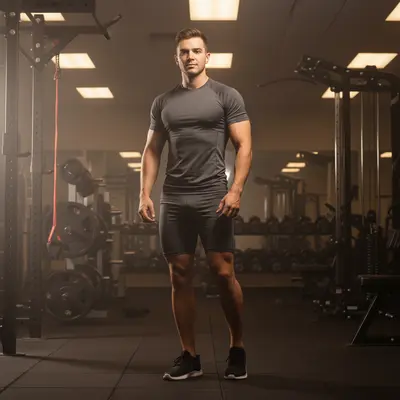
Before: Gym to daylight normalization
Before
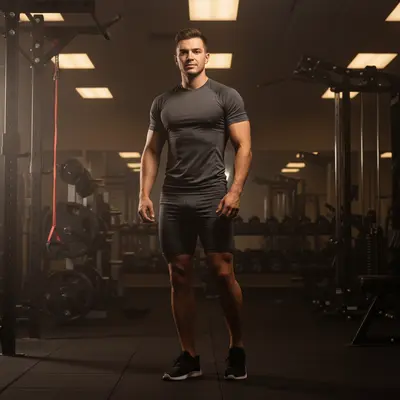
After: Gym to daylight normalization
After

AI Fitness Progress Tracker

Drop your photo here

or click to browse

Release to upload

Free • No signup

Popular use cases:
  • fitness progress tracker
  • body transformation tracker
  • gym progress documentation
  • muscle gain tracking
  • fitness comparison photos
  • workout progress tool

Cost
Free No signup required
Time
Instant results in 15-30 seconds
Works on
Any device - browser, phone, tablet, desktop
Powered by
AI-powered photo editing
Scenario Prompt Time
Gym normalization normalize gym lighting to bright daylight 20s
Mirror cleanup replace mirror background with white wall 25s
Full standardization normalize lighting, fix color, clean background 30s

How it works

  1. Upload your progress photo

    Drop your latest gym or home progress photo into EditThisPic. Front, side, and back angles all work. Consistent pose and distance each time is key. JPG, PNG, WebP up to 7MB.

    Expect: Standard normalization: 20-30 seconds. Background replacement: may need 1-2 refinements.
  2. Describe the adjustment

    Type 'normalize lighting to bright even daylight for body comparison, keep physique exactly as is.' The critical instruction is 'keep physique exactly as is.' No marking needed.

    Tip: Never use 'enhance' or 'improve' in fitness progress prompts — the AI may add definition or alter proportions. 'Normalize' and 'keep exactly' are your safe words.

    Copy one of these to get started:

    Gym lighting normalization normalize this gym progress photo to bright even daylight conditions, keep my physique and body exactly as is
    Mirror selfie cleanup normalize the lighting and replace the gym mirror background with a plain white wall, keep my body exactly unchanged
    Match previous week photo adjust this progress photo to match bright neutral daylight conditions identical to my previous session
    Reduce harsh gym shadows soften the harsh overhead gym lighting shadows while preserving actual muscle definition and body composition
    3 more prompts
    Brighten dark locker room shot brighten this dark locker room progress photo to match daylight brightness, keep all body proportions unchanged
    Front and side consistency normalize this side-angle progress photo to match the same lighting standard as my front-facing photos
    Competition prep documentation normalize to bright, even, stage-like lighting conditions, preserve exact muscle definition and conditioning
  3. Review for accuracy

    Verify that muscle definition, body fat distribution, and proportions look identical to the original — only the lighting should be different.

  4. Refine if needed

    If the AI enhanced your physique, specify 'normalize ONLY the lighting — do NOT add muscle definition, change body composition, or modify any physical features.'

    Tip: Fitness progress photos must be honest documentation. Explicit 'do not modify physique' instructions prevent AI enhancement.
Try it free

AI Fitness Progress Tracker

Drop your photo here

or click to browse

Release to upload

Free • No signup

"12 weeks of normalized gym photos showed muscle gains I honestly couldn't see in the mirror. Having a consistent lighting baseline changed everything about how I track progress." @FitProgress_Daily

See it in action

Before: Gym to daylight normalization
Before
->
After: Gym to daylight normalization
After

Gym to daylight normalization

Normalizing a dim gym progress photo to match daylight conditions for consistent 12-week transformation tracking.

Prompt: normalize to bright even daylight conditions, keep my physique exactly as is
Before: Mirror selfie standardized
Before
->
After: Mirror selfie standardized
After

Mirror selfie standardized

Cleaning up a gym mirror selfie with a plain background for professional-looking transformation documentation.

Prompt: replace the gym mirror background with plain white wall, keep my body exactly unchanged
Before: Locker room photo brightened
Before
->
After: Locker room photo brightened
After

Locker room photo brightened

Brightening a dark locker room progress photo to show physique detail for coaching check-in.

Prompt: brighten to match daylight brightness, keep all body proportions and muscle definition unchanged

Detailed Guides by Scenario

📷

Personal Fitness Journey

Track your body composition changes with consistent, honestly documented progress photos.

Common Scenarios

  • Normalizing weekly gym photos for 12-week transformation documentation
  • Cleaning up mirror selfies for cleaner before-after comparison
  • Standardizing photos from different gyms during travel

Best Practices

  • Take photos in the same pose at the same time of day each week
  • Use the identical prompt for every normalization
  • Wear the same outfit for each progress photo when possible
📷

Online Coaching Check-ins

Help fitness coaches collect and compare standardized progress photos from clients training remotely.

Common Scenarios

  • Normalizing client check-in photos from different home setups
  • Creating professional-looking transformation timelines for clients
  • Building coaching portfolio with consistent before-after documentation

Best Practices

  • Send clients the exact normalization prompt to use each week
  • Establish standard pose angles: front, side, back
  • Compare normalized photos at 4-week intervals for meaningful change
📷

Competition Prep Documentation

Track conditioning and posing progress during bodybuilding or physique competition preparation.

Common Scenarios

  • Documenting peak week conditioning changes daily
  • Tracking posing improvements across practice sessions
  • Creating stage-lighting previews for competition readiness assessment

Best Practices

  • Take posing photos in consistent lighting each practice session
  • Document both relaxed and posed shots for full picture
  • Compare conditioning at 1-week intervals during final prep

If something looks off

AI enhanced my physique instead of just fixing lighting

Why: The AI interpreted the request as body enhancement and added muscle definition or altered proportions.

Try: Be explicit: 'normalize ONLY the lighting — do NOT add muscle, change definition, alter proportions, or modify any body feature'

Tip: List every body feature NOT to change: muscle definition, body fat, proportions, size. Be exhaustive.

AI changed the wrong area or something I didn't want changed

Why: The AI couldn't determine exactly which area you meant from description alone.

Try: Tap a marker on the specific area you want to change, then regenerate with the same prompt

Tip: Markers tell the AI 'I mean THIS one specifically.'

Muscle shadows look different after normalization

Why: Normalizing lighting reduced the dramatic shadows that showed muscle definition.

Try: Add 'preserve natural body shadows and muscle definition contours while normalizing overall brightness'

Tip: Some shadow is natural and shows real muscle shape. Specify 'preserve natural body shadows' to keep them.

Body proportions look slightly different

Why: The AI subtly changed proportions during processing.

Try: Compare head-to-body ratio, limb length, and waist-to-shoulder proportions against the original before accepting

Tip: Use the before/after slider to verify proportions. Any change means the edit should be redone with stricter instructions.

Colors look washed out after brightening

Why: Over-brightening removed the natural color richness of the photo.

Try: Add 'maintain color saturation and skin tones while brightening to daylight level'

Tip: Specify both brightness AND color preservation to avoid washed-out results.

Quick answers

Do I need to mark anything before describing the adjustment?

No! Just describe the lighting fix: 'normalize to bright daylight conditions.' The AI adjusts the entire photo. Only use markers if you need to fix a specific area while leaving the rest unchanged.

Will the AI make me look more muscular or leaner?

Not if you specify otherwise. Type 'keep my physique and body exactly as is.' The AI normalizes lighting without enhancing muscle definition, slimming, or altering body composition.

Is there a free fitness progress tool without signup?

Yes. EditThisPic is free to try with no account needed. Upload your progress photo, normalize lighting, and track your transformation. One free edit per week, credit packs from $1.99.

How do I track fitness transformation accurately?

Take consistent-pose photos weekly. Upload each to EditThisPic with 'normalize to bright daylight, keep physique exactly as is.' Compare normalized photos to see real changes over time.

Can I share these with my coach or trainer?

Yes. Download normalized photos for check-ins. Consistently lit progress documentation helps trainers assess your training and nutrition results accurately.

What should I wear for consistent progress photos?

The same fitted clothing every time — a consistent outfit removes a variable. Shorts and a fitted top or sports bra for women, shorts for men. Same colors each time if possible.

How often should I take progress photos?

Weekly for active training phases. Bi-weekly for maintenance. Same time of day (morning, fasted) for most consistent body appearance across photos.

Does it work on phone photos?

Yes. EditThisPic works in any mobile browser. Take a progress photo and normalize it from your phone. No app download needed.

Ready to track your fitness transformation?

Free to try. No signup required.

Try it free