Free • No signup Track Wound healing progress · Free

AI Wound Care Tracker

Upload wound photos and let AI normalize lighting for consistent medical documentation.

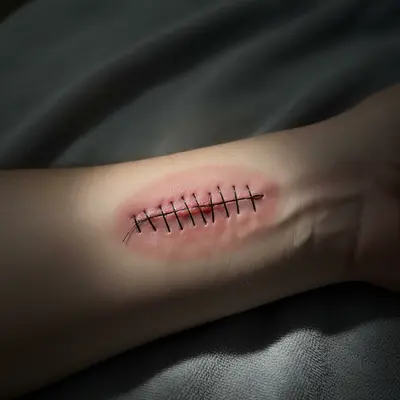
Before: Surgical incision healing
Before
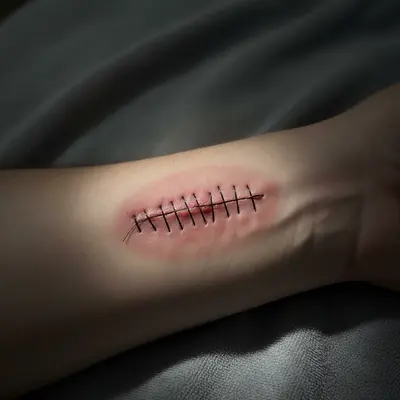
After: Surgical incision healing
After

AI Wound Care Tracker

Drop your photo here

or click to browse

Release to upload

Free • No signup

Popular use cases:
  • wound care tracker
  • wound healing documentation
  • surgical recovery tracker
  • wound progress photo
  • wound assessment tool
  • healing documentation

Cost
Free No signup required
Time
Instant results in 15-30 seconds
Works on
Any device - browser, phone, tablet, desktop
Powered by
AI-powered photo editing
Scenario Prompt Time
Clinical normalization normalize to clinical lighting, preserve all wound detail 20s
Flash correction reduce flash glare, preserve tissue color exactly 25s
Shadow removal remove shadows, show full wound under even light 20s

How it works

  1. Upload your wound photo

    Drop a photo of the wound into EditThisPic. Consistent distance and angle each session ensures accurate healing comparison. JPG, PNG, WebP up to 7MB.

    Expect: Standard normalization: 20-30 seconds. Color correction for tissue assessment: may need 1-2 refinements.
  2. Describe the adjustment

    Type 'normalize to bright even clinical lighting for wound documentation, preserve all wound detail, tissue color, and healing exactly as is.' Be specific about preserving wound characteristics. No marking needed.

    Tip: Wound documentation requires preserving tissue color accurately — redness, granulation tissue, and eschar all have clinical significance. Always say 'preserve tissue color.'

    Copy one of these to get started:

    Clinical wound documentation normalize to bright even clinical lighting for wound documentation, preserve all wound detail, tissue color, and edges exactly
    Surgical incision tracking normalize lighting on this surgical incision photo to bright even conditions, preserve suture detail, redness, and healing progress
    Burn healing documentation normalize the lighting on this burn photo to clinical standards, preserve exact color of healing tissue including pink and red areas
    Remove flash glare on wound reduce flash glare on the wound while preserving all tissue detail, color, and wound edge definition
    3 more prompts
    Match previous photo conditions adjust this wound photo to match bright neutral daylight conditions, preserve all wound characteristics exactly
    Reduce shadow across wound remove the shadow falling across the wound so the full wound bed is visible under even lighting
    Daily healing timeline photo normalize to standard documentation conditions: bright, even, neutral white balance, preserve all wound features
  3. Review for accuracy

    Verify that wound edges, tissue color, exudate, and healing signs are accurately visible. The lighting should be normalized but wound appearance unchanged.

  4. Refine if needed

    If the AI altered wound appearance, specify 'fix ONLY the lighting — do NOT modify wound color, edges, or any tissue appearance.'

    Tip: Medical documentation photos must never be cosmetically altered. Explicit preservation instructions are essential.
Try it free

AI Wound Care Tracker

Drop your photo here

or click to browse

Release to upload

Free • No signup

"My surgeon asked how I got such consistent wound photos. AI-normalized lighting made my surgical recovery timeline actually useful for the follow-up assessment." @WoundCare_RN

See it in action

Before: Surgical incision healing
Before
->
After: Surgical incision healing
After

Surgical incision healing

Normalizing post-surgical incision photos to track healing across follow-up visits with consistent lighting.

Prompt: normalize to bright clinical lighting, preserve suture detail, redness, and tissue color exactly
Before: Burn recovery tracking
Before
->
After: Burn recovery tracking
After

Burn recovery tracking

Standardizing a burn healing photo for consistent documentation over the recovery period.

Prompt: normalize to clinical lighting, preserve all healing tissue color and texture exactly
Before: Wound bed assessment
Before
->
After: Wound bed assessment
After

Wound bed assessment

Normalizing lighting on a wound photo to accurately show tissue color for medical team review.

Prompt: normalize to bright even lighting, preserve wound bed color and edge definition clearly

Detailed Guides by Scenario

📷

Home Wound Care Documentation

Document wound healing at home between medical visits with standardized photos.

Common Scenarios

  • Normalizing daily photos of a healing surgical incision
  • Tracking burn recovery with consistent lighting documentation
  • Documenting wound care for insurance or disability claims

Best Practices

  • Take photos from the same angle and distance each session
  • Include a ruler or coin for size reference alongside the wound
  • Use the same normalization prompt for every photo in the series
📷

Telehealth Wound Assessment

Provide healthcare providers with standardized wound photos for accurate remote assessment.

Common Scenarios

  • Sending normalized wound photos to home health nurses
  • Creating visual timelines for telehealth wound care check-ins
  • Documenting complications early with clear, consistent photos

Best Practices

  • Follow your provider's preferred photo format and angle
  • Normalize all photos to the same lighting standard before submitting
  • Note the date and treatment applied alongside each normalized photo
📷

Clinical Wound Documentation

Healthcare facilities can standardize wound documentation across different rooms and lighting conditions.

Common Scenarios

  • Normalizing wound photos taken in different exam rooms
  • Creating standardized healing timelines for patient records
  • Ensuring consistent documentation across multiple care providers

Best Practices

  • Establish a standard normalization prompt for your facility
  • Train staff to photograph from consistent angles and distances
  • Verify that normalized photos maintain clinical accuracy

If something looks off

AI altered the wound appearance

Why: The AI modified wound tissue, color, or edges during processing.

Try: Be explicit: 'normalize ONLY the lighting — do NOT modify wound color, tissue, edges, or any wound characteristics'

Tip: Medical documentation must be unaltered. List every wound feature to preserve.

AI changed the wrong area or something I didn't want changed

Why: The AI couldn't determine exactly which area you meant from description alone.

Try: Tap a marker on the specific area you want to change, then regenerate with the same prompt

Tip: Markers tell the AI 'I mean THIS one specifically.'

Tissue color changed after color correction

Why: Over-correction of lighting also shifted the actual tissue color.

Try: Specify: 'preserve exact tissue color — redness, pink, and all wound bed colors must remain unchanged'

Tip: Tissue color indicates healing stage. Never allow color shifts in wound documentation.

Wound appears smoothed or less detailed

Why: The AI applied smoothing to the wound area during processing.

Try: Add 'maintain full resolution and every wound detail: edges, texture, granulation, sutures, exudate'

Tip: For wound documentation, every visual detail has clinical significance.

Flash glare obscuring wound bed

Why: Direct flash created a white hotspot on moist wound surfaces.

Try: Soften the flash glare specifically: 'reduce the bright flash reflection on the wound surface while keeping all tissue detail'

Tip: Use diffused lighting or photograph from a slight angle to avoid direct flash reflection on moist surfaces.

Quick answers

Do I need to mark the wound before describing what I want?

No! Just describe the adjustment: 'normalize to clinical lighting, preserve all wound detail.' The AI adjusts lighting across the entire photo. Only use markers if you need to fix lighting on a specific area.

Will the AI alter or heal the wound in the photo?

Not if you specify otherwise. Type 'preserve all wound detail, tissue color, and edges exactly as is.' The AI normalizes lighting without modifying wound appearance in any way.

Is there a free wound documentation tool without signup?

Yes. EditThisPic is free to try with no account needed. Upload your wound photo, normalize the lighting, and create consistent documentation. One free edit per week, credit packs from $1.99.

How do I document wound healing accurately?

Photograph the wound from the same distance and angle each session. Upload to EditThisPic with 'normalize to clinical lighting, preserve all wound detail.' Compare normalized photos to assess healing accurately.

Can I share these with my healthcare provider?

Yes. Download normalized photos for appointments, telehealth visits, or patient portals. Consistently lit wound documentation helps providers assess healing between visits.

What types of wounds can I track?

Surgical incisions, burns, lacerations, pressure injuries, diabetic ulcers, skin grafts, and any wound requiring ongoing monitoring. The tool normalizes photos regardless of wound type.

Is this suitable for professional medical documentation?

EditThisPic normalizes lighting for consistency. For official medical records, verify with your healthcare facility that AI-normalized photos meet their documentation standards.

Does it work on phone photos?

Yes. EditThisPic works in any mobile browser. Take a wound photo and normalize it from your phone. No app download needed.

Ready to document wound healing?

Free to try. No signup required.

Try it free