Free • No signup Track Hair loss progress · Free

AI Hair Loss Tracker

Upload scalp photos and let AI normalize lighting for accurate hair density comparison.
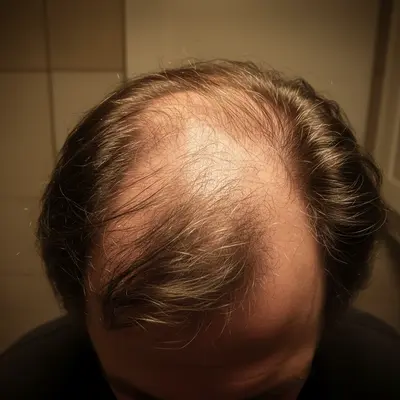
Before: Crown thinning tracking
Before
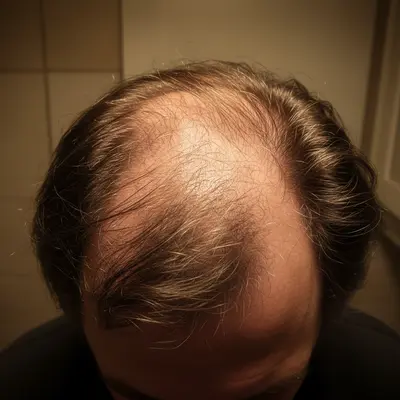
After: Crown thinning tracking
After

AI Hair Loss Tracker

Drop your photo here

or click to browse

Release to upload

Free • No signup

Popular use cases:
  • hair loss tracker
  • hair regrowth progress
  • hair density comparison
  • minoxidil results tracker
  • hair treatment documentation
  • scalp photo comparison

Cost
Free No signup required
Time
Instant results in 15-30 seconds
Works on
Any device - browser, phone, tablet, desktop
Powered by
AI-powered photo editing
Scenario Prompt Time
Crown normalization normalize lighting, show scalp density exactly as is 20s
Hairline tracking normalize lighting, preserve exact hairline and baby hairs 25s
Part-line comparison normalize lighting to show part width clearly 20s

How it works

  1. Upload your scalp photo

    Drop a photo of the area you're tracking into EditThisPic. Top-down crown shots or hairline photos work best. Consistent angle each time is key. JPG, PNG, WebP up to 7MB.

    Expect: Standard normalization: 20-30 seconds. Color correction: may need 1-2 refinements.
  2. Describe the adjustment

    Type 'normalize lighting to bright even overhead light to show hair density and coverage clearly.' Be specific about preserving hair detail rather than enhancing it. No marking needed.

    Tip: 'Show hair density clearly' prevents the AI from making hair look thicker or fuller — you want documentary accuracy, not cosmetic improvement.

    Copy one of these to get started:

    Crown area normalization normalize the lighting on this crown photo to bright even overhead lighting, show hair density and scalp visibility exactly as is
    Hairline documentation normalize this hairline photo to bright even lighting, preserve the exact hairline position and all baby hairs
    Remove flash hotspot on scalp reduce the flash hotspot on the scalp while keeping all hair strands and density visible
    Match previous photo conditions adjust this scalp photo to match bright daylight conditions with neutral white balance, preserve all hair detail
    3 more prompts
    Temple area tracking normalize this photo of my temple area to bright even lighting, show the actual density and any new growth clearly
    Color-correct for true hair color remove the warm yellow cast from bathroom lighting to show true hair color and scalp tones
    Part-line documentation normalize the lighting on this hair part photo to show the part width and hair density on both sides clearly
  3. Review for accuracy

    Verify that hair density, thinning patterns, and scalp visibility are accurately preserved. The lighting should be normalized but hair thickness should appear unchanged.

  4. Refine if needed

    If the AI made hair appear thicker or added density, specify 'normalize ONLY the lighting — do not add, thicken, or modify any hair.' Tap markers on problem areas if needed.

    Tip: For hair tracking, the AI must never 'improve' the hair. Explicit instructions to preserve exactly what exists are essential.
Try it free

AI Hair Loss Tracker

Drop your photo here

or click to browse

Release to upload

Free • No signup

"Finally seeing real proof my minoxidil is working. Same-angle photos with normalized lighting show new growth I couldn't see just looking in the mirror." @HairRegrowth_Track

See it in action

Before: Crown thinning tracking
Before
->
After: Crown thinning tracking
After

Crown thinning tracking

Normalizing a top-down crown photo to track minoxidil treatment results over 3 months.

Prompt: normalize to bright even overhead lighting, show hair density and scalp visibility exactly as is
Before: Hairline progress photo
Before
->
After: Hairline progress photo
After

Hairline progress photo

Documenting hairline changes with normalized lighting to track finasteride treatment effectiveness.

Prompt: normalize to bright even lighting, preserve exact hairline position and all fine hairs
Before: Part-line comparison
Before
->
After: Part-line comparison
After

Part-line comparison

Standardizing a part-line photo for width comparison across weekly check-ins.

Prompt: normalize the lighting to show part width and density on both sides clearly

Detailed Guides by Scenario

📷

Personal Hair Treatment Tracking

Track your hair treatment results with consistent, comparable photos over months.

Common Scenarios

  • Normalizing weekly crown photos to track minoxidil results
  • Documenting hairline changes during finasteride treatment
  • Comparing part-line width over a 6-month treatment period

Best Practices

  • Take the same-angle photo at the same time each week
  • Use identical prompts for every normalization
  • Track from multiple angles: crown, hairline, temples, part line
📷

Dermatology Treatment Assessment

Help patients provide accurate hair loss documentation between clinic visits.

Common Scenarios

  • Standardizing patient scalp selfies for teleconsultation review
  • Creating visual timelines for PRP or hair transplant recovery
  • Documenting treatment response for insurance documentation

Best Practices

  • Instruct patients to photograph from the same angle each visit
  • Normalize all photos to bright overhead lighting standard
  • Note the treatment week alongside each normalized photo
📷

Hair Transplant Recovery Tracking

Document the recovery and growth timeline after hair transplant surgery with standardized photos.

Common Scenarios

  • Tracking graft growth at weeks 1, 4, 8, 12, and 24 post-surgery
  • Documenting shedding phase vs new growth phase
  • Creating recovery timelines for clinic portfolios

Best Practices

  • Start documentation from day 1 post-procedure
  • Photograph both the donor and recipient areas
  • Compare normalized photos at regular intervals for milestone documentation

If something looks off

AI made my hair look thicker or added hair

Why: The AI interpreted the request as a cosmetic improvement rather than documentation.

Try: Be explicit: 'normalize ONLY the lighting — do NOT add, thicken, darken, or modify any hair strands'

Tip: Hair tracking requires zero cosmetic changes. Always include 'do not modify hair' in your prompt.

AI changed the wrong area or something I didn't want changed

Why: The AI couldn't determine exactly which area you meant from description alone.

Try: Tap a marker on the specific area you want to change, then regenerate with the same prompt

Tip: Markers tell the AI 'I mean THIS one specifically.'

Fine baby hairs disappeared after editing

Why: The AI interpreted very fine vellus hairs as noise and removed them during processing.

Try: Add 'preserve ALL fine hairs, baby hairs, and vellus hairs — these are treatment results'

Tip: New growth from treatments like minoxidil starts as fine vellus hairs. Explicitly protect them.

Scalp color looks different after normalization

Why: Over-correction changed the scalp's natural pink or redness.

Try: Specify 'preserve natural scalp coloring, only adjust the lighting brightness and white balance'

Tip: Scalp color can indicate irritation from treatments — preserve it as clinical data.

Photos don't look comparable despite same prompt

Why: Significant lighting differences between original photos limit normalization accuracy.

Try: Take all photos in the same bathroom with the same lights on, then normalize — consistent source conditions help

Tip: The more similar your original conditions, the more reliable the AI normalization becomes.

Quick answers

Do I need to mark my scalp before describing what I want?

No! Just describe the adjustment: 'normalize lighting to show hair density clearly.' The AI adjusts the entire photo without marking. Only use markers if you need to fix lighting on a specific scalp area.

Will the AI make my hair look thicker?

Not if you specify otherwise. Type 'preserve hair density and scalp visibility exactly as is.' The AI normalizes lighting without adding hair, increasing density, or cosmetically improving appearance.

Is there a free hair loss tracker without signup?

Yes. EditThisPic is free to try with no account needed. Upload your scalp photo, normalize the lighting, and track progress. One free edit per week, credit packs from $1.99.

How do I track hair loss treatment progress?

Take the same-angle photo weekly (crown, hairline, or part line). Upload each to EditThisPic with 'normalize to bright even lighting, preserve all hair detail.' Compare normalized photos side by side to spot changes.

Can I share normalized photos with my dermatologist?

Yes. Download and bring them to appointments or telehealth visits. Consistently lit documentation helps your doctor assess whether treatments are working.

What treatments can I track with this?

Minoxidil, finasteride, PRP treatments, hair transplant recovery, microneedling results, or any treatment affecting hair density. The tool normalizes photos — it works regardless of the treatment.

How often should I take progress photos?

Weekly photos from the same angle and distance give the best tracking data. Monthly minimum for slower treatments like finasteride. Normalize each photo with the same prompt.

Does it work on phone photos?

Yes. EditThisPic works in any mobile browser. Take a scalp photo and normalize it right from your phone. No app download needed.

Ready to track your hair progress?

Free to try. No signup required.

Try it free