Free • No signup Track Acne treatment progress · Free

AI Acne Treatment Tracker

Upload acne progress photos and let AI normalize lighting for accurate week-over-week comparison.
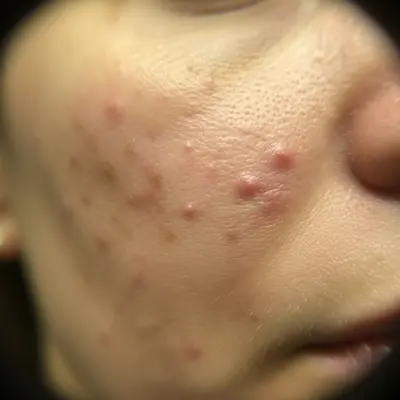
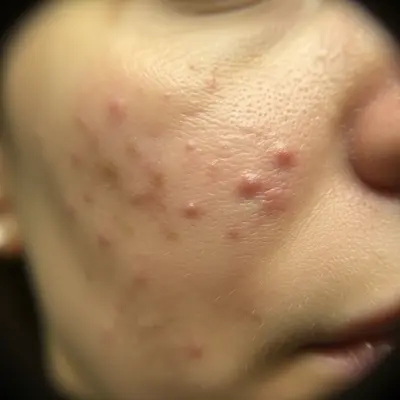
Before: Cheek acne tracking
Before
After: Cheek acne tracking
After

AI Acne Treatment Tracker

Drop your photo here

or click to browse

Release to upload

Free • No signup

Popular use cases:
  • acne treatment tracker
  • acne progress photo
  • skincare progress documentation
  • acne before after comparison
  • pimple treatment tracker
  • breakout documentation

Cost
Free No signup required
Time
Instant results in 15-30 seconds
Works on
Any device - browser, phone, tablet, desktop
Powered by
AI-powered photo editing
Scenario Prompt Time
Light normalization normalize to clinical lighting, preserve all acne exactly 20s
Color cast removal remove yellow cast, show true redness levels 20s
Full standardization clinical lighting, neutral balance, preserve all texture 25s

How it works

  1. Upload your acne photo

    Drop a close-up photo of the affected area into EditThisPic. Consistent distance and angle each time ensures accurate comparison. JPG, PNG, WebP up to 7MB.

    Expect: Standard normalization: 20-30 seconds. Full color correction: may need 1-2 refinements.
  2. Describe the adjustment

    Type 'normalize to bright clinical lighting, preserve all acne, blemishes, and skin texture exactly as is.' The key phrase is 'exactly as is' — you want documentary accuracy. No marking needed.

    Tip: Never use words like 'improve,' 'clear,' or 'fix' for acne tracking photos — the AI may interpret them as instructions to remove blemishes.

    Copy one of these to get started:

    Clinical lighting normalization normalize to bright even clinical lighting, preserve all acne, blemishes, redness, and skin texture exactly as they are
    Remove yellow bathroom cast remove the warm yellow color cast from bathroom lighting, show true redness and inflammation levels under neutral light
    Daylight standardization adjust white balance to neutral daylight, keep all pimples, scarring, and redness visible and accurate
    Flash hotspot reduction reduce the flash hotspot on the skin while preserving all acne lesions, texture, and redness intact
    3 more prompts
    Close-up texture preservation normalize this extreme close-up to even lighting while keeping every pore, bump, and mark at full detail
    Match weekly photo standard normalize to match my standard tracking conditions: bright, even, neutral white balance, no smoothing
    Reduce shadow on chin acne remove the shadow falling across my chin acne so the full extent of the breakout is visible under even light
  3. Review for accuracy

    Verify that all pimples, redness, scarring, and texture are visible and unchanged. Only the lighting should be different, not the skin condition.

  4. Refine if needed

    If the AI smoothed skin or reduced redness, regenerate with 'normalize ONLY the lighting — do NOT modify, smooth, or reduce any skin features.'

    Tip: The strongest way to prevent AI beautification: list what NOT to change — 'do not smooth, do not reduce redness, do not clear blemishes.'
Try it free

AI Acne Treatment Tracker

Drop your photo here

or click to browse

Release to upload

Free • No signup

"3 months of normalized acne progress photos proved my routine was working when daily mirror checks made me think nothing was changing. Week-over-week comparison is everything." @AcneFree_Journey

See it in action

Before: Cheek acne tracking
Before
->
After: Cheek acne tracking
After

Cheek acne tracking

Normalizing a cheek acne photo to track retinoid treatment results with consistent clinical lighting.

Prompt: normalize to bright clinical lighting, preserve all acne lesions and redness exactly
Before: Jawline breakout documentation
Before
->
After: Jawline breakout documentation
After

Jawline breakout documentation

Correcting shadows on jawline acne to document the full breakout severity for dermatologist review.

Prompt: remove shadows on jawline, show all acne under bright even lighting, preserve all blemishes
Before: Forehead progress photo
Before
->
After: Forehead progress photo
After

Forehead progress photo

Standardizing a forehead acne photo for week-over-week comparison during an antibiotic treatment course.

Prompt: normalize lighting to bright daylight, preserve all forehead acne and texture exactly as is

Detailed Guides by Scenario

📷

Personal Acne Treatment Journey

Track your acne treatment results with normalized photos that show real improvement over time.

Common Scenarios

  • Normalizing weekly retinoid progress photos
  • Removing bathroom color cast to see true inflammation
  • Documenting accutane results over a 6-month course

Best Practices

  • Take photos at the same distance and angle every week
  • Use the identical prompt for every photo
  • Photograph under the same conditions when possible
📷

Dermatology Treatment Documentation

Provide your dermatologist with standardized acne photos that accurately show treatment response.

Common Scenarios

  • Creating consistent timelines for treatment plan adjustments
  • Documenting breakout patterns and triggers over months
  • Sharing normalized photos via patient portal for telehealth

Best Practices

  • Take photos before and after each dermatology appointment
  • Note treatment changes alongside normalized photo dates
  • Ask your dermatologist if they have preferred photo standards
📷

Skincare Community Sharing

Share honest, consistently documented acne progress with online skincare communities.

Common Scenarios

  • Creating before-after comparisons for skincare routine reviews
  • Documenting product results with fair, normalized comparison photos
  • Building treatment timelines for skincare blog or community posts

Best Practices

  • Use identical lighting normalization for all shared photos
  • Be transparent that photos are light-normalized, not retouched
  • Include the treatment details alongside the visual documentation

If something looks off

AI cleared my acne instead of just fixing lighting

Why: The AI interpreted the editing request as cosmetic improvement and removed blemishes.

Try: Be explicit: 'normalize ONLY the lighting — do NOT remove, reduce, smooth, or modify ANY acne, blemishes, or redness'

Tip: List every thing NOT to change: pimples, redness, scarring, texture, bumps. The more explicit, the safer.

AI changed the wrong area or something I didn't want changed

Why: The AI couldn't determine exactly which area you meant from description alone.

Try: Tap a marker on the specific area you want to change, then regenerate with the same prompt

Tip: Markers tell the AI 'I mean THIS one specifically.'

Redness appears reduced after normalization

Why: Removing warm color cast also removed some legitimate skin redness.

Try: Specify: 'remove ONLY the artificial yellow cast from lighting — preserve ALL natural skin redness and inflammation'

Tip: Redness is clinical data — explicitly protect it during color correction.

Before and after photos look different despite same prompt

Why: Original lighting conditions varied too much between sessions.

Try: Photograph in the same location with the same lights each time for consistent source material

Tip: The closer your starting conditions are, the more accurate and comparable the normalized results.

Texture detail lost in close-up

Why: The AI reduced fine skin detail during processing.

Try: Add 'maintain full resolution — every pore, bump, and mark must remain visible'

Tip: For acne documentation, texture IS the data. Demand full detail preservation.

Quick answers

Do I need to mark my acne before describing what I want?

No! Just describe the lighting adjustment: 'normalize to clinical lighting.' The AI fixes lighting across the entire photo. Only use markers if you need to adjust lighting on a specific area while leaving the rest unchanged.

Will the AI remove my acne or smooth my skin?

Not if you specify otherwise. Type 'preserve ALL acne, blemishes, and skin texture exactly.' The AI normalizes lighting without removing, smoothing, or reducing any skin features.

Is there a free acne tracking tool without signup?

Yes. EditThisPic is free to try with no account needed. Upload your acne photo, normalize the lighting, and track treatment progress. One free edit per week, credit packs from $1.99.

How do I track acne treatment results accurately?

Take weekly close-up photos at the same angle and distance. Upload each to EditThisPic with 'normalize to clinical lighting, preserve all acne exactly.' Compare normalized photos side by side to spot real improvement.

Can I share these with my dermatologist?

Yes. Download normalized photos for appointments or telehealth visits. Consistently lit photos help your dermatologist assess treatment effectiveness between visits.

What acne treatments can I track?

Retinoids, antibiotics, benzoyl peroxide, salicylic acid, accutane, laser treatments, chemical peels, or any skincare routine. The tool normalizes photos regardless of treatment type.

How often should I take acne progress photos?

Weekly photos give the best tracking data for most treatments. Daily for fast-acting treatments like antibiotics. Use the same prompt and conditions each time.

Does it work on phone photos?

Yes. EditThisPic works in any mobile browser. Take a close-up and normalize it from your phone. No app download needed.

Ready to track your acne treatment?

Free to try. No signup required.

Try it free