Free โ€ข No signup Preview Braces ยท Free

AI Braces Preview

See how you'd look with braces before committing to orthodontic treatment
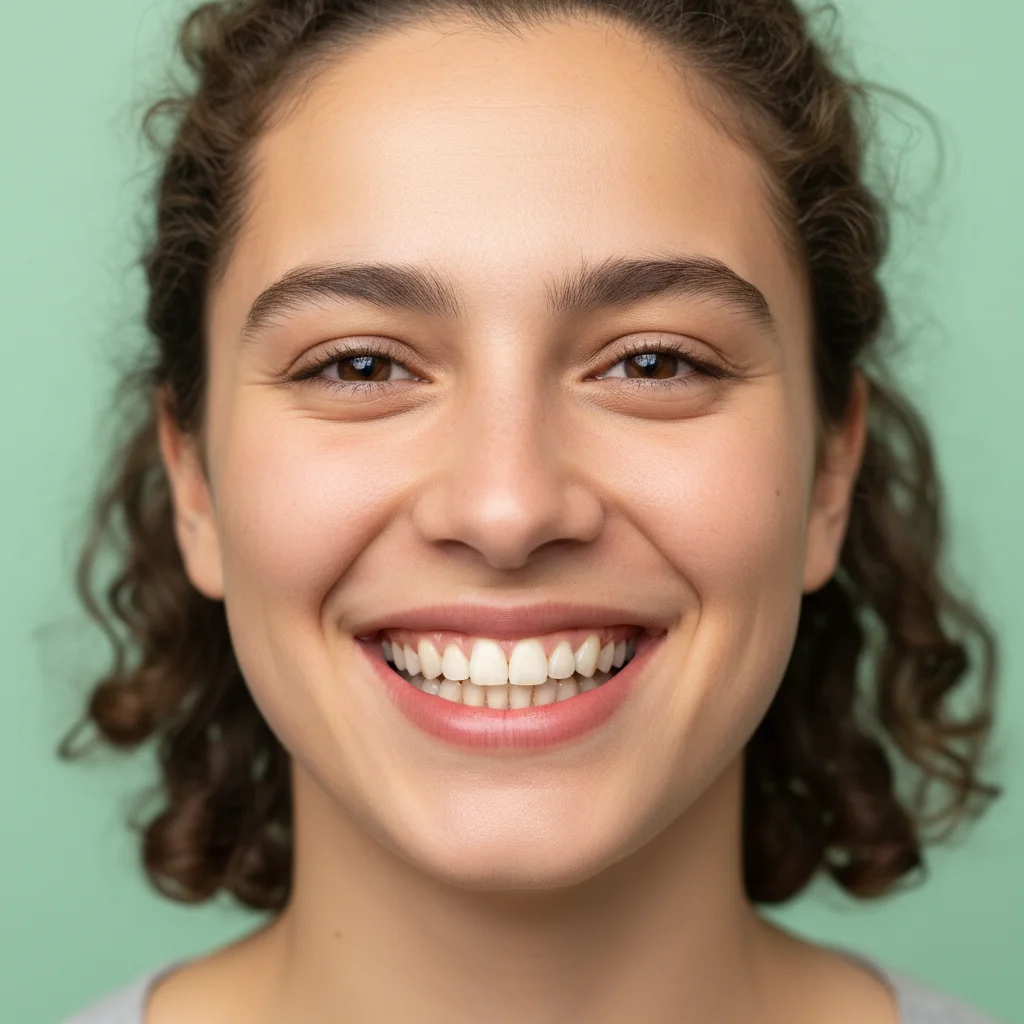
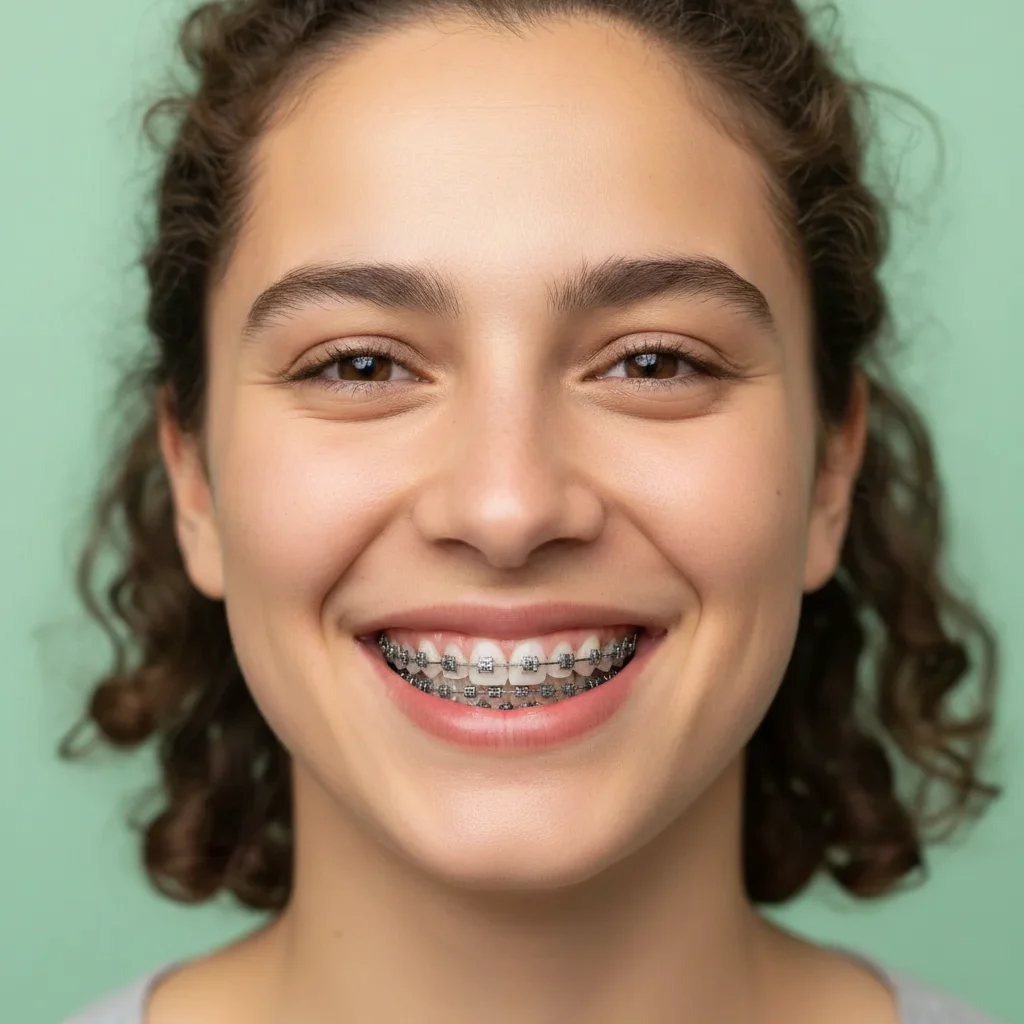
Natural smile without any orthodontic appliances
Before
โ†’
Same smile with realistic metal braces on all visible teeth
After

Preview Braces in Photo

Drop your photo here

or click to browse

Release to upload

Free โ€ข No signup

Advertisement
Popular use cases:
  • adult braces decision
  • teen braces preview
  • orthodontic consultation prep
  • braces anxiety relief
  • metal vs ceramic decision
  • orthodontic treatment visualization
  • before committing to braces

Cost
Free No signup required
Time
Instant results in 15-30 seconds
Works on
Any device - browser, phone, tablet, desktop
Powered by
AI-powered photo editing
Scenario Prompt Time
Traditional metal braces Add traditional metal braces with silver brackets to my top and bottom teeth 18s
Clear ceramic braces Show me with clear ceramic braces on my top and bottom teeth that blend with my tooth color 20s
Colored bands (teens) Give me metal braces with bright blue colored elastic bands on my top and bottom teeth 22s
Top teeth only Add metal braces to just my top teeth, leaving bottom teeth without braces 16s

How it works

  1. Upload your photo

    Choose a clear photo with a natural smile where your teeth are fully visible. Front-facing photos with good lighting work best. The AI needs to see your tooth structure clearly to add realistic braces.

    Expect: Upload takes 2-3 seconds. Accepts JPG, PNG, HEIC files up to 10MB. Smiling photos work better than closed-mouth.
  2. Describe the braces you want

    This is the key step. Tell the AI what type of braces to add: 'add metal braces to my top and bottom teeth', 'show me with clear ceramic braces', or 'give me braces on just my top teeth'. You can specify metal, ceramic, clear, or even colored bands without marking anything.

    Tip: Specify top only, bottom only, or both. You can also request specific bracket colors: 'silver metal braces' vs 'tooth-colored ceramic braces'.

    Copy one of these to get started:

    Standard metal braces (most common) Add traditional metal braces with silver brackets to my top and bottom teeth
    Clear ceramic braces Show me with clear ceramic braces on my top and bottom teeth that blend with my tooth color
    Top teeth only Add metal braces to just my top teeth, leaving bottom teeth without braces
    Colored bands for teens Give me metal braces with bright blue colored elastic bands on my top and bottom teeth
    3 more prompts
    Partial braces (front teeth only) Add braces to only my 6 front teeth on top and bottom, leaving molars clear
    Self-ligating braces Show me with modern self-ligating metal braces that don't have colored rubber bands
    Lingual braces (behind teeth) Add lingual braces that go behind my teeth so they are hidden from the front view
  3. Review the preview

    Examine how the braces look on your face. Check if the bracket placement looks natural, if the style (metal vs ceramic) suits you, and how noticeable they are when you smile. The AI creates realistic bracket shapes, wire placement, and proper dental positioning.

  4. Refine with markers if needed

    If you want braces on specific teeth only or the AI didn't apply them exactly where you wanted, tap markers on individual teeth, then regenerate. This gives you precise control over bracket placement.

    Tip: Markers are useful for previewing partial braces (like only front 6 teeth) or avoiding specific areas.
Try it free โ†“

Preview Braces in Photo

Drop your photo here

or click to browse

Release to upload

Free โ€ข No signup

"As an adult considering braces, this preview helped me get over my anxiety. I could see it wouldn't look as bad as I feared. Booked my ortho appointment the next day!" @SmileJourney32

See it in action

Natural smile without any orthodontic appliances
Before
->
Same smile with realistic metal braces on all visible teeth
After

Traditional metal braces on full smile

Classic silver bracket braces on both top and bottom teeth showing realistic wire and bracket placement
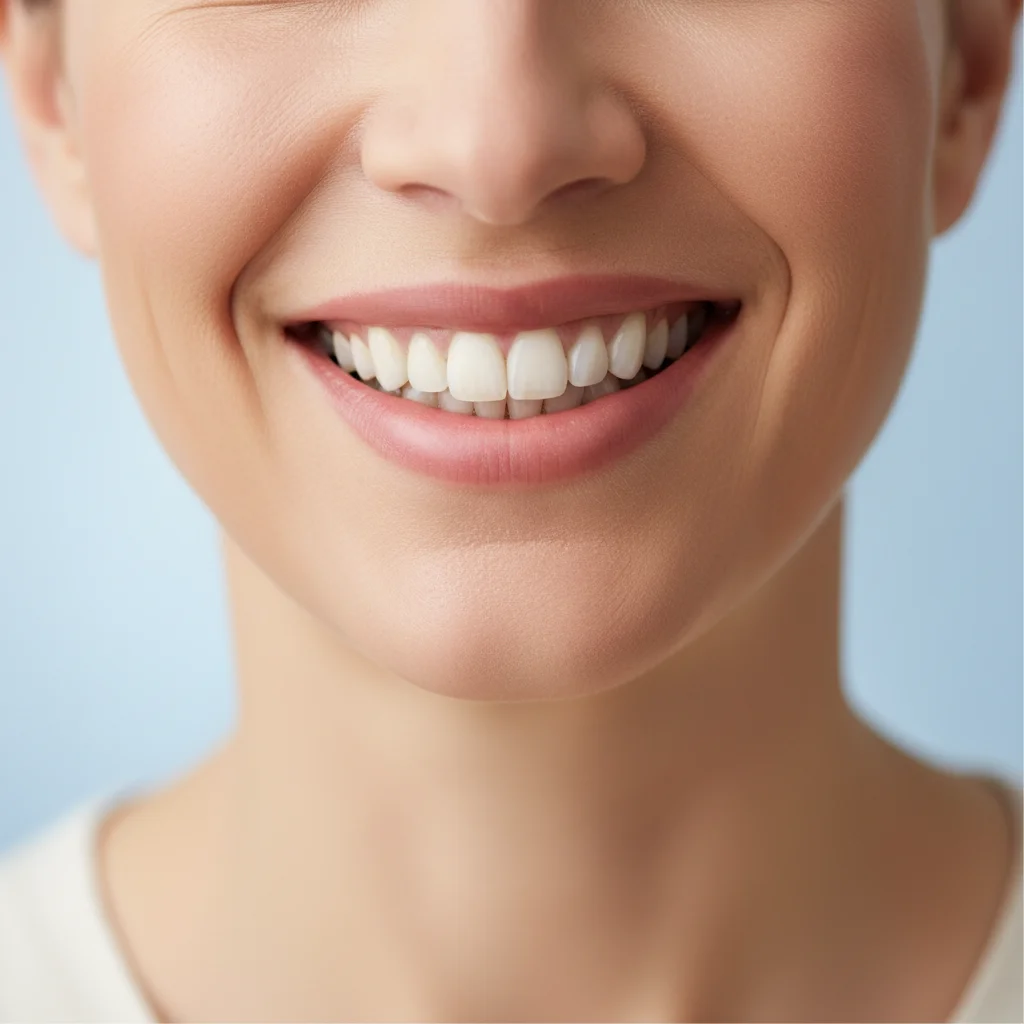
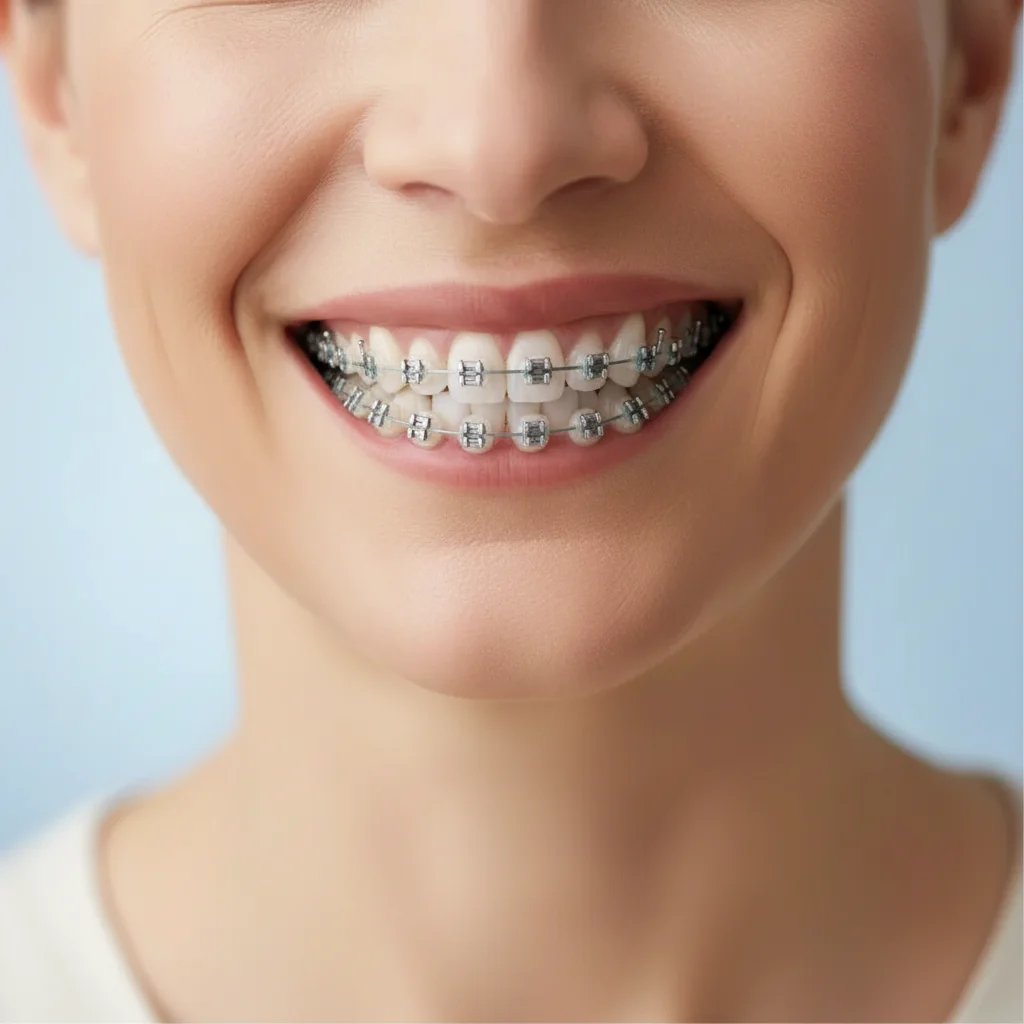
Prompt: Add traditional metal braces with silver brackets to my top and bottom teeth
Professional adult smile before braces
Before
->
Same smile with subtle clear ceramic braces
After

Clear ceramic braces for subtle look

Tooth-colored ceramic brackets that blend with natural teeth for less noticeable orthodontic treatment

Prompt: Show me with clear ceramic braces on my top and bottom teeth that blend with my tooth color
Teen smile before orthodontic treatment
Before
->
Same smile with blue-banded braces on top teeth only
After

Top-only braces with colored bands

Metal braces on upper teeth only with bright blue elastic bands, showing asymmetric treatment preview

Prompt: Add metal braces with bright blue colored elastic bands to just my top teeth
Advertisement

If something looks off

AI changed the wrong area or something I didn't want changed

Why: The AI couldn't determine exactly which teeth should get braces from description alone, especially for partial treatments.

Try: Tap markers on the specific teeth where you want braces, then regenerate with the same prompt

Tip: Markers tell the AI 'put brackets on THESE teeth only.' Essential for partial braces or asymmetric treatment previews.

The braces look too big or unrealistic

Why: The AI created oversized brackets that don't match real orthodontic appliance proportions.

Try: Try: 'Add realistic-sized metal braces with properly proportioned brackets to my teeth'

Tip: Keywords like 'realistic', 'natural-sized', and 'properly proportioned' help scale brackets correctly.

Can't see the braces wire or it looks wrong

Why: The archwire (metal wire connecting brackets) might be too subtle or positioned incorrectly.

Try: Specify: 'Add metal braces with visible silver wire connecting all the brackets'

Tip: Mentioning the wire explicitly ensures it's rendered clearly in the preview.

Colored bands don't show up or look wrong

Why: The AI might have difficulty rendering small colored elastic bands around each bracket.

Try: Be explicit: 'Add metal braces with bright [color] rubber bands around each bracket'

Tip: Use specific colors (red, blue, green) rather than 'colorful' for better results.

Braces affect my lips or face shape

Why: Sometimes the braces application inadvertently modifies facial features beyond just the teeth.

Try: Add: 'Keep my natural lips and face exactly the same, only add braces to my teeth'

Tip: Markers on teeth help constrain the edit to the dental area only.

Quick answers

Do I need to mark my teeth before previewing braces?

No! Just describe what type of braces you want in natural language. The AI understands prompts like 'add metal braces to my top and bottom teeth' without any marking. Markers are optional and only needed if you want braces on very specific teeth or partial treatment.

Is this braces preview tool really free?

Yes, completely free with unlimited previews. No account required, no watermark. Try metal braces, ceramic braces, different colors, top-only, bottom-only, or any combination as many times as you want.

How realistic are these braces previews?

The AI creates realistic bracket placement, wire positioning, and proper dental appliance appearance. However, this is a visualization tool showing how you'd look with braces, not a clinical prediction of your specific orthodontic treatment plan. Your actual braces will be placed by your orthodontist based on your treatment needs.

Can I preview different types of braces to compare?

Absolutely! Generate multiple previews to compare metal braces vs ceramic braces, different colored bands, or top-only vs full treatment. This helps you decide which orthodontic option you'd feel most comfortable wearing for 18-24 months.

Will this help me decide whether to get braces as an adult?

Many adult users report that seeing themselves with braces reduced their anxiety about orthodontic treatment. The preview helps you visualize the temporary aesthetic impact and decide if the end result (straight teeth) is worth the journey. Some find ceramic braces are less noticeable than they feared.

Ready to see yourself with braces?

Free tool. No signup. Preview metal, ceramic, or clear braces instantly.

Try it free โ†’