Free โ€ข No signup Change Hair texture ยท Free

Change Hair Texture in Photo with AI

Transform straight hair to curly, wavy to straight, or any texture in between - just describe what you want
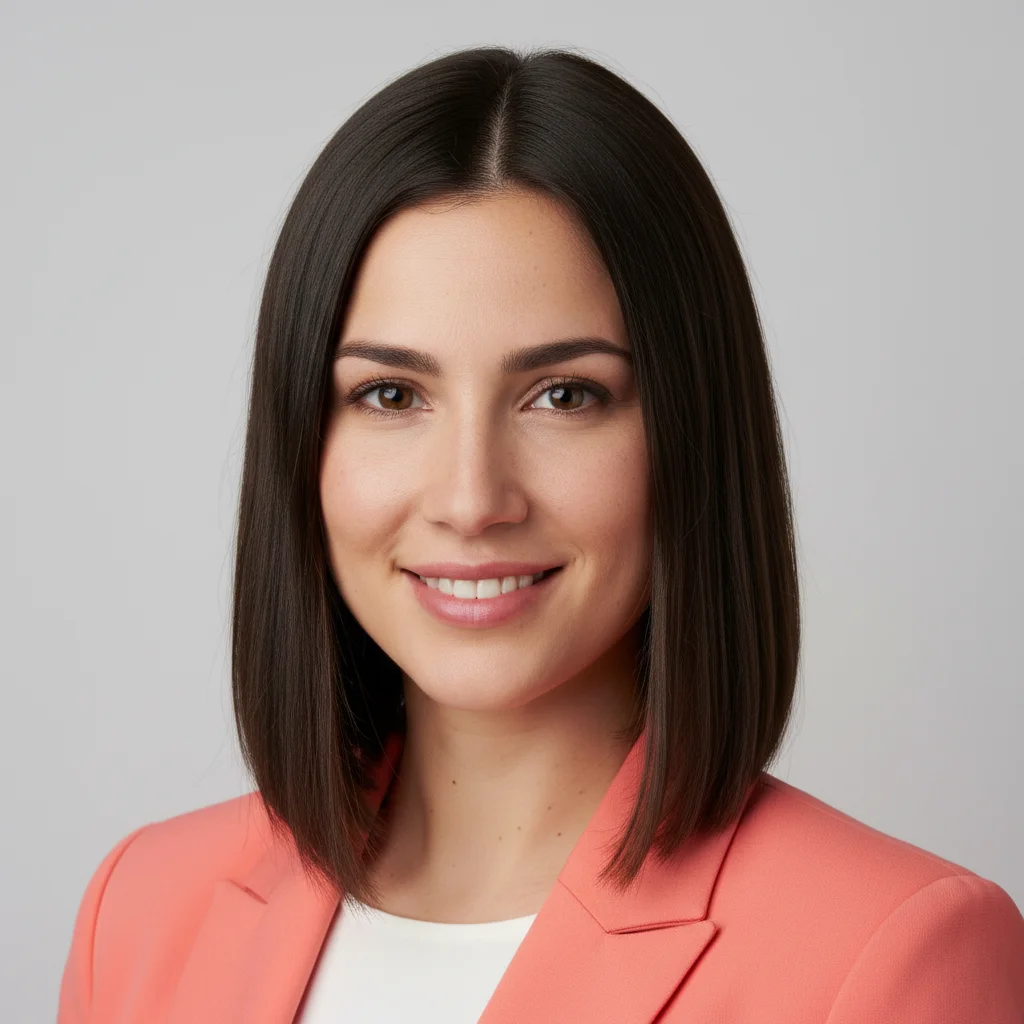
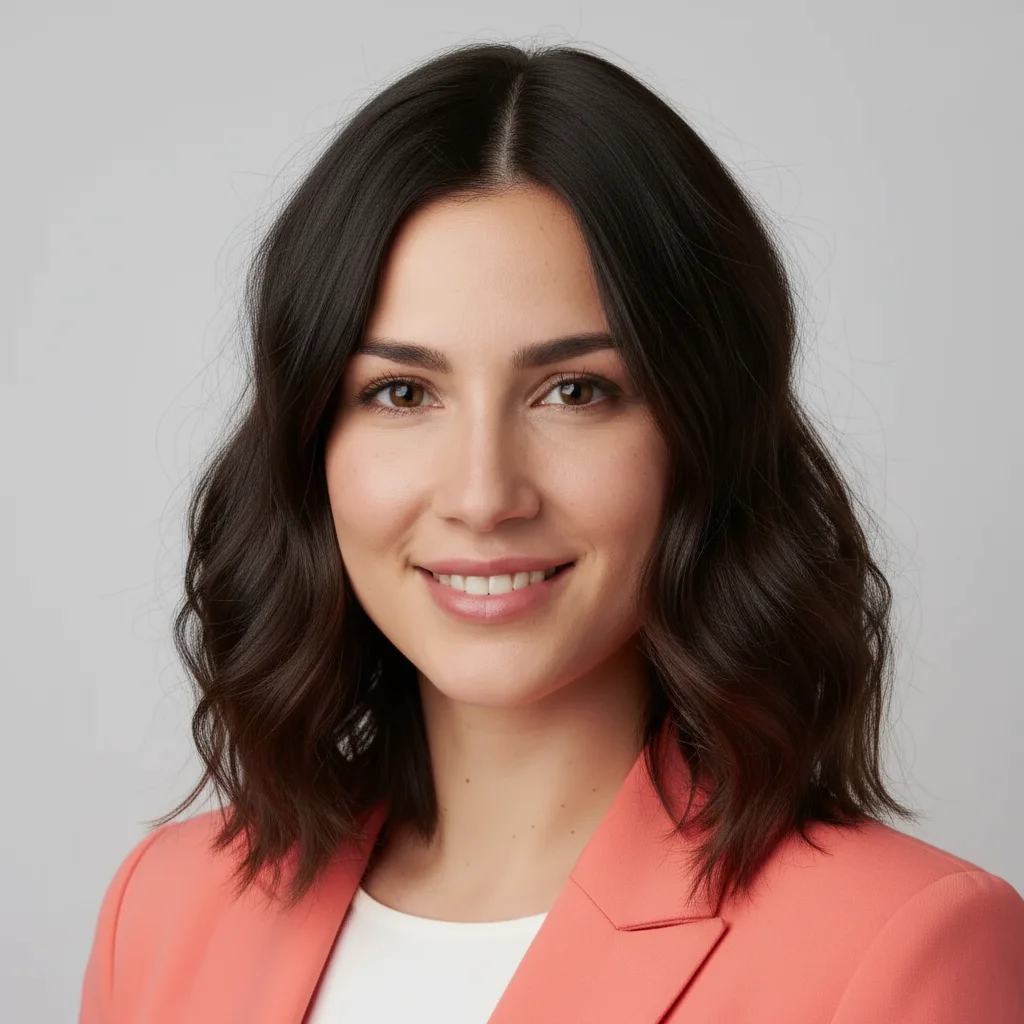
Woman with straight dark brown shoulder-length hair
Before
โ†’
Same woman with wavy beach-wave textured hair
After

Change Hair Texture in Photo

Drop your photo here

or click to browse

Release to upload

Free โ€ข No signup

Advertisement
Popular use cases:
  • hair texture transformation
  • curl pattern preview
  • straight to curly hair
  • wavy hair generator
  • texture change simulation
  • perm preview
  • hair type converter

Cost
Free No signup required
Time
Instant results in 15-30 seconds
Works on
Any device - browser, phone, tablet, desktop
Powered by
AI-powered photo editing
Scenario Prompt Time
Straight โ†’ Wavy Make the hair wavy with loose beach waves 8s
Straight โ†’ Curly Change the hair to have tight spiral curls 15s
Curly โ†’ Straight Straighten the hair completely, sleek and smooth 12s
Wavy โ†’ Kinky Change to a kinky coily texture throughout 18s
Specific Pattern Give the hair a 3C curl pattern with defined coils 15s

How it works

  1. Upload your photo

    Choose a photo where the hair is clearly visible. Front-facing photos work best. Hair should be well-lit and not heavily covered by accessories. The AI works on all hair types and lengths.

    Expect: Simple texture changes (straight to wavy): 8-12 seconds. Complex changes (straight to tight coils): 15-20 seconds.
  2. Describe the texture you want

    Type exactly what texture you want the hair to have. Be specific: "make hair wavy", "change to tight curls", "give hair beach waves", or "make hair straight and sleek". The AI understands texture patterns - no need to mark the hair area first. Just describe the end result you're looking for.

    Tip: Use texture descriptors like 'loose waves', 'tight coils', 'kinky texture', or '3B curls' for more precise results. The more specific your description, the better the match.

    Copy one of these to get started:

    Straight to wavy (most common) Make the hair wavy with loose beach waves
    Straight to curly Change the hair to have tight spiral curls
    Curly to straight Straighten the hair completely, sleek and smooth
    Natural curl pattern exploration Give the hair a 3C curl pattern with defined coils
    3 more prompts
    Wavy to kinky texture Change to a kinky coily texture throughout
    Subtle texture enhancement Add soft waves to the hair, keeping it mostly straight
    Specific section texture Make just the bottom half of the hair curly while keeping the top straight
  3. Review the result

    Check that the texture change looks natural and matches what you requested. Pay attention to how the new texture falls and frames the face. The transformation should look realistic with proper light and shadow.

  4. Refine with markers if needed

    If the AI changed texture on the wrong hair area (like changing bangs when you meant the back), tap a marker on the specific section you want textured, then regenerate. This is optional - most texture changes work with description alone.

    Tip: Markers are helpful when you want to change texture on only specific sections (front layers vs back, top vs bottom) while keeping other areas the same.
Try it free โ†“

Change Hair Texture in Photo

Drop your photo here

or click to browse

Release to upload

Free โ€ข No signup

"Tried different curl patterns for my headshot before actually getting a perm. Saved me from a bad decision!" @SarahStyleExperiments

See it in action

Woman with straight dark brown shoulder-length hair
Before
->
Same woman with wavy beach-wave textured hair
After

Straight to Beach Waves

Classic transformation for a relaxed, tousled look. Perfect for seeing how waves would frame your face before styling.
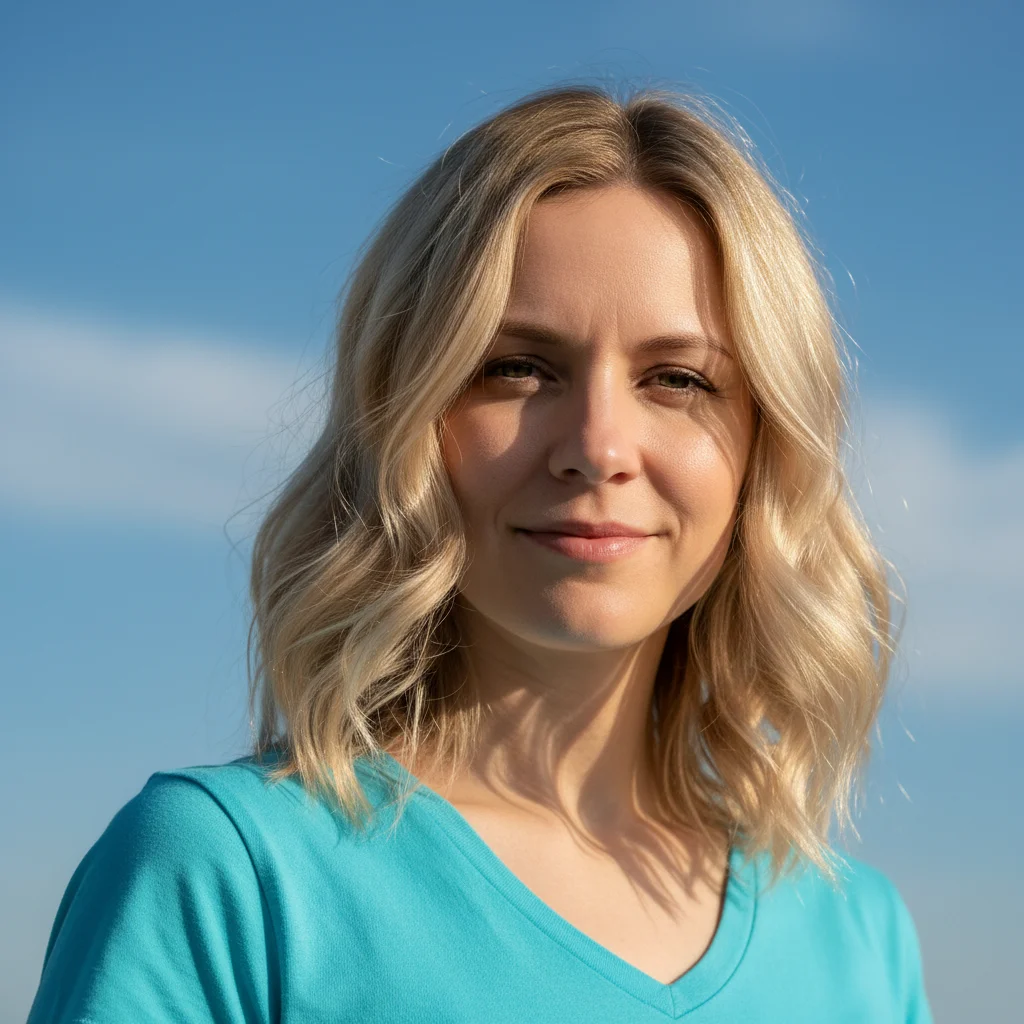
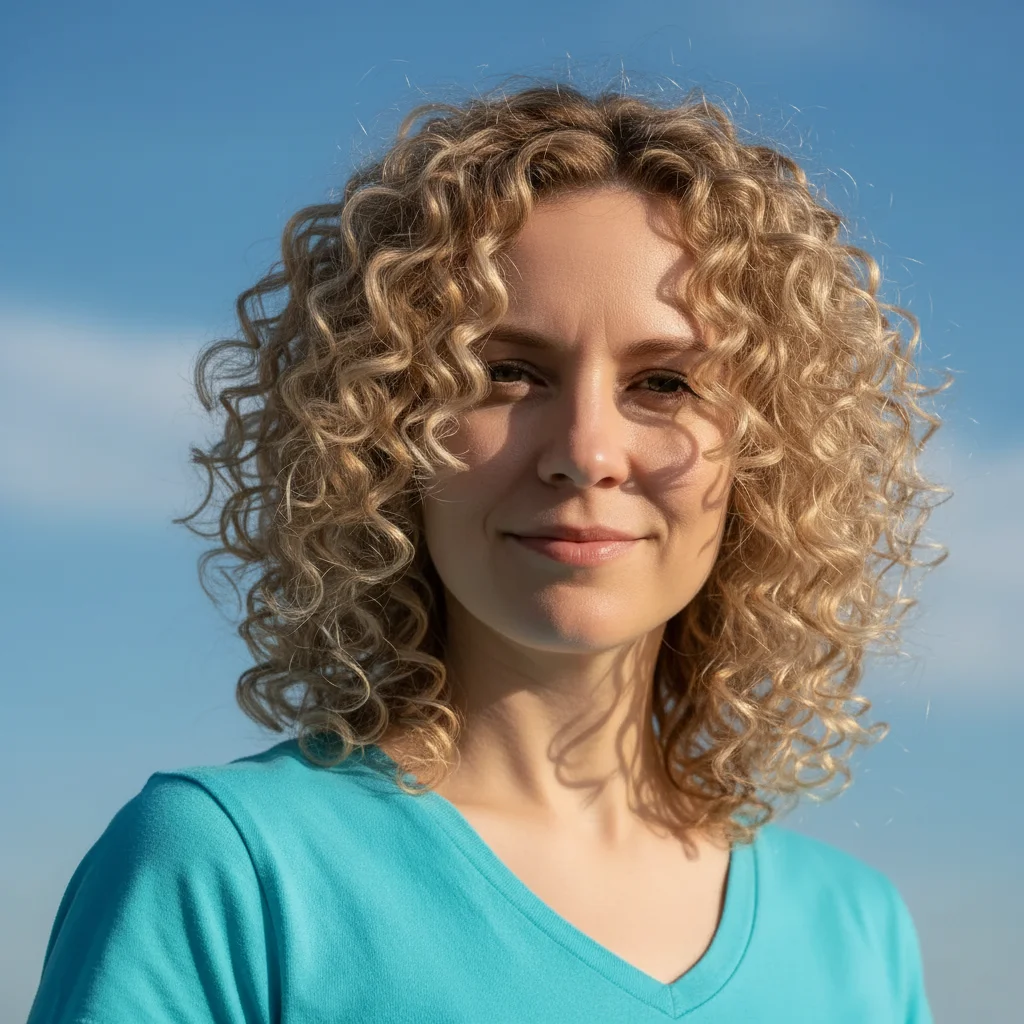
Prompt: Make the hair wavy with loose beach waves
Person with wavy blonde shoulder-length hair
Before
->
Same person with tight spiral curls throughout hair
After

Wavy to Tight Curls

Exploring a dramatic texture change from loose waves to defined spiral curls. Shows how different curl patterns change the overall look.

Prompt: Change the hair to have tight spiral curls
Man with natural curly dark hair
Before
->
Same man with straight, sleek hair
After

Curly to Sleek Straight

Previewing how natural curls would look straightened for formal events or style changes.

Prompt: Straighten the hair completely, sleek and smooth
Advertisement

If something looks off

AI changed the wrong area or something I didn't want changed

Why: The AI couldn't determine exactly which area you meant from description alone.

Try: Tap a marker on the specific area you want to change, then regenerate with the same prompt

Tip: Markers tell the AI 'I mean THIS one specifically.' Use them when description alone is ambiguous.

The new texture looks artificial or unnatural

Why: Very dramatic texture changes (pin-straight to afro coils) can look less natural because the AI has to completely rebuild the hair structure.

Try: Add 'natural-looking' or 'realistic' to your prompt: 'Make the hair wavy, natural-looking beach waves'

Tip: Gradual texture changes (straight to wavy, wavy to curly) usually look more realistic than extreme jumps.

Only part of the hair changed texture

Why: The photo might have complex lighting or the hair is partially obscured, making some sections harder for the AI to process.

Try: Add 'throughout the entire hair' to your prompt: 'Make the hair curly throughout the entire hair'

Tip: If the issue persists, use markers on the sections that didn't change to specifically target them.

The texture changed but the volume looks wrong

Why: Different textures have different natural volumes - curly hair typically has more volume than straight hair.

Try: Specify volume in your prompt: 'Make the hair wavy with medium volume' or 'Straighten the hair, keeping it flat and sleek'

Tip: Volume and texture are related but separate. You can request specific volume levels along with texture changes.

The curl pattern is too uniform or repetitive

Why: The AI sometimes creates perfectly even patterns that look less natural than real hair's varied texture.

Try: Add 'natural variation' to your prompt: 'Give the hair loose curls with natural variation in the curl pattern'

Tip: Real hair has irregularity. Asking for 'natural variation' or 'slightly messy' can make results look more authentic.

The hair texture changed but lost detail at the ends

Why: Long hair or hair with complex styling at the ends can lose definition during transformation.

Try: Try a photo where the hair is more evenly distributed or specify: 'Change to wavy texture, keeping the ends defined'

Tip: Photos where all the hair is visible and well-lit give the best results for maintaining detail through texture changes.

Quick answers

Do I need to mark the hair before describing what I want?

No! Just describe the texture you want ("make hair wavy" or "change to curls") and the AI detects and transforms the hair automatically. Only use markers if the AI changes the wrong hair section - for example, if you wanted to texture just the bottom layers but it changed everything.

How do I change hair texture for free?

Upload your photo to EditThisPic, type the texture you want ("make hair curly", "straighten hair", "add beach waves"), and the AI transforms it instantly. Free to use with no signup required and no watermark on your downloads.

Can I preview different curl patterns before getting a perm?

Yes, that's a perfect use case. Try prompts like "give hair 3B curls" or "tight spiral curls" or "loose waves" to see how different curl patterns would look on you before committing to chemical treatments or styling.

Will the texture change look natural on my hair type?

The AI maintains the natural characteristics of your hair (color, shine, thickness) while changing texture. Gradual changes (straight to wavy, wavy to curly) typically look more natural than extreme jumps (straight to kinky coils), but you can try any combination.

Can I change texture on only part of the hair?

Yes! Either describe it in your prompt ("make just the bottom half curly") or use markers to select specific sections. This works great for creating ombre texture effects or testing how curls would look just on the ends.

Ready to change your hair texture?

Free to try. No signup required.

Try it free โ†’