Free โ€ข No signup Add Bangs ยท Free

Add Bangs to Photo with AI

Preview any bang style before the cut - just describe what you want to see

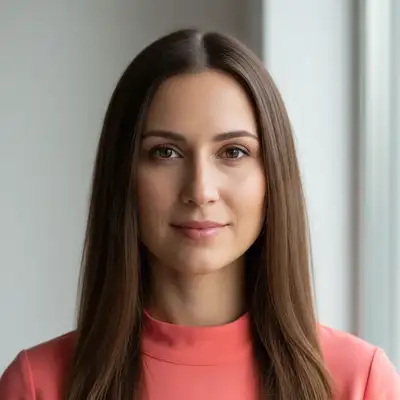
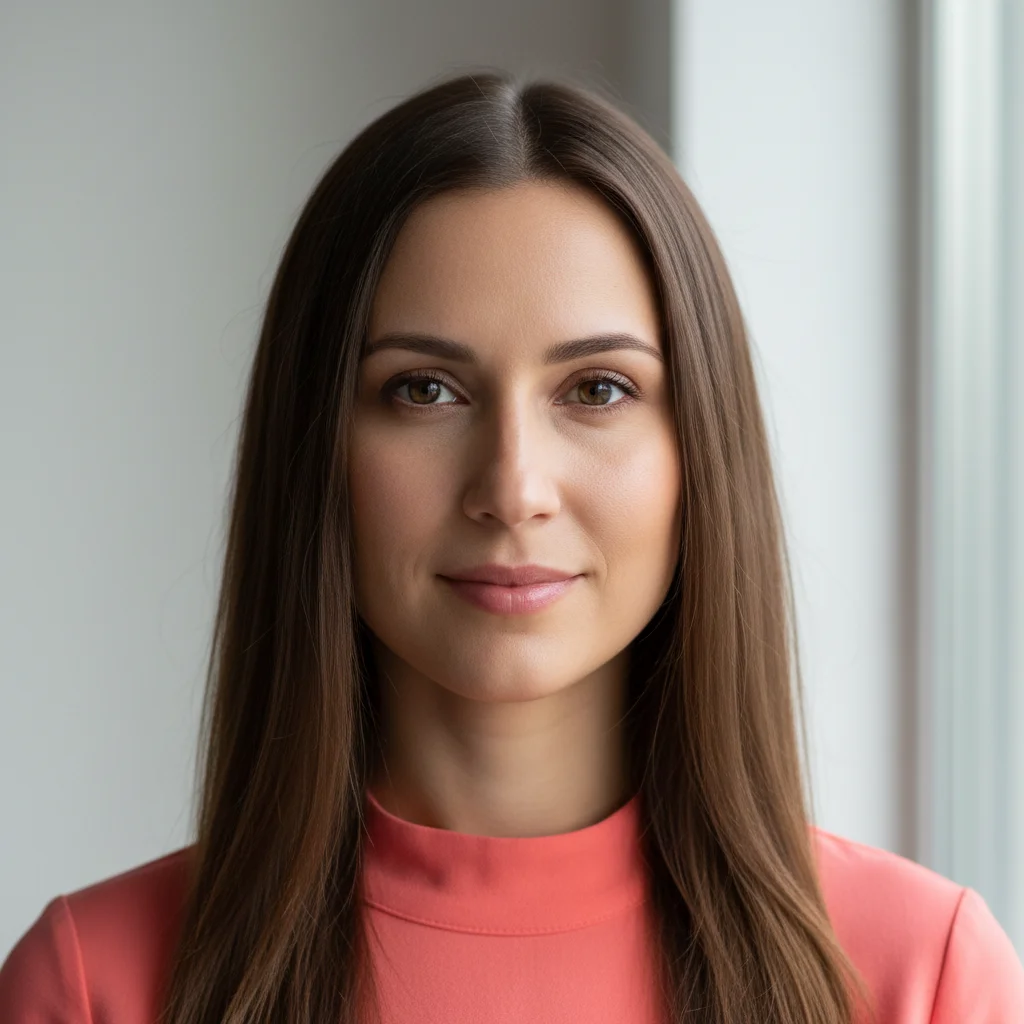
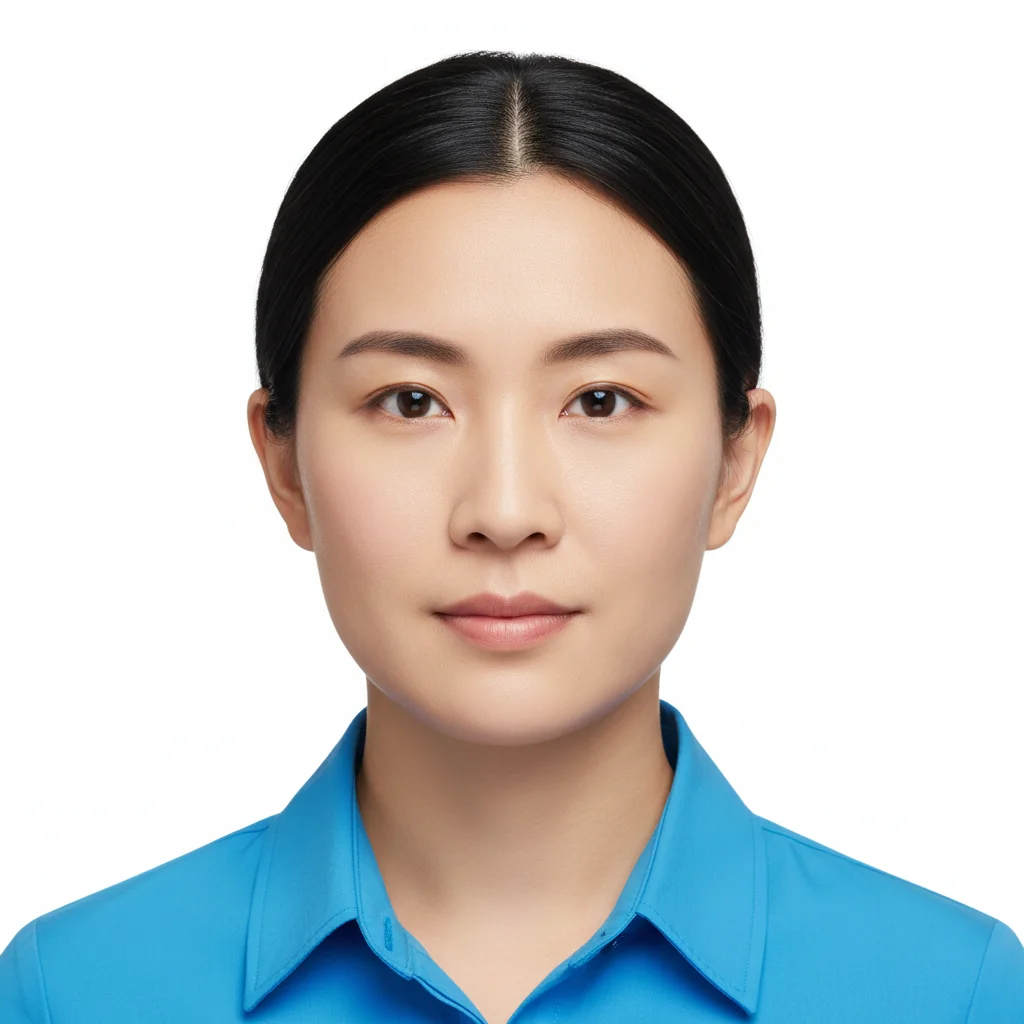
Woman with no bangs, forehead fully exposed
Before
โ†’
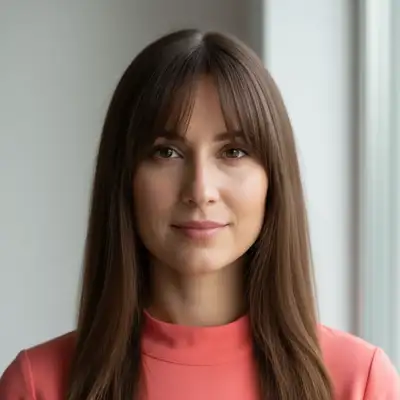
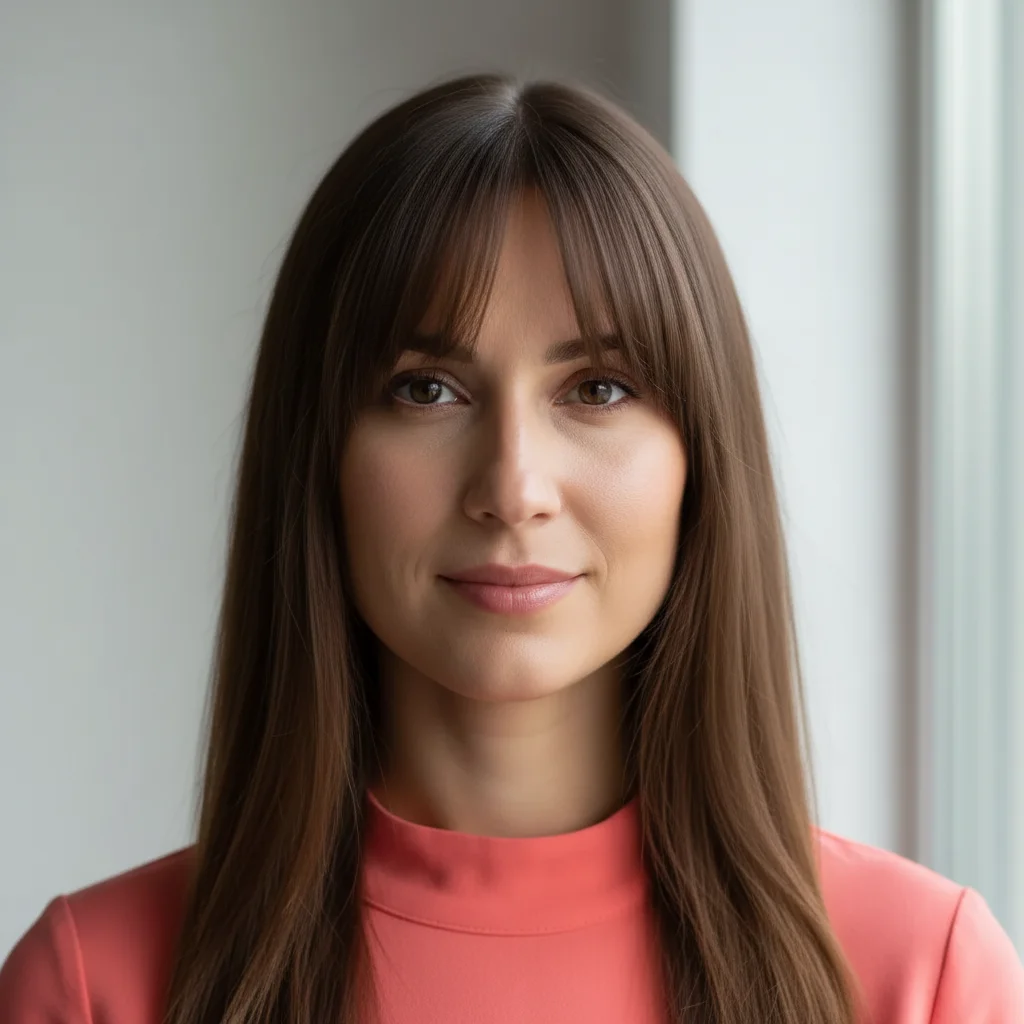
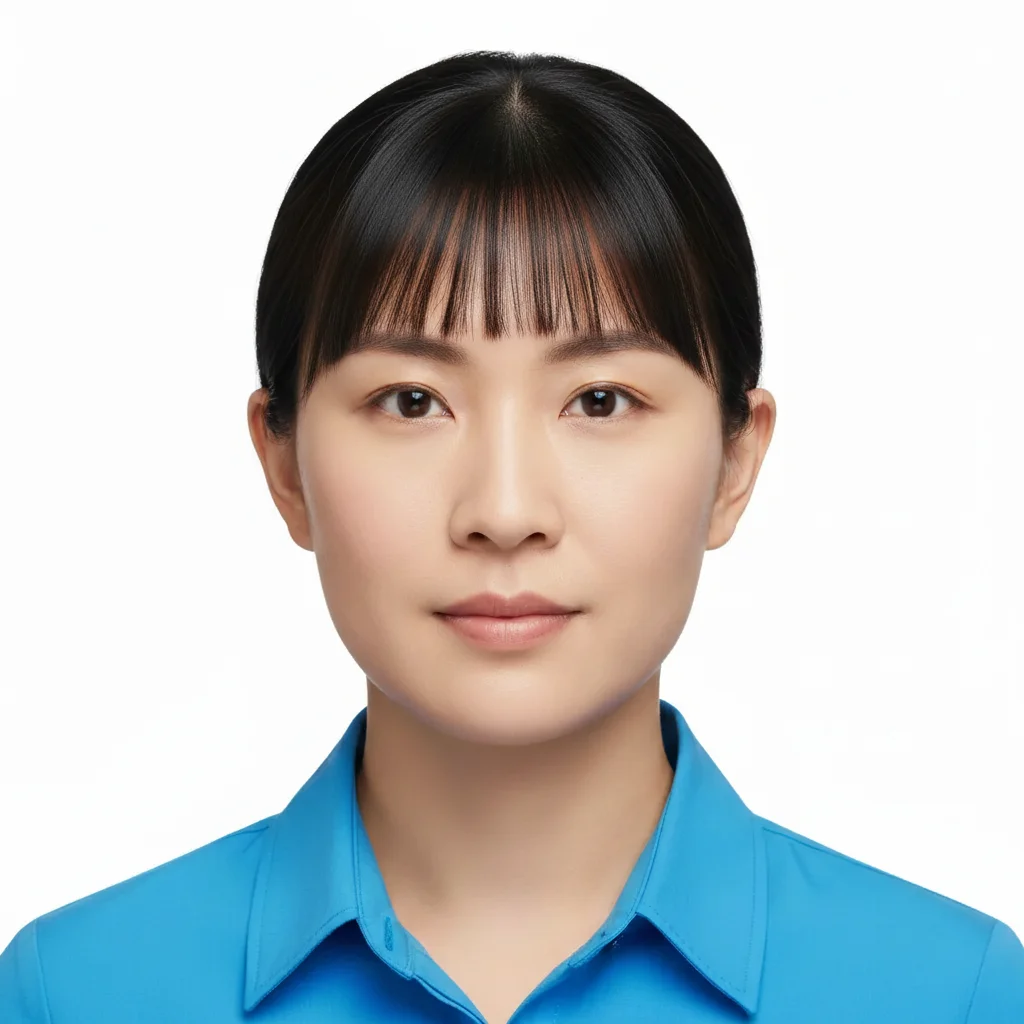
Same woman with curtain bangs parting in middle and framing face
After

Add Bangs to Photo

Drop your photo here

or click to browse

Release to upload

Free โ€ข No signup

Advertisement
Popular use cases:
  • add bangs to photo
  • preview bangs before haircut
  • try curtain bangs
  • see yourself with bangs
  • bang style preview
  • virtual bangs try-on
  • hairstyle with fringe

Cost
Free No signup required
Time
Instant results in 15-30 seconds
Works on
Any device - browser, phone, tablet, desktop
Powered by
AI-powered photo editing
Scenario Prompt Time
Curtain Bangs Add curtain bangs that part in the middle and frame the face 18s
Straight Blunt Add straight blunt bangs across the forehead, eyebrow-length 12s
Wispy Bangs Add wispy, feathery bangs with a light, airy texture 10s
Side-Swept Add side-swept bangs that sweep across the forehead to one side 15s
Baby Bangs Add baby bangs, very short ending mid-forehead 10s

How it works

  1. Upload your photo

    Choose a photo where your forehead and hairline are clearly visible. Face-forward photos work best. The AI needs to see your face shape and natural hair texture to create realistic bangs that suit you.

    Expect: Simple styles (straight blunt bangs): 10-15 seconds. Complex styles (layered curtain bangs, side-swept): 18-22 seconds.
  2. Describe the bangs you want

    Type what style of bangs you're considering. Be specific: "add straight bangs", "give me curtain bangs", "add wispy bangs", or "side-swept bangs across my forehead". The AI understands bang styles and will create them to match your hair color and texture - no need to mark your forehead first. Just describe the style.

    Tip: Bang style names work great: curtain, blunt, wispy, side-swept, baby bangs, bottleneck, feathered. You can also specify length: "eyebrow-length bangs" or "eye-grazing bangs" for precise results.

    Copy one of these to get started:

    Curtain bangs (most popular) Add curtain bangs that part in the middle and frame the face
    Straight blunt bangs Add straight blunt bangs across the forehead, eyebrow-length
    Wispy bangs Add wispy, feathery bangs with a light, airy texture
    Side-swept bangs Add side-swept bangs that sweep across the forehead to one side
    4 more prompts
    Baby bangs (short) Add baby bangs, very short ending mid-forehead
    Bottleneck bangs Add bottleneck bangs that are shorter in the middle and longer at the sides
    Long curtain bangs Add long curtain bangs that reach past the cheekbones
    Korean-style see-through bangs Add see-through bangs, thin and wispy showing some forehead
  3. Review the result

    Check how the bangs frame your face. Do they complement your face shape? Does the length work? The bangs should match your existing hair color and texture, looking like they naturally grew there.

  4. Refine with markers if needed

    If the bangs are positioned wrong or cover too much/little forehead, tap a marker where you want the bangs to fall, then regenerate. This is optional - most bang additions work with description alone.

    Tip: Markers help when you want very specific placement - like adjusting where curtain bangs part, or making side-swept bangs fall more to one side.
Try it free โ†“

Add Bangs to Photo

Drop your photo here

or click to browse

Release to upload

Free โ€ข No signup

"Saved me from bangs regret! Tried curtain, blunt, and wispy styles before booking my haircut. So glad I tested - I almost got the wrong style." @EmmaHairDecisions

See it in action

Woman with no bangs, forehead fully exposed
Before
->
Same woman with curtain bangs parting in middle and framing face
After

Curtain Bangs Addition

Most popular style - bangs part in the middle and frame the face on both sides. Flattering on most face shapes.

Prompt: Add curtain bangs that part in the middle and frame the face
Person with no bangs, hair pulled back off forehead
Before
->
Same person with straight blunt bangs across forehead
After

Straight Blunt Bangs

Classic full fringe - straight across the forehead at eyebrow length. Bold, statement-making look.

Prompt: Add straight blunt bangs across the forehead, eyebrow-length
Woman with wavy hair and no bangs
Before
->
Same woman with wispy side-swept bangs flowing to the right
After

Wispy Side-Swept Bangs

Soft, romantic look with bangs swept to one side. Light and feathery texture, not heavy.

Prompt: Add side-swept bangs that sweep across the forehead to one side
Advertisement

If something looks off

AI changed the wrong area or something I didn't want changed

Why: The AI couldn't determine exactly which area you meant from description alone.

Try: Tap a marker on the specific area you want to change, then regenerate with the same prompt

Tip: Markers tell the AI 'I mean THIS one specifically.' Use them when description alone is ambiguous.

The bangs don't match my hair color or texture

Why: Complex lighting, highlights, or unclear hair texture in the original photo can make matching difficult.

Try: Specify explicitly: 'Add curtain bangs matching my dark brown hair color' or 'Add straight bangs with the same wavy texture as my hair'

Tip: Photos with clear, even lighting and visible hair texture give the AI better reference for matching.

The bangs are too thick/heavy or too thin/sparse

Why: The AI's default density might not match your preference for bang fullness.

Try: Specify density: 'Add thin, light bangs' or 'Add thick, full bangs' to control how dense they appear

Tip: "Thin", "wispy", or "see-through" create lighter bangs. "Full", "thick", or "heavy" create denser bangs.

The bangs are the wrong length (too short or too long)

Why: Without length specification, the AI chooses a standard length that might not be what you wanted.

Try: Add length detail: 'eyebrow-length bangs', 'bangs just above the eyes', or 'long bangs past the cheekbones'

Tip: Reference points like eyebrows, eyes, nose, or cheekbones help the AI place bangs at the exact length you want.

Curtain bangs don't part in the right place

Why: The AI might have placed the center part slightly off from where you'd naturally part your hair.

Try: Use a marker at the exact point where you want the bangs to part, then regenerate

Tip: Your natural hairline's highest point is usually where curtain bangs should part. Markers let you specify this precisely.

The bangs look unnatural or pasted-on

Why: The bangs might not be blending with your natural hairline or matching the lighting of your photo.

Try: Add 'natural-looking' or 'realistic': 'Add natural-looking curtain bangs that blend with my hairline'

Tip: Face-forward photos with clear forehead visibility and good lighting produce the most natural-looking bang additions.

Quick answers

Do I need to mark my forehead before describing what I want?

No! Just describe the bang style you want ("add curtain bangs" or "add blunt bangs") and the AI detects your forehead and hairline automatically. Only use markers if the AI placed the bangs in the wrong position - for example, too high or too low on your forehead.

How do I add bangs to photos for free?

Upload your photo to EditThisPic, type the bang style you want to try ("add curtain bangs", "add blunt bangs", "add side-swept bangs"), and the AI adds them instantly. Free to use with no signup required and no watermark on your downloads.

Can I try different bang styles on the same photo?

Yes! After seeing one style, just describe a different style and regenerate. Try curtain, blunt, wispy, and side-swept on the same photo to compare which suits your face shape best before getting a real haircut.

What bang style is best for my face shape?

The AI can add any style, but generally: oval faces can wear any bangs, round faces look good with side-swept or curtain bangs, long faces benefit from straight-across blunt bangs, and heart-shaped faces suit wispy or curtain bangs. Try multiple styles to see what you like!

Will the bangs match my hair color and texture?

Yes, the AI analyzes your existing hair and creates bangs that match color, texture, and natural wave pattern. For best results, use photos where your hair is clearly visible and well-lit so the AI has good reference material.

Ready to add bangs to your photo?

Free to try. No signup required.

Try it free โ†’