Pricing Visualize Bathroom tile · Free

AI Bathroom Tile Visualizer

← Browse all creative effects

Last updated

Upload your bathroom photo and describe the tile you want — the AI visualizes it in 30 seconds. Free, no account needed.
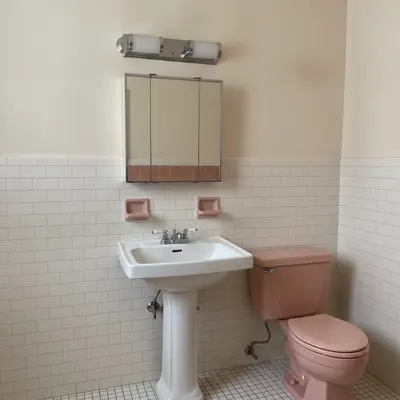
Bathroom with dated dusty pink ceramic wall tile and white pedestal sink Same bathroom with wall tile replaced by white subway tile, fixtures preserved

Upload photo to visualize bathroom tile

"change the bathroom wall tile to large-format white Carrara marble tile, polished surface with natural grey veining, thin grey grout, preserve all fixtures"

Free to try · no sign-up · photos are never shared

Release to upload

<30stypical edit
1 freeedit weekly
Photo on your phone? Scan to open this editor there — free edit works on your phone too.

1 free edit every week·packs from $4.99

How it works

  1. Upload a photo of the bathroom showing the tile area

    Use a photo where the tile surface is clearly visible — a straight-on shot of the shower wall, the floor, or the full bathroom from the doorway. Avoid heavily steam-fogged or extremely dark photos. JPG, PNG, or WebP up to 7MB.

    Expect: Simple tile color or material swaps finish in about 30 seconds. Complex pattern changes with small tile units (penny tile, mosaic) or full wall-to-floor overhauls may benefit from one refinement pass.
  2. Describe the new tile material, size, and location

    Type your instruction directly: 'replace the shower wall tile with large-format white marble tile, polished surface, thin grey grout' or 'change the bathroom floor to small white hex tile, white grout.' Specify which surface (wall, floor, shower surround) and include tile size, material, finish, and grout color for the most accurate render. No marking needed.

    Tip: Specify 'wall tile,' 'floor tile,' or 'shower surround tile' explicitly to prevent the AI from changing the wrong surface. Bathrooms have multiple tile surfaces and clear scope prevents unintended changes.

    Copy one of these to get started:

    White subway tile for pre-listing bathroom update replace all bathroom wall tile with white 3x6 subway tile in a classic horizontal brick pattern, white grout, keep the vanity, toilet, and tub fixtures unchanged
    Large-format marble tile for luxury bathroom change the bathroom wall tile to large-format white Carrara marble tile, polished surface with natural grey veining, thin grey grout, preserve all fixtures
    Grey slate for a spa-style bathroom replace the shower wall tile with grey slate tile in a horizontal stacked pattern, natural stone texture, dark charcoal grout, preserve the shower fixtures
    Black and white hex floor tile change the bathroom floor to classic black and white hexagonal mosaic tile, alternating black and white tiles in a checker-like hex pattern, white grout
    3 more prompts
    Zellige tile for an artisan bathroom replace the shower wall tile with white zellige tile, hand-made irregular surface with subtle gloss variation and slight imperfections, white grout
    Update pink or green dated tile for listing replace the dated pink bathroom tile with neutral warm white ceramic tile in a simple 4x4 square pattern, light grey grout, preserve all porcelain fixtures
    Navy accent tile for a bold design change the shower surround tile to deep navy blue 4x12 inch tile in a vertical stacked pattern, white grout for contrast, keep the floor and vanity area unchanged
  3. Check grout lines, tile edges, and fixture borders

    Zoom to 100% on the tile grout lines and the borders where tile meets the toilet, vanity, mirror, or tub. These transitions are the most detail-sensitive areas in a bathroom tile render. Check that fixtures and hardware remain unchanged.

  4. Refine specific tile areas with markers if needed

    If the AI changed the wrong tile surface (floor instead of wall, or vice versa), tap markers on the specific surface area and regenerate with a precise prompt naming the surface. Bathrooms with multiple tile zones benefit from markers for precision.

    Tip: Markers are most useful in bathrooms where you want to change only one surface — for example, only the shower wall but not the floor. Tap the specific tile area before regenerating.

See it in action

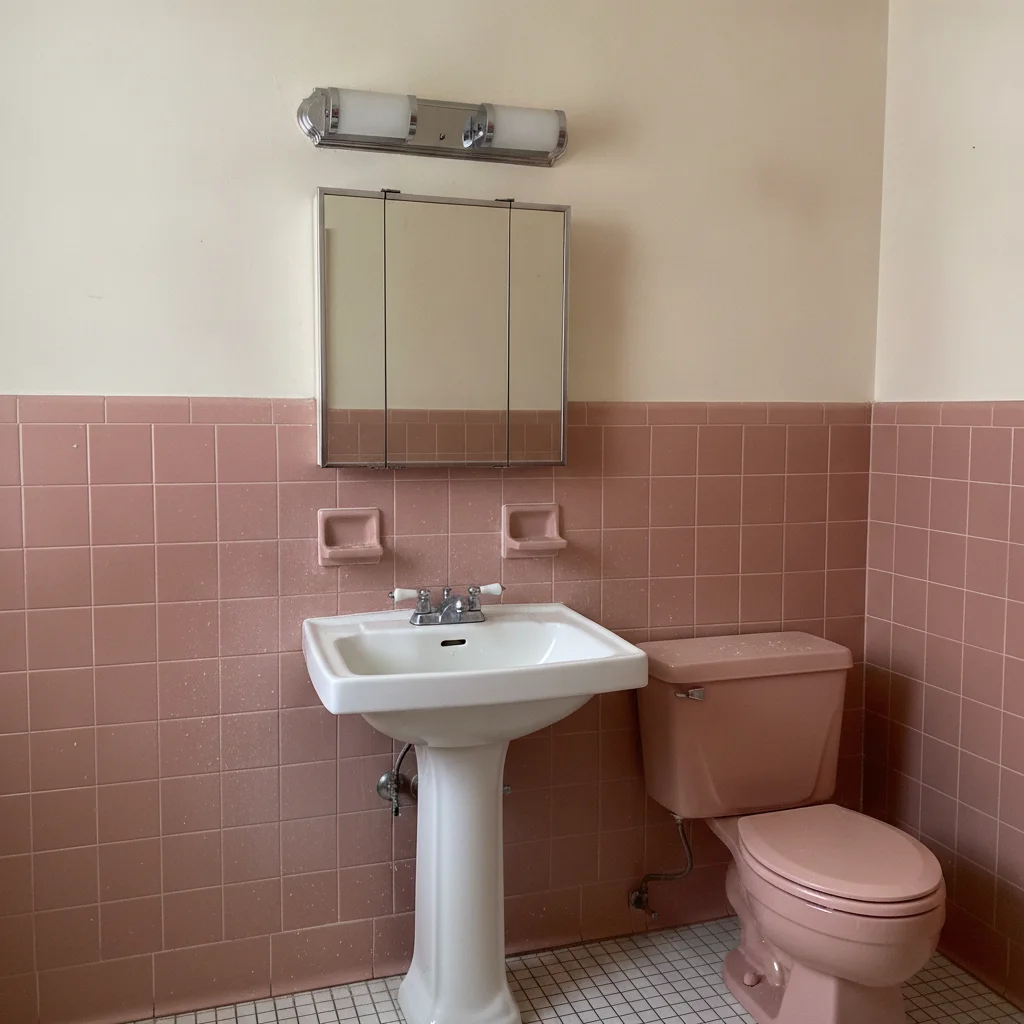
Bathroom with dated dusty pink ceramic wall tile and white pedestal sink
Before
->
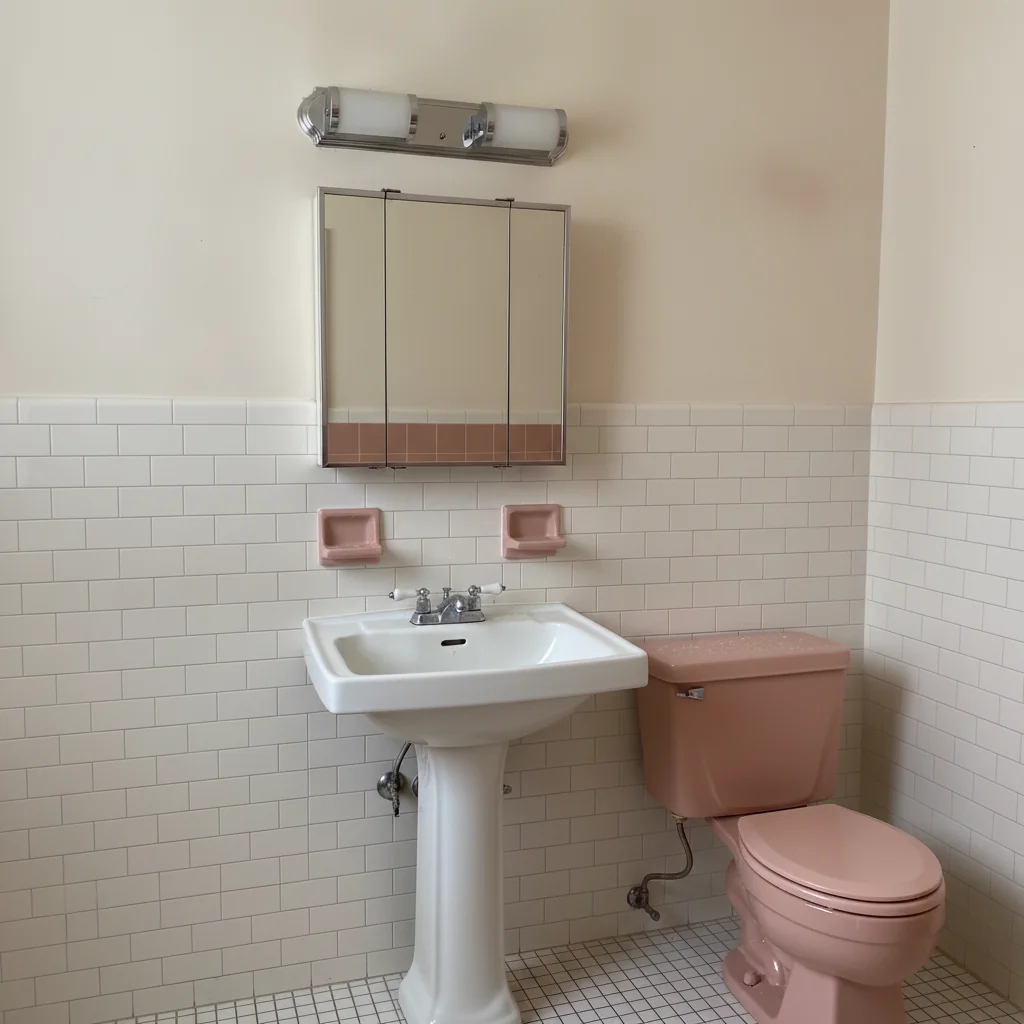
Same bathroom with wall tile replaced by white subway tile, fixtures preserved
After

Dated pink tile to white subway — pre-listing bathroom refresh

A home with a 1970s pink tile bathroom was limiting buyer interest. The AI previewed a clean white subway tile replacement that significantly improved the listing photo before the renovation decision was made.

Prompt: replace all bathroom wall tile with white 3x6 subway tile in a classic horizontal brick pattern, white grout, keep the vanity, toilet, and tub fixtures unchanged
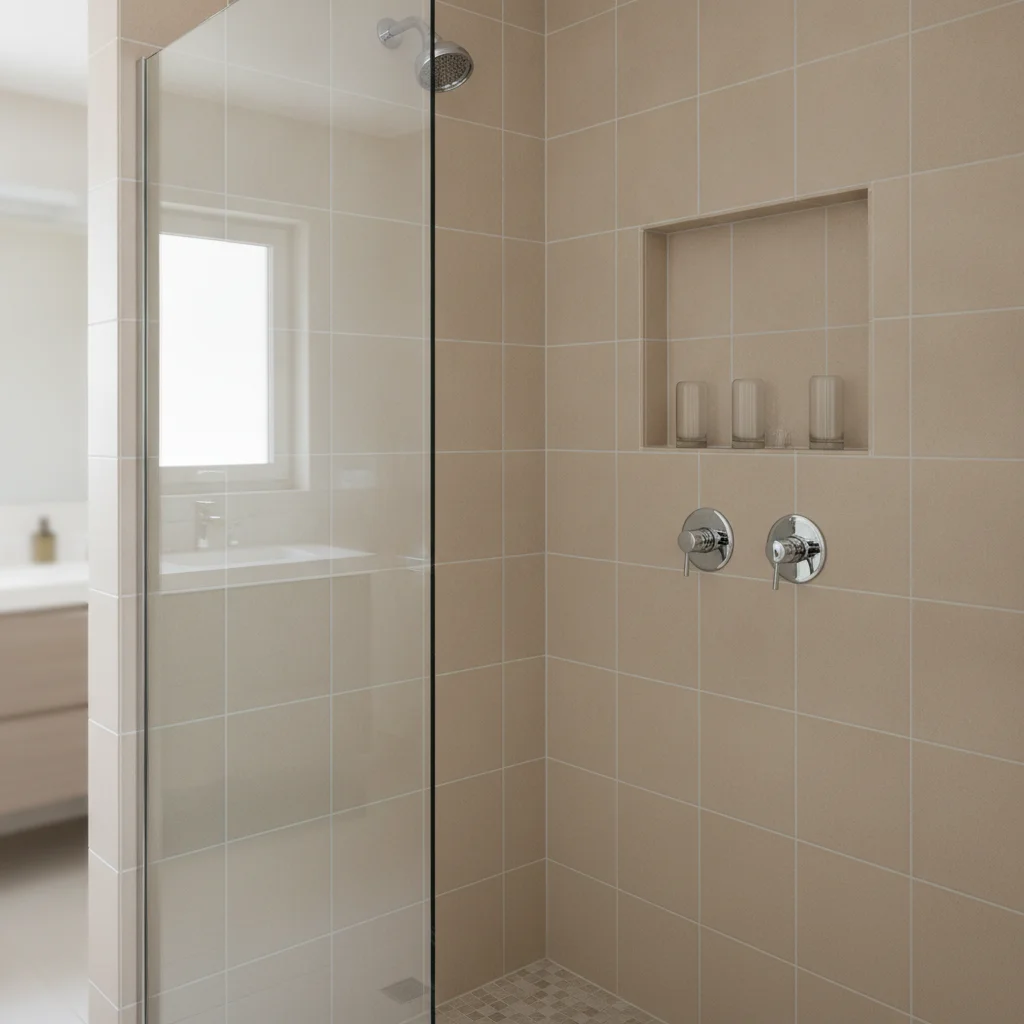
Bathroom shower with plain beige ceramic tile and chrome fixtures
Before
->
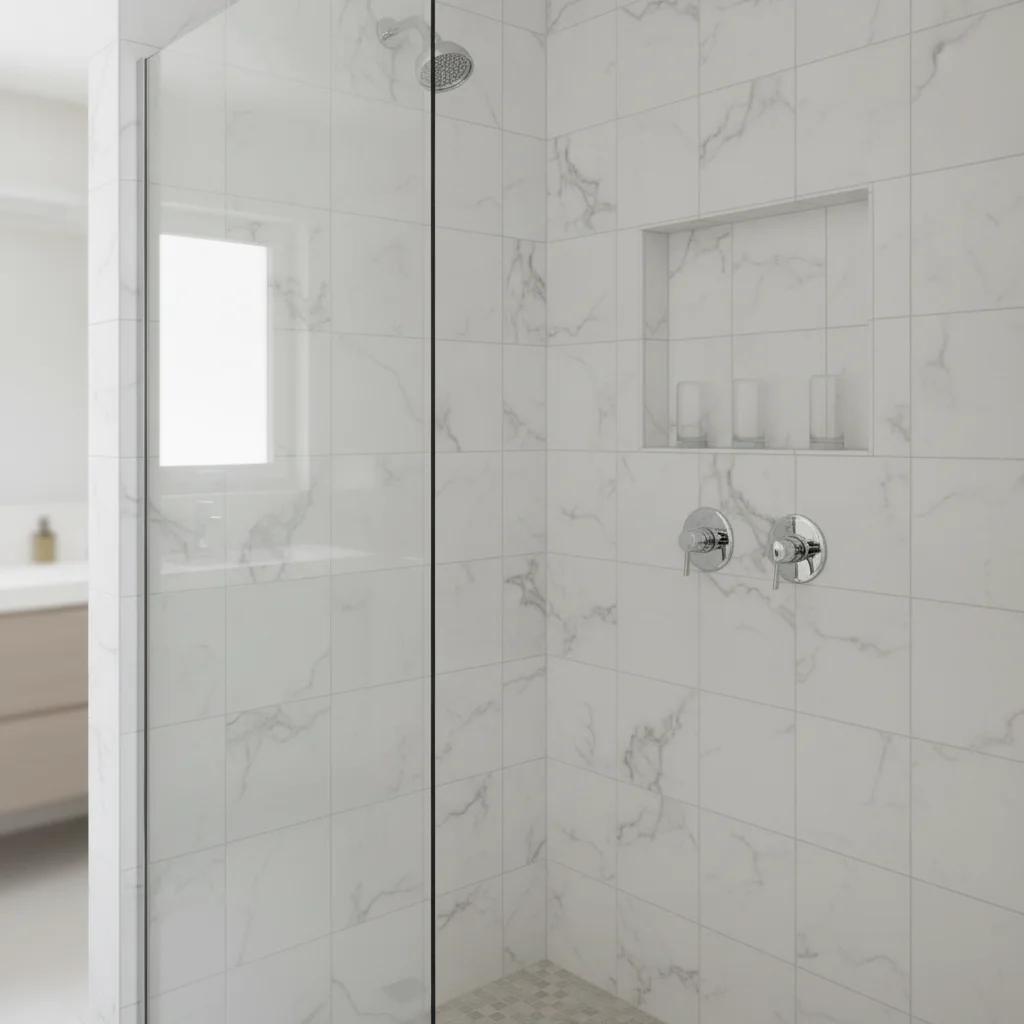
Same bathroom shower with tile changed to white Carrara marble with grey veining
After

Basic beige tile to marble — luxury renovation concept

An interior designer needed to present a luxury marble tile option to a client before specifying the material. The render preserved the shower fixtures accurately and showed the full transformation.

Prompt: change the bathroom wall tile to large-format white Carrara marble tile, polished surface with natural grey veining, thin grey grout, preserve all fixtures
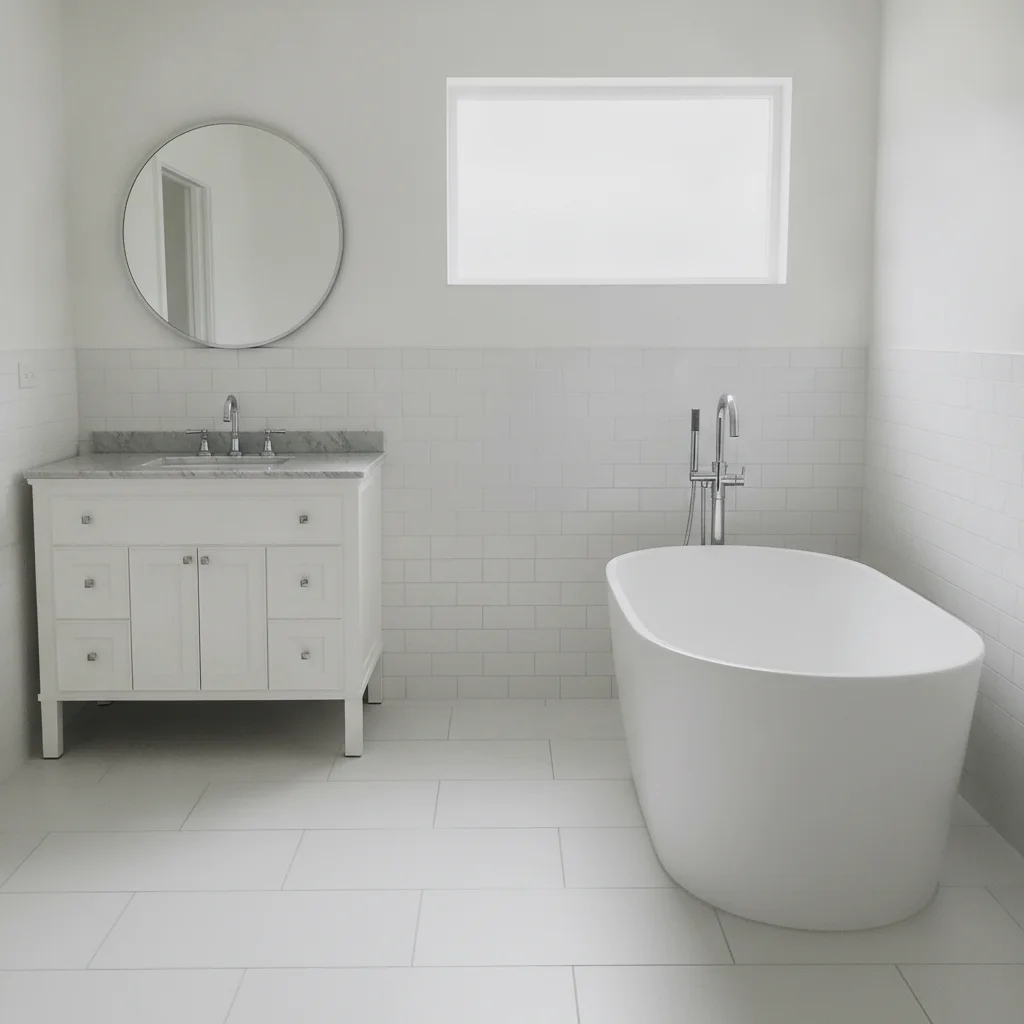
Bathroom with plain white large-format floor tile and freestanding tub
Before
->
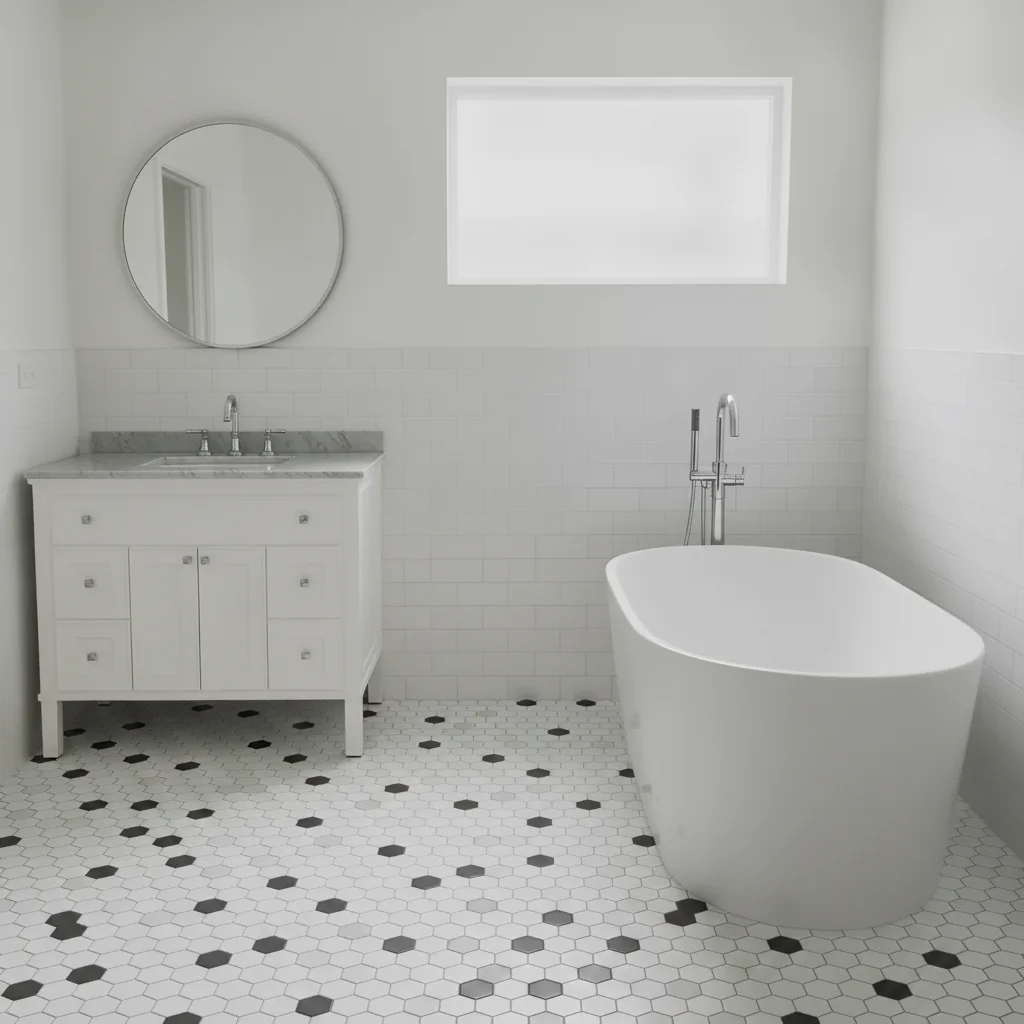
Same bathroom with floor changed to classic black and white hexagonal mosaic tile
After

Plain floor to black and white hex — classic bathroom design

A homeowner planning a bathroom renovation wanted to see if the classic black and white hex tile floor would work with their existing white subway wall tile before ordering the tile.

Prompt: change the bathroom floor to classic black and white hexagonal mosaic tile, alternating black and white tiles in a checker-like hex pattern, white grout

Quick answers

Do I need to mark the tile area before visualizing new bathroom tile?

No. Type 'replace the shower wall tile with white subway tile' and the AI identifies and replaces the tile without any marking. Markers are helpful when you want to change only one surface (wall but not floor, for example) — tap a marker on the specific tile surface and regenerate.

Is there a free bathroom tile visualizer that doesn't need an account?

Yes. EditThisPic visualizes bathroom tile for free with no account. Upload your bathroom photo, describe the tile material and pattern, and download the result in about 30 seconds. Works in any browser on desktop or mobile. The free edit is a preview — purchased downloads are clean, full quality.

How do I preview bathroom tile before buying and installing?

Upload a photo of your bathroom to EditThisPic, then type the tile you're considering — for example, 'replace the shower wall with large-format grey slate tile, stacked horizontal pattern, charcoal grout.' The AI renders the new tile in about 30 seconds. Compare multiple tile options before purchasing.

Can I visualize both floor tile and wall tile changes in the same image?

Yes. Include both surfaces in your prompt: 'replace the shower wall tile with white subway tile and change the floor to black and white hex mosaic.' The AI can change multiple tile surfaces in one pass, though complex multi-surface changes may benefit from one refinement pass.

What bathroom tile update has the best ROI for home listings?

White 3x6 subway tile with white or light grey grout consistently photographs well and appeals broadly to buyers in MLS listing photos. It signals clean, modern, and low-maintenance. Use EditThisPic to preview this on your actual bathroom before deciding whether a pre-listing tile replacement is worth the investment.

Can I preview replacing dated 1970s bathroom tile without renovating?

Yes — this is one of the most common use cases for this tool. Upload a photo of the dated tile (pink, avocado green, harvest gold) and type 'replace the bathroom tile with white subway tile.' The AI shows how a tile replacement would look before you commit to the renovation. Useful for both personal planning and pre-listing staging decisions.

How much does EditThisPic cost?

You get 1 free edit per week — no account needed. After that, one-time credit packs start at $4.99 for 10 edits, valid 12 months, no subscription. Power users who edit daily can pick Studio Membership, a monthly workspace at $49.99/mo for 300 edits. Purchased downloads are clean with no watermark.

Ready to visualize your bathroom tile?

Free to try. No signup required.

1 free edit included·Credit packs from $4.99