Free • No signup Generate Business photos · Free

AI Business Photo Generator

Turn any photo into a polished business portrait. No studio needed.

Man in casual green t-shirt in home office
Before
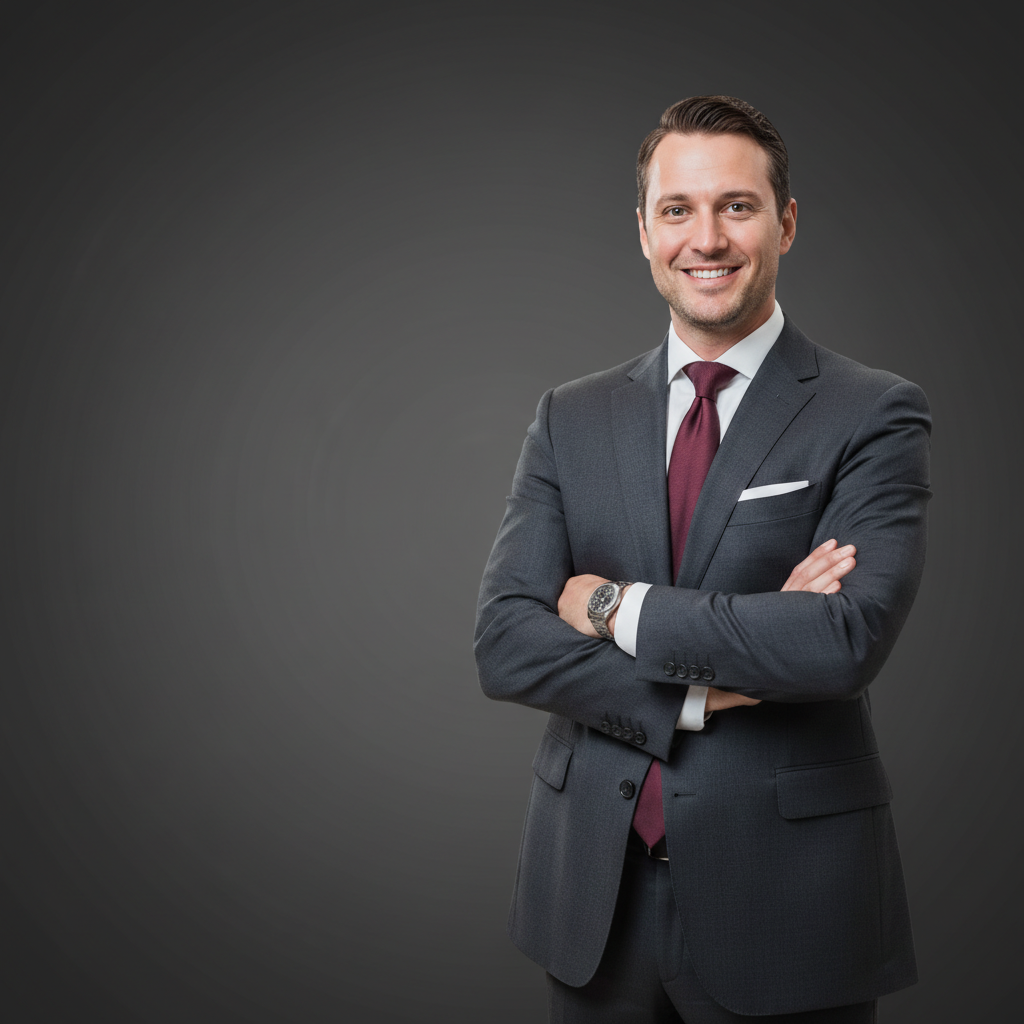
Same man in navy blue suit with professional grey studio background
After

AI Business Photo Generator

Drop your photo here

or click to browse

Release to upload

Free • No signup

Advertisement
Popular use cases:
  • LinkedIn profile photos
  • corporate team pages
  • business cards
  • company websites
  • startup founder photos
  • real estate headshots
  • consulting profiles
  • executive portraits

Cost
Free No signup required
Time
Instant results in 15-30 seconds
Works on
Any device - browser, phone, tablet, desktop
Powered by
AI-powered photo editing
Scenario Prompt Time
Basic headshot cleanup make this a professional headshot with clean background 30s
Full business transformation transform into corporate headshot with suit and studio backdrop 40s
Executive portrait create executive portrait with dramatic lighting and dark background 45s

How it works

  1. Upload your photo

    Drop your image into EditThisPic. JPG, PNG, WebP up to 7MB. Clear photos where the face is well-lit work best. Selfies, webcam shots, and casual portraits all work for business photo generation.

    Expect: Standard business portraits: 30-40 seconds. Complex full-body transformations: 45-60 seconds and may need refinements.
  2. Describe the business look you want

    Type your instruction: 'transform into a professional business portrait with clean background and studio lighting' or 'make this look like a corporate headshot with a navy suit.' Be specific about attire, background, and lighting. No marking needed—the AI understands what 'business portrait' and 'professional look' mean.

    Tip: Mention specific attire like 'charcoal suit with white shirt' and background like 'solid grey backdrop' for the most realistic corporate results.

    Copy one of these to get started:

    Classic corporate headshot transform into a professional corporate headshot with a navy blue suit, white shirt, and clean solid grey background with studio lighting

    LinkedIn profile photo make this a professional LinkedIn photo with business casual attire, soft neutral background, and warm natural lighting
    Executive portrait transform into an executive portrait with a dark charcoal suit, subtle tie, and dark gradient background with dramatic studio lighting
    Real estate agent headshot create a professional real estate agent headshot with a blazer, confident smile, and blurred outdoor background with natural light
    3 more prompts
    Startup founder photo transform into a startup founder portrait with a smart casual look, open-collar shirt, and clean white background with bright even lighting
    Financial advisor portrait make this a professional financial advisor portrait with a dark suit, conservative tie, and solid navy blue background with soft lighting
    Team page photo transform into a team page photo with business attire, clean white background, and consistent professional lighting matching a corporate website
  3. Review the result

    Check that the business styling looks natural. Verify the lighting is consistent, clothing fits the body naturally, and the background is clean. Zoom in on collar, shoulders, and face details.

  4. Refine with markers if needed

    If specific areas like the collar, tie, or background edges need adjustment, tap markers on those spots and regenerate. Most business photo transformations work perfectly on the first try.

    Tip: Markers are for precision refinement only. Try without them first—you usually won't need them.
Try it free

AI Business Photo Generator

Drop your photo here

or click to browse

Release to upload

Free • No signup

"Needed professional headshots for our startup team page and didn't have time for a photographer. Uploaded everyone's selfies and got corporate-quality portraits in minutes. Saved us hundreds of dollars." @StartupCTO_James

See it in action

Man in casual green t-shirt in home office
Before
->
Same man in navy blue suit with professional grey studio background
After

Casual selfie to corporate headshot

A casual home selfie transformed into a polished corporate headshot with professional attire and studio backdrop.

Prompt: transform into a professional corporate headshot with a navy blue suit, white shirt, and clean solid grey background with studio lighting
Woman in casual denim jacket in park setting
Before
->
Same woman in charcoal blazer with dark gradient studio background
After

Outdoor photo to executive portrait

A woman's outdoor photo transformed into a polished executive portrait suitable for company leadership pages.

Prompt: transform into an executive portrait with a dark charcoal blazer, professional styling, and dark gradient background with dramatic studio lighting
Advertisement

If something looks off

AI changed the wrong area or something I didn't want changed

Why: The AI couldn't determine exactly which part of the photo you meant from description alone. This happens when both attire and background need changes simultaneously.

Try: Tap a marker on the specific area you want to change, then regenerate with the same prompt

Tip: Markers tell the AI 'I mean THIS area specifically.' Use them when description alone is ambiguous.

Suit or clothing doesn't fit the body naturally

Why: Unusual poses, crossed arms, or angled shoulders make it harder for the AI to generate clothing that follows the body shape.

Try: transform into a professional business portrait, ensure the suit follows the body's natural pose and proportions

Tip: Front-facing photos with arms at sides produce the most natural-looking business attire.

Background looks fake or has artifacts

Why: Complex hair or clothing edges make it difficult to create a clean separation between subject and new background.

Try: Tap markers on the edges between hair and background and regenerate: clean up the transition between subject and background

Tip: If hair edges look rough, mention 'with natural hair edges' in your prompt.

Lighting on face doesn't match the new background

Why: The original photo's lighting direction conflicts with what the studio background suggests, making the composite look unnatural.

Try: transform into a business portrait with studio lighting that matches the natural light direction on the face

Tip: If the original has window light from the left, mention 'with soft key light from the left' to keep it consistent.

Result looks too generic or template-like

Why: Vague descriptions like 'make professional' lead to generic stock-photo results. More specific details produce more authentic portraits.

Try: Be more specific: include attire details, background style, and lighting mood like 'charcoal suit, slate grey background, warm Rembrandt lighting'

Tip: Photography terms help: 'Rembrandt lighting', 'butterfly lighting', 'high-key' all give distinct professional looks.

Quick answers

Do I need to mark my face or clothing before describing the business look I want?

No! Just describe what you want: 'transform into a corporate headshot with a navy suit' or 'make this a professional business portrait.' The AI understands these concepts. Only use markers if you want to refine specific edges or areas after the first attempt.

How do I turn a selfie into a professional business photo for free?

Upload your selfie to EditThisPic and type something like 'transform into a professional business portrait with studio lighting and a clean background.' The AI handles attire, background, and lighting in one step. Free to try with no account needed, and results download without watermarks.

Is there a free AI business photo generator that doesn't require login?

Yes, EditThisPic generates professional business photos with no account or login required. Upload any photo, describe the business look you want, and download the result. No watermarks, no signup walls. Works for headshots, team photos, and corporate portraits.

What's the best free tool for creating professional headshots from selfies?

EditThisPic transforms casual selfies into professional business headshots using AI. Unlike studio headshot services that cost $100+, just upload your photo and describe the look. It handles background replacement, professional attire, and studio lighting automatically. Free to try, results in under a minute.

Ready to create your professional business photo?

Free to try. No signup required.

Try it free