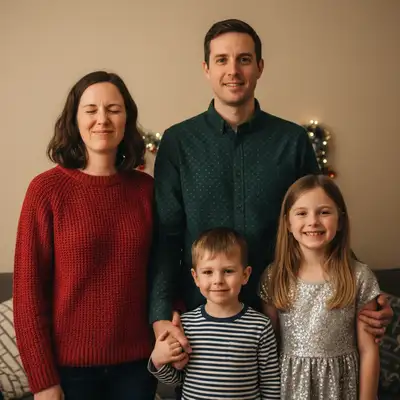
EditThisPic edits photos for any holiday or season using AI. Upload your photo, describe the effect — 'add a Christmas background,' 'make this spooky for Halloween,' 'summer beach vibe' — and get a result in under 60 seconds. Works for Christmas cards, Halloween filters, summer enhancers, autumn portraits, and festive backgrounds. Free, no signup required.
Unlike generic photo editors that require you to manually cut out backgrounds, layer textures, and color-grade by hand, EditThisPic takes a plain-English description — 'Christmas background with decorated tree' or 'spooky Halloween graveyard' — and applies the full seasonal transformation automatically, including matched lighting and realistic atmospheric effects.
Use case guides
Turn any family portrait, pet photo, or casual snapshot into a professional-looking holiday card or Christmas greeting. Add festive backgrounds, decorations, snow, and warm seasonal lighting — no photography studio or graphic design skills needed.
Common scenarios
- A family photo from summer that needs a Christmas background with a decorated tree and snowy outdoor scene for holiday cards
- A pet photo that needs Santa hats, reindeer antlers, or a cozy fireplace setting for a pet holiday card
- A plain indoor portrait that needs holiday lighting, garland framing, and festive atmosphere for a company holiday card
Best practices
- Describe specific Christmas elements by name: 'decorated fir tree with warm lights, snowy window, and fireplace glow' beats 'make it Christmasy' for richer, more natural results
- For group family photos, add 'keep all faces clearly visible' to prevent the AI from obscuring anyone with foreground decorations
- Use the Holiday Card Maker or Family Christmas Card Maker tools — they're optimized for card composition and output a card-ready image
- For portraits taken in summer with green foliage, ask the AI to 'replace the background completely' rather than overlay — the green trees won't blend well with a winter scene
Sample prompts
Add a Christmas background with a beautifully decorated tree, warm golden fairy lights, and gently falling snow — keep all faces visible and well-litMake this a cozy holiday card photo — add a festive fireplace scene behind us with garland, candles, and warm Christmas lighting
Upgrade Halloween costume photos with dramatic atmospheric effects — misty graveyards, full moons, haunted mansions, fog-filled forests, and moody dramatic lighting. Works with costume selfies, kids' trick-or-treat photos, and pet costume shots.
Common scenarios
- A costume selfie against a plain wall that needs a graveyard, haunted house, or dark forest background to match the outfit's theme
- A kids' trick-or-treat photo that needs a fun, spooky (but not scary) background with jack-o'-lanterns, autumn leaves, and orange moonlight
- A group Halloween photo where the existing background is distracting and needs to be replaced with a moody, atmospheric scene
Best practices
- Specify mood intensity: 'spooky but fun for kids' vs. 'genuinely unsettling horror atmosphere' gives very different results — pick the right tone for your audience
- Name the background scene rather than just the mood: 'misty Victorian graveyard with iron gates and bare oak trees under a full moon' is far more specific than 'spooky background'
- For costume enhancement, tell the AI about the costume type: 'this is a vampire costume — add dramatic red and black lighting with a gothic castle in the background'
- Autumn leaf effects, fog, and flickering torch lighting can be added without changing the background for a subtler Halloween atmosphere
Sample prompts
Add a misty graveyard background with a full moon, bare twisted trees, and fog rolling in — dramatic but not too frightening, deep shadows and cool blue moonlightMake the atmosphere spooky for Halloween — add pumpkins, orange and purple lighting, and a haunted house silhouette in the background
Add summer energy to any photo — beach backgrounds, golden hour lighting, tropical vibes, and warm saturated colors. Perfect for travel throwbacks, social media content, and lifestyle photos that need a warm-weather feel regardless of when they were taken.
Common scenarios
- An indoor or overcast-day portrait that needs the warm, sun-drenched look of a beach golden hour without actually being at the beach
- A vacation photo taken on a cloudy day that needs the bright blue sky, clear water, and vivid summer colors it deserved
- A product or lifestyle photo that needs a summery tropical or beach setting for warm-season marketing content
Best practices
- Golden hour lighting is the most versatile summer enhancement — 'add warm golden hour light from the left, slightly hazy summer sky' works for nearly any portrait
- For beach backgrounds, describe the specific type: 'calm turquoise Caribbean water with white sand' vs. 'dramatic Pacific coast with dark rocks and crashing waves' are completely different scenes
- Summer photo enhancement works well as a standalone step: start with 'enhance the summer feel and warmth of this photo' before asking for more specific changes
- Combining a sky replacement with lighting enhancement gives the most dramatic summer transformation: 'replace the overcast sky with a vivid blue summer sky, warm up the overall lighting and colors'
Sample prompts
Add a beautiful golden hour summer beach scene — warm orange sun on the horizon, calm turquoise water, soft sandy beach, lens flare from the sunEnhance this photo for summer — brighten the sky to vivid blue, warm up the colors and shadows, add tropical lush greenery in the background
Transform any outdoor portrait or landscape into peak autumn with golden foliage, warm afternoon light, and rich seasonal color palettes. One of the most requested seasonal edits — turn summer green into fall gold without waiting for the season to change.
Common scenarios
- A summer family portrait in a park where the green trees need to become golden and red autumn foliage for a fall announcement or card
- A landscape or nature photo taken outside of autumn that needs the dramatic golden-hour light and color palette of peak fall foliage
- A portrait session taken during a dull overcast day that needs the warm, directional light and rich earth tones of an autumn afternoon
Best practices
- Specify the foliage color mix for more realistic results: 'golden yellow, burnt orange, and deep crimson leaves with some still on the branches and some falling' beats 'autumn colors'
- Autumn lighting is as important as leaf color — add 'warm directional afternoon sunlight coming through the trees, long shadows' for the signature fall look
- For portraits, ask the AI to 'keep skin tones warm and natural' so the orange color grading of autumn doesn't push subjects' faces toward an orange cast
- The season change works best on photos with visible sky and trees — purely indoor photos or close-up portraits are harder to fully transform seasonally
Sample prompts
Change all the trees to peak autumn colors — golden yellow, burnt orange, and deep red leaves with warm afternoon sunlight filtering through, some leaves falling gentlyTransform this summer scene into autumn — fall foliage on the trees, warm golden light, earth-tone color palette throughout, cozy seasonal atmosphere
Frequently Asked Questions About Seasonal Photo Editing
What is the best free Christmas photo editor?
EditThisPic lets you add Christmas backgrounds, festive lighting, snow, and holiday card layouts to any photo using a plain-English description. Upload your photo, type 'add a Christmas background with a decorated tree and warm fireplace lighting,' and get a result in under 60 seconds. Free to try with no signup — preview it free, and purchased downloads are clean.
How do I add a Halloween filter to my photo?
Upload your photo to EditThisPic and describe the effect: 'add a spooky graveyard background with full moon and fog' or 'make the lighting dramatic and Halloween-themed with deep shadows.' The AI applies the atmospheric effect to your entire photo, adjusting lighting and mood — not just overlaying a flat filter.
Can AI change the season in my photo?
Yes. Type 'change this to autumn with golden and red leaves, warm afternoon light' or 'make this a winter scene with snow and cool blue sky.' The AI transforms vegetation, sky, lighting, and overall color palette to match the target season. Works best with outdoor photos that have visible sky and trees.
How do I make a holiday card from a photo?
Upload your family, group, or pet photo and describe the card style: 'add a Christmas background with a decorated tree and warm lighting for a holiday card' or 'create a festive holiday card with a snowy outdoor scene and Happy Holidays.' The Holiday Card Maker and Family Christmas Card Maker tools are specifically optimized for card composition.
Can I add a summer beach background to any photo?
Yes. Upload any portrait or lifestyle photo and describe the summer scene: 'add a sunny beach background with turquoise water, white sand, and golden hour lighting.' The AI replaces or transforms the background to match the summer feel while keeping your subject naturally lit. Works for portraits, product photos, and pet photos.
How do I add autumn colors to a summer photo?
Describe the transformation: 'change all the trees to peak autumn colors — golden yellow, burnt orange, and deep red leaves — warm afternoon sunlight filtering through.' The AI transforms green summer foliage into realistic fall colors, adjusts the lighting to match autumn's warm directional light, and shifts the overall color palette toward earth tones.
Does the seasonal editing look realistic or filtered?
The AI matches lighting, color temperature, and shadows to the seasonal theme rather than overlaying a flat filter. Snow effects come with cooler overall tones and frost. Autumn edits include warm directional golden-hour light. Christmas scenes include the glow of indoor holiday lighting. The result looks photographed in that season, not stylized.
Can I use a summer photo enhancer to fix underexposed vacation photos?
Yes. Combine seasonal enhancement with photo correction in one prompt: 'fix the underexposed shadows, replace the gray overcast sky with a vivid blue summer sky, warm up the overall colors and lighting.' The AI handles both the technical exposure fix and the seasonal enhancement in a single pass.
What festive photo backgrounds are available?
Any festive background you can describe — Christmas trees and fireplace scenes, snowy outdoor settings, decorated mantlepieces, haunted Halloween mansions, spring cherry blossom gardens, summer beach golden hours, cozy autumn forests. The AI creates the background from your description rather than picking from a fixed template library.
Does this work for Halloween costume photos?
Yes. Upload your costume photo and describe the atmosphere: 'add a misty graveyard background with full moon and bare trees' or 'make the lighting dramatic and spooky with deep purple and orange shadows.' Works for costume selfies, kids' Halloween photos, and group shots. Specify 'fun and spooky' vs. 'genuinely scary' to control the intensity.
Is seasonal photo editing free?
Yes. EditThisPic gives you one free preview edit per week with no account needed, and purchased downloads are clean. For holiday card batches or multiple seasonal edits, credit packs start at $4.99 for 10 edits or $4.99 for 10 edits.
Can I do seasonal photo editing on my phone?
Yes. EditThisPic works in any mobile browser — iPhone, Android, or tablet — with no app download required. Upload a photo from your camera roll, type the seasonal effect you want, and download the result. The mobile experience handles Christmas cards, Halloween effects, and all seasonal edits without a desktop.