AI Photo Editor for Shopify Product Photos
Create cohesive, professional Shopify product photos in seconds. No Photoshop needed.
Drop your photo here
or click to browse
Free • No signup
Release to upload

"My DIY product photos looked like a garage sale. EditThisPic made them look like a real brand. Sales went up 40% the first week." @ShopifySellerJenna
Built for Shopify Store Owners
Shopify customers judge your brand quality in 3 seconds. Inconsistent or amateur product photos signal 'low quality' even if your products are excellent. EditThisPic helps D2C brands create the cohesive, professional look that builds trust and justifies premium pricing. Edit your entire catalog in an afternoon, not weeks.
Tools Shopify Sellers Use Most
Change Background to White
Create clean white backgrounds that make products pop
Remove Shadow
Clean up distracting shadows from DIY product photography
Enhance Photo
Improve lighting and clarity across your product catalog for consistency
Remove Background
Remove cluttered backgrounds to create clean product shots
Create Professional Shopify Product Photos
-
Upload your product photo
Drop your product image into EditThisPic. JPG, PNG, and WebP up to 7MB. Even photos taken on your phone with messy backgrounds work great. The AI handles the transformation.
Simple products on solid backgrounds: 15-20 seconds. Complex products with reflections or detailed textures: may need 2-3 refinements for perfect consistency. -
Describe your desired look
Type what you want: 'replace background with pure white seamless studio backdrop' or 'enhance product with consistent bright lighting and clean white background.' Be specific about the look you want across your catalog. The AI understands concepts like 'background,' 'lighting,' and 'consistent styling' without you marking anything.
For catalog consistency, save your exact prompt and reuse it for every product. This creates the cohesive look that makes stores feel professional. -
Generate and review
Check that the background is clean, lighting is consistent, and the product looks professional. Compare it to your other product photos to ensure visual consistency. Zoom to 100% to verify edges are clean and natural-looking.
Keep a reference photo from your first successful edit. Use it to visually compare all subsequent products for consistency. -
Refine edges if needed
If any edges show background remnants or the styling isn't quite consistent with your other products, tap markers on those problem areas and regenerate. Most Shopify product photos work perfectly on the first try, but refinement is available when you need it.
Markers are for precision refinement, not a required step. Try without them first—description alone handles most edits.
Shopify Product Photo Prompts
replace background with pure white seamless studio backdrop, clean and professional, no shadows or distractions
Pure white backgrounds make products pop and create a clean, professional store aesthetic.
replace background with pure white, enhance lighting to be bright and even, consistent e-commerce product photography style
This prompt creates the cohesive look across your entire catalog that makes stores feel like real brands.
remove all background distractions and clutter, show product only on pure white seamless backdrop, professional lighting
Perfect for when you photograph products on your desk or kitchen table. Removes all the messy surroundings.
replace background with pure white studio backdrop, preserve natural reflections on product surface, clean professional edges
Reflective products need their shine preserved while removing the background. This maintains product appeal.
Show 3 more prompts
replace background with pure white seamless backdrop, preserve all fabric texture and natural soft edges, no harsh cutout look
Handmade fabric items need soft edges. Adding 'natural soft edges' prevents that cut-out-with-scissors appearance.
remove all environmental elements and people, show product only on pure white seamless backdrop, professional product photography
Convert lifestyle photos to clean product shots. Great when you want both types of images in your store.
replace background with pure RGB 255,255,255 white, completely uniform with no gradients or color variations, professional clean look
If your DIY white background looks gray or off-white, this ensures pure white for a professional appearance.
| Edit Type | Prompt | Time | |
|---|---|---|---|
| Pure white background | replace background with pure white seamless studio backdrop, clean and professional |
15s | Try This → |
| Consistent catalog style | replace background with pure white, enhance lighting to be bright and even |
20s | Try This → |
| Reflective products | replace background with pure white, preserve product reflections |
20s | Try This → |
| Handmade/fabric items | replace background with pure white, preserve texture and natural soft edges |
20s | Try This → |
Shopify Product Photo Examples
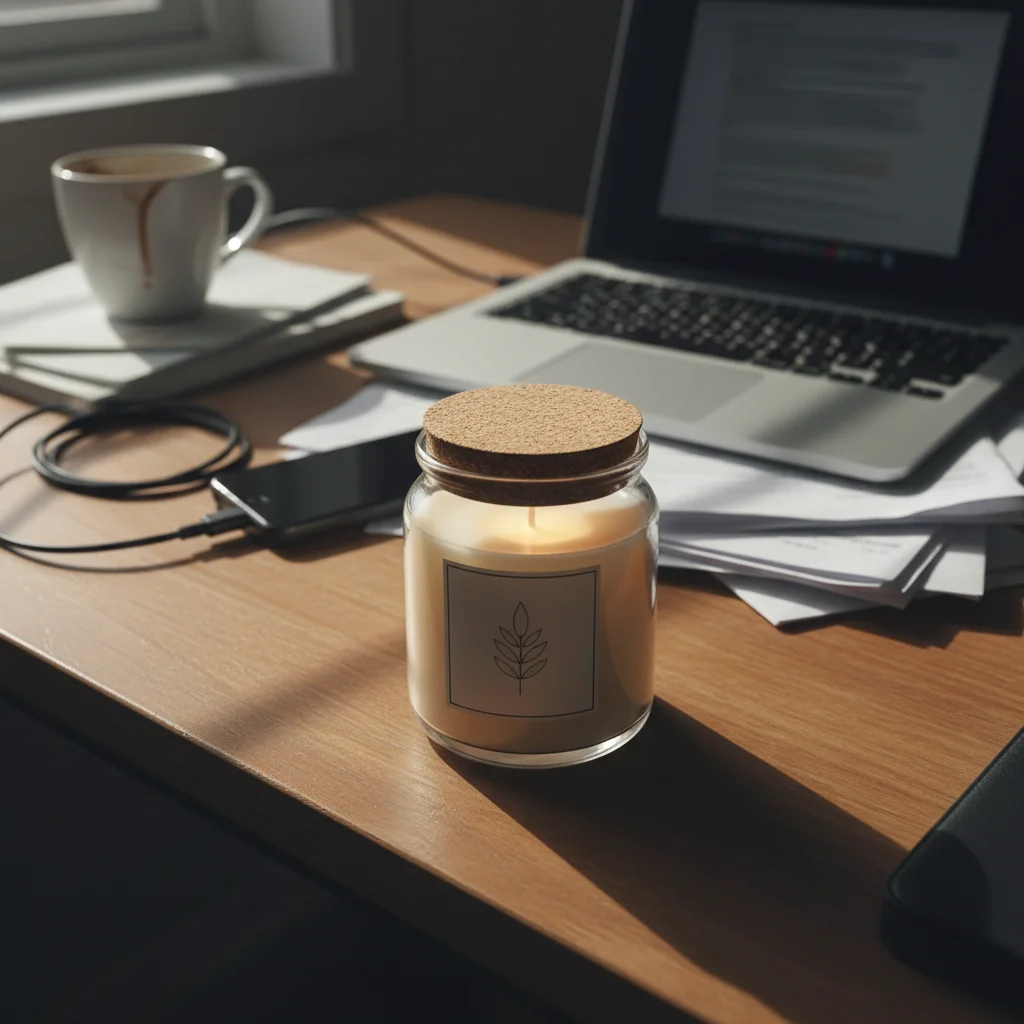
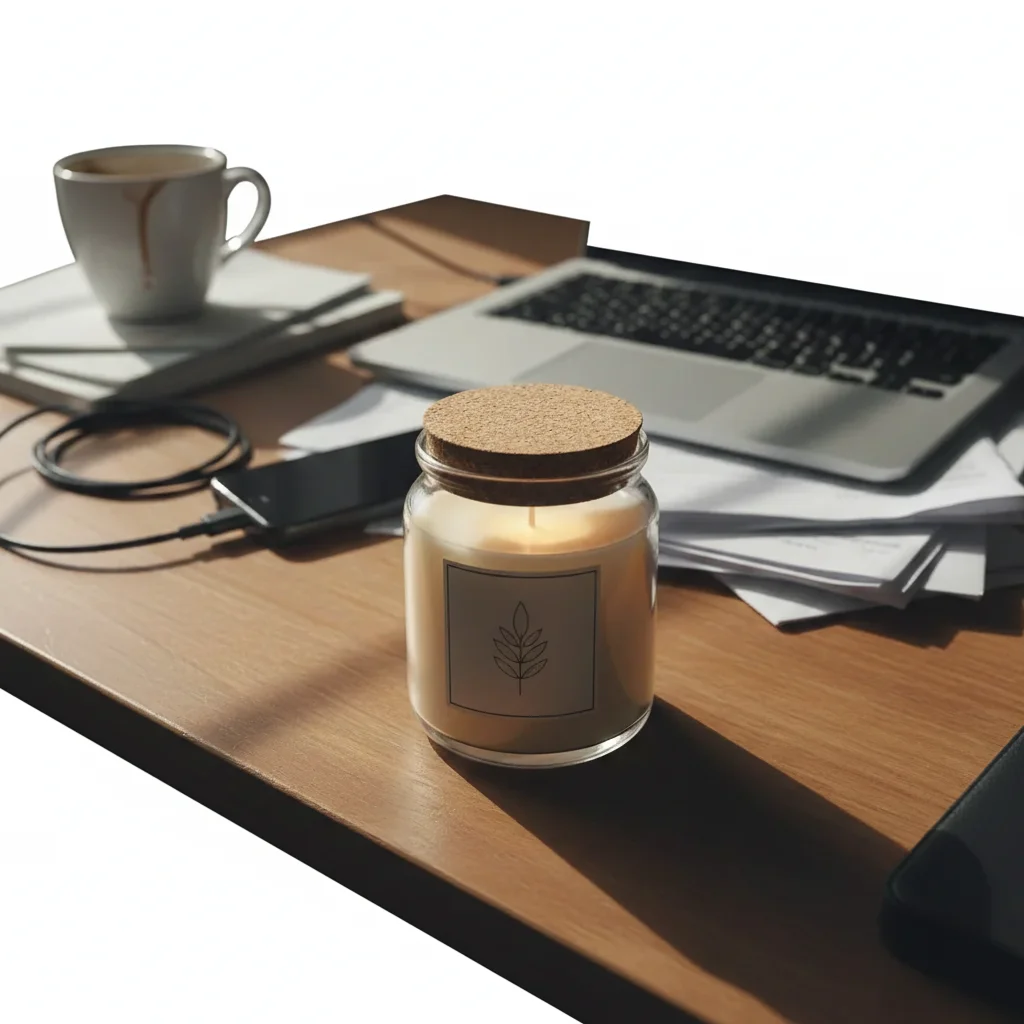
Handmade candle store-ready
Handmade candle photographed on cluttered home desk. One prompt created a professional Shopify product photo with clean white background.
replace background with pure white seamless studio backdrop, clean and professional, no shadows or distractions
Jewelry with preserved shine
Silver earrings photographed on jewelry display. The AI kept the metallic reflections while adding a clean white background.
replace background with pure white studio backdrop, preserve natural reflections on silver surface, clean professional edges
Common Shopify Product Photo Issues
Background isn't pure white (looks gray or off-white)
Why: The AI may have created 'studio white' with subtle gradients for a natural look, but this can make your store look inconsistent or unprofessional.
replace background with pure RGB 255,255,255 white, completely flat and uniform, no gradients or variations, clean professional look
Check corners and edges of the image. Impure white often shows up at the very edges. Zoom to 100% to verify true white throughout.
Products don't look consistent across my catalog
Why: Each photo may have slightly different lighting, white balance, or styling. This breaks the cohesive brand look that professional stores have.
Use the EXACT same prompt for every product: 'replace background with pure white, enhance lighting to be bright and even, consistent e-commerce product photography style'
Save your successful prompt in a note. Apply it to every product photo. Consistency in prompt = consistency in results.
Product edges have white halo or color fringing
Why: The original background color mixed into edge pixels during removal. Common with products photographed against colored backgrounds or with colored lighting.
replace background with pure white with no color contamination at product edges, clean sharp separation
If fringing persists on specific edges, tap markers on those areas and regenerate with the same prompt.
AI changed the product color or affected the product
Why: The AI couldn't determine exactly which area you meant, especially with light-colored products on light backgrounds.
Tap markers on the product areas you want to preserve, then regenerate with 'replace background only with pure white, do not change product'
Markers tell the AI 'protect THIS area specifically.' Essential for white or cream products on white backgrounds.
Handmade items look cut-out or fake
Why: Hard edges make soft products (fabric, yarn, food) look artificial. Natural products need natural-looking edges.
replace background with pure white seamless backdrop, preserve all texture and natural soft edges, organic transition not harsh cutout
Adding 'natural soft edges' or 'organic transition' prevents the Photoshop cutout look on handmade items.
Lifestyle photo converted but lost product appeal
Why: Removing context (hands holding product, lifestyle setting) can make products look less aspirational. Balance is needed.
Keep the lifestyle photo for secondary images. Use 'remove background, show product only' for your main image only.
Shopify lets you have multiple product images. Use clean white background for the main image, lifestyle shots for gallery images.
Shopify Seller Questions
Do I need to mark the background before describing what I want?
No! For most edits, just describe what you want: 'replace background with pure white' or 'enhance lighting for consistency.' The AI understands these concepts. Only use markers when you need precision—like refining specific edges after your first attempt, or protecting light-colored product areas from being affected. Try description-only first—it works for 90% of Shopify product photos.
How do I get consistent styling across my entire product catalog?
Use the exact same prompt for every product photo. Save it in a note: 'replace background with pure white, enhance lighting to be bright and even, consistent e-commerce product photography style.' Paste this for every product. Consistent prompt = consistent results. This is how professional Shopify stores maintain their cohesive brand look without hiring photographers.
Should I use white backgrounds or lifestyle photos for Shopify?
Use both. White background for your main product image (this is what shows in collections and search). Use lifestyle photos for secondary gallery images to show the product in use. EditThisPic lets you create both: clean white backgrounds for main images, and enhanced lifestyle shots that still look professional. Upload multiple images to your product to cover both needs.
Can this help me compete with big brands on professional-looking photos?
Absolutely. The gap between DIY and professional product photography is mostly lighting, background, and consistency. EditThisPic handles all three: clean white backgrounds, enhanced lighting, and when you use the same prompt for every product, perfect consistency. Customers can't tell the difference between this and $50-per-photo professional work. Many Shopify sellers use EditThisPic to match the visual quality of brands 10x their size.
How do I handle products with white or very light colors?
Light-colored products on white backgrounds can confuse AI about what's product vs. background. Add specificity: 'replace background with pure white, keep the cream-colored candle intact.' If the AI affects your product, tap markers on the product areas you want protected and regenerate. The markers tell the AI 'don't change this specific area.' This is especially important for white clothing, cream ceramics, or light-colored handmade items.
Is this better than hiring a product photographer for my Shopify store?
For standard white-background product shots, EditThisPic is faster, more affordable, and gives you complete control. Professional photographers charge $15-50 per photo and take days. EditThisPic delivers results in 15 seconds for free. However, for complex lifestyle photography with models, styling, or creative direction, professional photographers still offer value. Most successful Shopify sellers use EditThisPic for their main product images and invest in professional photography only for hero lifestyle shots or campaigns.
Is EditThisPic's AI photo editor for shopify product photos really free?
Yes — you get 1 free edit per week, no account needed. For unlimited edits, plans start at $3.99/month.
Can I shopify product on my phone?
Yes. EditThisPic works in any mobile browser — iPhone, Android, tablet. No app download needed.
Ready to create professional Shopify product photos?
Free to try. No signup required. Build your brand today.
Start EditingTrusted by 15,000+ users