Bumble Photos: Free AI Editor for Better Bumble Profile Photos
Last updated
Better Bumble photos in 30 seconds — remove exes, soften harsh light, look like the most flattering version of you.
Drop your photo here
"remove the person on the right and fill in the background with the trees and trail naturally, keep me looking exactly the same"
Release to upload


Built for Bumble Users
On Bumble, women make the first move — which means your photos have to earn that swipe in under two seconds. Most people don't need a photoshoot. They need three or four photos they already love, minus the ex, with the lighting fixed and the framing tightened. EditThisPic does exactly that. Describe the change in plain English, get a clean result in 30 seconds, download it without a watermark, and upload straight to Bumble.
Tools Bumble Users Reach For
Remove Person
Cleanly remove an ex, a stranger, or a photobomber and rebuild the background
Enhance Lighting
Replace harsh overhead light with soft, flattering portrait lighting
Enhance Portrait
Subtle portrait polish that keeps you looking like yourself
Blur Background
Add depth so you become the obvious subject of the photo
How to Make Better Bumble Photos
-
Upload your best Bumble candidate
Drop in a photo where YOU already look great — good expression, natural pose, real moment. JPG, PNG, WebP, or HEIC up to 7MB. Bumble's slot is roughly 640x800, so vertical photos with your face in the upper half work best.
Soft lighting fix or portrait polish: 15-20 seconds. Removing an ex with background rebuild: 20-30 seconds, occasionally one refinement. -
Describe what's wrong
Type the change in plain English: 'remove the person on the left, rebuild the beach behind them' or 'soften the harsh shadows on my face from the overhead light, keep everything natural.' Be specific about position, color, and the words 'natural' and 'keep my face the same' if you want a believable result. No marking needed.
Say what to keep, not just what to change. 'Keep my smile and skin tone exactly the same' prevents the AI from over-editing your features. -
Generate, then check at swipe size
Tap generate. When the result loads, zoom out and look at it the size it'll appear in Bumble's swipe feed. Your face should still read clearly, the edit shouldn't be obvious, and the background should look real.
-
Refine with markers if needed
If the AI left a faint outline where someone used to stand or smoothed your face too much, tap markers on those spots and regenerate with a more specific prompt. Most Bumble edits don't need this step.
Markers are for precision. If the description was clear, the first try usually works.
Copy-Paste Prompts for Bumble
remove the person on the right and fill in the background with the trees and trail naturally, keep me looking exactly the same
Naming their position ('right') and what to rebuild ('trees and trail') gives the AI everything it needs in one shot.
soften the lighting on my face, lift the shadows under my eyes and nose from the overhead light, keep it completely natural
Naming the source of the shadows ('overhead light') and saying 'keep it natural' prevents the AI from over-correcting.
enhance portrait quality, gently smooth my skin, sharpen my eyes, keep all my facial features exactly the same
Be explicit about features. 'Keep my features the same' is the difference between you and a stranger.
brighten the photo overall, lift the exposure on my face, keep the lighting looking like real ambient light
Bumble photos that read 'dim' get scrolled past. A small lift makes a big difference at swipe size.
Show 2 more prompts
remove the strangers in the background, blend the wall behind them naturally, keep me exactly the same
If you don't know which direction they're in, just say 'the strangers in the background.' The AI handles it.
add a natural depth of field background blur, keep my face in sharp focus, like a portrait shot on a 50mm lens
Mentioning a real lens ('50mm') tends to give a more believable bokeh than asking for 'blur.'
| Edit Type | Prompt | Time | |
|---|---|---|---|
| Remove ex | remove the person on the [left/right] and rebuild the background |
25s | Try This → |
| Fix harsh light | soften the lighting on my face, lift the shadows, keep it natural |
15s | Try This → |
| Subtle portrait | enhance portrait quality, keep my features exactly the same |
15s | Try This → |
| Background blur | add natural depth-of-field blur, keep my face sharp |
15s | Try This → |
Real Bumble Photo Transformations

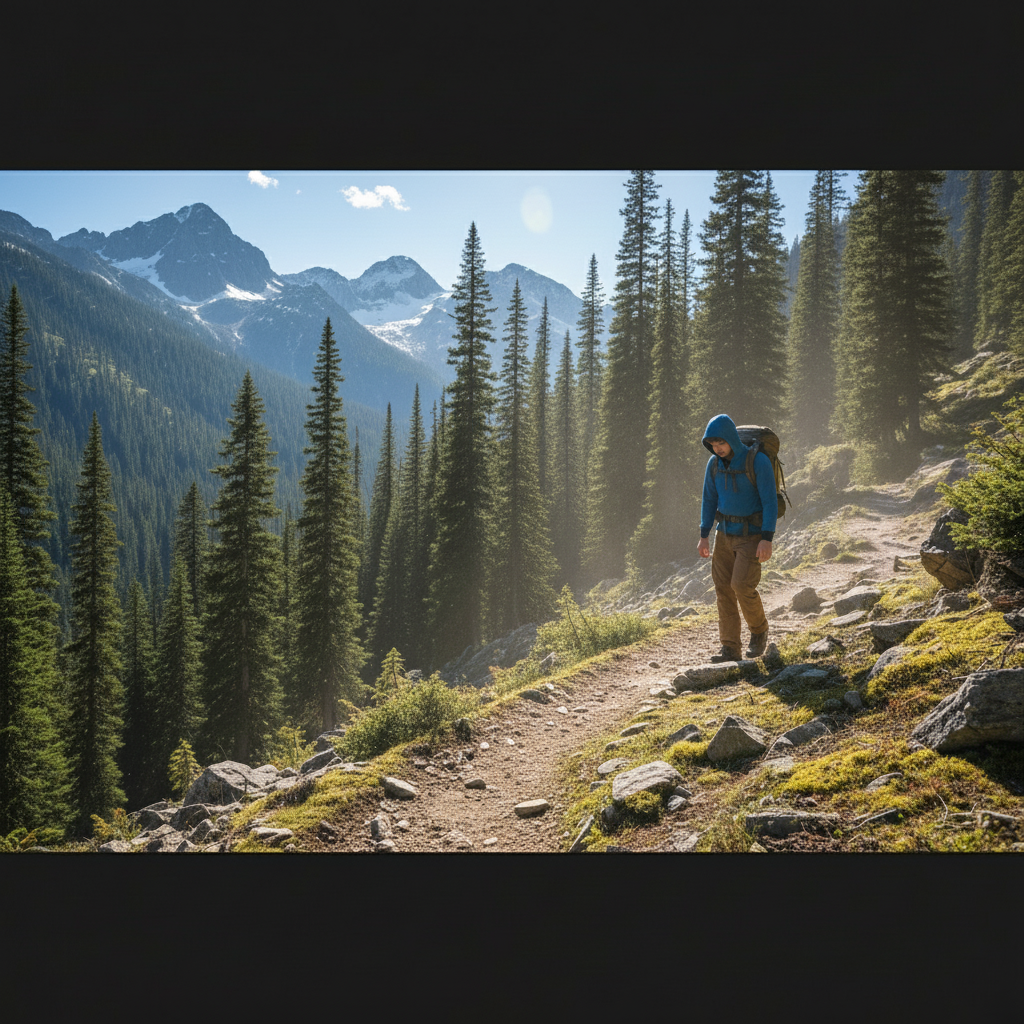
Hiking photo, ex removed
A great mountain shot with an ex-partner at the edge of frame. One prompt removed them and rebuilt the trail and trees behind.
remove the person on the left and fill in with the mountain trail and pine trees naturally, keep me looking exactly the same

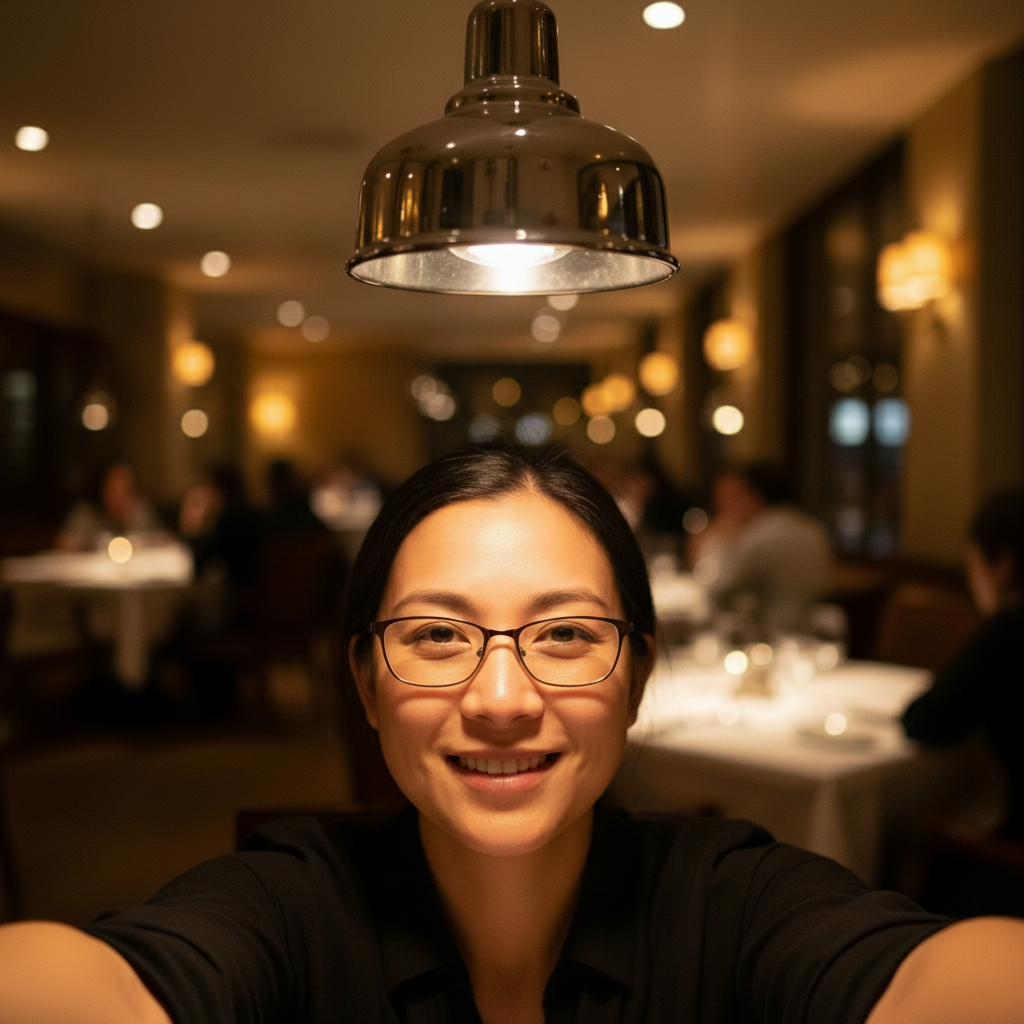
Restaurant selfie, harsh light fixed
A dinner-date selfie ruined by overhead pendant lights creating raccoon-eye shadows. Softened to read like flattering window light.
soften the lighting on my face, lift the shadows under my eyes and nose from the overhead pendant light, keep everything natural


Coffee-shop portrait, background cleaned
Good portrait with strangers visible behind. Removed the background people and added natural depth-of-field blur.
remove the strangers in the background and add a natural depth of field blur to the cafe behind me, keep my face in sharp focus
When Things Go Wrong
Removed ex left a faint outline or shadow
Why: The AI rebuilt the background but a soft edge or color shift remains where the person used to be.
clean up the soft outline where the person was standing and blend the background completely, no visible seam
Run a second pass that ONLY targets the leftover artifact instead of re-running the original prompt.
Portrait enhancement changed my face
Why: The AI smoothed too aggressively or shifted features. This is the #1 way to make a Bumble photo look fake.
redo the enhancement, keep all my facial features and proportions exactly the same, only soften skin slightly and improve sharpness
Add 'keep my face the same' to every portrait prompt. You want to look like yourself when you actually meet.
AI changed the wrong area or removed the wrong person
Why: From description alone the AI couldn't tell which person you meant — common in group photos or photos with two people of similar build.
Tap a marker directly on the person you want removed, then regenerate with the same prompt
Markers say 'I mean THIS specific one.' Use them whenever description alone is ambiguous.
Lighting fix made me look orange or plastic
Why: The AI pushed warmth or smoothing too far when you said 'flattering' or 'soft.'
redo the lighting fix, only lift shadows slightly, keep my natural skin tone and texture, no warm color shift
Words like 'subtle,' 'natural,' and 'keep skin tone' cap how aggressive the AI gets.
Photo looks great but my face gets cut off in Bumble's preview
Why: Bumble's swipe card crops to roughly 640x800 (vertical 4:5). Photos with the face near the edge get clipped.
extend the top of the photo with more sky and the bottom with more scenery to give my face room in a vertical 4:5 frame
Always preview your edited photo at 4:5 vertical before uploading. If your face is too close to an edge, extend that side.
Frequently Asked Questions
What makes a good Bumble photo?
A good Bumble photo is sharp, well-lit, shows your face clearly, and reads at swipe size in under two seconds. Lead with a smiling head-and-shoulders shot in soft natural light, then mix in a full-body, an activity, and one social photo for variety. Avoid sunglasses on the first photo, group photos where you're hard to identify, and heavy filters that make you look unrecognizable in person.
What size are Bumble photos?
Bumble displays profile photos at roughly 640x800 pixels (a 4:5 vertical aspect ratio) on the swipe card, and stores them at higher resolution under the hood. Upload vertical photos when possible, keep your face in the upper-middle of the frame so it doesn't get clipped, and stay under 5MB per image. You can have up to 6 photos on a Bumble profile.
Can I use AI photos on Bumble?
Yes — Bumble allows AI-edited photos as long as they're still recognizably you. The platform's rules forbid wholly synthetic faces or photos that misrepresent how you look. EditThisPic is designed for honest edits: removing exes, fixing harsh light, polishing portraits subtly. As long as you'd be recognizable on a first date, you're fine.
How do I remove my ex from a Bumble photo for free?
Upload the photo to EditThisPic and type 'remove the person on the [left/right] and rebuild the background naturally, keep me exactly the same.' The AI removes them and reconstructs whatever was behind them in 20-30 seconds. The download is free, has no watermark, and you can do it from any phone or laptop browser.
How many photos should I have on Bumble?
Bumble allows up to 6, and most successful profiles use all 6. The standard mix is: clear face shot first, full-body second, activity or hobby third, social proof (with friends) fourth, travel fifth, something playful sixth. Skip duplicates, sunglasses on the first photo, and any photo where it isn't immediately obvious which person is you.
Is there a free Bumble photo editor that doesn't need an account?
Yes. EditThisPic gives you one free Fast edit per week with no email and no signup, and the download has no watermark. If you're rebuilding a full Bumble profile in one sitting and need 5 or 6 edits at once, the Lite plan is $4.99/month for 15 credits, or you can grab a one-time $1.99 three-edit pack with no subscription. Either way you keep the photos.
Will my Bumble photos look obviously edited?
Not if you write your prompts well. The two rules: say 'keep me exactly the same' for any portrait edit, and use words like 'natural' and 'subtle' for any lighting or color change. Always check the result at swipe-feed size — most over-edited tells (smoothed skin, weird ear shapes, blurry edges) only show up at thumbnail scale.
Can I edit Bumble photos on my iPhone or Android?
Yes. EditThisPic runs entirely in any modern mobile browser — Safari on iPhone, Chrome on Android, and tablets. Open the site, upload from your camera roll, edit, download, and open Bumble in the same browser session. There's also a native iOS app on the App Store if you'd rather have a home-screen shortcut.
Popular use cases
Ready to upgrade your Bumble photos?
Free to try. No signup. No watermark. Stronger first impression in 30 seconds.
Edit Your Bumble PhotoTrusted by 15,000+ users