Free • No signup Convert Photos to anime style · Free

AI Anime Photo Converter

Describe anime style you want and AI transforms your photo instantly. No drawing skills needed.

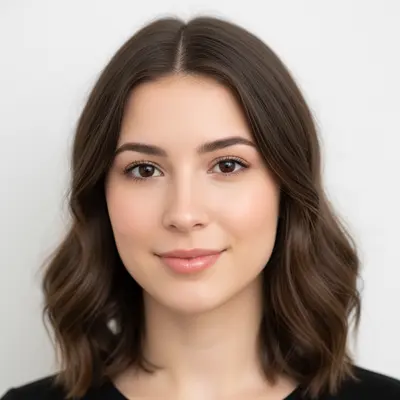
Portrait of young woman with natural features
Before
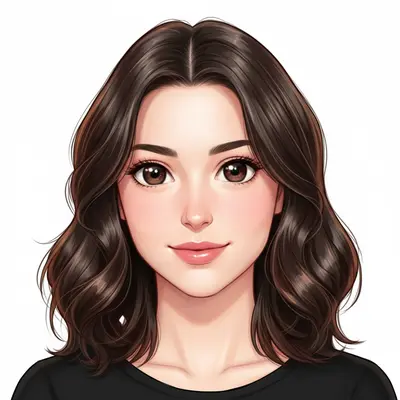
Same woman transformed into anime character with stylized features and large eyes
After

AI Anime Photo Converter

Drop your photo here

or click to browse

Release to upload

Free • No signup

Popular use cases:
  • anime avatar creation
  • manga character art
  • social media anime profiles
  • anime art gifts
  • anime style portraits
  • otaku photo editing
  • kawaii photo conversion
  • anime character design

Cost
Free No signup required
Time
Instant results in 15-30 seconds
Works on
Any device - browser, phone, tablet, desktop
Powered by
AI-powered photo editing
Scenario Prompt Time
Basic anime conversion convert to anime style with vibrant colors 30s
Manga character style turn into manga character with clean line art 35s
Studio Ghibli style convert to Studio Ghibli anime style with soft colors 40s

How it works

  1. Upload your photo

    Upload any portrait, selfie, or photo with clear facial features. The AI works best with photos where faces are visible and well-lit. JPG, PNG, WebP up to 7MB.

    Expect: Simple portraits: 30-40 seconds. Complex group photos: 45-60 seconds and may need refinements.
  2. Describe the anime style you want

    Type your instruction: 'convert to anime style with detailed shading and vibrant colors' or 'turn into manga character with large expressive eyes.' Be specific about the anime style, colors, and details. No marking needed—the AI understands 'anime style' and 'manga character.'

    Tip: Include style details like 'Studio Ghibli style', 'detailed shading', or 'vibrant colors' for more specific anime looks.

    Copy one of these to get started:

    Classic anime style conversion convert to anime style with detailed shading, vibrant colors, and large expressive eyes
    Manga character style turn into manga character with stylized features and clean line art style
    Studio Ghibli inspired style convert to Studio Ghibli anime style with soft colors and detailed hair texture
    Modern anime style with vibrant colors transform to modern anime style with bright vibrant colors and glossy highlights
    3 more prompts
    Kawaii cute anime style convert to kawaii anime style with oversized eyes, soft pastel colors, and cute features
    Realistic anime style turn into realistic anime character with detailed facial features and natural proportions
    Dark anime style convert to dark anime style with dramatic shadows, intense colors, and serious expression
  3. Review the anime transformation

    Check that facial features are stylized naturally and colors are vibrant. Look for characteristic anime elements like larger eyes, smooth skin, and stylized hair. Zoom in on facial details and overall composition.

  4. Refine with markers if needed

    If specific facial features or areas need more anime styling, tap markers on those spots and regenerate. Most conversions work perfectly on the first try.

    Tip: Markers are for precision refinement only. Try without them first—most anime conversions capture the style beautifully.
Try it free

AI Anime Photo Converter

Drop your photo here

or click to browse

Release to upload

Free • No signup

"My daughter wanted an anime version of our family photo for her room. This AI tool made it happen in seconds - she loves how we all look like anime characters now!" @AnimeFamilyDad

See it in action

Portrait of young woman with natural features
Before
->
Same woman transformed into anime character with stylized features and large eyes
After

Portrait to classic anime character

A regular portrait photo transformed into a classic anime character with large eyes and vibrant styling.

Prompt: convert to anime style with detailed shading, vibrant colors, and large expressive eyes
Casual selfie of young man
Before
->
Same person as manga character with stylized features and clean lines
After

Selfie to manga character style

A casual selfie converted into manga-style artwork with clean line art and stylized features.

Prompt: turn into manga character with stylized features and clean line art style
Family portrait with parents and child
Before
->
Same family in Studio Ghibli anime style with soft colors and detailed features
After

Family photo to Studio Ghibli style

A family portrait transformed into the gentle, detailed animation style of Studio Ghibli films.

Prompt: convert to Studio Ghibli anime style with soft colors and detailed hair texture

Detailed Guides by Scenario

📷

Social Media & Avatars

Create unique anime-style profile pictures and avatars for social media platforms, gaming profiles, and online communities.

Common Scenarios

  • Converting profile photos to anime style for Instagram, Twitter, or Discord
  • Creating anime avatars for gaming platforms and virtual communities
  • Making anime-style content for TikTok and social media posts

Best Practices

  • Use clear, well-lit photos for the best anime conversion results
  • Specify the anime style you want - kawaii cute, realistic anime, or manga character
  • Consider your platform's image requirements when choosing photo orientation
📷

Personal Gifts & Artwork

Transform family photos, couple pictures, and personal memories into beautiful anime artwork perfect for gifts and keepsakes.

Common Scenarios

  • Converting family portraits to anime style for unique wall art
  • Creating anime versions of couple photos for anniversary gifts
  • Turning childhood photos into anime art for nostalgic presents

Best Practices

  • Use high-quality original photos for print-worthy anime artwork
  • Consider the recipient's anime style preferences when describing the conversion
  • Group photos work best when everyone is clearly visible and well-lit
📷

Creative Projects & Fan Art

Use anime photo conversion for creative projects, fan art creation, character design inspiration, and artistic exploration.

Common Scenarios

  • Creating anime self-portraits for art portfolios or creative projects
  • Converting photos to match specific anime series aesthetics
  • Generating anime character references for drawing and illustration

Best Practices

  • Experiment with different anime styles to find the perfect aesthetic for your project
  • Be specific about anime characteristics - eye size, color vibrancy, shading style
  • Use the converted anime images as inspiration rather than final artwork for commercial use

If something looks off

AI changed the wrong area or something I didn't want changed

Why: The AI couldn't determine exactly which part of the photo you wanted to convert from description alone. This happens with busy backgrounds or multiple people.

Try: Tap a marker on the specific face or person you want to convert, then regenerate with the same anime prompt

Tip: Markers tell the AI 'convert THIS person specifically.' Use them when multiple faces are in the photo.

Anime features look unnatural or distorted

Why: Poor photo quality, unusual angles, or extreme lighting can make it harder for the AI to create natural-looking anime features.

Try: convert to anime style with natural proportions and smooth facial features

Tip: Adding 'natural proportions' helps the AI balance anime stylization with realistic facial structure.

Eyes are too large or features too exaggerated

Why: The AI interpreted 'anime style' as very stylized cartoon rather than balanced anime aesthetics.

Try: convert to realistic anime style with natural eye size and subtle anime features

Tip: Using 'realistic anime' creates a more balanced look that's still anime but not overly cartoonish.

Colors look flat or washed out

Why: The conversion didn't enhance the vibrancy that's characteristic of anime art style.

Try: convert to anime style with vibrant colors, detailed shading, and glossy highlights

Tip: Explicitly requesting 'vibrant colors' and 'glossy highlights' ensures the anime pop and vibrancy.

Hair doesn't look anime-styled enough

Why: Hair stylization is complex and the AI may not have applied enough anime characteristics to the hair texture and flow.

Try: convert to anime style with detailed stylized hair and flowing anime hair texture

Tip: Hair is often the most distinctive anime feature—be specific about wanting 'stylized hair' for better results.

Quick answers

Do I need to mark anything before converting to anime style?

No! Just describe the anime style you want: 'convert to anime style with vibrant colors' or 'turn into manga character.' The AI understands what faces and people are in your photo. Only use markers when you have multiple people and want to convert just one person specifically.

How do I convert a photo to anime style for free?

Upload your photo to EditThisPic and type what anime style you want: 'convert to anime style with detailed shading' or 'turn into Studio Ghibli character.' The AI transforms your photo into anime artwork in 30-45 seconds. Free, no account required, no watermarks on the result.

Is there a free anime photo converter that doesn't require signup?

Yes, EditThisPic is free to try with no account needed. Upload your photo, describe the anime style you want, and download the anime artwork. No watermarks on outputs. Perfect for creating anime avatars, social media profiles, or gifts without commitment.

Can AI convert any photo to anime style?

Yes! The AI works on portraits, selfies, group photos, and even pet photos. It adapts the anime style to different ages, poses, and lighting conditions. Photos with clear facial features produce the best anime conversions, but the AI handles various photo types well.

What's the best free AI tool for anime photo conversion?

EditThisPic offers free anime photo conversion with no signup required. Unlike apps that apply generic filters, describe exactly what anime style you want. It handles everything from kawaii cute styles to realistic anime, creating detailed artwork that captures anime characteristics authentically.

How realistic do anime photo conversions look?

Very realistic within the anime art style. The AI maintains facial structure while adding anime characteristics like larger eyes, smoother skin, and stylized hair. You'll still be recognizable but with authentic anime aesthetics—vibrant colors, detailed shading, and the distinctive anime look.

Can I convert group photos or family pictures to anime?

Yes. Upload a group photo and say 'convert everyone to anime style' to transform the whole group, or use markers to convert specific people. Family anime portraits, friend group anime art, and couple anime conversions all work great.

Does the anime converter work on selfies and phone photos?

Absolutely. Selfies, phone photos, and casual pictures all convert well to anime style. The AI enhances photo quality while adding anime styling, so even lower-quality selfies can become beautiful anime artwork.

What anime styles can I create from my photos?

Many styles: classic anime with large eyes, Studio Ghibli soft style, manga character look, kawaii cute style, realistic anime, dark anime aesthetic, and modern vibrant anime. The more specific your description, the more accurate the anime style will be.

Can I convert my photo to anime on my phone?

Yes. EditThisPic works in any mobile browser on iPhone or Android with no app download needed. Upload your photo, type your anime style description, and download the anime artwork. The full conversion experience works perfectly on mobile.

Is it safe to upload my photos for anime conversion?

Yes. EditThisPic processes your photo only for the anime conversion you request. Photos are not stored permanently or used for training. The tool is designed for creative and personal use. Your original photo is never modified—you get a new anime version.

Ready to convert your photos to anime style?

Free to try. No signup required.

Try it free