AI Photo Editor for Baby Announcement Photos
Last updated
Turn your DIY baby photos into announcement-worthy moments in seconds.
Drop your photo here
"replace the hospital background with a soft white dreamy nursery setting, gentle natural lighting, newborn photography style"
Release to upload
Built for New and Expecting Parents
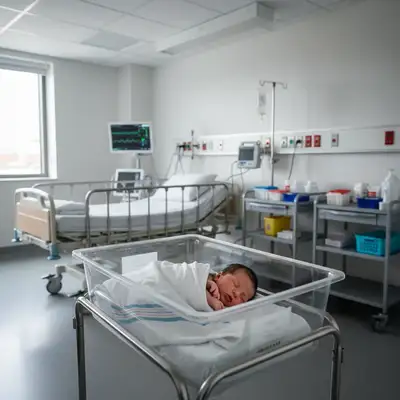
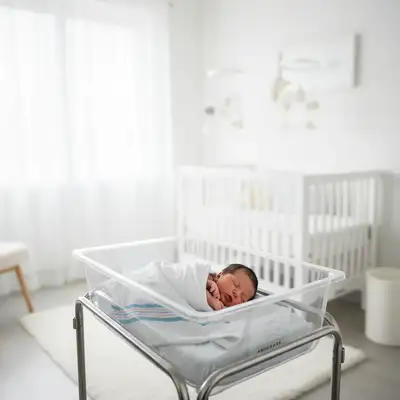
Baby announcements are major life moments shared with family and friends on social media. You want photos that match the joy of the occasion, but hospital rooms and DIY home setups rarely look professional. Hiring a newborn photographer costs $300-800. EditThisPic lets you transform your phone photos into announcement-worthy images that look like they were shot in a studio - all in plain English prompts, ready in seconds.
Tools Parents Use Most for Baby Photos
Replace Background
Transform hospital rooms into soft nursery settings or clean white backdrops
Remove Objects
Remove medical equipment, IV lines, and hospital clutter from birth photos
Enhance Lighting
Add soft, dreamy lighting that gives photos that newborn photography glow
Fix Lighting
Soften harsh hospital lighting and remove unflattering shadows
Enhance Photo
Brighten dark photos and reduce grain from indoor lighting
How to AI Photo Editor for Baby Announcement Photos
-
Upload your baby photo
Drop your pregnancy reveal, birth announcement, or newborn photo into EditThisPic. JPG, PNG, WebP up to 7MB. Works with phone photos, hospital shots, DIY home photos, and ultrasound pictures. Whether it's a cluttered hospital room or messy living room, upload what you have.
Simple edits like background replacement: 25-35 seconds. Complex transformations combining lighting and cleanup: may need 2-3 refinements. -
Describe your edit in plain English
Type what you need: 'replace the hospital background with a soft white nursery setting' or 'remove the medical equipment and add gentle soft focus lighting.' Be specific about the mood you want. No marking or selection needed - the AI understands baby photo editing language and what makes announcements special.
Combine multiple edits in one prompt: 'replace background with soft pink nursery, add gentle glow, and soften the lighting' to transform the whole photo at once. -
Review and download
Check important details: baby's face should look natural, background transitions should be smooth, lighting should feel soft and flattering. Verify skin tones look healthy and natural. Download your announcement-ready image and share with family, post to Instagram, or create birth announcement cards.
Copy-Paste Prompts for Baby Announcements
replace the hospital background with a soft white dreamy nursery setting, gentle natural lighting, newborn photography style
This is the most popular transformation - turns any hospital room into a professional-looking studio portrait
remove all medical equipment, IV lines, monitoring wires, and hospital tubes from the photo, clean up the scene
Be thorough listing equipment - the AI will find and remove everything you mention
replace the background with a clean white backdrop, studio photography style, focus attention on the baby bump
Clean white backgrounds make text overlays and announcement details stand out perfectly
add gentle soft focus and warm dreamy lighting, create that soft golden hour newborn photography aesthetic with slight glow
This creates that professional newborn photographer look with soft, flattering light
Show 4 more prompts
brighten the photo and reduce grain and noise, soften the harsh hospital lighting, keep baby's skin tones natural and healthy
Mentioning skin tones prevents the AI from over-processing and keeps baby looking natural
replace background with soft pink nursery setting with dreamy lighting (or soft blue for boys), clean elegant look
Specify pink or blue to match your gender reveal theme - works perfectly for social announcements
remove the people in the background, fill with clean hospital wall or soft nursery backdrop
Great for birth photos where nurses or visitors are visible but you want just baby and parents
add soft blur to the background, keep baby in sharp focus, professional portrait photography depth of field
Mimics that iPhone portrait mode effect - draws all attention to baby's face
| Edit Type | Prompt | Time | |
|---|---|---|---|
| Replace hospital background | replace background with soft white nursery |
30s | Try This → |
| Remove medical equipment | remove IV lines and hospital equipment |
25s | Try This → |
| Add soft newborn glow | add gentle dreamy lighting, soft focus |
25s | Try This → |
| Clean home background | replace with clean white backdrop |
30s | Try This → |
Real Examples
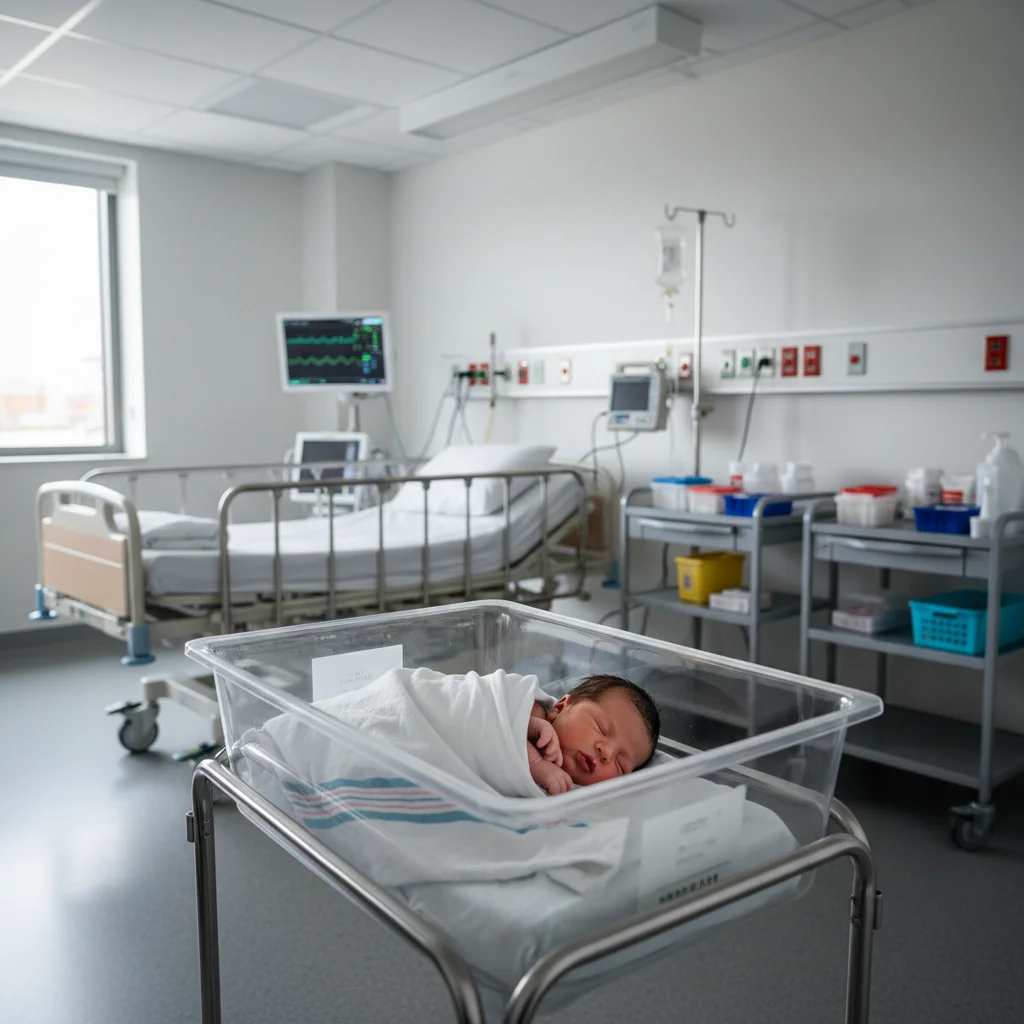
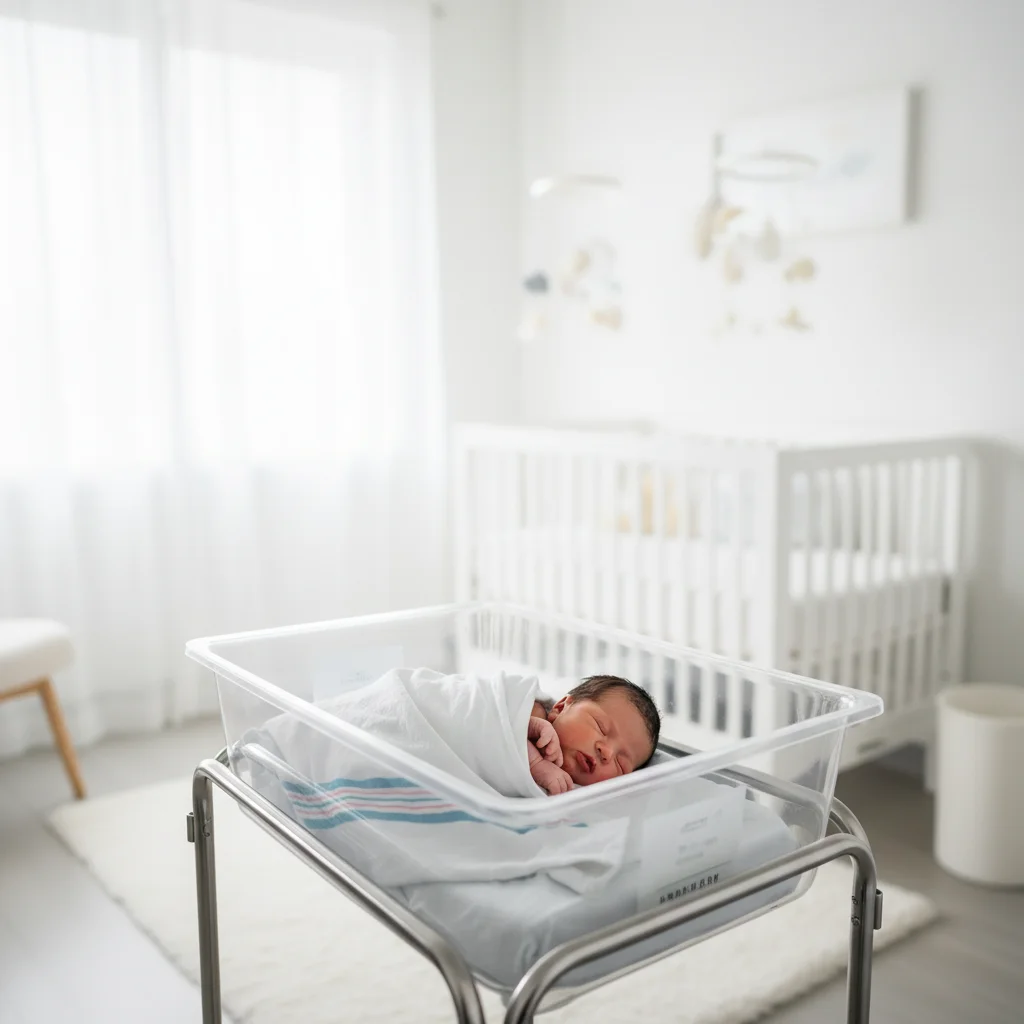
Hospital background to soft nursery
A birth announcement photo taken in a hospital room with medical equipment visible. The AI replaced the clinical background with a dreamy soft white nursery setting and removed all visible medical equipment.
replace the hospital background with a soft white dreamy nursery setting, gentle natural lighting, newborn photography style
Removed medical equipment and tubes
A precious first photo of baby with IV lines and monitoring equipment visible. One prompt cleaned up all the medical clutter while preserving the tender moment.
remove all medical equipment, IV lines, monitoring wires, and hospital tubes from the photo, clean up the scene
When Things Go Wrong
Lighting enhancement made baby's skin look too orange or processed
Why: Aggressive lighting adjustments can shift skin tones if not constrained to natural baby coloring.
soften the lighting and add gentle glow, keep baby's skin tones natural and healthy looking, no orange tint
Always mention 'natural skin tones' when editing baby photos to prevent over-processing.
Soft focus made the whole image blurry, including baby's face
Why: Generic blur instructions can affect the entire image rather than just creating atmospheric softness.
add gentle soft focus to the background and lighting, keep baby's face sharp and clear, professional portrait style
Specify 'background' when requesting soft focus - you want the atmosphere soft, but baby's features clear.
Background replacement looks artificial or pasted-on
Why: The AI needs guidance on matching lighting and atmosphere between subject and new background.
replace background with soft nursery setting, match the lighting on baby to the new background, natural seamless blend
'Match the lighting' tells the AI to harmonize baby and background so they look like one cohesive photo.
Frequently Asked Questions
How do I replace a hospital background in a baby photo?
Upload your baby photo to EditThisPic and type: 'replace the hospital background with a soft white dreamy nursery setting, gentle natural lighting.' The AI automatically detects the background, preserves your baby perfectly, and generates a professional-looking nursery backdrop in 25-35 seconds. No masking or selection needed - just describe the atmosphere you want.
Can I remove medical equipment from birth announcement photos?
Yes. Type 'remove all medical equipment, IV lines, monitoring wires, and hospital tubes from the photo' and the AI detects and removes every piece of medical equipment you mention. It fills the areas naturally so the photo looks clean and focused on your baby. Be thorough listing items - the more specific you are, the better the result.
How to create that soft dreamy lighting in baby photos?
Type 'add gentle soft focus and warm dreamy lighting, create that soft newborn photography aesthetic' and the AI applies the signature soft glow that professional newborn photographers achieve. This adds that flattering, tender atmosphere to your announcement photos without making them look overly processed.
Will it work on photos taken with my phone camera?
Absolutely. EditThisPic works great on phone photos - that's what most parents use for first baby pictures. The AI can enhance lighting, clean up backgrounds, and add professional touches to any photo quality. iPhone, Android, even older phone cameras all work fine.
Do I need to mark anything before describing what I want?
No! Just describe your edit: 'replace background with soft nursery' or 'remove the IV lines.' The AI understands baby photo context and finds backgrounds, equipment, and lighting automatically.
How does it handle delicate baby hair and soft edges?
The AI is trained on fine details including wispy baby hair, soft fabrics, and gentle edges. It preserves those delicate features while changing backgrounds.
Can I use this for pregnancy announcement photos too?
Yes! Pregnancy reveals work great. Common edits include 'replace background with clean white backdrop,' 'remove clutter from the room,' and 'add soft romantic lighting for maternity photo.' Whether it's a baby bump photo, ultrasound announcement, or gender reveal, the same prompts work beautifully.
Will the edited photos look natural or overly processed?
EditThisPic aims for natural-looking enhancements. The key is in your prompt - saying 'natural' and 'soft' creates gentle edits. Mention 'keep skin tones natural' when editing baby photos to prevent over-processing. You want announcement-worthy polish, not artificial effects, and the AI understands that context.
What if I want to combine multiple edits?
You can combine multiple changes in one prompt! Try: 'replace hospital background with soft pink nursery, remove medical equipment, and add gentle dreamy lighting.' The AI handles complex multi-step edits. This saves time and ensures all changes work together harmoniously.
Can I create announcement cards with these photos?
Yes! Download your edited photos and use them in announcement card services like Minted, Shutterfly, or Canva. EditThisPic preserves full image quality and resolution. The photos work perfectly for social media posts, printed birth announcements, thank you cards, and newborn photo books.
Popular use cases
Ready to create your perfect baby announcement?
Free to try. No signup required. No watermarks.
Upload Your Baby PhotoTrusted by 15,000+ users