Free • No signup Create Discord avatar · Free

Discord Avatar Maker

Last updated

Describe the vibe — 'dark warrior with purple glow' — and get a bold Discord avatar in 20 seconds.

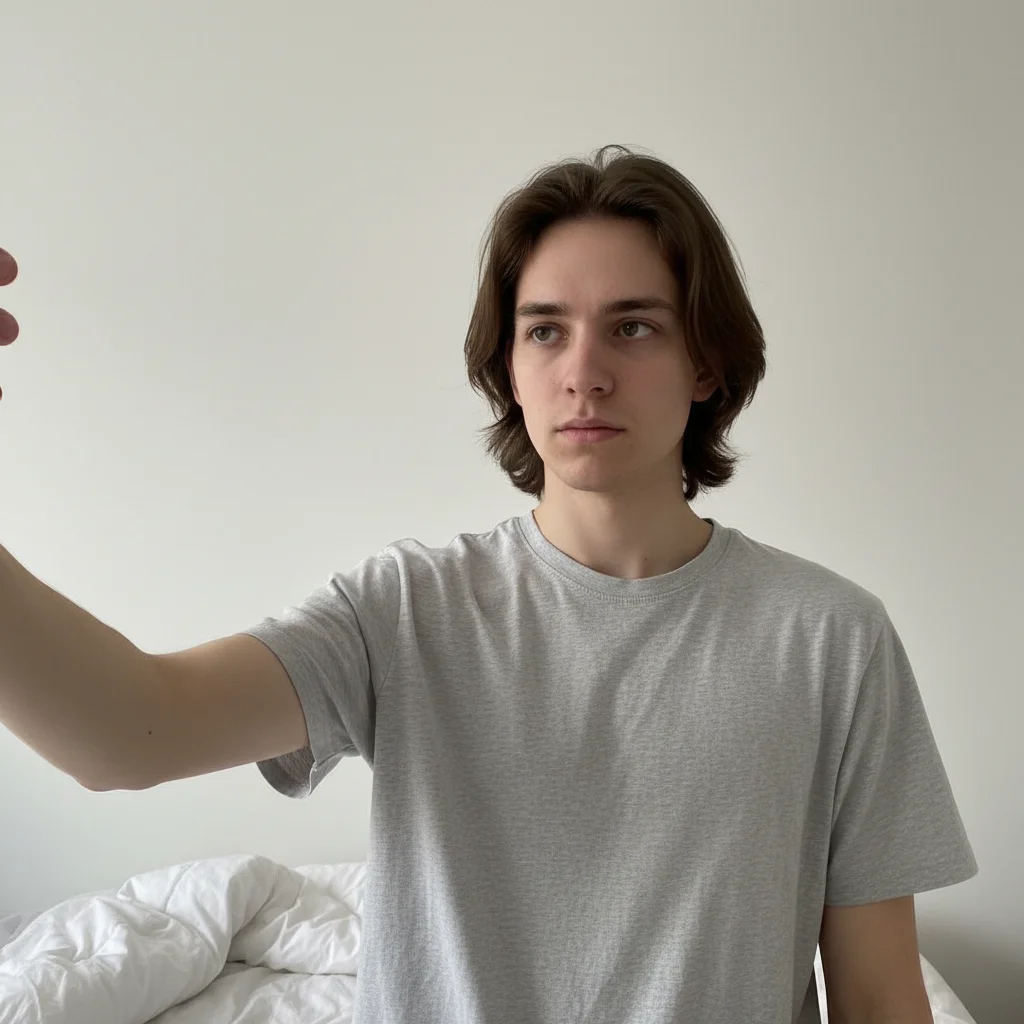
Casual selfie with plain background and neutral expression
Before
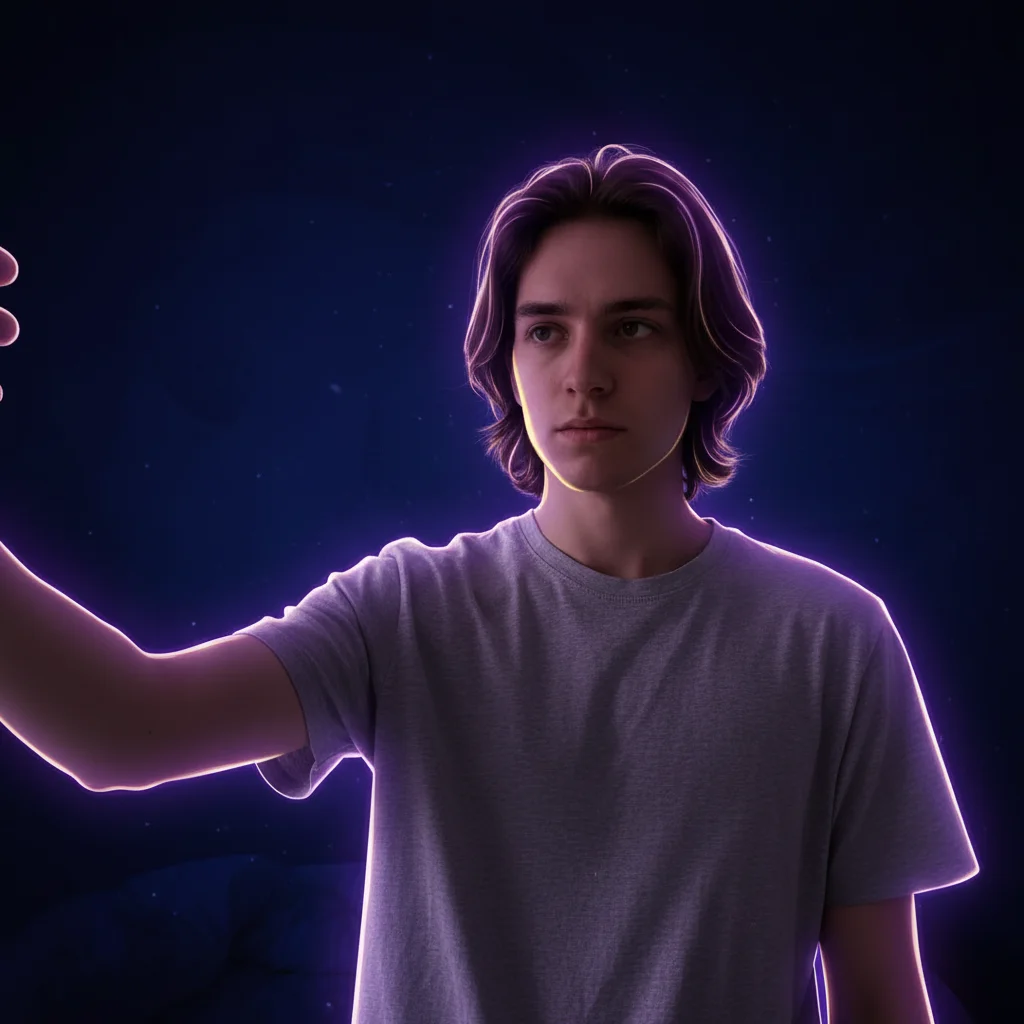
Bold dark fantasy Discord avatar with purple glow and dramatic contrast
After

Upload photo to create discord avatar

"convert to clean anime-style Discord avatar with soft pastel background, cel-shaded linework, bold eyes — clear at small display size"

Release to upload

FreeNo signupNo watermark

1 free edit·then from $1.99

Popular use cases:
  • Discord gamers
  • online community members
  • streamers
  • anime fans
  • gaming communities
  • custom pfp creators

Cost
Free No signup required
Time
Instant results in 15-30 seconds
Works on
Any device - browser, phone, tablet, desktop
Powered by
AI-powered photo editing
Scenario Prompt Time
Dark fantasy dark fantasy warrior Discord avatar with purple and black, high contrast 20s
Anime pfp anime-style Discord pfp with pastel background and cel-shaded linework 20s
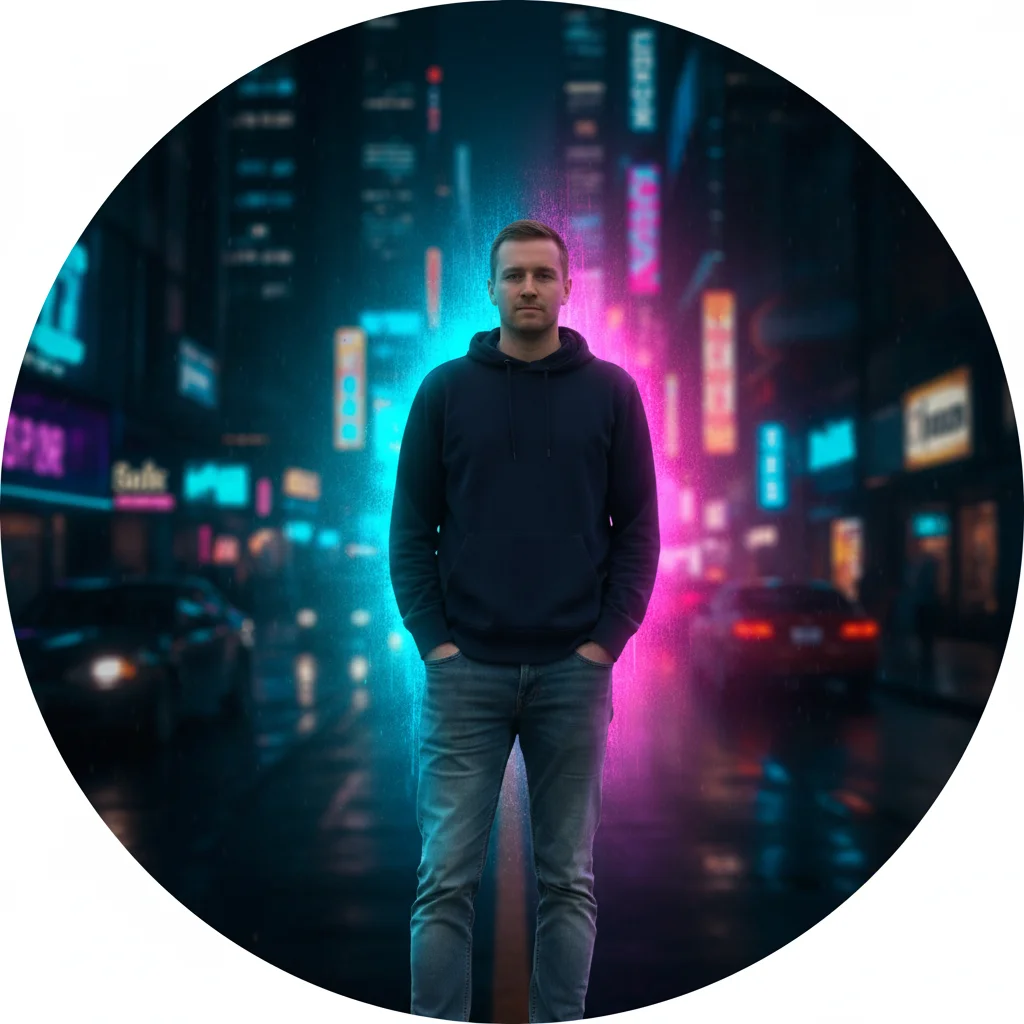
Cyberpunk cyberpunk Discord avatar with neon blue and purple, dark city background 25s

How it works

  1. Upload your photo

    Drop any photo into EditThisPic — a selfie, gaming photo, or character image. JPG, PNG, or WebP up to 7MB. For best results, use a photo with a clear subject against a simple background.

    Expect: Simple style transforms: 15–20 seconds. Complex aesthetic changes: 25–35 seconds.
  2. Describe the avatar style you want

    Type what you want: 'dark fantasy warrior avatar with purple background glow', 'clean minimalist anime pfp with soft blue tones', or 'bold cyberpunk portrait with neon lighting and high contrast.' No marking needed — just describe the aesthetic.

    Tip: Mention that it's for a small profile picture: 'optimized for small 128x128 display, strong contrast, bold visual.' This makes the AI prioritize features that read clearly at Discord's tiny size.

    Copy one of these to get started:

    Dark gaming / warrior aesthetic transform into a dark fantasy warrior Discord avatar with deep purple and black background, high contrast, bold and dramatic — optimized for small profile picture display
    Anime / cartoon pfp convert to clean anime-style Discord avatar with soft pastel background, cel-shaded linework, bold eyes — clear at small display size
    Cyberpunk / neon vibe make a cyberpunk Discord pfp with neon blue and purple lighting, dark city background, high contrast portrait — bold at small size
    Clean minimalist look create a clean minimal Discord avatar with solid dark background, sharp portrait focus, no distracting elements — professional and clear at 128x128
    2 more prompts
    Fake but realistic Discord avatar create a realistic-looking Discord avatar portrait with neutral dark background, natural lighting, slightly stylized but photorealistic — like a real person's pfp
    Glitch / vaporwave style transform into a vaporwave Discord avatar with pink and cyan color grading, subtle glitch artifacts, retro aesthetic — high contrast for small display
  3. Download your Discord avatar

    Review the result and check that the main subject is clear and recognizable at small size. Discord crops avatars to a circle — make sure the face or main element is centered. Download and upload directly to Discord.

  4. Refine with markers if needed

    If the background style is off or a specific area needs adjusting, tap a marker on that spot and regenerate: 'darken this area and add more purple glow here.' Most avatars look great on the first try.

    Tip: Markers help when you want to target a specific area — like adjusting just the background while keeping the face style the same.
Try it free

Upload photo to create discord avatar

"make a cyberpunk Discord pfp with neon blue and purple lighting, dark city background, high contrast portrait — bold at small size"

Release to upload

Free • No signup

See it in action

Casual selfie with plain background and neutral expression
Before
->
Bold dark fantasy Discord avatar with purple glow and dramatic contrast
After

Selfie turned dark fantasy warrior avatar

A Discord user wanted a dramatic gaming avatar from their selfie. One prompt turned it into a dark warrior pfp that reads clearly at Discord's small size.

Prompt: transform into a dark fantasy warrior Discord avatar with deep purple and black background, high contrast, bold and dramatic — optimized for small profile picture display
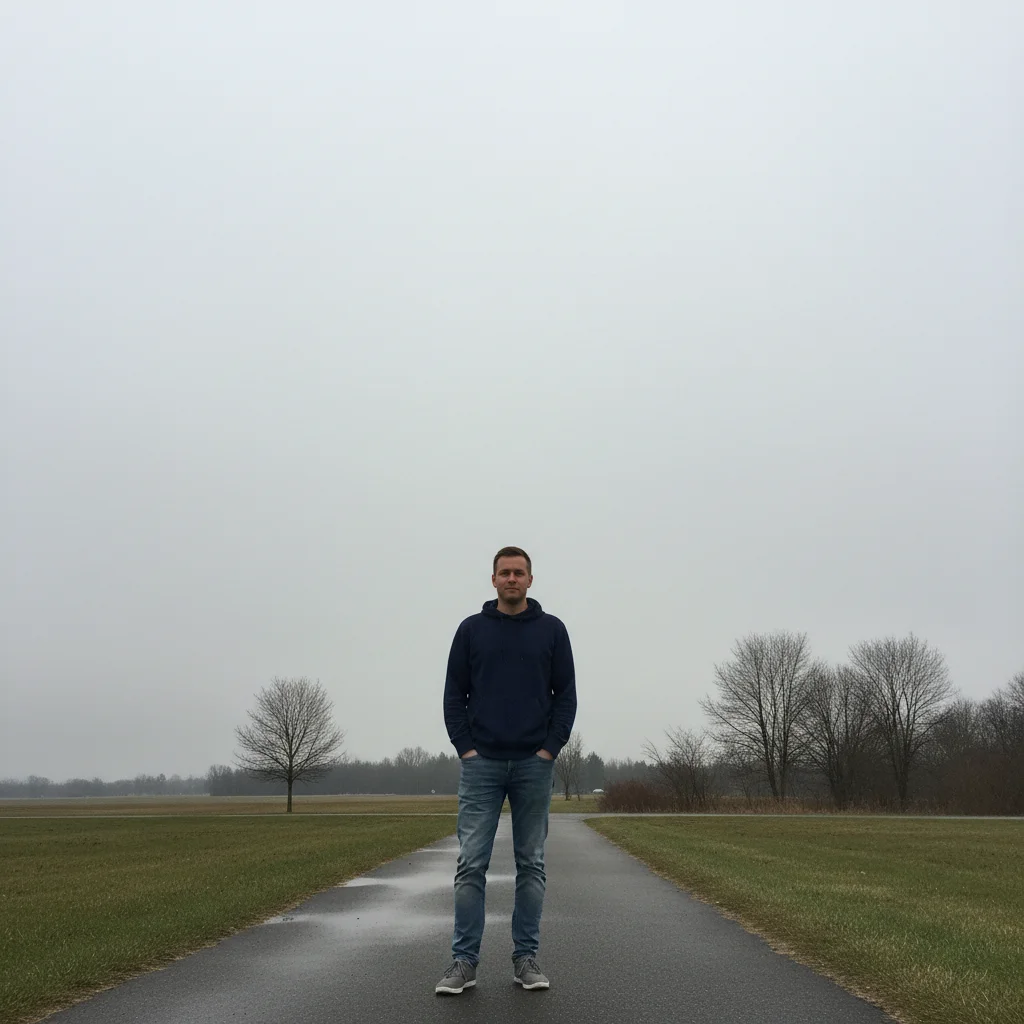
Standard portrait photo outdoors against a concrete wall
Before
->
Clean anime-style Discord avatar with pastel background and cel-shaded linework
After

Photo converted to anime-style Discord pfp

A gaming community member wanted an anime avatar that still looked like them. The AI created a cel-shaded style pfp while preserving their key features.

Prompt: convert to clean anime-style Discord avatar with soft pastel background, cel-shaded linework, bold eyes — clear at small display size

If something looks off

AI changed the wrong area or something I didn't want changed

Why: The AI couldn't determine exactly which area you meant from description alone. This is rare for avatar styling but can happen with complex backgrounds.

Try: Tap a marker on the specific area you want to change, then regenerate with the same style description

Tip: Markers tell the AI 'I mean THIS area specifically.' Use them when you want to keep the face style but change only the background.

Avatar looks blurry or unclear at small size

Why: The AI optimized for detail at full resolution without boosting contrast for small display.

Try: make the Discord avatar high contrast with bold features, sharp at 128x128 size — boost contrast and simplify background

Tip: Include 'bold at small size' or 'high contrast for Discord display' in your prompt to get a result that reads clearly.

Face looks distorted or unrecognizable

Why: Strong style transforms can alter facial features, especially with surreal or heavily stylized aesthetics.

Try: keep the face recognizable and true-to-photo, apply [style] only to lighting and background — preserve facial structure

Tip: If you need to look like yourself, add 'preserve facial structure and likeness' to any style prompt.

Background style doesn't match the aesthetic I described

Why: The style description was too vague for the AI to understand the specific aesthetic.

Try: change background to solid deep purple with subtle glow effect — simple, dramatic, high contrast

Tip: Be specific about colors: 'deep purple', 'neon cyan', 'matte black' rather than 'dark' or 'colorful.'

Quick answers

Do I need to mark or select anything before describing the avatar style?

No. Just upload your photo and describe the look you want — 'dark fantasy warrior', 'anime pfp', 'cyberpunk portrait.' The AI transforms the whole image to match the aesthetic. Only use markers if you want to target one specific area, like changing just the background.

Is there a free Discord avatar maker with no login?

Yes. EditThisPic makes custom Discord avatars from your photos for free with no account and no watermark. Upload, describe your style, download and upload to Discord. Works on desktop and mobile in any browser.

How do I make a Discord avatar from a photo for free?

Go to EditThisPic, upload your photo, and type the style you want: 'dark fantasy warrior avatar with purple glow' or 'clean anime pfp with bold eyes.' Download the result and upload it to Discord. No account required, no watermark.

Can I create a fake but realistic-looking Discord avatar?

Yes. Type: 'create a realistic-looking Discord avatar portrait with neutral dark background, natural lighting, slightly stylized but photorealistic.' The AI adjusts your photo to look like a polished profile picture without making it obviously AI-generated.

What's the right size for a Discord profile picture?

Discord displays profile pictures at 128×128 pixels (and even smaller in server member lists). For best results, describe an avatar with 'high contrast' and 'bold at small size' — this tells the AI to optimize for legibility at Discord's tiny display size.

How much does EditThisPic cost?

You get 1 free edit per week — no account needed. After that, credit packs start at $1.99 for 3 edits. Monthly plans start at $4.99/mo for 15 edits with unused credits rolling over. All edits are full resolution with no watermark.

Ready to make your Discord avatar?

Free to try. No signup required.

1 free edit included·Credit packs from $1.99