AI Photo Editor for Passport & ID Photos
Last updated
AI photo editing for passport, visa, work ID, and school ID photos. Compliant size, white background, neutral expression — without a trip to the pharmacy.
Drop your photo here
"make this a US passport photo — exactly 2x2 inches, plain white background, head centered and 50-69% of frame, neutral expression, no shadows"
Free to try · no sign-up · never used for AI training
Release to upload


Built for Travelers
EditThisPic uses a plain-English prompt to crop, recompose, and swap the background to compliant white — no manual measurement, no studio backdrop. Useful when you have a phone selfie and a deadline. Always verify the final image against your country's official spec before submitting.
How It Works
-
Take or upload a clear selfie
Use natural front-on light, look straight at the camera, neutral expression, no glasses, hair off your face.
A clean selfie produces a clean passport photo. Garbage in, garbage out.Stand near a window facing the light. Avoid harsh overhead light or backlight. -
Describe the photo format you need
Type the country and size — e.g., 'US 2x2 passport photo' or 'Schengen visa 35x45mm.' Say 'plain white background' and 'neutral expression' explicitly.
Be explicit: "no shadows," "keep face natural," "head centered." The AI follows specific instructions more reliably than vague ones. -
Verify against the official spec, then download
Compare the output against the official photo guide for your document type. If anything's off, redo with a more specific prompt before downloading.
Popular Prompts for ID Photos
make this a US passport photo — exactly 2x2 inches, plain white background, head centered and 50-69% of frame, neutral expression, no shadows
Always mention 'no shadows' — the most common rejection reason.
make this a Schengen visa photo, 35x45mm, plain light background, neutral expression, head and shoulders visible, no glasses glare
Schengen requires 35x45mm and light (not pure white) background.
make this a UK passport photo, 35x45mm, plain cream or light grey background, neutral expression, mouth closed
UK accepts cream or light grey — not pure white.
convert into a corporate work ID photo, plain neutral background, shoulders included, friendly but professional expression
Work IDs often allow a small smile — say 'friendly' if you want one.
Show more prompts
convert this into a student ID photo with a plain blue background, head and shoulders visible
Confirm your school's accepted background color before submitting.
make the background pure white and remove all shadows, keep my face and expression exactly the same
Use the AI to fix the issue cited on the rejection — don't re-edit everything.
Examples


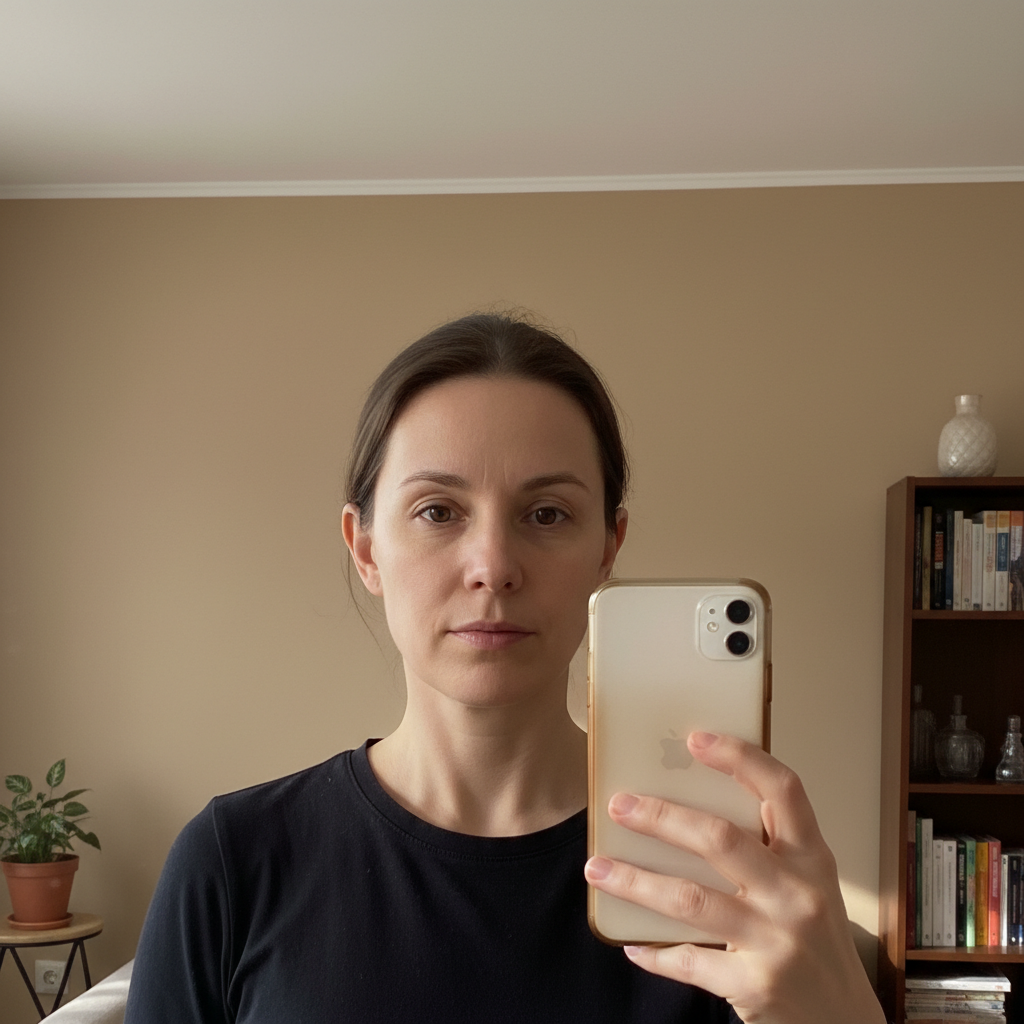
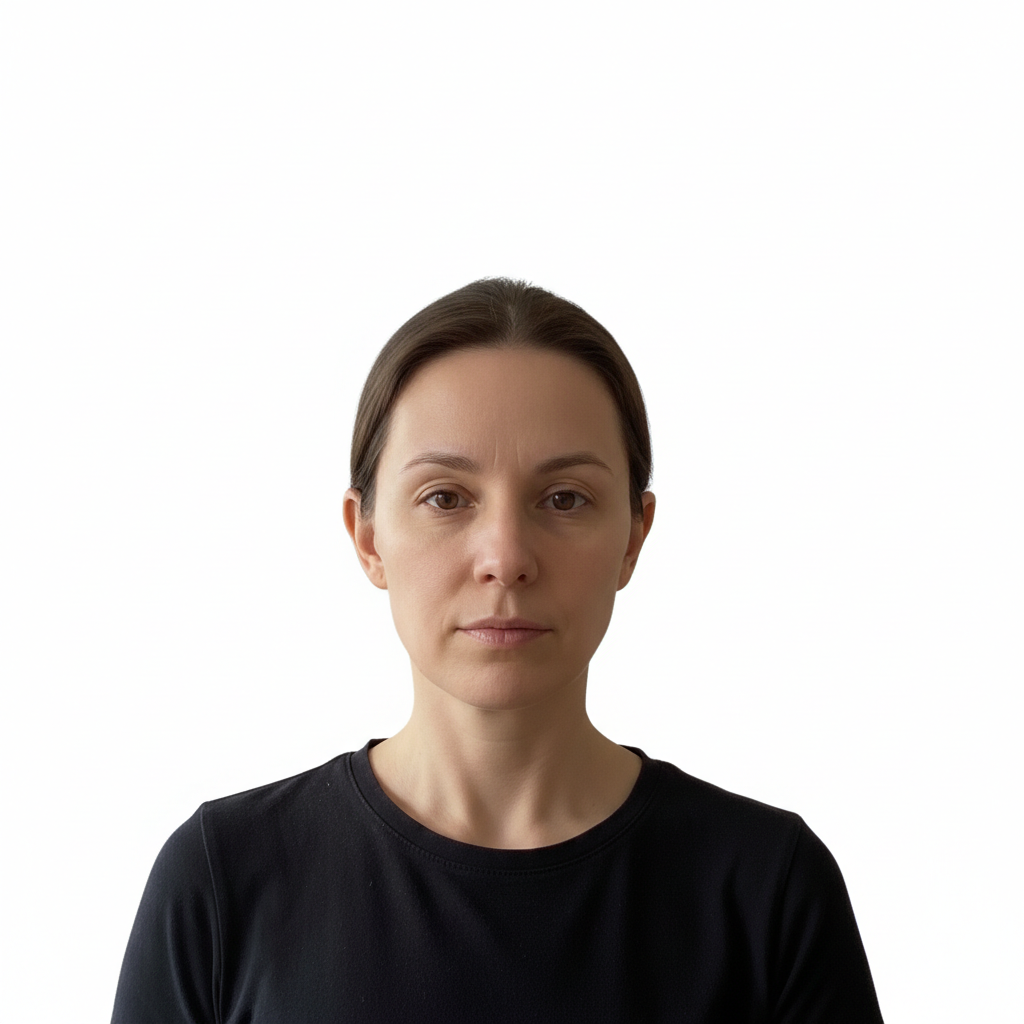
Selfie to US 2x2 Passport Photo
A standard front-facing selfie converted to a compliant US 2x2 passport photo.
make this a US passport photo, 2x2 inches, plain white background, head centered, neutral expression
General Passport Photo from Selfie
Generic passport photo with a clean white background.
convert this selfie into a passport photo with a plain white background and head correctly framed
FAQ
Can I really use an AI-edited photo for an actual passport application?
In most countries, yes — passport authorities care about the image meeting the official spec (size, background, expression, lighting), not about how it was produced. The US State Department, UK HM Passport Office, and Schengen authorities accept digital uploads. That said, every authority reserves the right to reject any photo. Always check the final image against the official spec before submitting and keep the original selfie as a backup.
Is EditThisPic free for passport photos?
Yes. EditThisPic offers one free Fast edit per week with no signup. For multiple passport photos or a few quick retries, the smallest pack is 10 edits for $4.99 — still far less than a pharmacy print.
Will the AI change my face?
EditThisPic is configured to keep facial identity stable when you ask for a passport-style edit. It will not smooth your skin, change your head shape, or alter features. If you see any of that, redo the edit and add "keep my face natural and unchanged."
What sizes does it support?
US 2x2 inches (51x51mm), Schengen 35x45mm, UK 35x45mm, Indian 51x51mm, Australian 35x45mm, and most other national formats. Specify the country in the prompt and the AI handles cropping and aspect ratio.
What if my photo gets rejected?
Read the rejection reason carefully (it's almost always size, background, shadows, expression, or glasses glare). Upload the original selfie again and write a prompt that specifically fixes that issue — for example, "make the background pure white with absolutely no shadows." Most rejections are recoverable in one targeted edit.
Do I need a special background to take the selfie?
No — the AI replaces the background. But a plain wall or curtain helps the model do a cleaner job. Avoid busy patterns, mirrors, and direct backlight.
Should I wear glasses or jewelry?
For most countries, no glasses are allowed (some accept clear glasses without glare — check your country's spec). Religious headwear is generally allowed if it doesn't obscure the face. Heavy jewelry usually isn't an issue.
Can I print this at home for a passport?
Yes — most pharmacies print compliant photos for $0.30-1.00. Download the AI-edited photo, take the file (or send to the pharmacy's app), and ask for a 2x2 print on photo paper.
What file format does the photo download as?
JPG or PNG, up to 2048px, no watermark on purchased downloads. Most government upload portals accept both.
Need a passport or ID photo today?
Free to try. No signup required.
Start Editing