Free β€’ No signup Remove Makeup Β· Free

AI Makeup Remover

Type what you want removed and AI reveals natural beauty underneath.

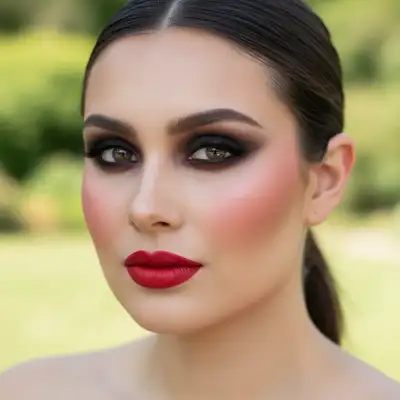
Woman with full glam makeup including red lipstick and dramatic eyeshadow
Before
β†’
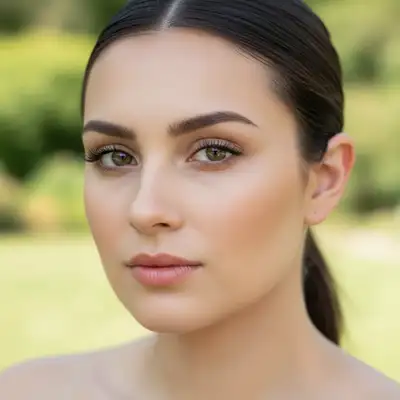
Same woman with all makeup removed showing natural skin
After

AI Makeup Remover

Drop your photo here

or click to browse

Release to upload

Free β€’ No signup

Popular use cases:
  • skincare documentation
  • natural beauty photography
  • professional headshots
  • social media authenticity
  • beauty industry
  • modeling portfolios

Cost
Free No signup required
Time
Instant results in 15-30 seconds
Works on
Any device - browser, phone, tablet, desktop
Powered by
AI-powered photo editing
Scenario Prompt Time
Complete makeup removal remove all makeup and show natural skin while preserving facial features 20s
Foundation removal remove foundation and concealer while keeping eye makeup and lips natural 15s
Eye makeup removal remove all eyeshadow, eyeliner, and mascara while preserving natural eyelashes 18s
Natural skincare photos remove all makeup to show authentic skin for skincare documentation 20s

How it works

  1. Upload Your Photo

    Drop your image into EditThisPic. Works with JPG, PNG, and WebP formats up to 7MB. For best results, use well-lit photos where makeup is clearly visible.

    Expect: Simple makeup removal: 15-30 seconds. Complex full-face makeup: may need 2-3 refinements for perfect results.
  2. Describe what you want removed

    Type your instruction: 'remove all makeup and show natural skin' or 'remove foundation but keep lips.' Be specific about which makeup elements to remove. No marking neededβ€”the AI understands makeup types like foundation, lipstick, eyeshadow, and blush.

    Tip: Specify skin tone preservation: 'while maintaining natural skin texture and tone'

    Copy one of these to get started:

    Complete makeup removal remove all makeup and show natural skin while preserving facial features
    Remove foundation only remove foundation and concealer while keeping eye makeup and lips natural
    Natural skincare photography remove all makeup to show authentic skin for skincare documentation
    Professional natural headshots remove makeup while maintaining professional lighting and natural skin tones
    3 more prompts
    Remove bold lipstick remove bright lipstick and return lips to natural color and texture
    Strip dramatic eye makeup remove all eyeshadow, eyeliner, and mascara while preserving natural eyelashes
    Clean beauty transformation remove all cosmetics and reveal natural beauty with authentic skin texture
  3. Generate and review

    Click Generate and the AI removes makeup while preserving natural facial features, skin texture, and lighting. Check the result at full zoom to verify natural-looking skin.

  4. Refine with markers if needed

    If certain makeup areas need more work or natural skin tones need adjustment, tap markers on those specific spots and regenerate. This is optionalβ€”most makeup removal works without markers.

    Tip: Markers are for precision refinement of specific makeup areas, not required for basic removal.
Try it free ↓

AI Makeup Remover

Drop your photo here

or click to browse

Release to upload

Free β€’ No signup

"Amazing how natural it looks! Perfect for my skincare journey photos - shows my real skin progress." @naturalbeauty_sara

See it in action

Woman with full glam makeup including red lipstick and dramatic eyeshadow
Before
->
Same woman with all makeup removed showing natural skin
After

Full Makeup Removal

Complete transformation from full glam makeup to natural skin, preserving authentic skin texture and tone.

Prompt: remove all makeup and show natural skin while preserving facial features
Selfie with everyday makeup including pink lipstick and subtle eyeshadow
Before
->
Natural skin revealed after makeup removal
After

Natural Beauty Transformation

Stripped away everyday makeup to reveal authentic skin for skincare documentation and natural beauty photography.

Prompt: remove all makeup to show authentic skin for skincare documentation
Professional headshot with polished business makeup
Before
->
Natural professional portrait with makeup removed
After

Professional Natural Headshot

Removed makeup while maintaining professional lighting for authentic business portrait with natural skin tones.

Prompt: remove makeup while maintaining professional lighting and natural skin tones

Detailed Guides by Scenario

πŸ“·

Skincare Documentation & Progress

Remove makeup to document authentic skin condition for skincare routines, dermatology visits, and progress tracking without cosmetic interference.

Common Scenarios

  • Before/after photos for skincare product reviews and routine documentation
  • Dermatology appointments where natural skin assessment is needed
  • Acne treatment progress tracking over time without makeup variables
  • Skincare brand partnerships requiring authentic before shots

Best Practices

  • Use consistent lighting and angles for accurate progress comparison
  • Remove all makeup including primer and concealer for true skin assessment
  • Document the same time of day to account for natural skin variations
  • Save original photos to track both makeup-wearing and natural skin over time
πŸ“·

Natural Beauty & Authentic Photography

Create authentic natural beauty content for social media, personal branding, and clean beauty movements that celebrate makeup-free confidence.

Common Scenarios

  • Social media content celebrating natural beauty and self-acceptance
  • Personal branding photos showing authentic, unfiltered appearance
  • Clean beauty and minimalist lifestyle content creation
  • Dating app photos that represent your true natural appearance

Best Practices

  • Choose photos with good natural lighting to enhance authentic skin glow
  • Preserve natural facial expressions and genuine smiles in the process
  • Consider partial makeup removal to maintain some definition while staying natural
  • Use results for confidence-building and self-acceptance journey documentation
πŸ“·

Professional Authentic Headshots

Create professional portraits that showcase natural confidence and authenticity for industries that value genuine, unretouched appearance.

Common Scenarios

  • Healthcare and wellness professional headshots emphasizing natural trustworthiness
  • Academic and research professional photos showing authentic credibility
  • Corporate environments promoting diversity and natural beauty acceptance
  • Personal coaching and therapy professional imagery building genuine connection

Best Practices

  • Maintain professional lighting and composition while removing makeup
  • Preserve natural skin texture that conveys competence and approachability
  • Consider partial removal to maintain polished look while staying authentic
  • Ensure final result aligns with how colleagues see you in person daily

If something looks off

AI changed the wrong area or removed facial features

Why: The AI couldn't determine exactly which makeup elements you meant from description alone. This happens when the prompt is too general.

Try: Be more specific: 'remove only lipstick' or 'remove eyeshadow but keep mascara.' Use markers on specific makeup areas for precision.

Tip: Markers tell the AI 'remove makeup from THIS area specifically.' Use them when description alone is ambiguous.

Skin looks unnatural or patchy after makeup removal

Why: The AI may have overprocessed areas or struggled with heavy makeup coverage.

Try: Try 'remove makeup while preserving natural skin texture and pores' or use markers to target only heavily made-up areas.

Tip: For heavy makeup, try a two-step approach: remove base makeup first, then eye/lip makeup separately.

Makeup still visible after removal

Why: Some makeup types or heavy application may need multiple passes for complete removal.

Try: Generate the result, then mark any remaining makeup spots and run 'remove remaining makeup traces' for a second pass.

Tip: Waterproof or long-wear makeup may need targeted removal with specific markers.

Natural skin tone doesn't look right

Why: The AI had difficulty determining authentic skin color under heavy makeup foundation.

Try: Add 'preserve original skin tone from visible areas like forehead or neck' to help the AI match natural coloring.

Tip: Photos with visible natural skin areas (neck, hands) give the AI better reference for skin tone matching.

Eyes look hollow or unnatural without eye makeup

Why: Heavy eye makeup can mask natural eye features that need to be preserved during removal.

Try: Try 'remove eye makeup while enhancing natural eyelashes and eyebrow definition' to maintain eye structure.

Tip: For dramatic eye looks, consider partial removal: 'remove eyeshadow but keep natural lash definition.'

Quick answers

Do I need to mark the makeup areas before describing?

No! Just describe what makeup you want removed: 'remove all makeup' or 'remove foundation but keep lips.' The AI understands makeup types. Only use markers when you need precision on specific areas or if the first result isn't perfect.

Will the result look natural or obviously edited?

Our AI analyzes underlying skin texture, tone, and facial features to create realistic makeup-free results. When used on well-lit photos with clear instructions, the natural skin appearance is virtually indistinguishable from never wearing makeup.

Can I remove specific makeup items like just lipstick or just foundation?

Yes! Be specific in your prompt: 'remove only red lipstick' or 'remove foundation but keep eye makeup.' The AI can selectively remove different makeup types while preserving others for partial natural looks.

Does it work on all skin tones and makeup styles?

Yes, our AI is trained on diverse skin tones and makeup styles from natural to dramatic. It accurately reveals natural skin across light, medium, and dark complexions. Works best with even lighting and clear makeup visibility.

Is EditThisPic's AI makeup remover really free?

Yes β€” you get 1 free edit per week, no account needed. For unlimited makeup removal and editing, plans start at $3.99/month.

Can I remove makeup from photos on my phone?

Yes. EditThisPic works in any mobile browser β€” iPhone, Android, tablet. No app download needed. Perfect for quick makeup removal on the go.

How do I get the best natural-looking results?

Use well-lit photos where natural skin is visible somewhere (neck, forehead). Be specific about what to remove. For heavy makeup, try removing in stages: base makeup first, then eye/lip makeup.

What's the difference between removing makeup and beauty editing?

Makeup removal reveals your authentic natural skin underneath cosmetics. Beauty editing enhances or changes facial features. Our tool focuses on authentic makeup-free results, not artificial beauty filters.

Can I see what I'd look like with different natural skin tones?

No, this tool removes makeup to reveal your authentic natural skin tone. It doesn't change your actual skin color, only removes cosmetic coverage to show what's underneath.

Ready to reveal your natural beauty?

Free to try. No signup required.

Try it free β†’