Free • No signup Change Color · Free

AI Color Replacer

Change any color to any other color while preserving textures, shadows, and details.
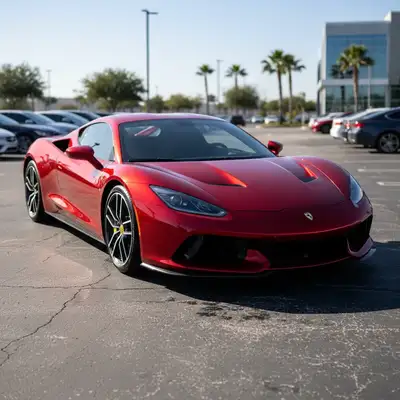
Bright red sports car with glossy metallic finish
Before
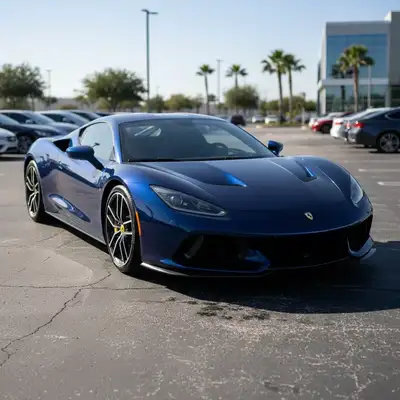
Same car now in deep midnight blue with preserved reflections
After

AI Color Replacer

Drop your photo here

or click to browse

Release to upload

Free • No signup

Popular use cases:
  • car color visualization
  • product color variants
  • wall color preview
  • hair color preview
  • furniture recoloring
  • brand color matching
  • e-commerce color options

Cost
Free No signup required
Time
Instant results in 15-30 seconds
Works on
Any device - browser, phone, tablet, desktop
Powered by
AI-powered photo editing
Scenario Prompt Time
Single object change the car color from red to blue, preserve shine 15s
Wall color preview change wall color from beige to sage green 15s
Product variant change product color to matte black, maintain texture 20s

How it works

  1. Upload your photo

    Upload any photo with a color you want to change. Images with clear, distinct colored objects work best. JPG, PNG, WebP up to 7MB.

    Expect: Solid colors: 15-20 seconds. Complex gradients or textured surfaces: may need 2-3 refinements.
  2. Describe the color change

    Type your instruction: 'change the wall color from beige to sage green' or 'make the car dark metallic gray.' Specify both the original color and the new color for clarity. No marking needed for obvious single-colored objects.

    Tip: Use descriptive color names: 'burgundy', 'forest green', 'metallic silver' produce better results than just 'red', 'green', 'gray.'

    Copy one of these to get started:

    Color Replacer change the car color from red to midnight blue — make it look natural and professional
    Wall color for real estate change the wall color from beige to light sage green, keep the same finish and lighting
    Product color variant change the product color from white to matte black, maintain all surface texture and details
    Hair color preview change the hair color from blonde to auburn brown, natural looking with realistic highlights
    3 more prompts
    Furniture color swap change the sofa color from gray to warm terracotta, preserve the fabric texture and shadows
    Accent color pop change just the door color from white to bold red, keep everything else the same
    Brand color consistency change the logo and packaging color from the current color to exact brand blue matching hex #1e3a8a
  3. Review the color change

    Check that textures, shadows, and highlights were preserved. Verify the new color looks natural under the existing lighting. Look for any missed spots or color bleeding into adjacent areas.

  4. Refine missed areas if needed

    If some spots were missed or the wrong areas changed, tap markers on those spots and regenerate. Most simple color swaps work perfectly on the first try.

    Tip: For objects with multiple similar colors (like a two-tone car), use markers to specify exactly which parts should change.
Try it free

AI Color Replacer

Drop your photo here

or click to browse

Release to upload

Free • No signup

"Showed my client their living room walls in 5 different colors without a single paint swatch. Sold the job on the spot." @DesignerMike_Paint

See it in action

Bright red sports car with glossy metallic finish
Before
->
Same car now in deep midnight blue with preserved reflections
After

Red sports car changed to midnight blue

A car listing photo showing the vehicle in an alternate color to attract different buyers.

Prompt: change the car color from red to deep metallic midnight blue, preserve the shine and reflections
Living room with beige walls and neutral furniture
Before
->
Same room with sage green walls creating fresh look
After

Living room walls recolored

A real estate photo showing the room in a trendier color.

Prompt: change the wall color from beige to light sage green, keep the same finish and natural lighting
Tan leather handbag with visible texture and stitching
Before
->
Same handbag now in matte black with preserved leather details
After

Handbag shown in alternate color

A product photo showing a handbag in black instead of tan.

Prompt: change the handbag color from tan to matte black, maintain the leather texture and stitching details

Detailed Guides by Scenario

📷

Interior Design & Home Renovation

Preview paint colors, furniture finishes, and decor changes before committing to purchases.

Common Scenarios

  • Testing wall colors before painting
  • Showing clients multiple color options using one photo
  • Matching furniture color to existing decor

Best Practices

  • Upload photos with even lighting for accurate color mapping
  • Describe the finish: 'matte charcoal' vs 'glossy charcoal'
  • Try 3-4 variations to build a comparison
📷

Automotive & Vehicle Color Preview

See what vehicles look like in different colors for listings, purchase decisions, or customization planning.

Common Scenarios

  • Showing buyers a car in different colors
  • Previewing a custom paint job
  • Creating dealership marketing materials

Best Practices

  • Mention 'metallic' or 'matte' finish for realistic paint
  • Preserve reflections and highlights by specifying in prompt
  • Use high-res photos for best detail in metallic finishes
📷

Product & E-commerce Visuals

Generate product color variants from a single photo for catalogs, ads, and online listings.

Common Scenarios

  • Creating all color variants from one studio shot
  • Matching product to brand colors
  • Showing seasonal color options without reshooting

Best Practices

  • Start with a well-lit product on a plain background
  • Use exact color names or hex codes for precision
  • Verify shadows and highlights look natural after change

If something looks off

Color change affected wrong areas

Why: Similar colors in different objects were all changed together.

Try: Tap a marker on the specific object you want changed and regenerate: only change this object to the new color

Tip: Markers isolate exactly what you mean, preventing spillover.

Texture or detail lost after color change

Why: The AI prioritized color accuracy over texture preservation.

Try: change the color to the new color, preserve all original texture, grain, and surface detail

Tip: Explicitly mention 'preserve texture' for textured surfaces.

AI changed the wrong area or something I didn't want changed

Why: The AI couldn't determine exactly which area you meant from description alone.

Try: Tap a marker on the specific color area you want changed, then regenerate with the same prompt

Tip: Markers tell the AI 'I mean THIS area specifically.'

New color looks flat or unrealistic

Why: The AI applied a uniform color without the original lighting variation.

Try: change the color while maintaining natural shadows, highlights, and lighting variation

Tip: Adding 'maintain shadows and highlights' preserves the 3D look.

Some spots or edges were missed

Why: Complex edges or small areas can be missed.

Try: Tap markers on the missed spots and regenerate: extend the color change to these areas too

Tip: Missed spots are easy to fix with markers.

Quick answers

Do I need to mark the colored area before describing the change?

For single obvious colored objects, no! Just describe: 'change the car from red to blue.' Use markers when there are multiple objects of the same color and you only want one changed.

What is the best AI color replacer in 2026?

EditThisPic's AI Color Replacer intelligently identifies objects and changes only the colors you specify while preserving textures, reflections, and lighting. Free, no signup, works on any device in your browser.

Will the texture and material look be preserved?

Yes! The AI preserves surface texture, reflections, shadows, and material properties. A glossy metallic car stays glossy in the new color. Fabric keeps its weave. For best results, add 'preserve texture' to your prompt.

Is there a free AI color replacer that doesn't require login?

Yes. EditThisPic requires no login, no signup, no app download. Upload your photo, describe the color change, and download the result for free with no watermark.

Can I match a specific hex color or brand color?

Yes! Describe colors by name, reference objects, or mention hex codes. 'Change to hex #1e3a8a' or 'match the Tiffany blue' both work. The AI interprets color descriptions accurately.

Can I change multiple colors in one prompt?

Yes! Describe all changes together: 'change the walls from beige to gray and the door from white to black.' For complex multi-color changes, doing them one at a time may give better results.

Can I use the AI color replacer on my phone?

Yes. EditThisPic works in any mobile browser. No app download needed.

Does it work on patterned or multicolored objects?

Yes, but be specific. For a striped shirt: 'change only the blue stripes to red, keep white stripes white.' Complex patterns may need markers to guide which parts should change.

Ready to change colors in your photos?

Free to try. No signup required.

Try it free